Amiga 1200 IDE CD ROM drive

  • Thread starter Thread starter sozzled
  • Start date Start date
  • Replies Replies 22
  • Views Views 699
Status
Not open for further replies.

sozzled

Member
Joined
Jun 20, 2019
Posts
55
Country
United Kingdom
Region
West Yorkshire
Hello all,

I know this question may have been sort of answered by browsing the internet (I think anyway) but I'm not sure I've interpreted it right. I've got an A1200 on the way and I'd like to attach a CD ROM drive to it. I found this (https://www.vesalia.de/e_amigaslimcddrive.htm) online and really cheap too. When I had an Amiga 1200 as younger man I had a Squirrel interface which hooked up to a CD drive and I think (memory is hazy) just booted straight into it if a CD was present (or might have had a run command of some sort in the hard disk startup sequence).

Anyway, to cut a long story short, will the above link work do you think? I'd like to keep the PCMCIA slot free for a network/wifi card.

- - - Updated - - -

To add to this, will it run CD32/CDTV titles also perhaps?

- - - Updated - - -

To further add to this, I've found an old external DVD drive for my PC and having dismantled it and looked at the innards I think it's an IDE drive. (definitely not SATA). Assuming it's not SCSI (sorry I'm not up on such things) then presumably I can add this to an IDE ribbon and if I can find a way of getting the audio out of it then that's job done? Which connectors would you guys recommend?
 
Last edited:
I used an old laptop CD drive and a 3 way 44pin ribbon cable to connect both it and an internal CF interface. I only use it for PD and Aminet CD's so cannot say if CD32 or CDTV discs work on it.

Basically, my CD configuration is the same as that Vesalia product and it works very well.
 
Last edited:
Yes this will work, you will need to install idefix97 unless it comes with it's own software or you can use a cdfile system of your choice and install manually, aminet has a few to choose from. I would recommend idefix97 as it has CD32 emulation, you can find an old power computing key with Google. For CD audio you'll need extra hardware
 
To further add to this, I've found an old external DVD drive for my PC and having dismantled it and looked at the innards I think it's an IDE drive. (definitely not SATA). Assuming it's not SCSI (sorry I'm not up on such things) then presumably I can add this to an IDE ribbon and if I can find a way of getting the audio out of it then that's job done? Which connectors would you guys recommend?

Hello,

yes it works; you need to prepare the right software driver for your setup. Something is free (like the cdfilesystem of the 3.1 and the cd.device, but you need to test it), something is commercial like idefix97 (anyway, amicdrom or something similar is free).
Then look at this

https://www.amibay.com/showthread.php?75775-Amiga-1200-unfinished-project

and this

https://www.amibay.com/showthread.php?53262-A1200-with-CD-ROM

and this

https://www.amibay.com/showthread.php?50072-A1200-case-modded-with-CD

Regards
Stefano
 
Thanks guys. Having looked at the connections on the back of my drive it has an audio out connector so I'll need to get the right connector for that and manually create an audio mixer which should be fairly straightforward. I've also got a Squirrel SCSI interface on the way as a backup plan (plus a bit of nostalgia as I had one for my childhood Amiga 1200 that I deeply regret selling years ago). I don't mind paying a bit for idefix97 either, support the community and all that.
 
I have one hooked up in an old external enclosure I picked up which gives me the audio output and then an ide cable connected to the drive and directly into a 4 way ide interface internally (the rf modulator has been removed and I twisted the cable to connect it). To get cd sound I just have a speaker bar in front of the TV connected to the audio out. Bit lo-tech but works well.

The drive looks great in an enclosure but the only problem is that it is hardwired to the Amiga. Sometime in the future I plan to make a simple extension for the back of the enclosure so the cd drive can be unplugged.

I think I used idefix software to install cd-rom and made a boot disk to run cd32 games as I couldn't seem to get them to run when I ran the cd32 software from hard disk. Most stuff works well and if you have the audio connected then you get nice cd sound. My biggest gripe is I can't get Defender of the Crown CD32 working.

I did previously have a laptop cd connected and this worked well too - some people use these and fit internally but I didn't want to cut the case up!

Good luck with it and have fun. There's nothing like getting a CU Amiga or Amiga Format Cd and having a few hours exploring all the software that they packed in or play Fire and Ice CD32 - who knew that it had a whole extra parallax layer?
 
Thanks guys. So the cable (https://www.ebay.co.uk/itm/New-Set-...e=STRK:MEBIDX:IT&_trksid=p2057872.m2749.l2649) has arrived. Tried plugging it in but no matter what I do it won't recognise the CF card hard drive. Just goes to the disk loader screen. I've tried every which way of combinations on the cable connection but it just won't work. I'm not worried about powering the CD drive, it's an external drive with it's own power supply so that's not an issue. Any ideas?
 
Last edited:
If the drive is a 5 25" then check to see if it is set to master, slave or cable select ... Possible cause is conflicting devices both set to slave or master. Change the cd to CS and try again.
 
The CD isn't connected at this point, just the CF hard drive adapter thing. I've tried both jumper settings (master slave and slave master) with no joy. Just doesn't seem to pick up the drive.
 
Is the CF card interface getting any power?

Any cuts or damage with the ribbon cable?

Ribbon cable plugged in wrong way (red or blue stripe to Pin 1)?

Also try booting the Amiga with a CF card inserted, hold down both mouse buttons to go into early startup control to see if it appears there.

Is the CF card formatted and partitioned? If not then boot Workbench floppy disk and run HDtoolbox
 
Last edited:
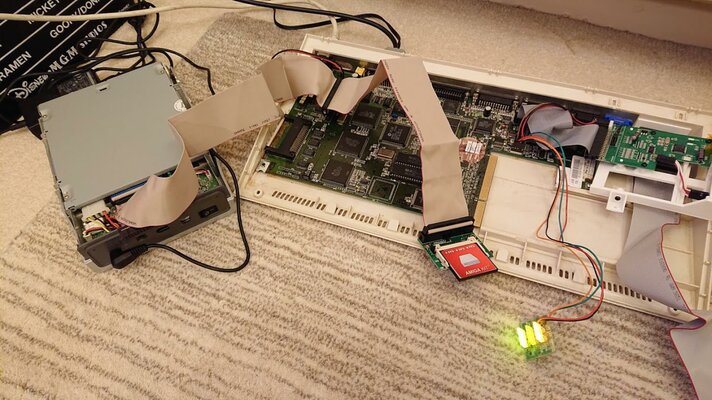
The Amiga came with a compact flash adapter already with a card that works and goes to a workbench screen. I removed that adapter and plugged in this new cable with the new CF adaptor that came with it (it came with a 44 pin to CF adapter, the original adapter is all pinned up the same as the IDE on the board. Photo attached. When I connect it all up, the hard drive LED comes up 'solid' (stays on, no flashing to indicate access) and then after a few seconds the booting screen appears. I'll try the both mouse button things once the case has dried out (took the opportunity to clean the case up seeing as I had it open).

insideA1200.jpg
 
So we know that the CF card is okay, as well as the 44 pin CF adaptor.

That leads us to look at this this Ebay purchase more closely and my spidey sense is telling me that the 40 pin CF adaptor is the most likely culprit here.

Are you able to return and get a refund?
 
Hello,

there is some incompatibilities that you can encounter: not all the CF work with a stock A1200 and, in a different way, not all the CF adapter are the same, and some might not work.
You can do a new try (if not already tried): put an end of the cable to the A1200 plug; the other end with the CF adapter, and then the CF inserted. Leave the plug in the middle of the cable, free. Boot your Amiga with the floppy (install disk) and look what HDToolBos tells.

Regards
Stefano

edit ---

Another thing: long cables are not safe with the internal IDE port of a stock A1200 (you need just test this thing, because in some situations they work; it is just an advice), and...is the CF adapter powered?
 
Last edited:
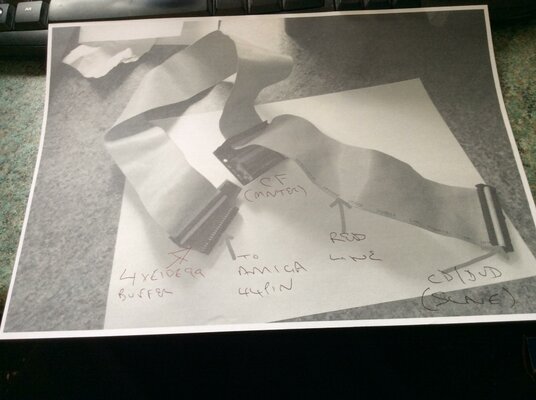
The cable doesn't look right me - is it connected directly to the motherboard because that looks like a 40 pin cable. With regards to the ROM is it set to slave, if so check if the red line is in pin one. If you use a 4XEIDE99 interface it has a 44 pin connector for the Amiga, the 40 pin cable connects to the interface, the middle connector to the CF and the end connector to the ROM if set to slave. Hope the pic helps!

ide.jpg
 
Last edited:
The cable doesn't look right me - is it connected directly to the motherboard because that looks like a 40 pin cable.

It's definitely a standard 40 pin IDE cable that the OP is using but there is an adaptor it gets plugged into, which in turn plugs into the A1200 IDE port.

I used the following items to get mine up and running ...

3 way 44 pin ribbon cable (30cms-45cms)
CF adaptor and card
External slim DVD enclosure
Laptop DVD/CD-ROM drive
Slim CD to 44 pin IDE adaptor

A small mod to the enclosure with my trusty Dremel was all that was necessary. No need for an external power supply as it all works off the A1200 IDE port. I did however, have to upgrade the A1200 supply from a lightweight one to something a bit more powerful.
 
Last edited:
Looking at the link posted of it, the adapter he is using is clearly a 40 pin adapter and the photo of it connected to his A1200 shows no power cable attached to it. This is why it's not working, he needs to run a cable from the floppy power connector to the IDE adapter as well.
 
Last edited:
Thanks -Acid- I hadn't realised it was needed, I thought it was all about powering the CD drive! Yes, I'm an idiot. OK, having connected all the power up it now boots from the CF card! So that's step one sorted.
JHmGE1pzN6u01rDInYHkgwnMeewwqxH5NUnGajBcXUKc3G0YRztniePHly5agVU0JMejk7_bVY8RLd7zZP6pa-Jiqu1bmy-5aiDXBXvCMEMgawzEAFmtxhcCLcteGsTibmKwjhnmoz7kaFPB1rpEHawSHssSLDaX63Q-fQOfLycz3H7L5w_BdS6qGLkG4QH-km1Y8FPm04AmeBTICAMuHmZIFrJ9seQhffr9BaXsvtfb-hkRUKBmFO87gSFH16mCibWMTtXy8R9XXcDliA8L0pu2XYOvR0NUwZr9EwTp4pc4Yf5nBguS6Jvs9dUC4wumWg3bdAZEqGSNW2Y2ObXck0UqgBpbVKEkYfkgS3UBf3dgMCPPyajcfLsYiylgq-bwG_E112hyb_4fwVwS-zDAEsiTI6YFLD-6rdN2M6_hbHBCZbl5Fvndc22lhFhLXMdhEQULUcyql-CYOAtZGgJjyL_vcM9KF6hTF-BLv_VbWwGZIB2ddP0DyVkTsRZhlhRjm0CQBhBJyVzPjeQzqlwrAqMdLxFW8enq9NqeSpVuq5ofCWeBqzam4c55o9RtXvvTpNr_FUIOC9Dkr0L02StYLrvs7Iup6AP7Sh1DG1bsf4NW_HLNYw7Tpo8aPi9z3qH-UXw_mNQSCrGOCUuE3vMU9zIZY50IcPXqghPHPmn3sW6SDnDjVOiM9mA=w1497-h842-no


However, not there yet. If I connect the CD drive up, it won't boot. Just sits with a solid HD light then eventually goes to the boot screen.

There is a jumper on the CD drive itself and I've tried it in all 3 positions (CS/Master/Slave) and also tried changing the master/slave jumper on the CF card adapter. Doesn't get it going.

Any ideas?

- - - Updated - - -

To further add to this, with the CD drive connected and the CF card essentially frozen, I go into the Bootup options and see this list:

Cx17SvBF6Y3TjCpH1PXpxcxYkePL61QIIEwierFlzknmCHQNsUMshKCJoNkAyWVQyL11WXTtq3VuaqHHlZZ-j9anyHgqRFTZvSr_5g6IzsJsyKf_IN9MKiRuzSY56qrZeTqyYfAIWI2_F8xg10NPX5XNrsbS_c2T5UAQtlr13bMWDPz2FQgoI2PfUIHGvltUJkskJQiUK7IthhLumsPS4_tNPZFp9gYJSuGL41DI5R-1yl0avABiy_Wum91gk0ZPl6EHIyWlyS99t5XRl3g6tRGLp_TbcsvJadDvgLkncdpBm9_v9_29UKOO7qYJvnZPv4YPU08rUSlqXhHyRv7uLQhG40Pkd0DxyHtmfFavN3uvYGPAELkgJ4Aa1CAovnbHAddsN41FJwy2Joca9GAA8S3lUQxVy1nc7vHvC9y2qYXsF3aez_EnDJc3Ftmkw7s4PS8VSlrUk3GDIGBzZ_lyVXF7GeDkbz_hoiXMm424z7DfoY96MScdCshK8hU_JKVPnJjs-6kScx06BNtW2x7sZRCnAPbEB3xEGIVrMbyiEA1s8FLkeMdcqxUB-86dAcib5VlneLOI68SCuMbHI9GuT4iIeff_waAOiVTzsO1wRZoMHmiddnmz_bq4erjgaoQO4XvIROUJysBcqAdiGbMXmWWx3N6LMjMezMtkZw8voM_zdE4xhazGRvU=w1497-h842-no


With the CD drive disconnected, the boot screen shows me this lot:

uMgjoaCFRNsoxKJX3C9qNLaJJPIPC4QhWUzwib_ywrc2bkUiOAlhhA-eEHsOql0tqpGUTY4WbM3dM-Wf5Dr3bC-fun1mKRAI_RrRZjYSy55yLW0vD3PIMkdT3uFh_h_sbiqws30vmC8wqWUa4pRP3qB5W9jDsUh98wfuxt7_b-ASC24q15cQ8ajkfrioBCXhhU_aC_WzEGonAZbU7gOgzxAQMky8eYUB0k7a5JcPoyyPHcELF41N65KOXcWNKePE3vtFSYCAP5aByFsAGefpuq0_loSItRSW4GPWF8XpiRdvCLvOdv7ubiTKOb1IFxgOq8NaoA0XjR9ItmDVBLIvd7txvXY-2YViW7102YonVdGEei5Y4YqZDttCpWNjjaPz9zKNJp-3udy2AdTEFsgqHzPryx9wBFsDechC9o3OWT0YmL9umMQkaJ-WFo4FTgdPEnRVqndIdpTbgavMVKqbp0nMCGepW2Zz_cGA5QDRlqxWYs7bTU2hg6zbzk_wBvkt5FsQ59JJBNWg4skoIZooEcGGJm08Oqa-oZBGJ4MJbqSQxGrmtyzLNNdOwyMcvsXSBJYTx0_Bu_ImvTpEAw0TYv0H977VF4YQ31Ux6xym9VQ99QYqm5QTaPB-KzuQmRDLy5vaUWqnSQu2XYKDGSZe9kEaeYq2GB7RdM4Qq8l8Xuat0g9-1cJ0rpc=w1497-h842-no


It's all a bit peculiar. I can only surmise that it's the CD drive itself causing some kind of wobble. Because if it's disconnected, then if I've interpreted screen 2 correctly, the cable is showing the IDE port all the available options it can supply. Or something like that.

- - - Updated - - -

Finally a picture of the innards of the CD drive. It's an old external PC drive with a USB to IDE circuit and power board. The drive itself is IDE - I think?? How can one tell the difference? The jumper is the light green thing you can see on the back of the drive itself.

Smkjm_4DtkvQ62lJ9xx-cwsJLoIENw7NKqRDrEllTVGt9LAWMBl_gV7epmMtGPLL9P-SudmSV2QuhVYEVSm2Hm0db6WDRquQrnEs595uL0coqdXPjVqqoFdJtMowT51kwi09ag0qVFUOIvSEJu633HTmL2AepKda5fllOv3zJ4m9vKS3VDwNhSlf1U31l5aSNpMBi95jQq7d8yEQ7wFP1m2BxpKbj6UJz83q7k06o_hQAIjeQoS3NHHq-IQnlAz0YY0QxzIBk3vaWEGEoAOI2T7VEe8IsZMfQVlv9mL0J8g1PU8ULq2COJwAeD3oBIAblfkgTW1HL9LbW6nDrHSgMorxJT5WEPekikW0yna5tO9rBSBt5C03MJHfWM4sGksQH3aYjVwEaeCBGsDSagitq7syIwF_MUlOtqLBuWrbWGUiR8PQeGtPnko4kkKrcaTwXnkY5p4xAbA0BXv7wTY8wOyvPMnUvmtSX_k55w25JKTNz40850bOIkecE3Sb4Aha-56-nYgSBuP4CEvKEMZSgBJI1LvInm8UTQLid6pNEpsks4FXL3_T38hLfhSCr3_jhCLzDYEjB5TixJFoEpYbUGwuwJxgT1kdMeDzq5XYg6sMrAwb_uHxa_ZhDGDs39yhCAtABWRprbG2b7G8FlbzyeIYsC7NvUKYhidcv6Bry3dC8S1GucbVMH4=w1497-h842-no
 
Last edited:
An IDE interface usually consists of 40 pins (2 rows of 20). There is a variant with only 39 pins, as seen in the picture of the drive innards you have posted. This is normal to have the gap where a pin should be, it's just a design feature so no worries there.

There definitely seems a conflict of interest with that setup. Usually, the CF card is the Master and the DVD drive is either Slave or CS. As the system recognises the CF card on it's own and boots to workbench, that can be eliminated.

Can you open and close the DVD drive okay when it has power applied?

The only thing you need from the enclosure is the 4 pin molex power connector from the interface board to the DVD drive. The ribbon cable should also be plugged directly into the back of the DVD drive itself
 
Yep can open and close the drive with all connected. The ide from the Amiga is directly connected to the drive. I've not connected the molex because the drive has it's own power supply so I don't need a feed from the Amiga.
 
This one has me stumped to be honest :banghead:
 
Last edited:
Status
Not open for further replies.
Back
Top Bottom