

SvladJelly
Member
To keep? Or not to keep.. that is the question!
Hello AmiBay. I did a little intro over in the appropriate section, but I had a few questions, and I was wondering if anyone could help out with an opinion or three..
(Skip down to the end past the dashes for my actual questions if you don't care to read my background.)
First a little about me and how I use my Amiga, besides the great games..
My first Amiga was a 2000HD when I was about 16 years old, purchased new for around $800, gotten as a gift. I dragged it around for years before finally upgrading to an Amiga 1200, with a new Blizzard 060 board and 32 gb of ram. It was amazing. In a state of poverty years ago, I sold it to an idiot who told me "his roommate threw the a1200 away, and he sold the 060 on ebay." I was totally heartbroken to say the least.
Recently.. I stumbled on a fantastic deal at a garage sale. An Amiga 4000d / 040 with Video Toaster and Flyer card, 2002 monitor, and get this.. A Tekmagic 060 accelerator for the Amiga 2000. And let's just say that the price was incredibly incredibly LOW. I couldn't believe my luck. So..
I made some Retr0brite today, and cleaned up my old Commodore 64, taking apart the whole unit, key by key. This one isn't my original, the first computer I had as a child.. and I don't have a power supply or disc drive for it, but I'm working on that.. it's all cleaned up and ready to go. (Found this one at a junk shop in Portland.) The C64 still has my favorite keyboard of all time. Ahh.. clack clack..!
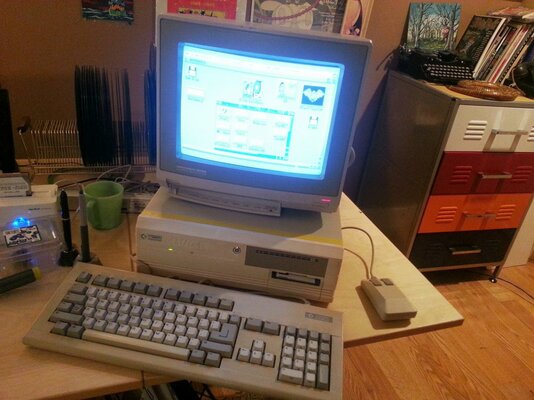
Did the same teardown / whitening / cleanup with the recent Amiga 4000 / 040 with Video Toaster and Flyer card that I lucked out on at a garage sale the other day. Removed years of icky yellow, grime and spiderwebs. Hit the power button when all clean and it booted up immediately. W00t!
So, years ago, I did my first commercial animation on the Amiga 4000, working for a mentor of mine in Portland Oregon. He would sit and make these textural 256 color paintings in Deluxe Paint 4 or 5, and save one a day. I always thought they were fantastic. Imagine my surprise when I loaded this Amiga up, ran Deluxe Paint, and found out that DPaint was registered to someone I knew over 20 years ago in Portland! He was the "Amiga tech" for one of my animation mentor! My mentor / teacher / boss must have rented or borrowed this machine at one time, and saved a few images to it. I probably actually did some of my animation work on this very machine. Small world!
I did about six animations for Sesame Street on the Amiga, all in Deluxe Paint, at a time where neither the Mac or the Pc could display full screen 720x480 animation in real time. The Amiga could! It was incredible to play around with back in the early 90's. I posted some of them here: http://www.youtube.com/watch?v=2TeeV2wFMck
All were done in Dpaint / Brilliance, with images / video having been grabbed a frame at a time (in black and white 16 or 32 colors) then colorized in the Amiga and white using a GVP external framegrabber with s-video in..
--------------------------------------------------------------------------------------------------------------------------------------------------------

So now I have a fantastic machine sitting here on my desk, all cleaned up and working beautifully. And man, it feels good to be an Amigan again!
1) Wiggle the chips.
Sometimes I have to open the case...and push the ram down a little bit, to make the contacts all work and have the thing start, after it sits for a little while. Dirty contacts? Not sure how I can fix that since some of the plastic rails are broken off on one side or another, that hold the ram chips in place.) Maybe a general cleanup of the thing would help greatly with that. Anyone have experience with this?
2) Scandoubled..
Upgrade wise, it has the a3640 / 040 in it, with 16 mb of ram on the main board.
I would love to get an indivision internal scandoubler, but it seems that they are no longer being sold.
3: Mediator / Radeon as flicker fixer?
Should I buy a mediator board and put a nice graphics card in it? This should allow me to view my desktop on my LCD monitor, through picasso 96 software / Elbox latest Radeon driver?
What about displaying games? Would ECS or AGA games still display through to the LCD using the Mediator and a Radeon card?
Wifi cards are NOT supported by the Mediator for the A4000d, correct?
4: Eventually I would like to drop the cash necessary to have a proper 060 / PPC card and explore that whole world. Should I sell the A4000 and 060 2000 accelerator in favor of going all in on an Amiga 1200 build? I like the portability of the 1200, but remember the hassles of installing peripheral devices and cards.. but they certainly are cheaper and more available.
Thanks in advance to anyone willing to help, oh great AmiBay Oracle!
Yo!
C
Hello AmiBay. I did a little intro over in the appropriate section, but I had a few questions, and I was wondering if anyone could help out with an opinion or three..
(Skip down to the end past the dashes for my actual questions if you don't care to read my background.)
First a little about me and how I use my Amiga, besides the great games..
My first Amiga was a 2000HD when I was about 16 years old, purchased new for around $800, gotten as a gift. I dragged it around for years before finally upgrading to an Amiga 1200, with a new Blizzard 060 board and 32 gb of ram. It was amazing. In a state of poverty years ago, I sold it to an idiot who told me "his roommate threw the a1200 away, and he sold the 060 on ebay." I was totally heartbroken to say the least.
Recently.. I stumbled on a fantastic deal at a garage sale. An Amiga 4000d / 040 with Video Toaster and Flyer card, 2002 monitor, and get this.. A Tekmagic 060 accelerator for the Amiga 2000. And let's just say that the price was incredibly incredibly LOW. I couldn't believe my luck. So..
I made some Retr0brite today, and cleaned up my old Commodore 64, taking apart the whole unit, key by key. This one isn't my original, the first computer I had as a child.. and I don't have a power supply or disc drive for it, but I'm working on that.. it's all cleaned up and ready to go. (Found this one at a junk shop in Portland.) The C64 still has my favorite keyboard of all time. Ahh.. clack clack..!
Did the same teardown / whitening / cleanup with the recent Amiga 4000 / 040 with Video Toaster and Flyer card that I lucked out on at a garage sale the other day. Removed years of icky yellow, grime and spiderwebs. Hit the power button when all clean and it booted up immediately. W00t!
So, years ago, I did my first commercial animation on the Amiga 4000, working for a mentor of mine in Portland Oregon. He would sit and make these textural 256 color paintings in Deluxe Paint 4 or 5, and save one a day. I always thought they were fantastic. Imagine my surprise when I loaded this Amiga up, ran Deluxe Paint, and found out that DPaint was registered to someone I knew over 20 years ago in Portland! He was the "Amiga tech" for one of my animation mentor! My mentor / teacher / boss must have rented or borrowed this machine at one time, and saved a few images to it. I probably actually did some of my animation work on this very machine. Small world!
I did about six animations for Sesame Street on the Amiga, all in Deluxe Paint, at a time where neither the Mac or the Pc could display full screen 720x480 animation in real time. The Amiga could! It was incredible to play around with back in the early 90's. I posted some of them here: http://www.youtube.com/watch?v=2TeeV2wFMck
All were done in Dpaint / Brilliance, with images / video having been grabbed a frame at a time (in black and white 16 or 32 colors) then colorized in the Amiga and white using a GVP external framegrabber with s-video in..
--------------------------------------------------------------------------------------------------------------------------------------------------------
So now I have a fantastic machine sitting here on my desk, all cleaned up and working beautifully. And man, it feels good to be an Amigan again!
1) Wiggle the chips.
Sometimes I have to open the case...and push the ram down a little bit, to make the contacts all work and have the thing start, after it sits for a little while. Dirty contacts? Not sure how I can fix that since some of the plastic rails are broken off on one side or another, that hold the ram chips in place.) Maybe a general cleanup of the thing would help greatly with that. Anyone have experience with this?
2) Scandoubled..
Upgrade wise, it has the a3640 / 040 in it, with 16 mb of ram on the main board.
I would love to get an indivision internal scandoubler, but it seems that they are no longer being sold.
3: Mediator / Radeon as flicker fixer?
Should I buy a mediator board and put a nice graphics card in it? This should allow me to view my desktop on my LCD monitor, through picasso 96 software / Elbox latest Radeon driver?
What about displaying games? Would ECS or AGA games still display through to the LCD using the Mediator and a Radeon card?
Wifi cards are NOT supported by the Mediator for the A4000d, correct?
4: Eventually I would like to drop the cash necessary to have a proper 060 / PPC card and explore that whole world. Should I sell the A4000 and 060 2000 accelerator in favor of going all in on an Amiga 1200 build? I like the portability of the 1200, but remember the hassles of installing peripheral devices and cards.. but they certainly are cheaper and more available.
Thanks in advance to anyone willing to help, oh great AmiBay Oracle!
Yo!
C


 ). You can run a 1280x1024 Workbench screen, and if you start a WHDLoad game with a standard 15KHz PAL/NTSC screenmode it automatically switches to the right output. And since it has a scandoubler/flickerfixer you can just use about any standard VGA screen.


