AMIGA A590 help needed. HDD

  • Thread starter Thread starter SviRu
  • Start date Start date
  • Replies Replies 30
  • Views Views 1983

SviRu

Active member
Joined
Jul 27, 2022
Posts
167
Country
Poland
Region
Jungles of Titan
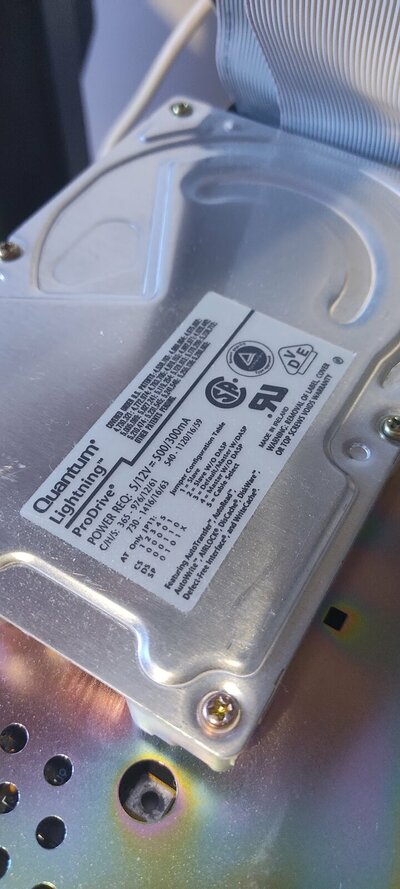
HI. Just got A590 with SCSI drive inside. It is an QUANTUM LIGHTNING PRO DRIVE. Can't figure it out how many mb does it have.

Amiga tries to boot from hd but fails.

NOT A DOS DISK IN DEVICE 6​

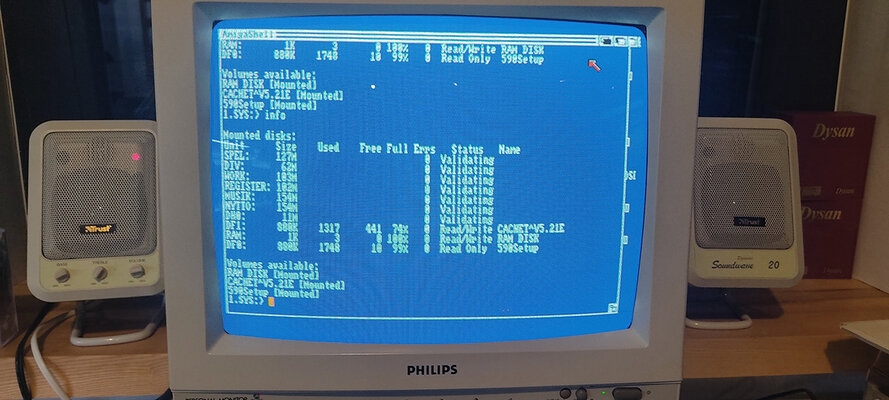
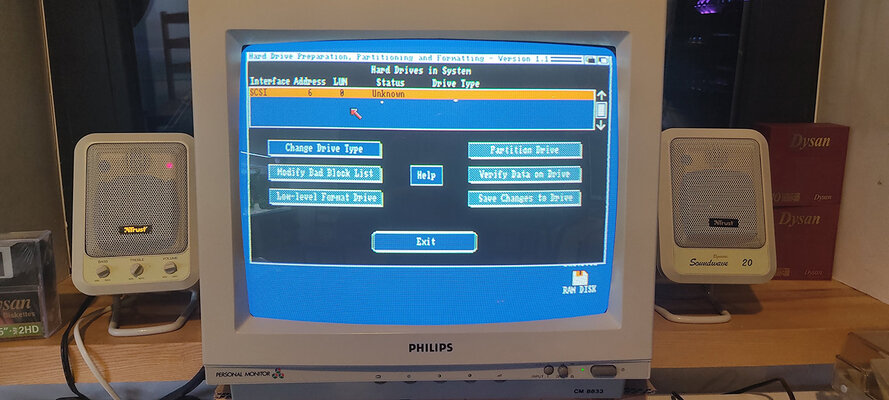
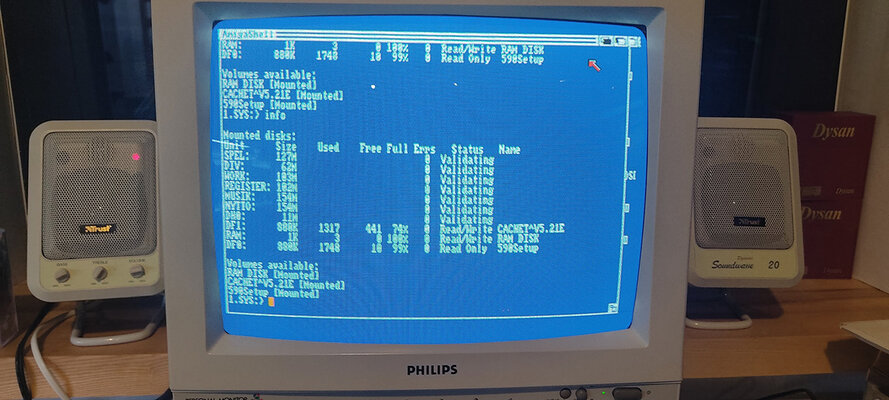
Booting from A590 setup disk - I can see additional 2mb of ram. HDBOXTOOL sees a disk but there is unknown right next to the status. All buttons greyed out except specify drive. When I type info command in CLI I can see many partitions but cant acess them. Their status is initalizing. I'll try to attach photos.

Please help. Stuck. Rev 6a 1.3 kick.
 

Attachments

  • IMG_20220812_171156.jpg
    IMG_20220812_171156.jpg
    131.6 KB · Views: 45
  • IMG_20220812_172815.jpg
    IMG_20220812_172815.jpg
    116.8 KB · Views: 48
  • IMG_20220812_190141.jpg
    IMG_20220812_190141.jpg
    181.2 KB · Views: 44
I never had an A590, although it seems that your hard disk is still validating (or corrupted somehow). If you don't need its contents, then make new partitions from scratch to see what happens.
 
I never had an A590, although it seems that your hard disk is still validating (or corrupted somehow). If you don't need its contents, then make new partitions from scratch to see what happens.
To do so i think i need to put scsi device details? That i dont have...
 
But HDD label showing IDE settings (Master/Slave jumpers)? Are you sure it is SCSI drive?

To answer my own question: That was stupid, Quantum made AT/SCSI drives under same name...
You have information required on a label, but you have to find out size of that drive.
Under "Power REQ" on a label you have C/H/S (cylinders/heads/sectors) values for 3 sizes of drive 365, 540, 730.

How big HDD A590 can take it? Because that HDD could be too big for it.
 
Last edited:
drive recognition is not working there is an error while reading drive details in hdtoolbox - idont understand inquiry data (type 2)
IMG_20220812_222840.jpg
 
Are both LED's lit or flashing on the A590?

On the rear of the A590, there is a set of 4 DIP switches. Reading from left to right, what position are they set to [off or on]?
 
Are both LED's lit or flashing on the A590?

On the rear of the A590, there is a set of 4 DIP switches. Reading from left to right, what position are they set to [off or on]?
yes both are working. You can see the partitions but cannot acess them. Dip switch is now off off off off. It was on off off off. It was set to autoboot now it is non boot version. With autoboot could not load WB from floppy.
 
Boot your A590 Setup floppy disk and open up a Shell.

Type in the following and press RETURN afterwards

version FULL scsi.device

If scsi.device is present and working, you should see the full version etc displayed in the Shell. Reply with what is shown.....

<edit>
When you say both LED's are on, are they both constantly lit or is one flashing?
 
Boot your A590 Setup floppy disk and open up a Shell.

Type in the following and press RETURN afterwards

version FULL scsi.device

If scsi.device is present and working, you should see the full version etc displayed in the Shell. Reply with what is shown.....

<edit>
When you say both LED's are on, are they both constantly lit or is one flashing?
it returns "error in open" green one is constantly on orange when trying to boot etc when trying to read
 
See if the HDTOOLBOX icon's tooltype is set to XT and not SCSI

One thing is for certain, the HD has been replaced during it's lifetime. AFAIK A590's shipped with XT Western Digital drives, not SCSI-2 ones
 
Last edited:
See if the HDTOOLBOX icon's tooltype is set to XT and not SCSI

One thing is for certain, the HD has been replaced during it's lifetime. AFAIK A590's shipped with XT Western Digital drives, not SCSI-2 ones
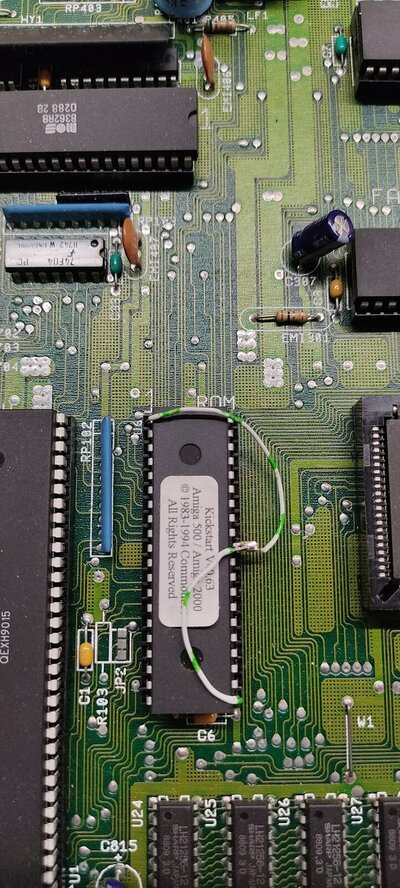
Booted amiga that it came with... it was not working but suddenly it raised from the dead. I opened it first. It has 3.1 rom... So I connected it to this Amiga and VOILA system booted with kickstart 3.1 Rev5 board. Still idk why it do not work with 1.3...

I have attached photo of KS 3.1 - could you explain why there are some wires - and more importantly can I swap it to rev6a???
 

Attachments

  • IMG_20220813_004655.jpg
    IMG_20220813_004655.jpg
    361.3 KB · Views: 26
Can you access the A590's contents ok using the kickstart 3.1 ROM?

I believe Kickstart 1.3 ROMs do not have scsi.device built-in as standard (has to be supplied on floppy disk) and 3.1 does.

Chances are the HD was formatted using the FastFile system which would explain why 3.1 can access it okay and 1.3 won't. FFS wasn't around in Kickstart 1.3 days, it appeared when Kickstart 2.05 was released. It's all gibberish as far as Kickstart 1.3 is concerned.

You can pop the 3.1 ROM out and replace it with a 1.3 if you wish. The wire is just there to shunt signals from one leg to the other allowing the chip to work correctly. however, if you do that then you will probably lose access to the HD again.
 
Last edited:
Can you access the A590's contents ok using the kickstart 3.1 ROM?

I believe Kickstart 1.3 ROMs do not have scsi.device built-in as standard (has to be supplied on floppy disk) and 3.1 does.

Chances are the HD was formatted using the FastFile system which would explain why 3.1 can access it okay and 1.3 won't. FFS wasn't around in Kickstart 1.3 days, it appeared when Kickstart 2.05 was released. It's all gibberish as far as Kickstart 1.3 is concerned.

You can pop the 3.1 ROM out and replace it with a 1.3 if you wish. The wire are just there to shunt signals from one leg to the other allowing the chip to work correctly. however, if you do that then you will probably lose access to the HD again.
That would explain why it is inaccessible. Then again 1.3 sees the partitions. I would like to go back to 1.3 - that would probably mean formating the drive somehow. I can access all data on 3.1 - everything works. Installed workbench is in Swedish - is it possible to switch language - or do you need to install a fresh copy?
 
Go into the Prefs folder on the HD and change keyboard layout, language and locale to your needs.

The 1.3 will happily see the partitions but the format structure and data contained within will be garbage to it, hence why it gets stuck trying to constantly verify.

I would recommend leaving it on KS3.1 to be honest.

Just out of interest, how big is each partition on the HD?
 
Last edited:
Go into the Prefs folder on the HD and change keyboard layout, language and locale to your needs.

The 1.3 will happily see the partitions but the format structure and data contained within will be garbage to it, hence why it gets stuck trying to constantly verify.

I would recommend leaving it on KS3.1 to be honest.

Just out of interest, how big is each partition on the HD?
You can see the each partition size on the photo - listed as validating
 

Attachments

  • IMG_20220812_171156.jpg
    IMG_20220812_171156.jpg
    131.6 KB · Views: 24
So that would tie up with the drive being 730Mb in capacity, as per the parameters shown on the label
 
So that would tie up with the drive being 730Mb in capacity, as per the parameters shown on the label
yes the drive is correctly 730mb. Did calculations on head cylinders etc. I can see that these hdds are quite expensive now on ebay. Almost 100$ for an old scsi drive... Is there hd toolbox built into wb 3.1?
 
Back
Top Bottom