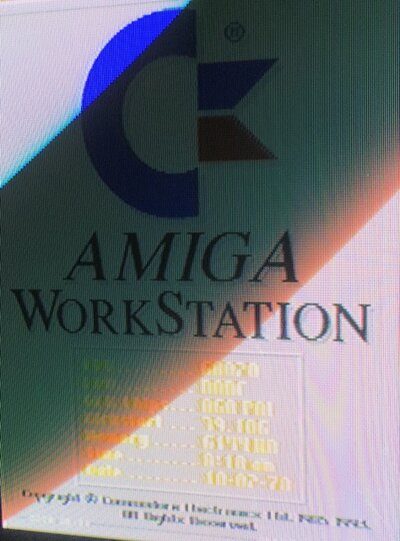
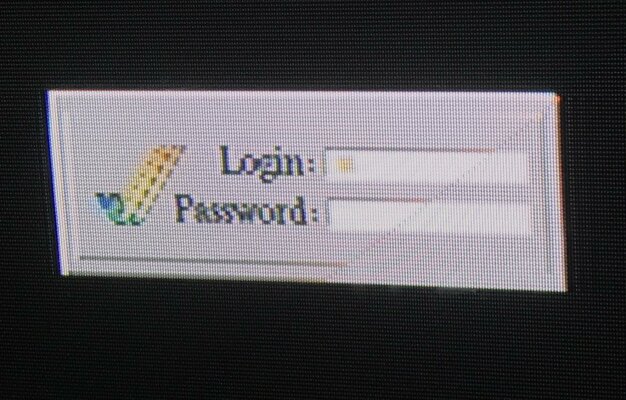
Amiga startup login screen - what is this??

  • Thread starter Thread starter Walterg74
  • Start date Start date
  • Replies Replies 12
  • Views Views 2282

Walterg74

New member
Joined
Feb 15, 2013
Posts
91
Country
Argentina
Region
Buenos Aires
Continuing with my "Got an amiga but I'm a noob and don't understand anything" series, I bring you another question...

Purchased and A1200, and when I went to test it I found myself with a user/password prompt...

e-mailed the seller but meanwhile, googling a bit I did manage to get as far as learning how to boot without startup sequence and issue a loadwb to get workbench.

After that though, even though I manage to edit the startup sequence or user startup, I cannot seem to find just what exactly that password prompt is, or what program, etc in order to remove it...

Googling doesn't help either as I've tried countless searches to try to see what this could be and nothing, so I decided to post here, where I'm sure the more knowledgeable folks will take one look and say: yeah, that's "x"...

I did get the user and password from the seller now, but that's beside the point, as I can see already some may answer "just format the hdd",and I might do that at some point just to learn how to work with hdds and install stuff etc. , but right now I am more interested in learning what all this is and how to remove it manually.

So anyway, this is how startup goes...

- Power on the computer, start loading and get the login screen
- I see a workbench title bar and then the "Amiga Workstatikn" page appears with workstation with a hardware info page
- I hit ESC and another workbench title bar and an image loads (guess the guy really liked Pamela Anderson)
- Hit ESC again and workbench loads

Attaching the screenies.

Now, anyone know what the h... this is? I know it's probably in the startup scripts but I don't know enough to identify these elements.

Edit: cannot add the "amiga workstation" info screenshot because it's too large. Will try to compress it.
 

Attachments
  • IMG_0092.jpg
    IMG_0092.jpg
    204.8 KB · Views: 9
Last edited:
Hi,

have you looked in the WBStartup folder to see if it's a app that runs on startup rather than in the startup-sequence?
 
That also looks like it could well be one of the many 'loading screen' image programs which usually run as apps from the WBStartup folder (I have one installed too...). :)
 
As RichyV points out, it could be something off the WBStartup folder. It could also be something loaded from the startup scripts at S:Startup-Sequence and S:User-Startup. My 1998 OS 3.0 setup had PicBoot (http://aminet.net/package/util/boot/PicBoot) launched from S:User-Startup to show a random image.
 
That also looks like it could well be one of the many 'loading screen' image programs which usually run as apps from the WBStartup folder (I have one installed too...). :)

As RichyV points out, it could be something off the WBStartup folder. It could also be something loaded from the startup scripts at S:Startup-Sequence and S:User-Startup. My 1998 OS 3.0 setup had PicBoot (http://aminet.net/package/util/boot/PicBoot) launched from S:User-Startup to show a random image.

Thanks guys, will boot up in a few mins and check those locations and provide what the startup scripts have.

Now noob question: a picture viewer but that has a user login screen?
 
Last edited:
Ok, so in the WBSTARTUP folder, there is only one program called "MouseBlanker". Not really sure what it's fore, but definitely not it...

If I look in sys:s/startup-sequence I see this:

; $VER: startup-sequence 39.9 (9.8.92)

C:SetPatch QUIET

C:Version >NIL:
C:AddBuffers >NIL: DF0: 15
FailAt 21

C:MakeDir RAM:T RAM:Clipboards RAM:ENV RAM:ENV/Sys
C:Copy >NIL: ENVARC: RAM:ENV ALL NOREQ

Resident >NIL: C:Assign PURE
Resident >NIL: C:Execute PURE

Assign >NIL: ENV: RAM:ENV
Assign >NIL: T: RAM:T
Assign >NIL: CLIPS: RAM:Clipboards
Assign >NIL: REXX: S:

Assign >NIL: PRINTERS: DEVS:Printers
Assign >NIL: KEYMAPS: DEVS:Keymaps
Assign >NIL: LOCALE: SYS:Locale
Assign >NIL: LIBS: SYS:Classes ADD
Assign >NIL: HELP: LOCALE:Help DEFER


hd0:Trashcan/Alock
OpenAWS -p5 -a -t -h12
ppshow hd0:Trashcan/pepsiMAX


IF NOT EXISTS SYS:Fonts
Assign FONTS:
EndIF

BindDrivers
C:Mount >NIL: DEVS:DOSDrivers/~(#?.info)

IF EXISTS DEVS: Monitors
IF EXISTS DEVS:Monitors/VGAOnly
DEVS:Monitors/VGAOnly
EndIF

C:List >NIL: DEVS:Monitors/~(#?.infolVGAOnly) TO T:M LFORMAT "DEVS:Monitors/%s"
Execute T:M
C:Delete >NIL: T:M
EndIF

SetEnv Workbench $Workbench
SetEnv Kickstart $Kickstart
UnSet Workbench
UnSet Kickstart

C:IPrefs

C:ConClip

Path >NIL: RAM: C: SYS:Utilities SYS:Rexxc SYS:System S: SYS:Prefs SYS:WBStartup SYS:Tools SYS:Tools/Commodities

IF EXISTS S:User-Startup
Execute S:User-Startup
EndIF

Resident Execute REMOVE
Resident Assign REMOVE


C:LoadWB

EndCLI >NIL:


That's it...

- - - Updated - - -

Adding user-startup:

C:HighDensityPatch
;BEGIN JPEG Datatype
assign JPEGIMP: Work:ArtGFX/Viewtek
assign DPAINT: Work:ArtGFX/DPaintIV
assign Psychedelic: hd1:Games/psy
assign SuperView: Work:ArtGFX/SuperView
assign Rebels: Work:Games/WhammerSlammer
Assign Whammer3 Work:Games/WhammerSlammer
;END JPEG Datatype
; Following lines added by Personal Paint
Assign >NIL: PPAINT: EXISTS
If WARN
Assign PPAINT: Work:ArtGFX/PPaint
EndIf
; End of lines added by Personal Paint


That's it.
 
ALock in dh0:trashcan looks a possibility...


Sent from my iPhone using Tapatalk Pro
 
Last edited:
Pretty sure it's alock. I used it 20+ years ago. Nice looking login prompt...

If memory serves, you can lock the Amiga with some security, where it required a password and couldn't be by passed. Although, booting without a SS, nullified everything it did. Still a neat idea. And someone without a working Amiga knowledge would be stopped :).
 
Last edited:
Pretty sure it's alock. I used it 20+ years ago. Nice looking login prompt...

If memory serves, you can lock the Amiga with some security, where it required a password and couldn't be by passed. Although, booting without a SS, nullified everything it did. Still a neat idea. And someone without a working Amiga knowledge would be stopped :).

It's a set of utilities that can also give you differing work environments depending on the login creds given. Also, it had a rudementary disk encrytion type thing too I think....
 
ALock in dh0:trashcan looks a possibility...


Sent from my iPhone using Tapatalk Pro

Yep, after sitting down with it a while and reading patiently, I figured out it does:

- alock. (Still need to download it to read rhe readme and figure out where the password file is,etc. Just to learn)
- openaws to display the "amiga workstation" screen with hardware info
- ppshow to display an image

- - - Updated - - -

And C:HighDensityPatch would point to a Power Computing XL HD floppy drive...


Correct, the comouter also came with one of those, and after reading the drive manual yesterday, I see that's what it is :)

- - - Updated - - -

Pretty sure it's alock. I used it 20+ years ago. Nice looking login prompt...

If memory serves, you can lock the Amiga with some security, where it required a password and couldn't be by passed. Although, booting without a SS, nullified everything it did. Still a neat idea. And someone without a working Amiga knowledge would be stopped :).

yes sir, it was indeed alock.

This is all just to learn, ans while it could be wiped, I also replaced the disk (120MB seagate) for now with a CF card, and added bonus of no humming...
 
Back
Top Bottom