
You are using an out of date browser. It may not display this or other websites correctly.
You should upgrade or use an alternative browser.
You should upgrade or use an alternative browser.
Apollo 1240/60 64 mb single simm
- Thread starter Marmes
- Start date
- Replies 128
- Views 50624
To install the module, you need to remove the memory controller socket and solder the controller directly on board. After that install module with soldering pins facing the ram socket. Then remove the small resistor market on picture.
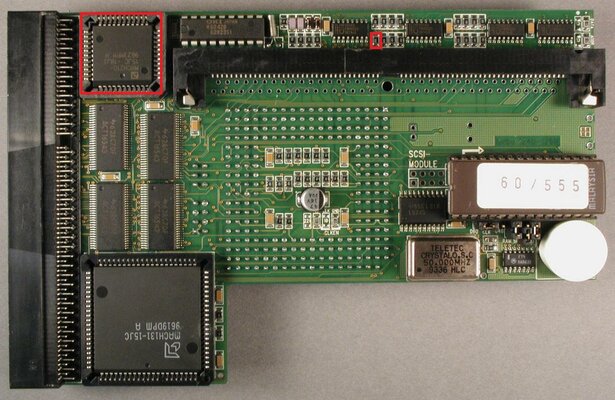
Now solder a wire on A11 of the board. I choose to pass it on that small hole to the other side of the board. Solder the other end on the pad bellow where it says R2 or R1 or R5. Usually R2 is fine.(R3 not used, tests only)
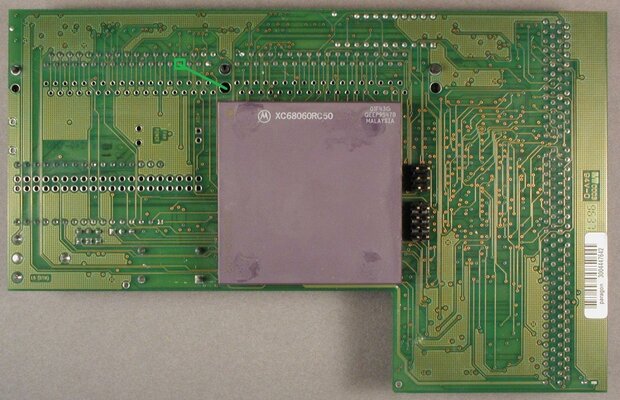
Now solder another wire on the yellow dot shown on image, and solder the other end on R4.
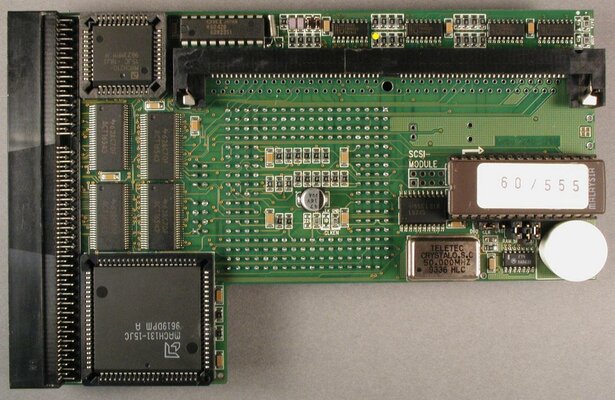
Hope this helps. My A1200 with apollo is runing for almost 2 months with this mod. No problems at all.
Now solder a wire on A11 of the board. I choose to pass it on that small hole to the other side of the board. Solder the other end on the pad bellow where it says R2 or R1 or R5. Usually R2 is fine.(R3 not used, tests only)
Now solder another wire on the yellow dot shown on image, and solder the other end on R4.
Hope this helps. My A1200 with apollo is runing for almost 2 months with this mod. No problems at all.
Last edited:

embedder
New member
Many thx for your manual.
I followed your steps but sadly I was not able to get it working.
So what I did:
1.
Clock down my Apollo 1260 from 80MHz to standard 50MHz (just to be safe).
2.
Removed MACH210 from his socket. Removed the Socket and soldered the MACH210 directly onto the PCB.
3.
Did a check here: Board ist starting and I can boot to WB3.1 with my 32MB of RAM
4.
Now I put your module onto the MACH210. Soldered A11 to R4 and the other one to R2.
But the machine gives me a black screen.
So I tried some thing:
1. Removed the module from MACH210 and checked the contacts. But all contacts seem to have "brush marks" so I a quite sure they all have contact.
2. Removed the 32MB RAM module - now machine turns on. I can see the 060 CPU - but as expected - no RAM
3. Then tried out some other 64MB RAM modules: Samsung Chips, 60ns - doesnt work, only black screen
4. Then tried out some other 64MB RAM module: MT Chips, 50ns - doesnt work, only black screen
5. tried again my working 32MB Siemens module - doesnt work
6. Removed marmes module from MACH210 with my 32MB RAM module - the Apollo1260 is still working
Then I tried the different solder points R1, R2, R3, R5
But none of them seem to work with the 32MB Siemens Module nor with the modules from Samsung or MT.
So whats wrong with my RAM modules? For what kind of RAM module I will have to look for? How can I debug this?
I followed your steps but sadly I was not able to get it working.
So what I did:
1.
Clock down my Apollo 1260 from 80MHz to standard 50MHz (just to be safe).
2.
Removed MACH210 from his socket. Removed the Socket and soldered the MACH210 directly onto the PCB.
3.
Did a check here: Board ist starting and I can boot to WB3.1 with my 32MB of RAM
4.
Now I put your module onto the MACH210. Soldered A11 to R4 and the other one to R2.
But the machine gives me a black screen.
So I tried some thing:
1. Removed the module from MACH210 and checked the contacts. But all contacts seem to have "brush marks" so I a quite sure they all have contact.
2. Removed the 32MB RAM module - now machine turns on. I can see the 060 CPU - but as expected - no RAM
3. Then tried out some other 64MB RAM modules: Samsung Chips, 60ns - doesnt work, only black screen
4. Then tried out some other 64MB RAM module: MT Chips, 50ns - doesnt work, only black screen
5. tried again my working 32MB Siemens module - doesnt work
6. Removed marmes module from MACH210 with my 32MB RAM module - the Apollo1260 is still working
Then I tried the different solder points R1, R2, R3, R5
But none of them seem to work with the 32MB Siemens Module nor with the modules from Samsung or MT.
So whats wrong with my RAM modules? For what kind of RAM module I will have to look for? How can I debug this?
I did a small mistake on thread, now is corrected.
Sorry about that
- - - Updated - - -
Just switch wire on R2 with wire on R4.
Sorry about that
Sorry about that
- - - Updated - - -
Just switch wire on R2 with wire on R4.
Sorry about that
Many thx for your manual.
I followed your steps but sadly I was not able to get it working.
So what I did:
1.
Clock down my Apollo 1260 from 80MHz to standard 50MHz (just to be safe).
2.
Removed MACH210 from his socket. Removed the Socket and soldered the MACH210 directly onto the PCB.
3.
Did a check here: Board ist starting and I can boot to WB3.1 with my 32MB of RAM
4.
Now I put your module onto the MACH210. Soldered A11 to R4 and the other one to R2.
But the machine gives me a black screen.
So I tried some thing:
1. Removed the module from MACH210 and checked the contacts. But all contacts seem to have "brush marks" so I a quite sure they all have contact.
2. Removed the 32MB RAM module - now machine turns on. I can see the 060 CPU - but as expected - no RAM
3. Then tried out some other 64MB RAM modules: Samsung Chips, 60ns - doesnt work, only black screen
4. Then tried out some other 64MB RAM module: MT Chips, 50ns - doesnt work, only black screen
5. tried again my working 32MB Siemens module - doesnt work
6. Removed marmes module from MACH210 with my 32MB RAM module - the Apollo1260 is still working
Then I tried the different solder points R1, R2, R3, R5
But none of them seem to work with the 32MB Siemens Module nor with the modules from Samsung or MT.
So whats wrong with my RAM modules? For what kind of RAM module I will have to look for? How can I debug this?
embedder
New member
Sorry for my late reply.
Well I changed the wires and its working now! Even with 80Mhz!
Okay okay, I didnt had muh time for testing, just booted into WB and ran starstruck . hope I can do some stability tests at the comming weekend.
But:
MANY MANY MANY THX to you marmes. This is the greatest hardware hack for an Apollo Accelerator since ages!!!
:woot: :woot: :woot: :woot: :woot: :woot:
:arms:arms:arms:arms:arms:arms

:yourock: :yourock: :yourock: :yourock: :yourock: :yourock:
Well I changed the wires and its working now! Even with 80Mhz!
Okay okay, I didnt had muh time for testing, just booted into WB and ran starstruck
. hope I can do some stability tests at the comming weekend.But:
MANY MANY MANY THX to you marmes. This is the greatest hardware hack for an Apollo Accelerator since ages!!!
:woot: :woot: :woot: :woot: :woot: :woot:
:arms:arms:arms:arms:arms:arms
:yourock: :yourock: :yourock: :yourock: :yourock: :yourock:
Last edited:
embedder
New member
Holy moley - this runs great even overclocked to 80MHz. At last I can run startstruck on this machine!
Does onybody has a hint for me how to make a kind of a stress test? A kind of a CPU/Memory hungry demo which I can run in a loop? Or a benchmark which I can run in a loop? I cant find any solution to run SysSpeed, Sysinfo or AIBB in a loop.
Or would it be possible to run a demo like "starstruck" into a loop from a DOS shell?
this here doesnt seem to work for me:
Does onybody has a hint for me how to make a kind of a stress test? A kind of a CPU/Memory hungry demo which I can run in a loop? Or a benchmark which I can run in a loop? I cant find any solution to run SysSpeed, Sysinfo or AIBB in a loop.
Or would it be possible to run a demo like "starstruck" into a loop from a DOS shell?
this here doesnt seem to work for me:
Code:
<code>
set limit 100
set counter 1

lab looppoint

if not $counter gt $limit val

  data2:demo/starstruck/starstruck

  set counter `eval $counter + 1`
  skip back looppoint

endif
</code>
Last edited:
embedder
New member
Just wanted to leave some more feedback.
I've been running Amiquake for about 72h without any crash or other interruptions. I can confirm that this sulltion works really reliable and very stable.
If somebody is interested in my setup - I tested this with this hardware:
1200 motherboard 1D4 (fully recaped by myself)
FastATA MK4 with 16GB CF card from "extreme Memory"
Indivision AGA MK2
Lyra2
Apollo 1260 (capacitor below CPU has been replaced with a ceramic one) with 64MB Mod from Marmes
64MB RAM Module from MT with 50ns
Clocked to 80MHz
Highly recommended module!
I've been running Amiquake for about 72h without any crash or other interruptions. I can confirm that this sulltion works really reliable and very stable.
If somebody is interested in my setup - I tested this with this hardware:
1200 motherboard 1D4 (fully recaped by myself)
FastATA MK4 with 16GB CF card from "extreme Memory"
Indivision AGA MK2
Lyra2
Apollo 1260 (capacitor below CPU has been replaced with a ceramic one) with 64MB Mod from Marmes
64MB RAM Module from MT with 50ns
Clocked to 80MHz
Highly recommended module!
Hi!
Nice project
Can You tell me if it will work with 64MB modules with DRAM chips with symmetrically adressed rows/collumns or it need asymmetrically adressed modules? Can You put here same sample DRAM chips codes (part numbers) which works for sure?
Nice project
Can You tell me if it will work with 64MB modules with DRAM chips with symmetrically adressed rows/collumns or it need asymmetrically adressed modules? Can You put here same sample DRAM chips codes (part numbers) which works for sure?

Hi Marmes
I'm one of your precedent buyer, and I've at last some time to install your wonderful piece of hardware.
I saw that you gave some explainations with 3 pics in page 10 or 11 of this tread, but I'm not sure to fully understand what to remove, how to remove it, and what to put instead (I need some newb manual I must admit lol).
Thanks for your help (or anyone's having done it already) !
(In fact I would like to see more steps if possible)
I'm one of your precedent buyer, and I've at last some time to install your wonderful piece of hardware.
I saw that you gave some explainations with 3 pics in page 10 or 11 of this tread, but I'm not sure to fully understand what to remove, how to remove it, and what to put instead (I need some newb manual I must admit lol).
Thanks for your help (or anyone's having done it already) !
(In fact I would like to see more steps if possible)
Last edited:
embedder
New member
Which part exacly of marmes' manual you didnt understand?
https://www.amibay.com/showthread.p...mb-single-simm&p=660717&viewfull=1#post660717
Remove the socket of your mach210 chip (see big red square of marmes' first foto) and solder the mach210 directly onto the pcb.
Then remove a resistor (see small red square on first picture).
Finally connect conect the two wires like marmes explained it.
https://www.amibay.com/showthread.p...mb-single-simm&p=660717&viewfull=1#post660717
Remove the socket of your mach210 chip (see big red square of marmes' first foto) and solder the mach210 directly onto the pcb.
Then remove a resistor (see small red square on first picture).
Finally connect conect the two wires like marmes explained it.

Hello
Some time ago I've installed Single Simm Mod on my Apollo 1260@66 and it's working perfect, bud now I've exchanged single sided memory module (very big, does not perfectly fit under trapdoor) with small single sided one, but after that only 48MB is visible :-(. I have 3 pcs of new memory modules and all behave the same way - only 48MB is visible. Modules are dual sided SIMMs with 8 Micron 50ns chips, all modules are tested in another configuration and are fully working as 64MB SIMMs. Now I've replaced new SIMMs with old ones, and I have 64MB but could not close trapdoor... Do You have any clues or suggestions - is it possible that my double sided modules work with Apollo Single Simm Mod as 64MB?
Single Simm Mod for Apollo itself is wonderfull piece of hardware, thanks Marmes!
Some time ago I've installed Single Simm Mod on my Apollo 1260@66 and it's working perfect, bud now I've exchanged single sided memory module (very big, does not perfectly fit under trapdoor) with small single sided one, but after that only 48MB is visible :-(. I have 3 pcs of new memory modules and all behave the same way - only 48MB is visible. Modules are dual sided SIMMs with 8 Micron 50ns chips, all modules are tested in another configuration and are fully working as 64MB SIMMs. Now I've replaced new SIMMs with old ones, and I have 64MB but could not close trapdoor... Do You have any clues or suggestions - is it possible that my double sided modules work with Apollo Single Simm Mod as 64MB?
Single Simm Mod for Apollo itself is wonderfull piece of hardware, thanks Marmes!
i applied that mod, but until now only two 16MB simms worked. The previous 32MB simm, which worked fine before, is now crashing the system right when Workbench is about to appear. The 64MB simm that i have crashes the machine immediately after power up.
At mine 64MB module amiga shows two regions of 16M RAM... So two blocks at different adresses with summary of 32 MB. Waiting for another module to check. Marmes any clues maybe what could be wrong ? It is module with 8x MT 4c16M4H9-5 DRAM chips.
Similar threads


- Replies
- 44
- Views
- 9K
- Replies
- 94
- Views
- 20K
- Replies
- 28
- Views
- 6K
- Replies
- 6
- Views
- 4K
