
My Amiga 500 has a TF536 installed and the very short IDE cable (5cm) I currently have is too short for everything to fit. So I bought a 40cm IDE cable from a seller on eBay and when plugged in, the Amiga won't post. Nothing, just black screen. Even if it's just the cable plugged into the TF536 (no CF card attached), the screen is black. With the 5cm IDE cable plugged in, the Amiga posts just fine. Could this simply be a bad IDE cable? It's the only thing I can think. Anyone else experience something like this? Thanks!

You are using an out of date browser. It may not display this or other websites correctly.
You should upgrade or use an alternative browser.
You should upgrade or use an alternative browser.
Bad IDE cable?
- Thread starter mattsoft
- Start date
- Replies 14
- Views 806

If that is all you have changed. Then that must be the culprit. I’m guessing though it could be down to the length of the cable. The longer the cable more distance for data and power. You have plugged the new cable the right way round?My Amiga 500 has a TF536 installed and the very short IDE cable (5cm) I currently have is too short for everything to fit. So I bought a 40cm IDE cable from a seller on eBay and when plugged in, the Amiga won't post. Nothing, just black screen. Even if it's just the cable plugged into the TF536 (no CF card attached), the screen is black. With the 5cm IDE cable plugged in, the Amiga posts just fine. Could this simply be a bad IDE cable? It's the only thing I can think. Anyone else experience something like this? Thanks!
If that is all you have changed. Then that must be the culprit. I’m guessing though it could be down to the length of the cable. The longer the cable more distance for data and power. You have plugged the new cable the right way round?
Yep, the long one is plugged in exactly the same orientation as the short with the red stripe on pin 1. It's weird that the cable alone will cause a black screen. It's almost like a wire/line is shorted inside the cable or something. Will get another one and see what happens!


The consensus is the cable length. It looks like the system is being pulled down due to the signal strength in the 40cm cable. Probably barely powering up the CF card adapter with the system in a halt state until it gets a signal back. Feel free to try another cable, but I have a feeling the same will happen again…..Yep, the long one is plugged in exactly the same orientation as the short with the red stripe on pin 1. It's weird that the cable alone will cause a black screen. It's almost like a wire/line is shorted inside the cable or something. Will get another one and see what happens!

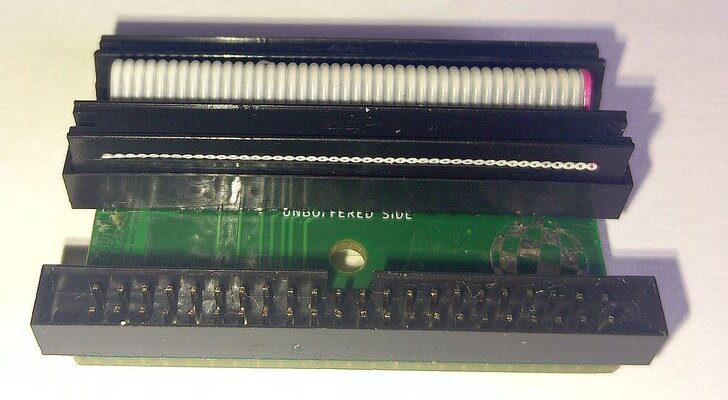
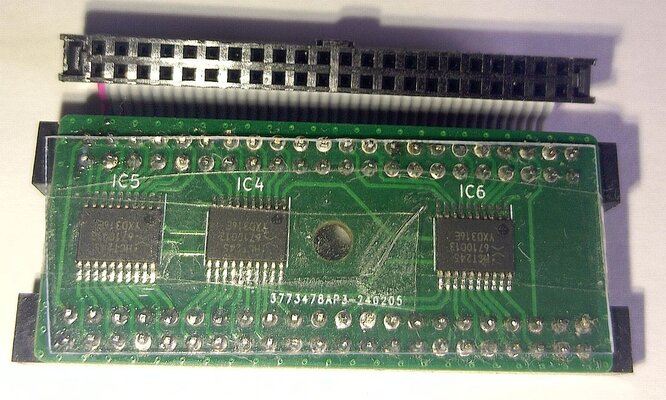
Thanks all - this is great information. I do see empty footprints for a few ICs next to the IDE header so this board most likely does not have the buffered interface. I will investigate the adapter @miggymad mentioned above and stick with the shorter cable for now.
I'm still at a loss -- and obviously I'm not electrical engineer here -- as to why the long cable will prevent the Amiga from booting if there is nothing plugged into the IDE cable. I understand with a CF card trying to pull power over that length. But this is just a passive cable plugged into the TF536 IDE header -- nothing at the other end. Can the cable by itself (with nothing plugged in) pull the power load down?
Thanks for all the information and help!
I'm still at a loss -- and obviously I'm not electrical engineer here -- as to why the long cable will prevent the Amiga from booting if there is nothing plugged into the IDE cable. I understand with a CF card trying to pull power over that length. But this is just a passive cable plugged into the TF536 IDE header -- nothing at the other end. Can the cable by itself (with nothing plugged in) pull the power load down?
Thanks for all the information and help!
All I will say, it’s an Amiga. Nothing makes sense… These machines have a mind of their own. One day they will work, the next it may not want to…Thanks all - this is great information. I do see empty footprints for a few ICs next to the IDE header so this board most likely does not have the buffered interface. I will investigate the adapter @miggymad mentioned above and stick with the shorter cable for now.
I'm still at a loss -- and obviously I'm not electrical engineer here -- as to why the long cable will prevent the Amiga from booting if there is nothing plugged into the IDE cable. I understand with a CF card trying to pull power over that length. But this is just a passive cable plugged into the TF536 IDE header -- nothing at the other end. Can the cable by itself (with nothing plugged in) pull the power load down?
Thanks for all the information and help!

Had something similar with a PCMCIA SD adapter with no SD card plugged in with a Mediator set to 8MB. Wouldn’t work properly. Removed the PCMCIA adapter. It works….
 Even though no SD card in the adapter to make the Amiga see the card.
Welcome to Amiga ownership…. Everyday is a challenge..

LOL! You are so right @Boing-ball !
@mattsoft
Just for some further insight and real world experience, I recently hooked up a buffered interface to one of my TF1260's along with various length IDE cables plus an SD card adaptor and ran some tests. The results are as follows:
SD card adaptor (5cm cable) - works
SD card adaptor (30cm IDE cable) - fail (black screen & lockup)
SD card adaptor & buffered interface (30cm IDE cable) - works
SD card adaptor & buffered interface (50cm IDE cable) - works
I also plugged the buffered interface directly onto my A1200's IDE with nothing on the TF1260's IDE and achieved similar results. Without the buffered interface fitted, no IDE cable over 5cm worked properly. A black screen or guru's were the usual end result of the tests.
Test hardware :
Amiga A1200 fitted with a 1D4 mainboard (recapped & timing fixes).
TerribleFire1260 (68060 rev. 6 CPU @50Mhz &128mb RAM).
Test software:
Full installation of AmigaOS 3.2.2.1.
Just for some further insight and real world experience, I recently hooked up a buffered interface to one of my TF1260's along with various length IDE cables plus an SD card adaptor and ran some tests. The results are as follows:
SD card adaptor (5cm cable) - works
SD card adaptor (30cm IDE cable) - fail (black screen & lockup)
SD card adaptor & buffered interface (30cm IDE cable) - works
SD card adaptor & buffered interface (50cm IDE cable) - works
I also plugged the buffered interface directly onto my A1200's IDE with nothing on the TF1260's IDE and achieved similar results. Without the buffered interface fitted, no IDE cable over 5cm worked properly. A black screen or guru's were the usual end result of the tests.
Test hardware :
Amiga A1200 fitted with a 1D4 mainboard (recapped & timing fixes).
TerribleFire1260 (68060 rev. 6 CPU @50Mhz &128mb RAM).
Test software:
Full installation of AmigaOS 3.2.2.1.
Good to know..@mattsoft
Just for some further insight and real world experience, I recently hooked up a buffered interface to one of my TF1260's along with various length IDE cables plus an SD card adaptor and ran some tests. The results are as follows:
SD card adaptor (5cm cable) - works
SD card adaptor (30cm IDE cable) - fail (black screen & lockup)
SD card adaptor & buffered interface (30cm IDE cable) - works
SD card adaptor & buffered interface (50cm IDE cable) - works
I also plugged the buffered interface directly onto my A1200's IDE with nothing on the TF1260's IDE and achieved similar results. Without the buffered interface fitted, no IDE cable over 5cm worked properly. A black screen or guru's were the usual end result of the tests.
Test hardware :
Amiga A1200 fitted with a 1D4 mainboard (recapped & timing fixes).
TerribleFire1260 (68060 rev. 6 CPU @50Mhz &128mb RAM).
Test software:
Full installation of AmigaOS 3.2.2.1.

@mattsoft
Just for some further insight and real world experience, I recently hooked up a buffered interface to one of my TF1260's along with various length IDE cables plus an SD card adaptor and ran some tests. The results are as follows:
SD card adaptor (5cm cable) - works
SD card adaptor (30cm IDE cable) - fail (black screen & lockup)
SD card adaptor & buffered interface (30cm IDE cable) - works
SD card adaptor & buffered interface (50cm IDE cable) - works
I also plugged the buffered interface directly onto my A1200's IDE with nothing on the TF1260's IDE and achieved similar results. Without the buffered interface fitted, no IDE cable over 5cm worked properly. A black screen or guru's were the usual end result of the tests.
Test hardware :
Amiga A1200 fitted with a 1D4 mainboard (recapped & timing fixes).
TerribleFire1260 (68060 rev. 6 CPU @50Mhz &128mb RAM).
Test software:
Full installation of AmigaOS 3.2.2.1.
Wow! Thanks for doing this. This is good information to know!
I've had the same issue with trying a 30cm cable on mine, it just sits there, doesn't boot, nothing on the screen. My friend here bought a new TF536 from our Canadian eBay guy and his works with the 30 cm. Both of us have the chips to show the I/F is buffered.
Similar threads
- Replies
- 0
- Views
- 192
- Replies
- 2
- Views
- 183

- Replies
- 3
- Views
- 262
