Best thermal paste?

  • Thread starter Thread starter Harrison
  • Start date Start date
  • Replies Replies 25
  • Views Views 4824

Harrison

Member
Joined
Dec 1, 2007
Posts
10,149
Country
UK
Region
West Sussex
I've used Arctic Silver 5 for a long time, but know it might not be the best any longer. Especially as it is conductive so dangerous if it get onto other parts of the motherboard, and is also fairly runny so not the easiest to apply.

I need to remount the heatsink on my i7 and was wondering what else you might recommend? MX4?
 
yes harrison i use mx4 or mx2 on all my cpu/gpu they all have either h50/55 or my i7 4770k has a h100 water cooler i have had no problems with any
 
Last edited:
Of course the conductiveness of AC5 will never be a problem with proper application ;) MX4 does seem to be the new top dog, though :)
 
I never use silver based ones any more just because I think the viscosity is to low on them. I prefer the more rubbery ceramic white type.

Bought a big tube 10 years ago that have the size of a toothpaste tube for a couple of bucks and I still use it today.

You can even use it instead of thermal pads for example in laptops just because it is so thick.

Now when it comes to the temp difference it ain't as good as Arctic silver 5 but I can live with a 5c difference in full load on my i7.
Doesn't really matter what you use the difference is extremely small.
 
highly recomend mx-4
the diference in thermal conductivity between it and as5 is really only down to application method.

basically its a bit like if i was using AS5 and was getting 20c idle temps. and some one els was using as5 and getting 22c idle temps with the exact same setup, the reason i had 2c less would be just because of the application method.

so i say they are really the same.

the benefits of mx-4?
its ceramic not silver so its non conductive.
Given the choice i go for mx-4 every time.
 
I also still use AS5,but I am in the the process of changing or modifying heatsink with copper shim,now I can feel more heat from alloy heatsink.

Bus speed has gone up along with overall performance with 24Hr+ test runs. Not a single crash yet.

NOTE: AS5 needs time to work at its best.
 
Last edited:
Yes, AS5 has a period for cure. I dont agree when people say that it is condutive. From specs over manufaturer site and i quote "Not Electrically Conductive:
Arctic Silver 5 was formulated to conduct heat, not electricity."
And the cure time is about 200 hrs "Due to the unique shape and sizes of the particles in Arctic Silver 5's conductive matrix, it will take a up to 200 hours and several thermal cycles to achieve maximum particle to particle thermal conduction and for the heatsink to CPU interface to reach maximum conductivity."
-after that, AS5 is at the best performance, until that when can expect a small temp increase!
 
I've been using MX2 and MX4 for a very long time with MX4 currently sat between my i7 4770k and H100 cooler, the chip has been overclocked to 4.5Ghz for about a year now without issue.
 
Last edited:
Hi monkeh what fanss you using and mobo as I have the same cpu and cooler with asus 87plus
 
I use the fans that came with the H100 and an MSI Z87-GD65 Gaming motherboard.

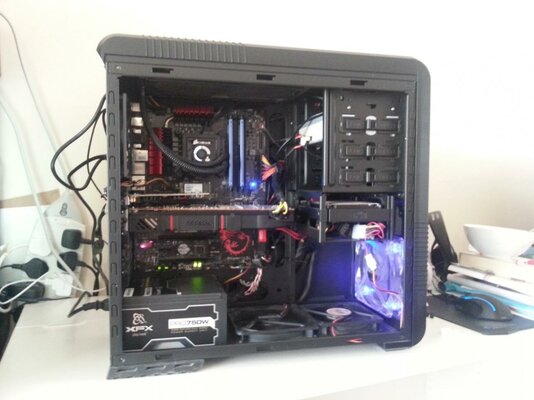
I have the radiator mounted in the top of the case, a CM690-II Dominator, with the fans mounted onto the top of the rad, exhausting warm air out through the top of the case and 2 fans in the bottom of the case feeding in cool air. There is also a fan at the front at the bottom pulling in cool air and one near the top at the back exhausting warm air from around the graphics card as the R9 290X gets really warm...

Not great picture of inside of the case:

2014-07-05 10.15.06.jpg

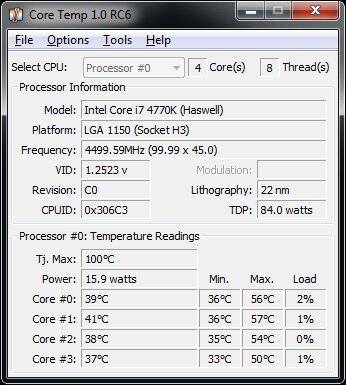
Screen shot of coretemp showing the overclock and min/max temps after playing some Warframe this morning, everything on @1920x1200

temp.jpg


Forgot to add the H100 is on the second setting at the mo as its pretty warm in my house - but for most of the year I get similar temps as I'm showing now with it running on the lowest/quietest setting.
 
Last edited:
I've been using MX2 and MX4 for a very long time with MX4 currently sat between my i7 4770k and H100 cooler, the chip has been overclocked to 4.5Ghz for about a year now without issue.

I've got an i7 2600k running stock atm on water cooling, there is no point atm to over clock (which was tested stable at 4.4ghz on air not tried with water cooling yet) as my GFX card is the current bottleneck (570gtx), I'm waiting for the 880gtx to arrive, not just for performance but for lower temps and lower (important) fan noise. the 570 gtx without MSI installed is basically a hoover running under my TV. I lower the temps and fan noise on my GFX by limiting frames until the 880 arrives :D
 
I had the 2600k before the 4770k, both excellent processors. The reason I'm using the 4770k was I bought it to build an mITX system in a Silverstone Sugo SG7 case, so was having to buy a new motherboard anyway so thought what the hell and bought into Haswell on release weekend with an ASrock Z87E-ITX and nVidia 670GTX, 256Gb mSATA yada yada yada... long story short I blew the PSU messing round so bought the new version of the motherboard I'd had on my 2600k, gave the mITX gear with a 4660k to my wife to upgrade her system. I have since replaced the Silverstone PSU (its a custom job to fit it into the very small case) and that system is an i5 3560k with 7950HD that my son uses :D.

My 2600k is currently being used by my brother and is running stable @4.2Ghz on air cos why not :). If I turn the H100 to max I can take my 4770k to 5Ghz but its hot and my memory isn't really up to it.
 
Last edited:
i have some shinziu x23 here i decided to try out..
Not really any better (dont believe the hype) for the price difference mx-4 is definatly better.
i was thinking of going for indego extreme, but after adding a extra pump and 120mm radiator to my water cooling im getting 68c max temps with intell burn in test on max, running my i5 2500k at 4.7..

this water cooling was a "well technically still is kind of" a silverstone tundra td-03 all in one. i decided i didnt want the 5 year waranty any way, so choped it up added a extra rad i had from my old big water setup. added a 2 bay res. and an extra pump (i didnt really think the one in the aio was good enough)
temps plumeted about 20c from the standard aio setup (makes me really think the pump on it sucks) and more like 35c from my air cooler which was a xigamtec aiger direct touch heat pipe so was no slouch either.

not the worlds prettyest of jobs. but it sure gets the job done.
the actuall block on the tundra seems really good. the fans are great the rad is epic. and its a dissapointment about the pump being so limp wristed.

any how.. mx-4 better
 
mines only at 4ghz


mines in a cm590 at the mo and had to hack the top to fit the fans on top

with 16gb 1600 vengeance ram and 780gtx

128gb ssd 2x 500gb hd and a 1tb hd


i have 2 stock i5 2500k with h55s and 2 i5 750 with h50-1s
 
Last edited:
It was an utter pita to get the H100 into the space I had as well. I had plans to buy 4 of the high pressure Corsair fans from OCuk and do a push/pull system through the rad but tbh it wasn't needed and now I think about it the heat sink above the cpu socket is in the way so they wouldn't fit underneath anyway :).

If I could be bothered I would change my memory to something in the red/black theme, swap the PSU for a nice Seasonic fully modular unit and braid the cabling properly with the stuff left over for my Sugo project.

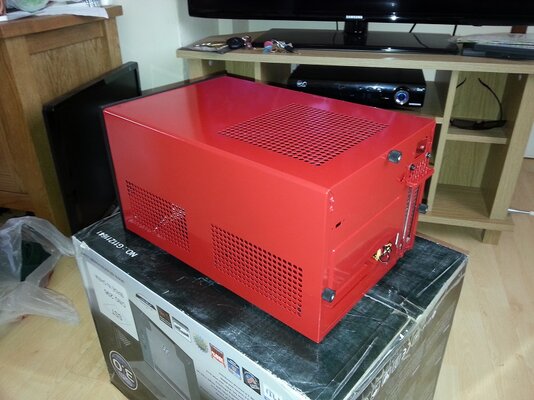
This is the Sugo case when I got it back from being painted:

2013-05-23 14.41.42.jpg

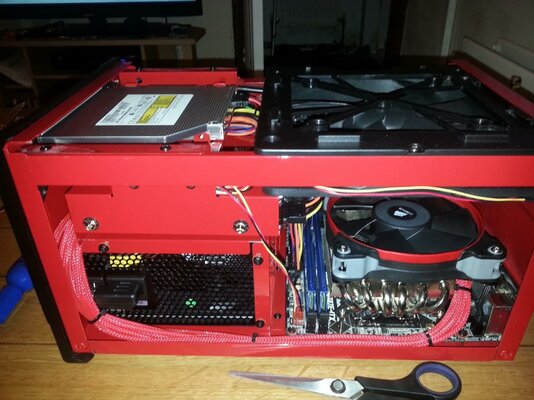
and the system I built inside of it:

2013-07-03 21.51.00.jpg

Full spec for this build was an i7 4770k @4Ghz, 16Gb Kingston HyperX RAM, 256Gb mSATA SSD, 2Tb 3.5" HDD, GeForce 670GTX and a Blu Ray optical drive :D. The cooler is a Prolimatech Samuel 17 with Corsair high performance fan on it. This system is now an i5 3570k with a Radeon 7950 in for my eldest.
 
Was looking at one of them when I got my R9 290x - it runs at around 95c fully loaded, just didn't feel like wrecking the warranty on it just yet ;).
 
yea thats why im trying it on my 560ti which i use for gaming at the mo as 1 of the fans is sticking its a 560GTX-Ti Twin Frozr II/OC
 
Last edited:
Back
Top Bottom