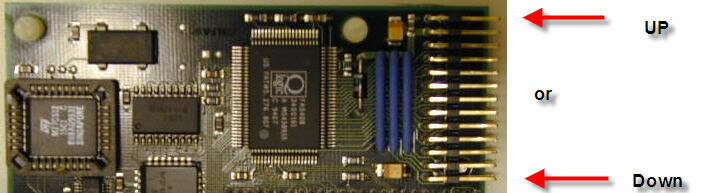
peyo64 Member AmiBayer Joined Aug 8, 2009 Posts 39 Country FRANCE Jul 19, 2010 #1 Hi there, I've received a controller Blizzard III SCSI with cable but I would like to connect, in the right direction, the red one scsi cable? I made a picture of the controller with two arrows. Let me know your proposition. Thanks by advance. Attachments SCSI III.jpg 27.1 KB · Views: 8
Hi there, I've received a controller Blizzard III SCSI with cable but I would like to connect, in the right direction, the red one scsi cable? I made a picture of the controller with two arrows. Let me know your proposition. Thanks by advance.
meega Elite ranking Joined Nov 24, 2007 Posts 933 Country UK Region 2 Jul 19, 2010 #2 http://amiga.resource.cx/photos/blizzardscsi3
peyo64 Member AmiBayer Joined Aug 8, 2009 Posts 39 Country FRANCE Jul 19, 2010 #3 meega said: http://amiga.resource.cx/photos/blizzardscsi3 Click to expand... I know but its tell me not how to connect in the right direction my scsi cable.
meega said: http://amiga.resource.cx/photos/blizzardscsi3 Click to expand... I know but its tell me not how to connect in the right direction my scsi cable.
drbrain Member Banned Joined Mar 4, 2010 Posts 598 Country Sweden Region Helsingborg Jul 19, 2010 #4 One of the solderpads on the bottom side of the card is square. That's pin 1 (red cable on scsi-cables and so on) http://amiga.resource.cx/photos/blizzardscsi3,3 the top right pad is square on that picture... So "Down" on your picture is pin 1 (red cable)...
One of the solderpads on the bottom side of the card is square. That's pin 1 (red cable on scsi-cables and so on) http://amiga.resource.cx/photos/blizzardscsi3,3 the top right pad is square on that picture... So "Down" on your picture is pin 1 (red cable)...
peyo64 Member AmiBayer Joined Aug 8, 2009 Posts 39 Country FRANCE Jul 19, 2010 #5 drbrain said: One of the solderpads on the bottom side of the card is square. That's pin 1 (red cable on scsi-cables and so on) http://amiga.resource.cx/photos/blizzardscsi3,3 the top right pad is square on that picture... So "Down" on your picture is pin 1 (red cable)... Click to expand... Thanks you very much!!
drbrain said: One of the solderpads on the bottom side of the card is square. That's pin 1 (red cable on scsi-cables and so on) http://amiga.resource.cx/photos/blizzardscsi3,3 the top right pad is square on that picture... So "Down" on your picture is pin 1 (red cable)... Click to expand... Thanks you very much!!
HeZoR Amiga Rules AmiBayer Joined May 20, 2010 Posts 307 Country Greece Region Nomos Pellis Jul 19, 2010 #6 peyo64 said: drbrain said: One of the solderpads on the bottom side of the card is square. That's pin 1 (red cable on scsi-cables and so on) http://amiga.resource.cx/photos/blizzardscsi3,3 the top right pad is square on that picture... So "Down" on your picture is pin 1 (red cable)... Click to expand... Thanks you very much!! Click to expand... Is this scsi kit compatible with the Blizzard 1230 MK II ?
peyo64 said: drbrain said: One of the solderpads on the bottom side of the card is square. That's pin 1 (red cable on scsi-cables and so on) http://amiga.resource.cx/photos/blizzardscsi3,3 the top right pad is square on that picture... So "Down" on your picture is pin 1 (red cable)... Click to expand... Thanks you very much!! Click to expand... Is this scsi kit compatible with the Blizzard 1230 MK II ?
peyo64 Member AmiBayer Joined Aug 8, 2009 Posts 39 Country FRANCE Jul 19, 2010 #7 HeZoR said: Is this scsi kit compatible with the Blizzard 1230 MK II ? Click to expand... No, only MK III.
HeZoR said: Is this scsi kit compatible with the Blizzard 1230 MK II ? Click to expand... No, only MK III.