
You are using an out of date browser. It may not display this or other websites correctly.
You should upgrade or use an alternative browser.
You should upgrade or use an alternative browser.
Blizzard SCSI Kit cable, 40cm or more
- Thread starter geminister
- Start date
- Replies 14
- Views 2312
- Status
- Not open for further replies.

By "normal external SCSI connector" you mean the DB25F external connector that the SCSI kit cable offers?
(mind you, it's far from a "normal" SCSI connector. It's an Apple kludge, in perfect violation of SCSI specs, but, like most Apple stuff, it found widespread use for no good reason)
It's just a parallel port cable. Since you want a long one, it's obviously not going inside an A1200 the way it was meant to, so you don't need to worry about slicing it in half and adjusting lengths. So a regular parallel port cable will do.
I can craft you one but it won't be cost efficient. Ask locally in computer stores with old PC hardware. You can probably build one for yourself just as well.
(mind you, it's far from a "normal" SCSI connector. It's an Apple kludge, in perfect violation of SCSI specs, but, like most Apple stuff, it found widespread use for no good reason)
It's just a parallel port cable. Since you want a long one, it's obviously not going inside an A1200 the way it was meant to, so you don't need to worry about slicing it in half and adjusting lengths. So a regular parallel port cable will do.
I can craft you one but it won't be cost efficient. Ask locally in computer stores with old PC hardware. You can probably build one for yourself just as well.

the cable is really easy to make you can re-use the fittings as they can be removed(unclipped carefully) to make a new one...trust me ive done a few they are really easy to make.
ribbon is just standard 25 strand ribbon cable,yes...you can use ide cable cut down.
you can just buy all the fittings and cable for not alot anyway...
there isnt anything special about he cable or fittings i have a few somewhere...
ribbon is just standard 25 strand ribbon cable,yes...you can use ide cable cut down.
you can just buy all the fittings and cable for not alot anyway...
there isnt anything special about he cable or fittings i have a few somewhere...
Last edited:
Then either you must have some weird routing in mind or you were given an incorrectly measured cable.It's going inside the A1200, actually.
The original SCSI kit cable is precisely cut to measure and exactly reaches the SCSI port. It's shorter than 40 cm, of course.
Considering building one myself. I'm wondering if I can't just sacrifice an old IDE cable.
Sure you can. As Roy said, if you're careful and don't lift at too much an angle, you can even reuse the 26 pin IDC clamp without breaking the hinges.
Then you decide:
If you want the cable to look pretty you slice 26 wires off the IDE cable to match the IDC connector. The 26th wire simply doesn't connect anywhere in the DB25 connector.
If you don't care much about pretty, you can slice 25 wires off the IDE cable and leave position 26 on the IDC empty.
I actually have a custom made 40 cm cable, prefolded for correct internal fitting in an A1200, but I'd only give it complete with the SCSI backplate and fixing screw so it's probably overkill for you.

geminister
New member
I'm not using it to attach to a backplate actually, it's going to a PowerMonster II sitting in the drive cage of the A1200, so completely internal routing. The supplied cable is not long enough so I can't currently put the PowerMonster in the drive cage.
But yeah, building my own will probably be my best bet.
But yeah, building my own will probably be my best bet.
I'm not using it to attach to a backplate actually, it's going to a PowerMonster II sitting in the drive cage of the A1200, so completely internal routing. The supplied cable is not long enough so I can't currently put the PowerMonster in the drive cage.
I am devotedly against CF-as-drives solutions - if you want my opinion, mount the SCSI cable properly to the SCSI backplate and get a proper external SCSI enclosure with a real 50-pin SCSI HD and possibly some optical drive, the way SCSI was meant for the A1200.
But yeah, building my own will probably be my best bet.
If you MUST stick to the CF-SCSI thing though... beware of the pinout, the PowerMonster uses a 40-pin SCSI which is uncommon (it's more or less 2.5" notebook SCSI).
For the IDC26 pinout, consult the DB25 Apple "SCSI": http://pinouts.ru/HD/ScsiExternalAmigaMac_pinout.shtml
For 40pin notebook SCSI: http://www.l8r.net/technical/t-smallscsi.shtml
Also keep in mind the SCSI kit does not provide termination power. So you will need to enable that on the PowerMonster (along with the usual termination).

He is using the one he bought on here that came with a backplate adapter which in effect gives it the normal SCSI external socket that connects directly to the SCSI kit cable, its just not long enough for his purposes.
It seems to work fine with his current setup - just needs to be extended.
I am interested in his progress as I would like to do something similar - I would not want my boot drive in a large external enclosure however. As I have some room under my miggy as I had to raise it due to angled ram on my 1260, I would consider a slimline custom enclosure under it for one of these though.....
It seems to work fine with his current setup - just needs to be extended.
I am interested in his progress as I would like to do something similar - I would not want my boot drive in a large external enclosure however. As I have some room under my miggy as I had to raise it due to angled ram on my 1260, I would consider a slimline custom enclosure under it for one of these though.....
geminister
New member
what connector is on the powermonster?
i think it would be better an neater if you got someone to or made a custom cable that directly connects them both together.
It's a 2.5" SCSI connector. I don' think it would be neater, lots of work to make a cable for that. It's easier to use the adapter that came with the PowerMonster.
- - - Updated - - -
I am devotedly against CF-as-drives solutions - if you want my opinion, mount the SCSI cable properly to the SCSI backplate and get a proper external SCSI enclosure with a real 50-pin SCSI HD and possibly some optical drive, the way SCSI was meant for the A1200.
But yeah, building my own will probably be my best bet.
If you MUST stick to the CF-SCSI thing though... beware of the pinout, the PowerMonster uses a 40-pin SCSI which is uncommon (it's more or less 2.5" notebook SCSI).
For the IDC26 pinout, consult the DB25 Apple "SCSI": http://pinouts.ru/HD/ScsiExternalAmigaMac_pinout.shtml
For 40pin notebook SCSI: http://www.l8r.net/technical/t-smallscsi.shtml
Also keep in mind the SCSI kit does not provide termination power. So you will need to enable that on the PowerMonster (along with the usual termination).
Why such resistance to using a CF card? It's quick and cheap, and the seek time is fantastic. Also, I would rather sell the SCSI Kit than use an external enclosure, I don't have the space for it at my desk and it would not be portable. Don't know how using this CF adapter is not using SCSI as it was meant to be, a hard drive would be slower.
With the adapter I also get an internal DB25 connector and switches for SCSI ID and termination power, so I actually think I have to use the adapter to get it to work with the SCSI Kit.
- - - Updated - - -
He is using the one he bought on here that came with a backplate adapter which in effect gives it the normal SCSI external socket that connects directly to the SCSI kit cable, its just not long enough for his purposes.
It seems to work fine with his current setup - just needs to be extended.
That's exactly correct, it works great but the cable is just too short.
Why such resistance to using a CF card? It's quick and cheap, and the seek time is fantastic. Also, I would rather sell the SCSI Kit than use an external enclosure, I don't have the space for it at my desk and it would not be portable. Don't know how using this CF adapter is not using SCSI as it was meant to be, a hard drive would be slower.

That would be the convenient way indeed. Here's a 40 cm parallel port ribbon cable which will suit you (if we believe the photo, pin 26 is not keyed so it's a direct fit to the SCSI kit's IDC26 connector. Some such cables use a keyed connector requiring either that you chop off pin26 on SCSI kit's IDC26 connector or that you spend some time opening up the blocked hole).With the adapter I also get an internal DB25 connector and switches for SCSI ID and termination power, so I actually think I have to use the adapter to get it to work with the SCSI Kit.
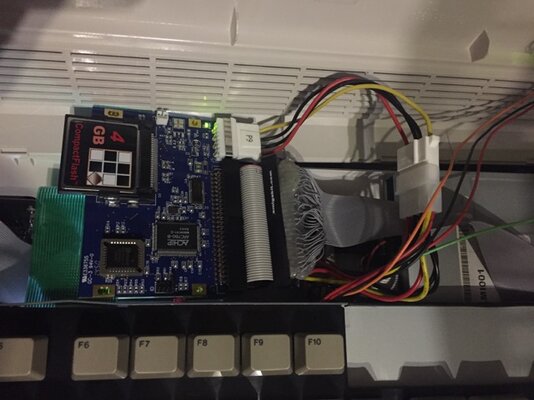
Now you got me thinking about mounting my SCSI-IDE adapter in the original HD spot as well. Currently I have just isolated the underside of the card with kapton tape it is just laying amongst all the other addons. Sits pretty firmly, but not the most secure solution.
geminister
New member
It's in a similar position right now too, turns out the contact on the BakMonolith is just too big and sticks out the wrong way. Up would have been better than down. I'm considering using some kind of extension cable for the 2.5" SCSI or something like that. Not sure yet.
But I managed to make my own cable now, so this thread is not needed as such anymore.
Now you got me thinking about mounting my SCSI-IDE adapter in the original HD spot as well. Currently I have just isolated the underside of the card with kapton tape it is just laying amongst all the other addons. Sits pretty firmly, but not the most secure solution.
But I managed to make my own cable now, so this thread is not needed as such anymore.
Last edited:
But would you mind keeping your other thread updated with your progress? Its interesting and even though the dishwasher and fridge freaking out in the last few days have financially put a hold on my plans, I still want to do something like this in future!
- Status
- Not open for further replies.
Similar threads
- Replies
- 2
- Views
- 569

- Replies
- 6
- Views
- 1K
- Locked
- Replies
- 9
- Views
- 732
- Replies
- 5
- Views
- 741