Recently I found some info on the TF330 disable bug being fixed. So I am chasing a TF330 with this function working. I have searched and found none for sale. Any of the current TF330 sellers have any?

You are using an out of date browser. It may not display this or other websites correctly.
You should upgrade or use an alternative browser.
You should upgrade or use an alternative browser.
Closed CD32 TF330 with disable/enable fix
- Thread starter Astral
- Start date
- Replies 27
- Views 2013
- Status
- Not open for further replies.
This has not been fixed. They were attempts tu do it, but eventually failed. That’s the last messages you can find about that.
330 disable function bug - exxos's Atari, Amiga & retro forum
330 disable function bug. Some people have observed that the disable function does not work correctly. I have already spoken with Stephen about this, but I t...
www.exxosforum.co.uk
Oh yeah? This says otherwiseThis has not been fixed. They were attempts tu do it, but eventually failed. That’s the last messages you can find about that.
330 disable function bug - exxos's Atari, Amiga & retro forum
330 disable function bug. Some people have observed that the disable function does not work correctly. I have already spoken with Stephen about this, but I t...www.exxosforum.co.uk
 ...
...
Ask @supaduper or the other builders of the cards on Amibay they should be able to advise/help

After testing the disable on the TF330 with terrible fire , we found that you do not even need a resistor as Steve mentions in that video, we can just bridge it with a Jumper and it will disable the TF330 from the CD32 reliably, but you need the disable firmware also to do this, and it is best to make a fly lead with a on/off switch and hang it outside the CD32 for convenience
I added the 1.8k resistor as shown in the video and installed an on/off switch. When the switch is in the off state, the CD-ROM won't start. Is there any firmware fix needed to make the disable feature work properly?After testing the disable on the TF330 with terrible fire , we found that you do not even need a resistor as Steve mentions in that video, we can just bridge it with a Jumper and it will disable the TF330 from the CD32 reliably, but you need the disable firmware also to do this, and it is best to make a fly lead with a on/off switch and hang it outside the CD32 for convenience
You don`t need the resistor with the disable firmware, you just jumper the two pins and that will workI added the 1.8k resistor as shown in the video and installed an on/off switch. When the switch is in the off state, the CD-ROM won't start. Is there any firmware fix needed to make the disable feature work properly?
Also if you want to use a switch it will need to be a ON/ON type switch, like mine in the picture
I have sent you an email
Attachments
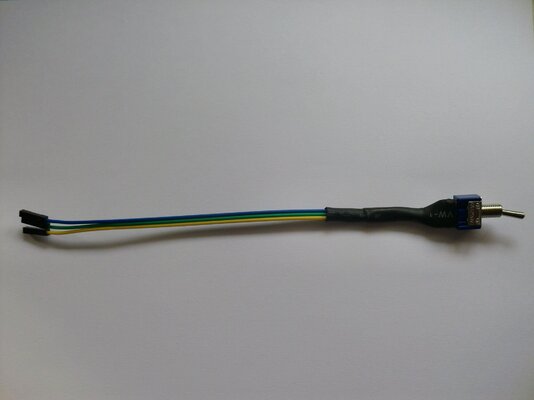
Last edited:
On which three pins exactly should this go and which pin must be the middle one of the switch?You don`t need the resistor with the disable firmware, you just jumper the two pins and that will work
Also if you want to use a switch it will need to be a ON/ON type switch, like mine in the picture
I have sent you an email
Looking at the Tf330 front on, the pin bottom left is the `Common` and goes on the middle pin on the switch.
so just put the other two connectors on the top left and the bottom right pins, does not matter which one you choose
so just put the other two connectors on the top left and the bottom right pins, does not matter which one you choose
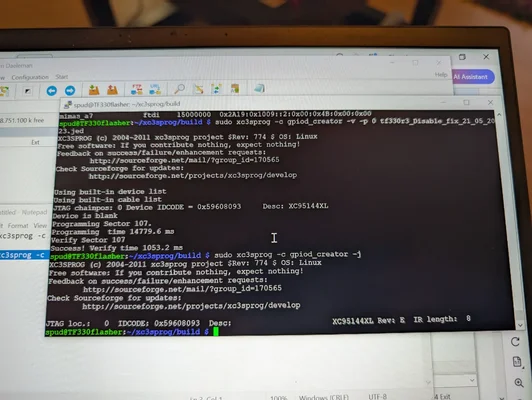
OK, I managed to flash the card. I think it was successful, see picture.
However, with the switch connected as in the other picture, I just get a black screen in one position and a working TF330 in the other position. Positions of the switch all the way to the left and all the way to the right. I assume having the switch in the middle is not what is needed, hence there's no use to connect the third contact.
Thanks for helping me out!
However, with the switch connected as in the other picture, I just get a black screen in one position and a working TF330 in the other position. Positions of the switch all the way to the left and all the way to the right. I assume having the switch in the middle is not what is needed, hence there's no use to connect the third contact.
Thanks for helping me out!
Attachments
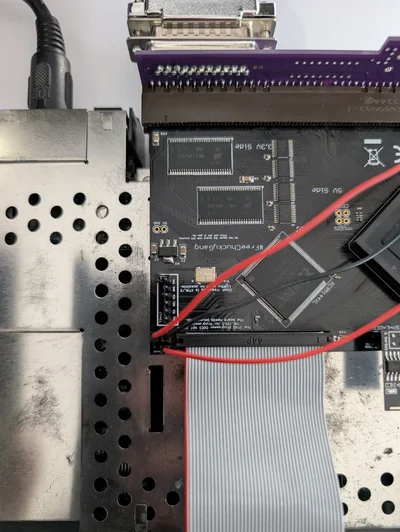
Last edited:
You are using a two way on/on switch ? which has three pins, so one way it will disable the TF330 and the other way it will boot to the CD32 splash screen with the TF330 disabled
Also try spraying some contact cleaner into the switch and flick it a good few times as even from new these switches gum up
Also try spraying some contact cleaner into the switch and flick it a good few times as even from new these switches gum up
Last edited:
So I did connect correctly? I wasn't sure what was top in your message, oriented in relation to text on PCB or to CD32.You are using a two way on/on switch ? which has three pins, so one way it will disable the TF330 and the other way it will boot to the CD32 splash screen with the TF330 disabled
Also try spraying some contact cleaner into the switch and flick it a good few times as even from new these switches gum up
Yes, on-off-on. So what would be what?
On: TF330 enabled (Splash screen when no HDD)
Off: ?
On TF330 disabled (Splash screen)
I'll test with a jumper first (Although I tested the switch for continuity successfully beforehand). What would be the disable config, blue horizontal or red vertical?
The disable position does not also disable the RGB on the riser, does it?
Yes confirm working with jumper first and yes you have done the pins connections correct 
And no when you have the TF330 enabled with no HD you will get Black screen, this is normal
And no when you have the TF330 enabled with no HD you will get Black screen, this is normal
Unfortunately, even after reflowing the pinheader solderjoints, it still doesn't work. The jumper definately shorts the two pins.
Enable works fine. Disable still gives black screen. Is that the same behaviour a TF330 gives without the proper firmware? So would something have gone wrong with flashing? Although it seems to work fine in enable mode (not thoroughly tested yet). I was a bit puzzled with the device is blank message here.

Enable works fine. Disable still gives black screen. Is that the same behaviour a TF330 gives without the proper firmware? So would something have gone wrong with flashing? Although it seems to work fine in enable mode (not thoroughly tested yet). I was a bit puzzled with the device is blank message here.
retromind
Member
I think it always says that "Device is blank", I remember the same from flashing TF1260, but it worked anyways.Unfortunately, even after reflowing the pinheader solderjoints, it still doesn't work. The jumper definately shorts the two pins.
Enable works fine. Disable still gives black screen. Is that the same behaviour a TF330 gives without the proper firmware? So would something have gone wrong with flashing? Although it seems to work fine in enable mode (not thoroughly tested yet). I was a bit puzzled with the device is blank message here.
View attachment 2546453
So don't be alarmed.
- Status
- Not open for further replies.
Similar threads

- Replies
- 0
- Views
- 23


- Replies
- 3
- Views
- 898