For Sale CDTV 1MB Game save replacement

  • Thread starter Thread starter ozkano
  • Start date Start date
  • Replies Replies 35
  • Views Views 4507

ozkano

Active member
AmiBayer
Rating - 100%
42   0   0
Joined
Oct 31, 2008
Posts
669
Country
Istanbul, Turkey
Region
Turkey
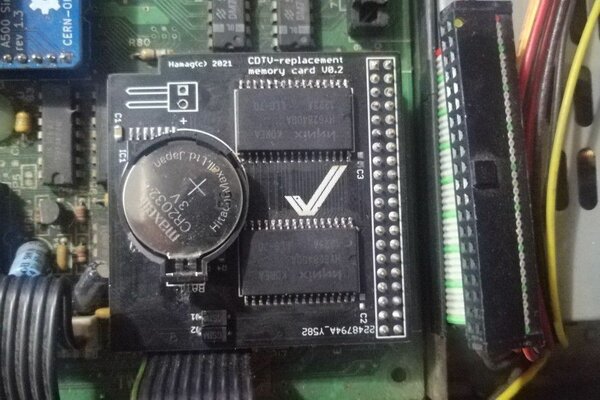
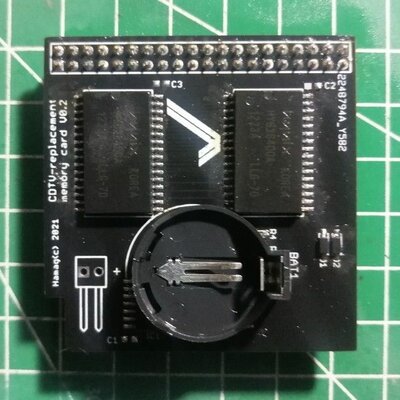
1mb sram
replacement of pcmcia card for game saving
needs coin battery to hold savings while the cdtv power off

asking 25 euro

iban, wise, payoner and paypal available

8 pcs available and
 

Attachments

  • IMG_20230622_185818_crop_14.jpg
    IMG_20230622_185818_crop_14.jpg
    67 KB · Views: 150
  • IMG_20230622_192330_crop_40.jpg
    IMG_20230622_192330_crop_40.jpg
    106 KB · Views: 147
Hello,
How about asking me before you sell my board here, I said I wanted at least one PCB for a reproduction.
is that too much?

greet Sven
Edit:
So I forgot to mention, 1MB doesn't work and there is already a newer revision... ;-)
 
Hello,
How about asking me before you sell my board here, I said I wanted at least one PCB for a reproduction.
is that too much?

greet Sven
Edit:
So I forgot to mention, 1MB doesn't work and there is already a newer revision... ;-)
please give your shipping address , i can send one, if you want i can remove from selling

Edit: i have not succeed to use as system ram

i tried various ram addresses but addmem refuses
 
Last edited:
Hello,
How about asking me before you sell my board here, I said I wanted at least one PCB for a reproduction.
is that too much?

greet Sven
Edit:
So I forgot to mention, 1MB doesn't work and there is already a newer revision... ;-)

What does that mean? Is there a conflict here?
 
maybe with the right software, the card is just a replacement for the CDTV memory card. which by the way is not a PCMCIA card but a fujisoku card with slightly different specs that the cards don't run according to the fujisoku standard... ;-)

because of the PCB

it's ok, sell the 8 pieces first and then we'll see. ;-)
 
I tested AllocRamDisk command to created reset proof ram disk. As a save game module it of course works.

http://aminet.net/package/disk/misc/AllocRamDisk it requires http://aminet.net/package/disk/misc/Memory37.4

I do not have JP16 closed so I tried only 128kb and 256kb

E00000-E1FFFF - 128k
E00000-E3FFFF - 256k

Didn't work. With Debug swicht it says "no suitable memory available"

I'm interested this because https://cdtvland.com/hardware/

CDTV titles can save data to these memory cards (think save games), but the memory cards were much more versatile than that.

Because they plugged straight into the CDTV’s address bus, they were addressable as regular RAM. This means you could also use them to expand the total amount of memory of your CDTV or do some fancy stuff like installing drivers (resident modules) that got activated on CDTV startup or even use them as AmigaDOS devices. Sadly, all these advanced features remained unused during the original life of the CDTV.
 
Last edited:
If you have verified that the memory at $E00000 is readable and writable (and battery backed), the memory should be able to do anything that a "real" CDTV memory card can do. The memory cards are dead simple SRAM, with just data- and address lines and R/W and chip select lines for the odd and even chips.

But here is one important thing you also may need to rule out: bookmark/cardmark.device will inspect the first word at $E00000 when the system starts up to see if the memory is in use. If $E00000 does not contain one of the values below, it will assume the memory is "unformatted" and will proceed to wipe the card and format it for cardmark use:

Magic valueMeaning
BKMemory used for bookmarks/cardmarks
RWR/W / RAM card
RORead only / ROM card
RDRam disk
OKSomething else

Cardmark.device is present in the official 1.0 ROM, the 2.0 ROM and the unofficial/custom 2.35 ROM. (It is missing from 2.7 and 2.30, because those ROMs contain portions of code that were built for the A570 and that hardware doesn't support memory cards). So if your system has 1.0, 2.0 or 2.35, you need to make sure to write "OK", "RD" or "RW" to address $E00000 once before use. Then you can use any memory from $E000002 and up freely without it getting wiped after reboots. (Let me know if you need help with that.)

If you're not using 1.0, 2.0 or 2.35, and have verified reading/writing RAM works fine, then the problem may lay with how AllocRamDisk / memory.device works, but I haven't used those tools, so can't really comment much there atm.

Also note: any resident modules on the memory card will only get initialized with the following combinations of CDTV/Kickstart ROM:

  • CDTV 1.0 + Kickstart 1.3
  • CDTV 2.35 + Kickstart 1.3 or Kickstart 2.x
If you use Kickstart 3+ then resident modules on the memory card will not get initialized. This is because the exec.library inside the CDTV ROM has been modified to also scan the $E00000-$E7ffff area for ROM tags. This region is not scanned by the "normal" exec.library in the Kickstart ROMs. Because the CDTV specific exec.library has a higher priority than its counterpart in Kickstart ROM it "wins", even if the exec.lib versions are identical. However, when the Kickstart ROM exec version is higher than the one in the CDTV ROM, then the Kickstart Exec wins and $E00000-$E7ffff is not scanned for ROM tags and no resident modules on the memory card will be initialized. (Support for Kickstart 3 and resident modules on memory cards is on the roadmap for a future CDTV Land CDTV OS ROM version, but that might take a while).

This is only the resident module functionality. Using the memory as system RAM (whether with AddMem or directly) and all other uses will work fine, as long as you mark the memory as "in use" according to the table above.

 
Last edited:
Thanks for these infomations.

I would like confirmation whether this device works or not to confirm my interest and pay for one item.
 
If you have verified that the memory at $E00000 is readable and writable (and battery backed), the memory should be able to do anything that a "real" CDTV memory card can do. The memory cards are dead simple SRAM, with just data- and address lines and R/W and chip select lines for the odd and even chips.

But here is one important thing you also may need to rule out: bookmark/cardmark.device will inspect the first word at $E00000 when the system starts up to see if the memory is in use. If $E00000 does not contain one of the values below, it will assume the memory is "unformatted" and will proceed to wipe the card and format it for cardmark use:

Magic valueMeaning
BKMemory used for bookmarks/cardmarks
RWR/W / RAM card
RORead only / ROM card
RDRam disk
OKSomething else

Cardmark.device is present in the official 1.0 ROM, the 2.0 ROM and the unofficial/custom 2.35 ROM. (It is missing from 2.7 and 2.30, because those ROMs contain portions of code that were built for the A570 and that hardware doesn't support memory cards). So if your system has 1.0, 2.0 or 2.35, you need to make sure to write "OK", "RD" or "RW" to address $E00000 once before use. Then you can use any memory from $E000002 and up freely without it getting wiped after reboots. (Let me know if you need help with that.)

If you're not using 1.0, 2.0 or 2.35, and have verified reading/writing RAM works fine, then the problem may lay with how AllocRamDisk / memory.device works, but I haven't used those tools, so can't really comment much there atm.

Also note: any resident modules on the memory card will only get initialized with the following combinations of CDTV/Kickstart ROM:

  • CDTV 1.0 + Kickstart 1.3
  • CDTV 2.35 + Kickstart 1.3 or Kickstart 2.x
If you use Kickstart 3+ then resident modules on the memory card will not get initialized. This is because the exec.library inside the CDTV ROM has been modified to also scan the $E00000-$E7ffff area for ROM tags. This region is not scanned by the "normal" exec.library in the Kickstart ROMs. Because the CDTV specific exec.library has a higher priority than its counterpart in Kickstart ROM it "wins", even if the exec.lib versions are identical. However, when the Kickstart ROM exec version is higher than the one in the CDTV ROM, then the Kickstart Exec wins and $E00000-$E7ffff is not scanned for ROM tags and no resident modules on the memory card will be initialized. (Support for Kickstart 3 and resident modules on memory cards is on the roadmap for a future CDTV Land CDTV OS ROM version, but that might take a while).

This is only the resident module functionality. Using the memory as system RAM (whether with AddMem or directly) and all other uses will work fine, as long as you mark the memory as "in use" according to the table above.

Can the card save game state when sysinfo doesn't detect cardmark.device? Sysinfo with this card does not see caermark.device (ROM 1.3+BootRom 1.0). The other extension is detected cardmark.device (SysInfo) and works for me in cardmark.device mode. With the command I can add it to Fast.
 
card is working as game saving mod, but i cant mount it as system ram

my config is kick 3.2 and extended rom 2.35

i will try to add cardmark.device and update original exec.libraray with cdtv exec.libraray in to kickstart or extented rom which one has enough space

Edit: also how can i write RW to address $E00000 with dos command
 
Can the card save game state when sysinfo doesn't detect cardmark.device?
The only games I know that supported memory card saves back in the day are Sim City and Wrath of the Demon I think. Sim CIty does not use cardmark.device and works fine without it. It just wipes anything you have on that card and saves its progress there, and puts the value 'OK' at the beginning so cardmark.device leaves it alone. Pretty horrible for the end users, but almost nobody had one anyway :-)

I haven't checked how Wrath of the Demon does its game save, but I wouldn't be surprised if they also ignored the operating system and just write to the memory directly.
 
Thank You for explaining the problem.
So I need to find a game that uses cardmark.device running from a floppy disk. Now I have a broken CD drive. :(
But why does the other extension enable cardmarket.device and this does not (SysInfo)?
 
Last edited:
So I need to find a game that uses cardmark.device running from a floppy disk. Now I have a broken CD drive. :(
I am not aware of any CDTV titles that use it. CD Remix II says it does in the documentation, but I have scanned every binary on the CD and none of them contains a "cardmark.device" string, so I'm not sure if it really does use it or whether it's just using the internal bookmark.memory.

Do you happen to know what's wrong with the CD-ROM drive? Failing capacitors is a very common problem with these drives and is a very fixable problem. Whatever you do, don't get rid of the drive. They're very rare and were only made for CDTV. There's a good chance the problem is repairable, so hang on to it. :)

But why does the other extension enable cardmarket.device and this does not (SysInfo)?
I don't know what the specific problem is with that one, but generally the only reason why cardmark.device is not created (and not visible in SysInfo) is if the memory starting at address $E00000 is not detected or it is already in use and has one of the magic values listed above, other than 'BK'.

A little more technical background on what happens on system startup: bookmark.device on startup will:
  • check if there's a magic value at $E00000. If it's 'BK' then cardmark.device is initialized, because it assumes the RAM has previously already been formatted for cardmark use.
  • If it's any of the other magic values, then it leaves it alone and does not create cardmark.device, because It assumes the RAM is already in use for a different purpose.
  • If it's neither, then bookmark.device will proceed to do a RAM test, to determine if there is any RAM at all at $E00000, and if so, how much.
  • If it succesfully finds RAM there and has determined how much, it will proceed to clear the RAM and format it for cardmark use. It will then also add the value 'BK' at address $E00000, and it will finally initialize cardmark.device. The screen will shortly turn purple on startup if it does that.
I would advise to maybe do some sort of RAM test at $E00000 just to make sure that the extension is working properly. Good luck!
 
Back
Top Bottom