Commodore 1083S CRT, picture pumping & focus problems

  • Thread starter Thread starter dj_pirtu
  • Start date Start date
  • Replies Replies 15
  • Views Views 708

dj_pirtu

Member
Joined
Sep 11, 2013
Posts
33
Country
Finland
Region
Nummela
I've heard that this forum is the place to ask about CRT problems :)

So, I have a 1083S monitor which has a really good picture and colors, brightness, geometry and convergence are all top notch.

BUT, when there's only minimal amount of stuff on screen, maybe a few letters on black background (in MSX basic for example) the picture shrinks and gets out of focus. When I write more stuff on the screen the picture zooms in and focus gets better.

AND, if screen is showing a little more stuff, maybe a game logo on black background and I set contrast to very low, the screen shrinks again but stays sharp. And when I set contrast up again the picture starts blooming and right after that it zooms in and blooming stops.

Other things I noticed:
there's a little amount of horizontal shaking on upper right corner on whatever brightness.
if there's lot of white color on screen the monitor speaker keeps really loud buzzing.

To me all this sounds like caps are going out?

I did a reflow to all bad looking solder joints and there was some, didn't make any difference.
 
1083 is a philips monitor,can you do a video of the fault on screen?
 
Surprisingly hard to film these problems, don't have a stand. Seems that the problem is not that bad when CRT is cold, gets worse when heated up.

In this video the first clip shows red text on black background, noticed yesterday that red color goes the most out of focus. White background corrects everything, picture gets super sharp and makes that loud buzz from speaker.

Then there's that contrast wheel clip which makes that blooming before it's focused again. Hard to take on video.


I'll try to video that weird shaking too from the upper half of the picture, CRT is warming up and it's starting to do that. EDIT: DAMN, seems that this isnt happening with my other MSX2, so not maybe a CRT problem.


Now CRT has warmed up and the shrinkening is getting so bad that the picture borders are coming visible. Problem wasnt this bad yesterday so it's getting worse all the time. Camera don't catch the dimmest contrast setting where the picture is at smallest.


All this reminds me of my friends old Trinitron which had same kind of problem but it didnt shrink and get out focus but blurred the picture differently when there wasnt enough stuff on the screen, or the picture was too dark.
 
Last edited:
Yep, I'm trying to show the focus & pumping problem with contrast setting. Hard to find software that makes the problem visible without touching controls.

Maybe I could write a basic program that makes a slowly growing white filled circle in the middle of the screen or something.

Edit: I'm learning here all the time... When the problem is active: picture is shrinked and out of focus. Then I turn brightness just a little more so that the scan lines gets visible and then the problem is gone and picture is normal.

Edit2: one more video, here it shows quite clearly, I'm adjusting brigthness here. https://1drv.ms/v/s!AmrOf1Byt4M7hpgsqH61oxAM-DhxVQ
Edit3: measured B+ and it's +129V with all the knobs set to minimum (as instructed in service manual)

I have googled a lot and it's somehow funny that I don't find anything about this subject. Picture breathing and blooming is explained everywhere but backwards breathing nowhere. :D
 
Last edited:
More testing...

I have few white letters on screen with black background. When the monitor is cold it fully works maybe two minutes. And then it starts pumping the picture smaller, while losting focus, and after a moment it stays smaller without focus.

Then I start to raise brightness so the black starts to turn to grey: image grows back to normal, and focus too.
 
Got another CRT, Philips VS0080: https://www.msx.org/wiki/Philips_VS_0080

And it does the same thing but not as bad as 1083S. Picture shrinks and starts to lose it's focus when brightness is turned low.

How can it be even possible that no one here don't know what causes that behaviour?!? :)
 
the service manual doesnt instruct you to have the main B+ at 129 volt

its 128 volts(or slightly under) and its meant to be steady no matter the brightness

second,brightness and contrast is meant to be at the center positition(you can feel the indent on the controls as you turn them) when setting up the screen and focus control on the lopt,i dont care what the service manual says
and is usually done with a test pattern on screen,if you dont do it that way,you wont have much range at the user controls and odd effects

talking for myself i offer a repair service,not a guess whats wrong with my monitor service so dont whine when people dont answer your questions
some people have things to do,like repairs that are usually right infront of me
 
Thanks for your tips, I appreciate.

I was just shocked how I can't find ANYTHING about this subject by googling so I can have some clues where to start looking about this problem.
I have repaired a lots of stuff, computers, amplifiers... and I was working as an electrician for 15 years, tested and repaired lots of circuit boards.

But my knowledge about CRTs is about zero and I was scared to death by my parents of the high voltages inside CRTs. And one reason is that there's so little stuff of the subject on the internet where to read.
 
i only use the service manual for the schematics,thats it,not much else,even then there can be mistakes ,i never seen your edit unltil the last post

its hard to diagnose anything from a video and some text,so keep that in mind,and i dont normally do diagnostics for a distance(hardly anyone does),i will try but its difficult

and with all respect,when someone asks for a vidfeo,dont play with the controls,one reason is it introduces problems made by the user
for instance maxing out the brightness and/or contrast back and forth in rapid pace can make the picture expand and contract and go blurry a bit,and might put me off helping

whats in the monitor is still electronics
 
i am going to add something i just thought about,and hopefully the moderators understand

telling me what you have done or do,doesnt really make any difference to me,what i dont want to do is turn it into a rant,or a peeing contest about how long anyone has been doing anything for or who is better than someone else

i have come across faults that make no sense for a while,it is what it is,there will always be problems to be solved,there is no instant answer the internet isnt very helpful in that regard,i knew this when i joined amibay,and when i first went on the internet,alot of info isnt very helpful and sometimes misleading or not factual or not there at all

you will never know everything :) neither will i
 
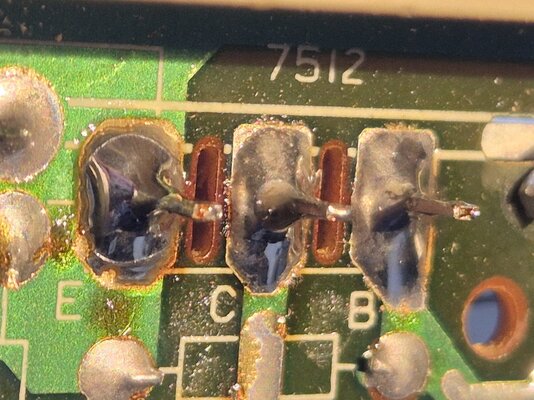
I just somehow missed bad solder joints on HOT... Did a reflow and bang, the damn thing works perfectly.

Seems that somebody has been there before me.
 

Attachments

  • 20250221_140419.jpg
    20250221_140419.jpg
    488.3 KB · Views: 18
I mean the surrounding area was dirty and seems it was handsoldered when all the others are soldered by machine.
 
Back
Top Bottom