Compact Flash cards are no good

  • Thread starter Thread starter Xanxi
  • Start date Start date
  • Replies Replies 35
  • Views Views 5345

Xanxi

Well-known member
Donator
AmiBayer
Joined
Jun 10, 2010
Posts
3,011
Country
France
Region
Paris
Hello.

I know that a lot of amiga users these days like to use Compact Flash cards instead of real hard drives, either IDE or SCSI.

I always strongly disagree with that because i do believe that CF are unreliable.

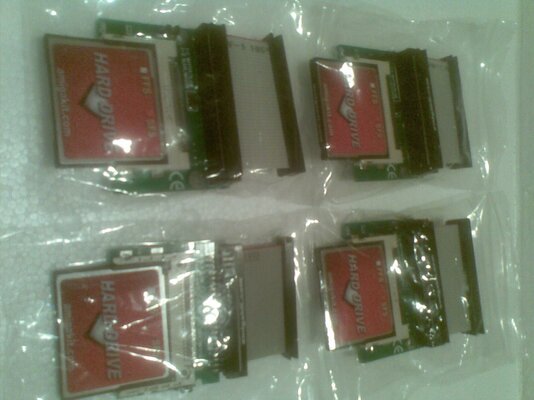
Look at the pic below: all those cards are from good brands and all of them are dead because i used them on amiga either IDE, SCSI or USB. They can't even be recognized by a PC reader by now, nor formatted or partitionned.
Most of them died all of a a sudden. Some didn't agree with amiga partitioning Tools.
All of them are crap.
So far, i only have a 8 GB Sandisk CF working. That's the one inside my A600. The reason is certainly that it is rarely used.

Do your computer a favor. Don't use CF. Use hard drives meant for real computers.

scaled.php
 
It really depends on usage. If you are using as a gaming machine just for whdload then a cf is fine. But for big box setups where you are writing a lot to the drive stick with HDD's :-)
Mozilla/5.0 (Linux; U; Android 2.3.3; en-gb; HTC_DesireHD Build/GRI40) AppleWebKit/533.1 (KHTML, like Gecko) Version/4.0 Mobile Safari/533.1
 
I mentioned something similar a long while back. CF Cards have a finite number of writes, although I'm not saying that's the problem here.

@Xanxi, for the cards to be seen by a PC (again) do you have to reset the 'removable bit' for the card. I remember playing around with something like that when I tried cards.
 
Yeah but how long did the CF's last before they became unreliable?

:coffee:
 
@Xanxi

Hi my friend :)

As Ed.D saids CF cards have a limited number of writes. Also is recommended to use new CF's on Amigas.

I'm using CF's to install OS's, but apps and games are installed in real HDD's
In anyway is recommended to use real HDD's, they are more faster and can work for years without probs.
 
Unless you are writing 1GB per day, everyday, I can't imagine you would hit the write cycle limit on any decent CF or SD/SDHC card in less than a couple years or more. Most modern cards have some basic wear leveling logic built into them.


I have a 32GB SDHC card in my machine, I will let you know if it fails anytime soon. :lol:
 
The trick with CF cards is to avoid writing to them unnecessarily. Don't ever do a full format on one, and don't do a block-by-block of a drive image to the card. Doing either of those things will vastly reduce the ability of the wear-levelling to do its thing.
 
Hello.

I know that a lot of amiga users these days like to use Compact Flash cards instead of real hard drives, either IDE or SCSI.

I always strongly disagree with that because i do believe that CF are unreliable.

Look at the pic below: all those cards are from good brands and all of them are dead because i used them on amiga either IDE, SCSI or USB. They can't even be recognized by a PC reader by now, nor formatted or partitionned.
Most of them died all of a a sudden. Some didn't agree with amiga partitioning Tools.
All of them are crap.
So far, i only have a 8 GB Sandisk CF working. That's the one inside my A600. The reason is certainly that it is rarely used.

Do your computer a favor. Don't use CF. Use hard drives meant for real computers.

scaled.php


I used those transcend cards, they are all re-used in real life photography, but I agree they are no good as hard disk, but the word is out, to use it as hard disk, but if you tell people not to use it, people will say, hey I have used it for several months, and still good etc.. I liked the cf usage some games.

I do not get what they do whith there amiga's, probably other usage etc..

Save the trouble and learn the lesson for you: compact flash is not a hard disk.. x 10. :roll: repeat X 20. CF is meant as digital storage not as hard drive x30. You cannot be cheap and get reliable storage x 40...
 
You cannot be cheap and get reliable storage x 40...

To be fair, a 4GB IDE drive wont set you back any more than a decent 4GB CF card. It's not being cheap, some people just prefere the silence :lol:.
 
For me the only advantage of the CF cards is to use different OS's. It's more affordable compared with the selection of the boot partition in the early Boot Menu.

If you want to boot under 3.1, 3.9 or 4.1 is better to have different CF's with the OS's installed.

As I know, if you're using HDD's, the only wayt to select different OS's is in the early Boot Menu and selecting the proper boot partition.
 
Lets not jump to conclusions and spread popular solid state memory myths. If controller does proper wear leveling, you need to keep writing at least a year, continuously, before cells get bad. (I have small Linux server that logs temperatures, has been running fine for 4 years or so now, using single CF card as a main harddrive)

I'd say your CF cards' controller died (no response at all), dead/bad flash memory would cause different, possibly random problems.

Perhaps they died due to static electricity, overvoltage, voltage spikes, bad internal connections, whatever. Lots of reasons.

Statistically there would be LOTS more reports of dying CF cards if this is normal behavior!
 
Phew thanks Tony, these 4 gems just arrived in the mail from AK today and I was thinking hmmm... to finally enter the realm of alternative HD solutions and look at all the bad press ;-)
 

Attachments

  • CF.jpg
    CF.jpg
    166.2 KB · Views: 2
I have to say, that I will do backups, on a daily basis, when I start using CF cards. As I just recently bought a new amiga 1200, I decided to go with the CF solution, eventhough a lot of people are complaining about their reliability.

Has there been any proper research done with regards to their reliability, when used as a HD that is?

It does seem odd that all of your cards are dead though, and to me, from a statistical point of view, it would seem that something else is causing these dead cards.
 
I have a lot of extensively tested data on various Amiga and PC compatiblity between many generic / branded compact flash cards.

In terms of reliability, I have found once a card is setup correctly it will function and function and function some more, I have yet to have one directly fail once installed on a system - this goes for new generic and new branded CF cards.

While I have a few generic / branded cards that dont support IDE mode, I have found of those that do, the most troublesome to setup are (in order of anoyance) Kingston, Lexar and Transcend.

The most compliant are SanDisk, Ultra II or earlier. The problem is, most of the cards I buy are second or third user cards, as such who knows the abuse that they have had before. What I can safelysay for SanDisk atleast is that any UltraII or earlier that I have bought new, has worked flawlessly first time - all the time - I have two setups that I do rely on, an CW-OS3.9 and CW-OS3.1 on a 2GB SanDisk and a 1GB Sandisk respectively.

I also have a slew of non-branded generics that work flawlessly in constant use as well. Finally I have plenty of MicroDrives (Hitatchi and Seagate) from 3.3v devices to 5v devices... while both seem to want a reboot installed in an Amiga after a power up, they work flawlessly in a PC or even on a Spectrum -


*the latter of wich is nice to power up a ZX Spectrum 128k +3 with a 3.3GB IDE MicroDrive in it!!.... dont get tied of "CAT TAB" 'ing that I can tell you lol!


Sufficed to say, that with second hand (CF cards included) that millage will vary - I even have CF cards here that wont initialize as an ATA device UNLESS connected to a PC IDE channel - even USB - IDE devices fail initializing them.
 
I have only one dead CF here (out of about 12) and that one came to me with read/write errors from the seller.

All of mine were bought new, Transcend and Kingston mainly except the few I bought from SDG.

I must say they're not in heavy use but all do get used weekly.
 
Well, in my case i achieve this conclusion because all those cards died within a couple of weeks in the past year while using them either on the IDE port of the A4000, the SCSI port of a GVP 030 A2000 board, the SCSI port of the Blizzard 2060, the IDE port of a Catweasel.
Meanwhile, i only had a problem once with a harddrive in 15 years (with a SFS partition but all the datas have been retrieved).

The strange thing with those CF is that when they fail, it seems nothing can be done to save them. When a hard drive is crashed, there is almost always a way to low level format it to save it, unless physically damaged.
 
Thats very interesting my friend,

If you want I have a very stable 512MB card here, your welcome to borrow it for your tests see if it dies on you - it was in my A1200/A4000 for a long time - even in a SX1 for a brief period.

Its been SFS/OFS and FFS formated a few times and it still works wonders... I have a package I still need to get to you, so I can bundle it up if you would like.
 
@Zetro: why not, i still need a dedicated CF for Birdgeboard or Shapeshifter use. Thanks.

@all:
I still have another working CF that i would like to revert from fixed disk to removable media. Any idea what software could do that?
 
Well, in my case i achieve this conclusion because all those cards died within a couple of weeks in the past year while using them either on the IDE port of the A4000, the SCSI port of a GVP 030 A2000 board, the SCSI port of the Blizzard 2060, the IDE port of a Catweasel.
Meanwhile, i only had a problem once with a harddrive in 15 years (with a SFS partition but all the datas have been retrieved).

The strange thing with those CF is that when they fail, it seems nothing can be done to save them. When a hard drive is crashed, there is almost always a way to low level format it to save it, unless physically damaged.

Did you use the same kind of compact flash adapter on all of them? Maybe that's the flaw in your setup? I'm not trying to discredit your use of CF, but instead trying to find out why all of your cards fail.

---------- Post added at 12:17 ---------- Previous post was at 12:15 ----------

I have a lot of extensively tested data on various Amiga and PC compatiblity between many generic / branded compact flash cards.

May I ask what you mean by extensively testing? I intend on using my amiga for coding, and given that there might be a number of read/writes to disk, I'm not sure if CF is the way to go.
 
@phiwer

extensively tested -

card has received several formats from FFS / SFS
card has received several formats from FAT32 / NTFS
card has undergone large bock read / write tests under Amiga (Native)
card has undergone large bock read / write tests under Amiga (CyberSCSI II)
card has undergone large bock read / write tests under Amiga (GVP - IOData R/SCSI IDE Bidge)
card has undergone large bock read / write tests under PC (various software)
device has been confirmed Healthy in Parition Magic 8.1

Some manufactures also provide testing software for their products, I use SanDisk's software, for their CF cards, however I beleive that both Kingston and Transcend offer some software to test their cards.

Most of the testing above was done some years ago, before the big splash of CF cards being used as Harddisks in Amiga's hadn't been done, a fellow EAB'er "Shrub" got the idea and we started testing a load out as CF cards / adapter and IDE / SCSI devices.

we found that the big factors in the day were CF cards ATA IDE MODE and CF card to IDE Adapters - there were a few cheap (and expensive) adapters that wouldn't allow the CF Card into IDE mode

In regards to anything reliable - as you know, if its mission critical - no matter the media you save it to... back it up! =)
 
Back
Top Bottom