Deneb: Poseidon, Trident, Luciferin, Firmware Upgrade Confusion

  • Thread starter Thread starter crazyegg
  • Start date Start date
  • Replies Replies 11
  • Views Views 4517

crazyegg

New member
Joined
Oct 20, 2009
Posts
27
Country
Toronto, Canada
Hi All,

I was very fortunate to acquire a Deneb card for my real A4000T from a fellow Amibayer!

I have read many posts and even the manual but still have a few queries. These questions are quite detailed but please bear with me. Thanks!


I am running AmigaOS 3.9 with BB2 and MUI installed along with a Picasso II video card.
  • What is the correct order of setting up this "second hand" card and the software? (i.e. install card first, flash the firmware, then Posideon and finally Luciferin?)
  • The manual states that I need to do a new install by setting the jumper to RESCUE mode so that the software can be copied from the flashROM and then installed on my A4000T. I am assuming that the latest versions of Poseidon and Luciferin would not be on the flashROM. As such, I was planning on just downloading these new versions instead. If so, can I safely bypass this step?
  • Do I need to set the RESCUE jumper when I copy modules to the flashROM? I know that I need to set the RESCUE jumper for flashing the firmware. Please confirm.
  • I will be using Zorro III PIO mode. As such, what are the drivers that need to be flashed to the Deneb?
  • How do I check the current firmware version of the Deneb?
  • Once I get my feet wet, what other modules are recommended for an A4000T setup running 3.1 or 3.9?
Thanks everyone!

Regards,
ed...
 
Rescue is only for firmware update, not for flashrom. Flashrom can be changed at any time with Luciferin.
For Z3pio, set the device denebpio-something online in Trident.
 
Set the RES mode to copy Luciferin and Deneb Tools to your hard drive. Download Poseidon 4.4 from Chris's site and the Deneb Firmware (if needed) from E3B. Install Poseidon and locate the Deneb's denebdmausb.device or the denebpiousb.device using Trident (it requires MUI). In the controllers section hit "add" then locate the driver (DEVS:USBhardware/). Then after it is added, hit "online" and the red dot above should go green. Click SAVE at the bottom. You could run a full install of all the the Deneb's software and let it add and configure the Poseidon version 4.2, and then install over it version 4.4. I like the Trident approach.
 
Last edited:
Hi,

Thanks for the tips.

What exactly is Deneb Tools?

I know that Poseidon is the USB stack (i.e. driver) and that Luciferin is the application that is used to add modules to the flashROM.

Regards,
ed...
 
I remember when I got mine the first thing I did was install it using the software on the card. Next I downloaded and installed the updated Poseidon 4.4 USB drivers and also updated the Deneb to the latest firmware, being V11. After that I downloaded Luciferin and added everything to the Flash ROM. I haven't come across anything called Deneb Tools as such.
 
Hi

First of all, upgrade the Deneb to V11.

Some usefull to flash (of course, the latest versions):

- FFS & SFS Filesystems
- 68040 and/or 68060 libraries
- Workbench.library
- Icon.library
- USB Mouse & Keyboard
......

I can post this evening a more detailed list of my Deneb's FlashROM and my config

:coffee:
 
Last edited:
The "tools" enable the Clockport and allow firmware upgrades. Be careful with the updates as I had one go wrong and it took 3 more install to get it right.
 
I bought Deneb here on Amibay and when it arrived I just put the card to free Z3 slot and installed Poseidon v4.4. Everything worked until I bought CyberVision PPC.

When I insert the CVisionPPC, my Amiga 4k stops booting (booting starts, but in the middle of the booting it stops and there is black screen). When I remove either Deneb or CVision PPC, everything is fine. I had CVision 64 and CVision 64/3D before the CVision PPC, so I also tried to make fresh OS3.1 and 3.9, but it nothing helps.

I think there is something "incompatible" loaded from the Deneb so Amiga freezes during the boot.

I started Luciferin for the first time and I am not sure what should I do now, what module can cause the problem. What would you do on my place?

Screens from Luciferin: http://jack.untergrund.net/Amibay/deneb/

UPDATE: I just upgraded firmware to v11, but it did not solve the problem. I found pressing LEFT MOUSE button will disable Deneb (boot flash screen is Red) and I can boot with CVision PPC connected. Still I need to find out what causes the "hate" between both cards.
 
Last edited:
Hello mate,

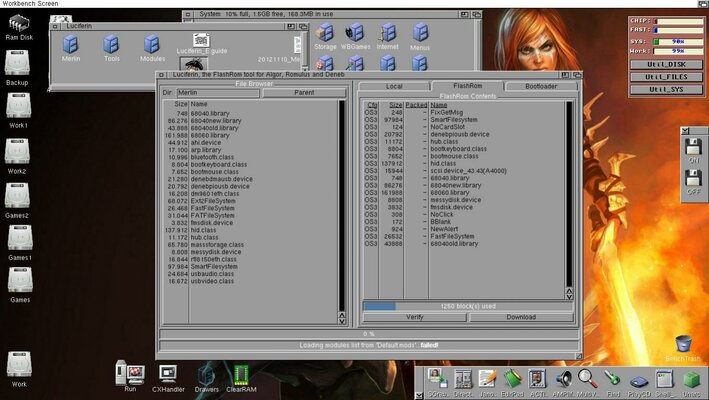
This is an screenshot of my DENEB FlashROM.

20140120_DENEB_FlashROM.jpg

As you can see the board is working in PIO mode. Poseidon.library & PsdStackLoader loads from WB.

My system is one A4K with CSPPC, CVPPC, .......

I hope this helps :)
 
OK thank you. I am currently booted with Left mouse, so Flashrom did not load. Now I have Luciferin opened, I see content of the FlashRom, but there is no Delete button, only Verify and Download.

But I still dont understand fully the tool, I need some kick to start understanding it ;o)

On E3B web, they say:

How can I completely clear the FlashROM? We recommend using the latest available version of Luciferin for handling the FlashROM.
To completely clear the FlashROM please proceed as follows (ROMOFF can be set, the warning issued by Luciferin on starting can be safely ignored, as full access to FlashROM is given anyhow):
  • Start Luciferin (simply acknowledge any warning on ROMOFF being set)
  • In case you want to backup the modules in FlashROM: select a directory for storage inside the file browser, select the modules to be backuped in "FlashROM", then activate "Download"
  • Select "Local", mark all modules, and "Remove" them.
  • Select a suitable bootloader under "Bootloader".
  • Select "Local" and then "Upload".
  • Your FlashROM is now empty.
Please mind that even with no modules installed inside the FlashROM the bootloader will always be loaded and executed.
If problems with FlashROM occur it is recommended to set ROMOFF for debugging!
First of all my Local is absolutely empty and it was always empty, so I cannot mark anything for deletion. Then they say "Select a suitable bootloader under Bootloader", I have no clue what is the bootloade and where can I find any or suitable one?

What I need is to clear my FlashROM, because obviously something does not like my CVision PPC. And then I will start to load back just what I need file by file.

UPDATE:

Because my "Load" is empty, I clicked Upload and I cleared the FlashROM. So there is nothing in my FlashROM and Amiga boots with both cards successfully. When I insert USB memory, it works, so I am satisfied now and with FlashROM usage I will play later.
 
Last edited:
I thought I can Upload to the FlashRom anything, but when I try to upload some patches like Set60nsMode or Rom2Fast I got error message:

Warning! The program "xxx" does not seem to contain a valid RomTag, and will therefore NOT be executed! You may safely remove this file from the list.

What do I wrong? Noclick od BBlank seems to be OK, why not other patches?
 
Back
Top Bottom