Glitches in XP after change mobo (Pics)

  • Thread starter Thread starter dougal
  • Start date Start date
  • Replies Replies 26
  • Views Views 3036

dougal

Active member
AmiBayer
Joined
Nov 25, 2009
Posts
2,360
Country
Malta
I replaced the motherboard & CPU of my Pentium IV PC with a newer motherboard & cpu i found thrown away.

Originally i had an ECS motherboard with Pentium IV 2.40 Ghz CPU.

I replaced it with Asrock motherboard with 2.66Ghz CPU. What it has extra to my old mobo is onboard SATA, onboard Video card (i'm using my AGP one), and onboard LAN.

I did a Windows XP repair to make XP load as it was giving the blue screen of death when i replaced the mobo.

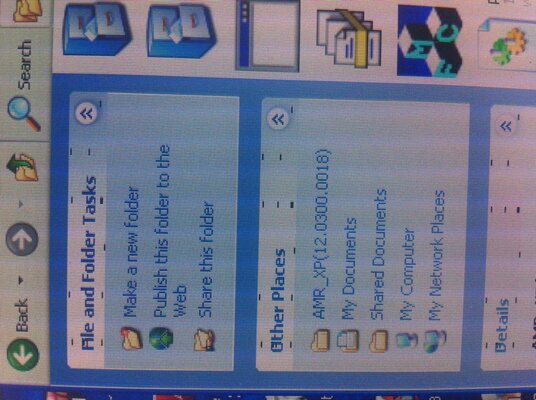
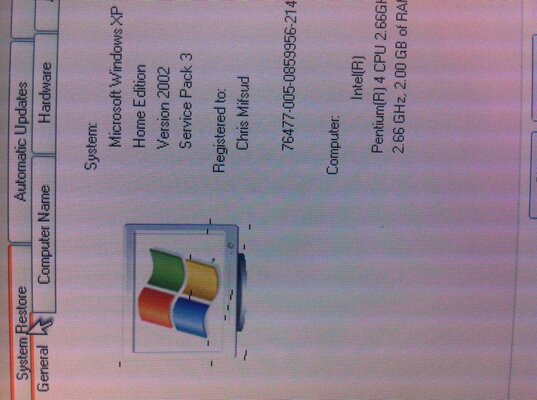
Anyway, there is a small graphics glitches (See pics) that come up either in the My computer properties, and etc, but not everywhere like does not show any glitch on desktop or web browser. It is slight.

Even some games have graphical glitches which are different.

It is using the same graphics card i was using on the old motherboard.

Also i noticed Youtube is now choppy on 720P and i do not think it was so much before.

Everything else works fine, RAM is all showing up properly and graphics card installed properly, sound card installed properly and Lan OK and all working.

Could there be a problem with hardware or maybe software because i did not to a 'Fresh' installation of Windows ?
 

Attachments

  • phot2o.jpg
    phot2o.jpg
    204.3 KB · Views: 3
  • photo.jpg
    photo.jpg
    192 KB · Views: 2
Well, the general consensus seems to be that mobo overhaul practically necessitates a fresh install as the registry has a lot of garbage related to the old setup. Nevertheless, I'm planning to try a repair install on my Win7, when I do a motherboard overhaul.

You could try to use registry cleaners like Ccleaner and also update your graphics card driver to see, if that would help.
 
Well, the general consensus seems to be that mobo overhaul practically necessitates a fresh install as the registry has a lot of garbage related to the old setup. Nevertheless, I'm planning to try a repair install on my Win7, when I do a motherboard overhaul.

You could try to use registry cleaners like Ccleaner and also update your graphics card driver to see, if that would help.

I updated the graphics card driver as it was not working properly after the mobo replacement.

So you are of the opinion that the problem is software and not hardware ?
 
Do you get the same glitches outside of XP? (such as during BIOS or if you boot from a Linux live CD environment)
If you do, it's likely to be hardware, if you don't it's likely to be software!
 
Have you installed the proper motherboard drivers for this one?
That could be the problem if your setup is looking for things for the old motherboard.
 
On a new machine (that's what it is called when you change the mobo) you do a fresh install of the OS. You never-ever use the old one because:
1. You cannot get rid of the low level boot time io drivers of the initial install.
2. You cannot replace them.

Wipe your os partition and make a fresh install lazy you! :p
 
Last edited:
On a new machine (that's what it is called when you change the mobo) you do a fresh install of the OS. You never-ever use the old one because:
1. You cannot get rid of the low level boot time io drivers of the initial install.
2. You cannot replace them.

Wipe your os partition and make a fresh install lazy you! :p
There's a couple more to add to that list:
3. Difference in Mass Storage Drivers between different motherboard chipsets (BSOD: INACCESSIBLE_BOOT_DEVICE anybody!!!!)
4. If it's a considerable upgrade (difference between CPU architecture/chipset etc.), difference in HAL (BSOD at boot-up yet again)
 
I would rather pluck by my eyes out using a rusty corkscrew than even think about seriously using a PC where someone switched motherboards and did not do a full reinstall of Windows.

As an idea, it's up there with using Hydrogen to provide lift for zeppelins, wearing a bloody meat suit to go scuba diving in the middle of shark infested water or using a chainsaw to trim your nasal hair.
 
I have done a few of those changing the MB and not doing a fresh install
and I always had problems..
Woodycool hit the nail on the head try a linux live cd see if you get
the same problems also the simple way go into your bios screen see
what that looks like..


:coffee:
 
This might work. Laplink has a software that enables you to save your installed program settings and restore them over a fresh install.

I would suggest, though, to make an image of your existing install. I actually purchased the Laplink software and tried it while migrating from XP to Win7. Didn't work. Why I am still suggesting it is that it may work, if you don't change the OS. Nevertheless, I plan to image my existing Win7 setup, try repair install, use the Laplink software to make the migration in case the repair install turns flaky and go the hard way of installing all again.

You really should be able to upgrade your hardware without doing a major system overhaul. :mad:
 
You can use the windows migration tool from one XP computer to the other if the last one have 7 installed. Been there, done that.

But lots of programs you used in the old machine might not work in an upgraded OS. Even worse if the elder unit was a x86 CPU and the new one is a dual/quad core.
 
You really should be able to upgrade your hardware without doing a major system overhaul

yep that be nice but microsoft don`t quite see it that way

bottom line dougal unless you replicate the error/behaviour on another OS we can`t rule out either the hardware or the software being at fault

so go and bite the bullet and reinstall windows, or another OS on an usb stick/sd card/ spare harddrive/ compact flash card/ etc

think with xp MS let u make 3 hardware changes before it got Pis*d at ya, so as most things are on the Mobo these days reaching 3 changes is easy, though I don`t know if they carried this on to later versions of windows as I know from experience its a lot easier to start trouble shouting from a known good be it hardware or software

oh you have backed up your important data of course before you started all this :cool:
 
Deffo fresh install.

I tried it back in 2002 and had no end of issues. Ever since, fresh install all the way.
 
There are no graphical glitches in the BIOS screens etc.

Before anything i will try re-seating the graphics card and the RAM. I say the RAM because one of the fasteners on the mobo is partially broken.
 
There are no graphical glitches in the BIOS screens etc.

The BIOS generally runs in text mode, so the chances of RAM- or transfer-based graphical glitches showing up are fairly slim.

I'd repeat the advice others have given of trying a Live Linux distro.

If that works OK, then try downloading the correct chipset drivers for your mobo, but before installing them, go into hardware manager on XP and remove any items relating to AGP and the chipset. Then install the drivers, and reboot.
 
Definitely do a clean OS install. Mad not to. You will spend more time trying to fix the existing one then it will take to install.

The graphical glitches could be a bad graphics card. But you won't know for sure until you do a clean os install.
 
As said, clean install is the way to go. The Windows install is still likely trying to use old drivers to run half of the hardware. Not to mention it is also probably missing half the ones it needs.
 
In Win 7 there is utility called system preparation tool that enables you to do a motherboard swap and still keep your settings and installed programs. Don't know if XP has this utility but I thought it might be helpful information to someone. Going to try this out, when upgrading.
http://www.sevenforums.com/tutorials/135077-windows-7-installation-transfer-new-computer.html

Windows XP has Sysprep too.

Its possible to do it without a fresh install, but unless you do this for a living - its too difficult for most.

Also, Windows 7 does not have the same HAL issues that XP had - MS made them interchangeable
 
Back
Top Bottom