Help with EasyFlash

  • Thread starter Thread starter protek
  • Start date Start date
  • Replies Replies 19
  • Views Views 4466

protek

"Takai desu ne." -"Jinsei da."
Joined
Feb 17, 2008
Posts
3,999
Country
Finland
Region
Oulu, Pohjois-Pohjanmaa
I got the EasyFlash assembled. Now, when I'm trying to put a crt image in with Easy Prog, the application complained that the flash chip was write protected. I had forgotten to put the jumper on. Now my C128D won't boot with the switch in either position. It does boot without the cart. Do I need to stick it into my C64?
 
According to Jim's site no not yet..

EasyFlash can be used on the C64, C64C, and SX64. C128/C128D use is not currently supported.

:coffee:
 
According to Jim's site no not yet..

EasyFlash can be used on the C64, C64C, and SX64. C128/C128D use is not currently supported.

:coffee:

Thanks!

Time to dig out the old breadbin. :)

---------- Post added at 20:02 ---------- Previous post was at 19:40 ----------

Something seems to be wrong. Even the breadbin boots in blank screen, when the cartidge is inserted and works ok without.

The cartridge revision is 1.5.
 
EasyFlash can be used on the C64, C64C, and SX64. C128/C128D use is not currently supported.
Jim is referring to the EasyFlash 3 in that statement. The C128 works perfectly with the original EasyFlash. :)

@protek

I'm not sure what the issue might be. You might want to double check your jumper to make sure the loop is either closed or not closed. It could be that the EasyFlash isn't going into programming mode and tries to load bad code.

Good luck!

Heather
 
@protek

I'm not sure what the issue might be. You might want to double check your jumper to make sure the loop is either closed or not closed. It could be that the EasyFlash isn't going into programming mode and tries to load bad code.

Good luck!

Heather

If the jumper is open, the computer will boot but Easy Prog indicates the flash chip write protected.

EDIT:
Ok, it seems that the jumper does the same thing as the switch. So, basically I need to disable the flash chip write protection. Do I just put the chip into Willem and do something?
 
Last edited:
I've never ran into that issue so I don't know what the problem is. :( Have you sent an email to skoe yet? He might know what's going on.

Heather
 
I contacted skoe and he suspected that I got a refurbished kit with locked chips.

The chips can be unlocked with a Willem but I'd need a DIP to PLCC adapter to be able to do that. I contacted the actual seller to see, if I could get replacements. Other options are to get the adapter (cheap but takes time) or new chips from the local electronics store (not so cheap but fast). I'll wait for the seller's response before I decide, which action I'll take.
 
Sounds like you have it covered. Please let us know how it turns out. :D

Heather
 
I got a pair of new flash chips and that sorted out the write protect problem.

I'm now struggling with getting the .crt file written. The EasyProg can't see the .crt file in my 1541-III. It sees .prg files and .d64 files but not the .crt file. If I rename the file to name.crt.prg, it sees it but gives an error, when trying to read.

Has the file to be all caps or what?
 
Glad you got the write protect error figured out. :) You may have to use the EasyFlash crt image splitter and put the split files in D64 images to get it to work properly. I always use the uIEC/SD to store the CRT images and the EasyFlash works with it just fine. :)

Heather
 
take a look at my video http://www.youtube.com/watch?v=vtNPK9jgxSg in particular the section that uses DIRMASTER to transfer .crt images into a .d64 file. Theres also a part 2 on my channel somewhere..

Failing that, talk me through the steps you are going through to get the crt onto easyflash and we can see where its going wrong.
 
I started with the Prince of Persia .crt file that can be found from the internet. I first simply copied the file on my memory card and put that in my 1541-III DTV. I ran EasyProg in my C64. It now reads the EasyFlash and I'm able to erase the cart. EasyProg and the C64 Basic can't see the file because the 1541-III filters out anything that isn't .d64 or .prg. I then renamed th pop.crt to pop.crt.prg. EasyProg sees the file now but isn't able to write it on the cart. It complains something about the header and type. I tried also disabling the speedload on EasyProg but that didn't help.

I then proceeded to split the .crt with EasySplit and used D64Editor to create a .d64 and put the files in. EasyProg sees the files but I get the same complaint about failing to read the header as with the renamed single .crt file. The pop.crt works ok in Vice.
 
I now have an uiec card reader. I've tired to find cookbook instructions how to load a .d64 image. My .d64 files are in the root of the mmc card. Whatever I try, the uiec starts to vlink in error and I'm not able to read directory. I'll probably invest in Jiffydos, when my monetary situation improves but in the meantime I have to make do with the vanilla Commodore.
 
Be sure to look over the following document. It gives some great information on using the uIEC.

http://www.n2dvm.com/UIEC.pdf

You should also get the CBM FileBrowser. Just put the program (fb64.prg) in the root of your SD card then you can easily load it any time you turn on your C64 using the following command.

LOAD "FB64.PRG",8
RUN

This will let you easily navigate to a disk and start a program. :) The above command assumes your uIEC is drive 8.

Hope that helps!

Heather

---------- Post added at 12:05 ---------- Previous post was at 12:01 ----------

Oh, I forgot to mention. You can put any PRG in the root of the uIEC. This means you can put the all the EasyFlash programs and the CRT images on the root and you don't have to open a D64 at all. :) This is especially handy since you don't have to split the CRT.

Heather
 
Thanks, Heather!

I seem to be getting file not found error with both my cards even though I have the .prg files in the root. Wonder if it doesn't like my mmc cards?
 
I believe the uIEC defaults to device 11. Try loading it using a ,11 instead of a ,8. :)

Heather
 
I believe the uIEC defaults to device 11. Try loading it using a ,11 instead of a ,8. :)

Heather

It's actually 10. Other ids give device not present.

---------- Post added at 23:00 ---------- Previous post was at 22:32 ----------

Problem solved. The uiec didn't like my 64 MB MMC cards. When I tried with an SD card, everything worked. I also managed to write the Prince of Persia .crt on my EasyFlash module. Yay! Finally something that I've assembled works! :D
 
Hurray!!! I'm so happy you got it all working. I hope some of the information I provided was helpful! You should definitely get JiffyDOS or some other DOS shell (Final Cartridge III) because it makes using the uIEC so much easier.

Time to party like it's 1985!

6024035.gif

Heather
 
It was helpful indeed. Thanks once more! :D

I do have Final Cartridge III and Action Replay VI in my possession. What I really need to get is a new SD card as this one is a loaner from my DSLite. Probably going to get a bigger card for my camera and use the old one for uiec.

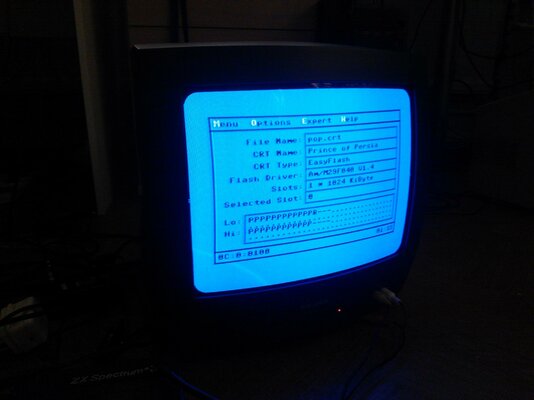
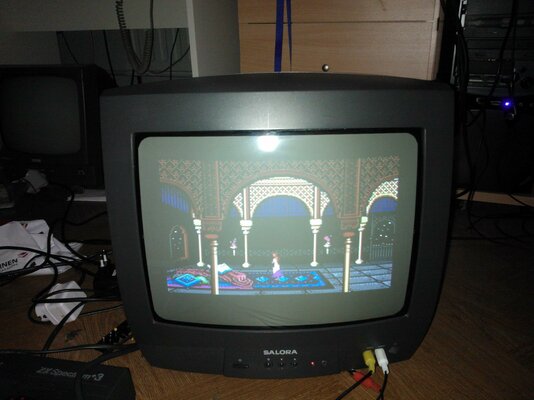
Edit: Here are a couple of pics of the EasyFlash being flashed and Prince of Persia running on real C64.
 

Attachments

  • WP_000091.jpg
    WP_000091.jpg
    190.8 KB · Views: 4
  • WP_000093.jpg
    WP_000093.jpg
    198.2 KB · Views: 4
Last edited:
I do have Final Cartridge III and Action Replay VI in my possession.
Wonderful! I don't know the Action Replay's DOS Wedge command, but the command for the FC3 is DOS". So if you wanted to do a directory, you would type DOS"$ or to change to a D64 image it would be DOS"CD:DISK.D64. :)

I hope you love your EasyFlash as much as I do mine!

Heather
 
Back
Top Bottom