Easyflash C64 Flashing

scrappysphinx

Confused retro man
AmiBayer
VIP
Joined
Jan 30, 2008
Posts
8,045
Country
UK
Region
Nottingham
Hi all, can anyone help me with instructions on how to flash the Easyflash cartridge?

I have a C64C & SD2IEC and have downloaded the easyprog software. I load up the software and get the greeting box, press enter to start the software and then it tells me

"A flash chip does not work or is not supported by the EasyAPI flash driver"

I've tried flicking the switch the other way but then the C64 just boots to a black screen.

This is my first time using a real C64 with my only other experience being one of those DTV things.

Any help would be appreciated

Thanks
 
hi mike you need to compile a image first from prg files or use a ready made 1 on the pc

then copy that to your sd card for sd2iec

then use the flash program to flash this to your cart

but I will give the info later after work
 
Hi John, i've got a crt image that supposed to be compatible with the easyflash and i've got the easyprog flashing software. I can load the software but it just gives the message

"A flash chip does not work or is not supported by the EasyAPI flash driver"
 
When I built my kit, I got not empty flash chips to begin with. Since I didn't have suitable adapter in my programmer to facilitate erasing and couldn't get them replaced by the retailer I ended up getting new chips from the local shop. Then it would work.

Can't remember if I had the exact same error but this was my case. I can check the emails between me and the designer what the problem in my case was.

---------- Post added at 15:27 ---------- Previous post was at 15:09 ----------

Here's the mail exchange between me and the seller. My problem was a bit different than yours but pretty much the same result. I've censored the the parts related to sender:
the Chips not write protected.
I Flashes all with EasyProg 1.4.0.
http://noname.c64.org/csdb/release/?id=85192

Best Regards
xxx


----- Original Message ----- From: xxxx
To: xxxx
Sent: Thursday, xxxx, xxxx x.xx PM
Subject: xxxxxx


------------------------------------------------------

Hello,

I ordered the EasyFlash 1.5.0 on xxxxx xxrd (order number xxxx). I assembled
and tried it today. When I tried to upload a cartridge image to the cart
with Easy Prog, the application said that the flash chip is write protected
and should be unlocked with a programmer. I'd unlock them myself but
unfortunately my programmer doesn't have the adapter for PLCC socket.

Can you help me with this issue?

I had the 1.4.0 version but it wouldn't flash them. As the retailer wasn't willing to address this issue further and I didn't have suitable adapter in my programmer, I checked my local electronics shop and was able to find replacement chips which worked right away.

Wasn't very happy how things were handled by the retailer. The designer however was very helpful with my other issues related to EasyFlash.

Well, that's water under the bridge and I got a working module.
 
Hi Protek, thanks for the tip. I ordered the kit from ebay so will send the seller a message and see what he has to say.

Am i right in thinking the flash chip is the 28 pin chip in the middle of the device?
I'm thinking the easyprog software can't identify the chip and thats my problem but i have next to no knowledge in programming chips either so just a wild guess.

From all the images i've seen of easyflash it shows the FlashID as AM29F040 and my chip is made by NEC with the code D43256C-15
 
There are two flash memory chips (the small square chips in the PLCC sockets). The problem you are having could be caused by bad solder joints, bad chips, or possibly by the chips not being erased as mentioned above.

The switch simply changes between programming mode and run mode. The reason you get a black screen in one position is because it's attempting to run the software on the chips, which it cannot do.

You should also make sure your SD2IEC is up to date with the latest firmware. I forget the error I was having, but there was a problem with the older version of the SD2IEC software that would not allow you to program the EasyFlash using EasyProg in fast mode. I forget what the actual mode is, but it's an option in the EasyProg menus. Upgrade your SD2IEC firmware then try to program the EasyFlash again. :)

Good luck!

Heather
 
Am i right in thinking the flash chip is the 28 pin chip in the middle of the device?
I'm thinking the easyprog software can't identify the chip and thats my problem but i have next to no knowledge in programming chips either so just a wild guess.

From all the images i've seen of easyflash it shows the FlashID as AM29F040 and my chip is made by NEC with the code D43256C-15

I had two tiny PLCC chips in mine.
 
Ah so the flash chips are the small square ones with 1 corner cut out.
I'll try updating the sd2iec and try again.

Thanks for the tips :)

SD2IEC updated to 0.10.3 from www.sd2iec.de
Still getting the same error message.
Checking the small chips one is listed as AM29F040B-90JI and the other is listed as AM29F010-120JI

Could this be causing the problem?

I can get 5 new AM29F040B-90JC from ebay (buy it now). Would it be worth trying these?

Thanks again
 
Last edited:
Easysplit and EasyPrg files http://skoe.de/easyflash/doku.php?id=downloads

Draco Cart Maker here http://csdb.dk/release/?id=89912

Write a CRT image with EasyProg

http://skoe.de/easyflash/doku.php?id=writecrt

Split files with EasySplit

http://skoe.de/easyflash/doku.php?id=splitfiles

make carts
http://www.lemon64.com/forum/viewtopic.php?t=33288

i see skydivingirl know how to do this too

here is 2 videos gazcbm made and sent me as he made mine


http://www.youtube.com/watch?v=vtNPK9jgxSg
http://www.youtube.com/watch?v=dWS1mqji7QU

some info here too

https://www.amibay.com/showthread.php?t=28344
 
Thanks for the links John however i can't get the easyprog software to detect the cartridge at the moment.

Quick update though, after emailing Thomas Giesel (creator?) from skoe.de/easyflash he has advised me that the problem is due to the AM29F010 chip. Apparently it is the wrong type and won't work. The easyflash should have two of the AM29F040B chips. I've now contacted the ebay seller too and quoted him this message and he has agreed to send me two new chips tomorrow to see if that cures my problem :)
 
thats bad mate about wrong chips

but hopfully you get it sorted with new 1s
 
Quick Update

I received two new matching chips today both of the AM29F040B-90JI variety

At first it seemed to load fine and showed AM29F040 as the Flash ID for both the low and high flashID so i erased all and that seemed to work fine. I then tried to flash a crt image to the cart and it failed with an error 26. Not the Low FlashID shows as unkown. Swapping the chips over and the low still shows as unknown.

I think there might be a problem with my hardware somewhere and i need to check my soldering :lol:
 
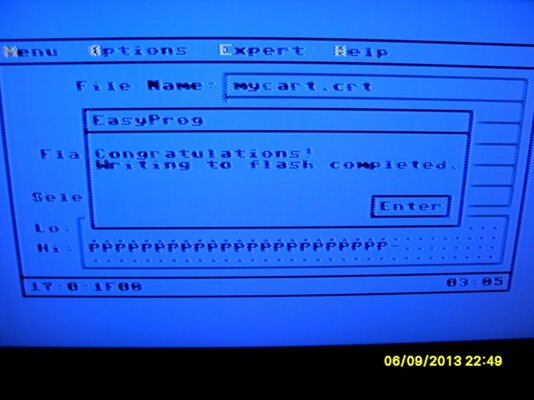
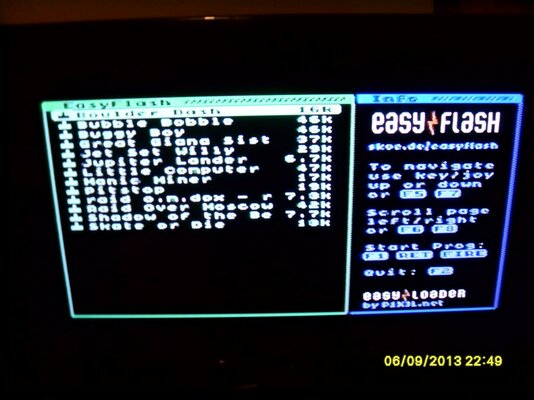
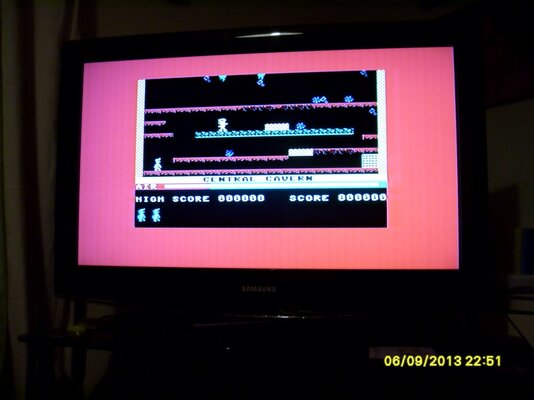
Success!

Rechecked all soldering and seemed fine.
Tried again but still no go. I noticed that the flash chips dropped all the way to the bottom of the plcc socket and didn't appear to make much of a contact. I stuffed the socket with a piece of folded cardboard to raise the chip but still fit in the socket snug without movement.

Result
 

Attachments

  • SDC14015.JPG
    SDC14015.JPG
    76.6 KB · Views: 10
  • SDC14016.JPG
    SDC14016.JPG
    89.7 KB · Views: 9
  • SDC14017.JPG
    SDC14017.JPG
    64.9 KB · Views: 7
Last edited:
That's awesome! Congratulations! You really need to try Prince of Persia on the C64 and of course the many fun Lucas Arts titles. :)

Heather
 
Glad to hear you got it working! :thumbsup:

@thread: What was the total capacity of the cart again? Can you append stuff on it or do you have to reflash it completely to add .crt files?
 
Each AM29F040 is 512K so two of these chips gives it a total of 1MB of storage. While the EasyFlash is capable of writing to specific sectors of the flash RAM, you are not able to add another program without re-flashing the entire cartridge. Some of the games that have been converted to EasyFlash actually store saved games to the EasyFlash's memory. I don't know exactly how this works, but there must be custom coding in the re-design of the game to write to a certain sector.

I'd love to see the process of changing a disk based game to work on the EasyFlash. Unfortunately, I've been unable to find any information on how it's done.

Enjoy your EasyFlash!

Heather
 
Hi, drudging up this old thread. I'm building some EF1 cartridges and am having an issue. I keeping get this message "The roml flash chip is write protected. It can be unlocked with programming equipment only." I've swapped out the chips a few times, they are supposedly new AM29F040B-90JC flash chips. I have a programmer but not a 32 PLCC adapter. Before I splurge on that I wanted to know if this is an accurate issue or perhaps I have another problem. I've used various version of EasyProg (1.5 -> 1.8) with the same message. Do these chips need to be cleared or formatted to work with Easyprog?
 
Back
Top Bottom