
How to fix dying CDROM drive?

  • Thread starter Thread starter Xanxi
  • Start date Start date
  • Replies Replies 7
  • Views Views 118

Xanxi

Well-known member
Donator
AmiBayer
Joined
Jun 10, 2010
Posts
3,010
Country
France
Region
Paris
Hi there.

Despite my constant efforts to maintain my main A4000 rig with new modern parts, i have one more thing causing me troubles.
The computer has a laptop slim CD/DVD burner which is inserted in a special 5.25 caddy hosting a slim 5.25 bay and a 3,25 bay. The latter has a shugart floppy drive / USB memory cards reader combo and the slim bay has my cd burner. It is of slim IDE type and a converted allows me to connect to to the IDE channel of the A4000 as slave device.
Everything has worked nicely for 10-15 years (that drive may have been replaced once circa 2015 but i can't be sure).

It has been making some spinning noises these days, and now it keeps resetting and spinning when powering the computer. The A4000 can't boot, the IDE LED is stuck ON.
Except if i firmly push on the eject button, then the computer does boot but the computer freezes as long as i remove my finger from the button, and the drive continue to light and spin.
If i keep the CD tray open, the A4000 operates ok.

This is annoying because to replace the drive i need to take once again 3/4 of the computer apart with always risks to the hardware, and i even need to move half my room to get access to the computer.

Before doing that at the expense of rare free time, i would appreciate a bit of advice about what would be the likely fault here and if i can do something to fix it from the outside without removing the drive .

Thanks in advance.
 
Hi there.

Despite my constant efforts to maintain my main A4000 rig with new modern parts, i have one more thing causing me troubles.
The computer has a laptop slim CD/DVD burner which is inserted in a special 5.25 caddy hosting a slim 5.25 bay and a 3,25 bay. The latter has a shugart floppy drive / USB memory cards reader combo and the slim bay has my cd burner. It is of slim IDE type and a converted allows me to connect to to the IDE channel of the A4000 as slave device.
Everything has worked nicely for 10-15 years (that drive may have been replaced once circa 2015 but i can't be sure).

It has been making some spinning noises these days, and now it keeps resetting and spinning when powering the computer. The A4000 can't boot, the IDE LED is stuck ON.
Except if i firmly push on the eject button, then the computer does boot but the computer freezes as long as i remove my finger from the button, and the drive continue to light and spin.
If i keep the CD tray open, the A4000 operates ok.

This is annoying because to replace the drive i need to take once again 3/4 of the computer apart with always risks to the hardware, and i even need to move half my room to get access to the computer.

Before doing that at the expense of rare free time, i would appreciate a bit of advice about what would be the likely fault here and if i can do something to fix it from the outside without removing the drive .

Thanks in advance.
Hi,

First off Snap! 🫰 I have something similar. I use Icybox and StarTech slim optical with 3” Floppy with USB card reader or Gotek. So know what you mean.
From what you have described, it more than likely be something with the main electronics board on the drive.
Possibly a Capacitor that’s failing.
And even if you want to fix It, then you will have to remove the drive. For the price of a replacement which are available, then I would replace it.

Sorry.
 
That doesn't seem easy to find new replacement IDE/ATAPI slim CD burner, they are only SATA by now. This computer has no room for the bulk of another slimSATA to 40 pins IDE adapter, i need to keep my current slimIDE to 40pins IDE and CD audio header. :picard:
I may ditch the CDROM completely and relocate my SSD into a fake slim CD case, but that was the only computer left here with a CD reader/burner and it was useful from time to time.
 
Hi there and Merry Christmas.

The CDROM alone might not be the issue here.
Besides it doing the reset endlessly, i have noticed when i leave the tray open that my DF0: is clicking faintly from time to time despite the anticlick software, and is not able to read a disk anymore. Motor seems not turning fine and the LED is faint. And the front USB ports just beneath it are now giving only +3,5V to 4,2V with constant fluctuations.
It seems i have a power issue again (https://www.amibay.com/threads/dont-leave-your-retrocomputer-working-unattended.2456067/)
Everything else is working fine so far.

I wonder if what i have done lately could be causing this.
- i have installed my Apple IIGS on top of the A4000 due to lack of desk space, and my Iiyama monitor on top of both. The Apple IIGS is not so heavy since its PSU has been replaced by a PicoPSU, but the total weight makes my IKEA table bowing.
- still due to the lack of space, i have installed an USB switch to share my PC keyboard with all 4 computers on the desk (Intel Nuc, A1200, Apple IIGS and A4000). The keyboard is connected to the two Amiga via USB as secondary keyboards. It works fine on both even though i use the front USB ports of the A4000 which are very weak as explained above. Now i have disconnected it completly from the A4000 but the issue remains.

I need to remove the Apple IIGS and check the internals of the A4000, and maybe change my PSU again.
 
Last edited:
Hi there and Merry Christmas.

The CDROM alone might not be the issue here.
Besides it doing the reset endlessly, i have noticed when i leave the tray open that my DF0: is clicking faintly from time to time despite the anticlick software, and is not able to read a disk anymore. Motor seems not turning fine and the LED is faint. And the front USB ports just beneath it are now giving only +3,5V et 4,2V with constant fluctuations.
It is seems i have a power issue again (https://www.amibay.com/threads/dont-leave-your-retrocomputer-working-unattended.2456067/)
Everything else is working fine so far.

I wonder if what i have done lately could be causing this.
- i have installed my Apple IIGS on top of the A4000 due to lack of desk space, and my Iiyama monitor on top of both. The Apple IIGS is not so heavy since its PSU has been replaced by a PicoPSU, but the total weight makes my IKEA table bowing.
- still due to the lack of space, i have installed an USB switch to share my PC keyboard with all 4 computers on the desk (Intel Nuc, A1200, Apple IIGS and A4000). The keyboard is connected to the two Amiga via USB as secondary keyboards. It works fine on both even though i use the front USB ports of the A4000 which are very weak as explained above. Now i have disconnected it completly from the A4000 but the issue remains.

I need to remove the Apple IIGS and check the internals of the A4000, and maybe change my PSU again.
Good to know in one way or the other you have found the main culprit.

I always use Corsair SF450, 600 or 750W SF PSU’s in my A4000D fleet plus Am.i.goun PSU to A4000 cables . Coupled with Arymanx’s adapter or installed in Ordynes new Desktop case.
 
Good news, CD capability is back, and everything else too.
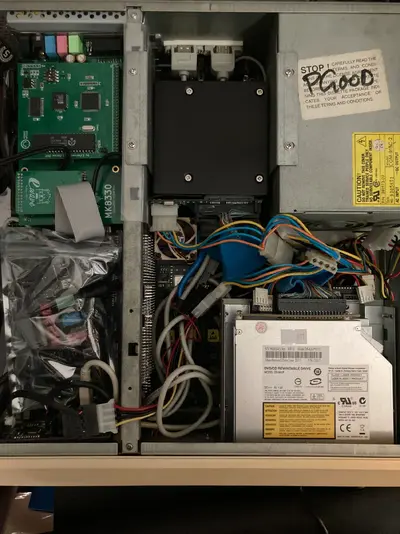
I have remanaged the molex cables, as both CD and DF0: were powered from Y cables coming from who knows where inside my mess of cables.
I have connected them directly to the PSU without Y cable and it is much better. CD works, DF0: works, front USB are now at steady 4,80V which is not too bad for the A4000.
Here is a picture of the inside. One day i should get rid of all the extra cabling.
Why was it working good before failing? I will never know.
 

Attachments

  • IMG_6053.webp
    IMG_6053.webp
    302.4 KB · Views: 1
Good news, CD capability is back, and everything else too.
I have remanaged the molex cables, as both CD and DF0: were powered from Y cables coming from who knows where inside my mess of cables.
I have connected them directly to the PSU without Y cable and it is much better. CD works, DF0: works, front USB are now at steady 4,80V which is not too bad for the A4000.
Here is a picture of the inside. One day i should get rid of all the extra cabling.
Why was it working good before failing? I will never know.
Wow! I had something similar in a A1200 tower. Some of my extension power leads actually started to melt! Caught it in time.
The problem you have in the A4000 desktop case is lack of space and cooling. Wouldn’t be surprised if heat and cold have caused connectors to heat up and cool down causing movement on the molex connectors.
Also the more distance in a cable the more voltage drop off. Looking at your PSU (original?) unless you have recapped it, then you may experience power fluctuations.
At least you have sort out the problem.
 
Yeah i guess that adding the keyboard and mouse controller on the weak usb ports has damaged those Y cables further and now they are done. I will take them off and shorten the lines at the next occasion. Thanks.
 
Back
Top Bottom