Indivision AGA mk2 + harddisk = no go?

  • Thread starter Thread starter Khebonger
  • Start date Start date
  • Replies Replies 39
  • Views Views 3594

Khebonger

New member
Joined
Jun 27, 2016
Posts
37
Country
Nederland
Region
NB
got home an hour ago, found my Indivision AGA mk2 on my doorstep
11pm, the night is young, let's install it

only to find i can't put my harddisk back in because the Indivision board is in it's way?
"manual" only mentions removing the harddisk, not a word on remounting it

grrr
 
"manual" only mentions removing the harddisk, not a word on remounting it
True. One usually replaces HDD with SD or CF card. My solution looks like this:

ka47_view1_288.jpg
 
Last edited:
I've purchased a longer IDE cable and a Kingspec PATA SSD which I just shoved near the connectors on the floppy side. Nothing generates heat over there so it should be fine. Made sure it's not conductive first, don't want any shorts.
My Amiga 1200 also had intermittent problems when original HDD mounting platform was installed. No issues since I removed it.
Do your Amiga a favor and replace that mechanical, power hungry, noisy, vibrating thing with something else. :)
 
Right. First partition with Workbench is about 500 MB and Kickstart 3.1 boots from it by default, no problem. The rest is one huge partition which Amiga doesn't see until Workbench loads updated scsi.device while booting. I've used PFS3 for both partitions but you can use any filesystem. I wouldn't recommend FFS on big partitions because Amiga doesn't have enough RAM to repair the FFS if anything goes wrong.

If you decide to use SSD then make sure you power on your Amiga every couple of months or so to allow SSD to recharge the cells. If you leave it unpowered a year or more, you risk losing all your data.
 
Last edited:
that's something i didn't know about ssd

any pata ssd will work?
i'd rather buy locally, i can get a transcend 32gb (TS32GPSD330) for a good price

edit: oh wait, that "industrial" version doesn't even need a cable, that's cool
 
Last edited:
Don't know about other PATA SSDs but I guess they work. See CraigsBar's post above. Fitzsteve was praising Kingspec so I gave it a try and it works perfectly.
Earlier I was experimenting with SATA/IDE adapters and that was bad, Amiga couldn't see any partition by default so I had to boot from a floppy to load updated scsi.device every time before booting from SATA SSD. That was not an option for me so I went with PATA SSD and never looked back.
 
pata ssd is on its way :)
seller (vesalia) now shows an info text about the internal harddisk needing relocation
 
Nice.

Let me know if you get stuck with partitioning the drive. Default scsi.device can't handle such large drives so it's easy to get confused with all the negative numbers on the screen.
 
that might become a problem indeed, it's been 20 years since i last had an Amiga, so any tips are welcome :)
 
There's a good guide over on EAB for installing a large drive. As for the partitioning, you could always download and use Amikit which is based off OS 3.9 to do it, that way your disk size will show the correct numbers.
 
Yes you could do that. If you decide to go with good old WB3.1 or ClassicWB then try this...

Boot your WB3.1 floppy. Start HDToolBox, click "Change Drive Type", click "Define New", click "Read Configuration" (the size won't match, just ignore it), click "Ok". click "Ok". Now click "Partition Drive", click "New Partition", create just one 500MB partition, you can use filesystem at will, I used PFS3. Here is a PFS3 guide with tutorial for libs, IDs etc: http://grimore.org/amiga/compact_flash
Don't create other partitions yet, all you need is just one for WB at this point. Quick-format the partition using appropriate command line tool (for PFS3 see the guide mentioned above).
Copy everything from your mechanical drive's WB partition to this newly created partition.
Reboot your Amiga, it should boot fine.
Now you need to add the updated scsi.device. I've used 43.45 which came with ClassicWB in MyFiles/LargeHD/128GB_Support/SCSI_v43_45_ChrisToni. Copy A1200IDE.scsi.device.43.45 to Devs: and rename it to scsi.device. Add the following to the top of the S:Startup-Sequence:

Code:
IF EXISTS DEVS:scsi.device
  C:LoadModule DEVS:scsi.device
EndIF

Now reboot your Amiga and verify the updated scsi.device is loaded. Open the shell and type "version scsi.device", it should reply with "scsi.device 43.45".

If everything is ok, proceed to HDToolBox and create and quick-format other partition(s) at will.

At the end, verify that everything is fine using Check4GB command line tool. It should look like this:
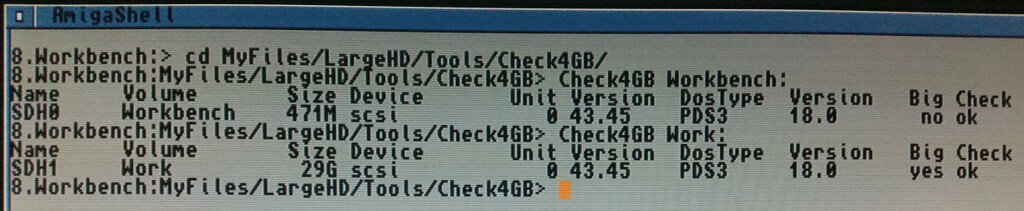
amiga-ssd.jpg
 
Last edited:
argh, think i messed up the cable on the indy.

i thought it would be great idea to lead it through the shielding but it got caught
now i can't get a stable image :(

weirdly enough, the indivision logo does show up readable on the display, hope i didn't break the Amiga....
 
Are you using the grounding cable which arrived with the Indy? I had unstable image on mine until I connected one side of the grounding cable to the Indy and screwed the other to the screw hole near the PSU connector. Without it, the GND on the indy is floating a little above the 0V and it causes instabilities. Check with multimeter first to make sure you're connecting it to the GND (0V). You don't want to connect it to anything else.
 
Last edited:
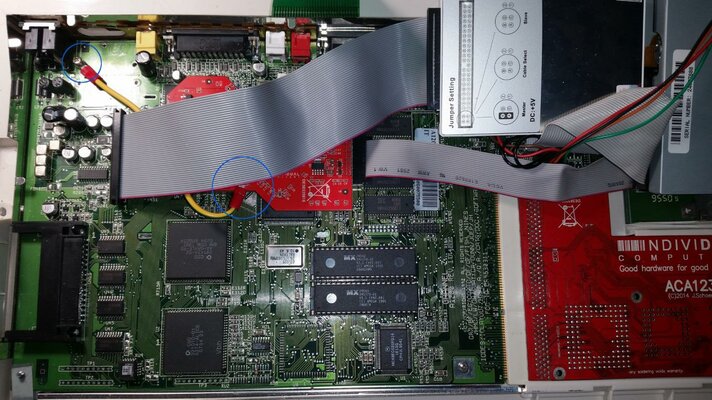
Here it is, both sides of the cable are marked with a blue circle...

20160712_204529.jpg

I guess you don't have the modulator removed. In that case try to find other ground nearby using multimeter. The screw at the left bottom corner is also a ground and the rail on the bottom of the picture but I'm not sure the grounding cable is long enough to reach there. The shield (if you have it) should also be the ground. Screws on the RGB connector should be ground too.
 
Last edited:
ah right, you got rid of the RF module

mine still has it and of course no soldering iron in sight, guess i'll be shopping again tomorrow :)

thanks for the photo!
 
I guess even taping it to the RF modulator's cover should do the trick. No need to (de)solder anything.
 
Back
Top Bottom