
You are using an out of date browser. It may not display this or other websites correctly.
You should upgrade or use an alternative browser.
You should upgrade or use an alternative browser.
Indivision AGA mk2 + harddisk = no go?
- Thread starter Khebonger
- Start date
- Replies 39
- Views 3594
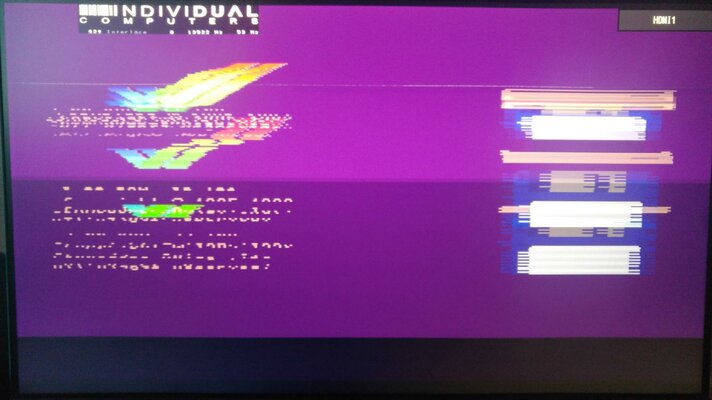

had to pull the indy off to put on the grounding wire anyway, so it's reseated
cable was 'dented', so i guess the bits i tried to bend out of it's way wasn't enough, maybe it's broken inside?
odd that it does show the logo normally
cable was 'dented', so i guess the bits i tried to bend out of it's way wasn't enough, maybe it's broken inside?
odd that it does show the logo normally
Last edited:
will do, i'm pretty sure the cable is fried
didn't have time to do something with the Amiga for some weeks, but managed to hook it up tonight to my TV, image is just perfect, so i think it's really the cable
been trying the 32gb ssd, no luck so far
it does partition, but after reboot, partitions don't show up so i have nothing to format...
didn't have time to do something with the Amiga for some weeks, but managed to hook it up tonight to my TV, image is just perfect, so i think it's really the cable
been trying the 32gb ssd, no luck so far
it does partition, but after reboot, partitions don't show up so i have nothing to format...
Last edited:
Weird. Have you done this in HDToolBox?
Don't try to type disk geometry manually after "read configuration" part. I made that mistake first time I tried SSD. "Read configuration" can display weird numbers but that's normal.
Change Drive Type -> Define New -> Read Configuration -> Ok -> Ok -> Partition Drive -> (at this point you create only first partition no larger than 500 MB).
Don't try to type disk geometry manually after "read configuration" part. I made that mistake first time I tried SSD. "Read configuration" can display weird numbers but that's normal.
yeah that's what i did. i did read somewhere you have to change the MaxTransfer to 0x1fe00, but using the default value doesn't make a difference
settings in photo
maybe a 32gb ssd is too big for the amiga to handle? weird that it can partition it...
edit: oh you have a 32gb ssd as well I see, or is the cf card your boot device?
edit2: i did use standard FFS, not PFS3, don't know if that is making the difference?
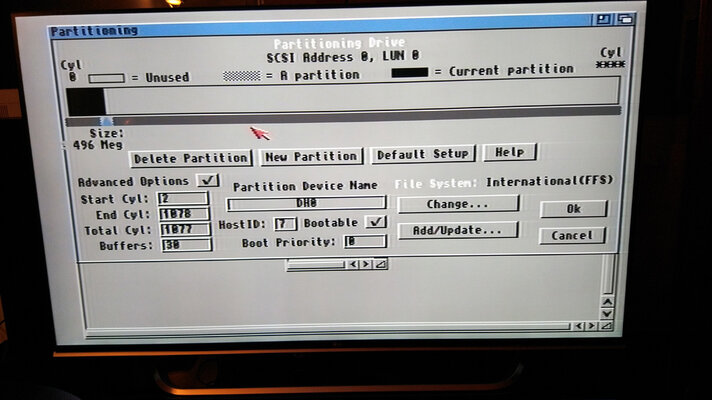
settings in photo
maybe a 32gb ssd is too big for the amiga to handle? weird that it can partition it...
edit: oh you have a 32gb ssd as well I see, or is the cf card your boot device?
edit2: i did use standard FFS, not PFS3, don't know if that is making the difference?
Last edited:
MaxTransfer of 0x1fe00 should be fine but it's unrelated to disappearing partition problem.
Everything on your photo seems correct to me.
When you say "it does partition, but after reboot, partitions don't show up so i have nothing to format", do you mean the partition disappears in HDToolBox? Next time you get into HDToolBox, there is no partition defined? I've never seen anything like that.
I have only 32GB Kingspec SSD in my Amiga and it boots just fine but it started booting only after formatting the first partition from the shell. Basically, after creating the first partition and rebooting, I had to boot the floppy with HDToolBox once again, go into shell and format from there. After that it was bootable.
Everything on your photo seems correct to me.
When you say "it does partition, but after reboot, partitions don't show up so i have nothing to format", do you mean the partition disappears in HDToolBox? Next time you get into HDToolBox, there is no partition defined? I've never seen anything like that.
I have only 32GB Kingspec SSD in my Amiga and it boots just fine but it started booting only after formatting the first partition from the shell. Basically, after creating the first partition and rebooting, I had to boot the floppy with HDToolBox once again, go into shell and format from there. After that it was bootable.
no the partition remains as defined, it just doesn't show up as an icon in workbench (as unformatted)
that's what i saw in a video, you partition, save, exit & reboot and the partitions show up as icons
wrong way to do it? just use shell to format?
that's what i saw in a video, you partition, save, exit & reboot and the partitions show up as icons
wrong way to do it? just use shell to format?
Just format it from the shell and it should be fine. Use a quick format or you'll wait forever to finish it. Type "format ?" to see the syntax.
Make sure you format it as FFS since you created FFS partition.
...or something like that (I'm not near my Amiga at the moment).format drive DH0: name "Workbench" quick
Make sure you format it as FFS since you created FFS partition.
Last edited:
device not mounted: This error occurs when a tool needs a disk that is not currently in a disk drive
Either your partition is not named "dh0" or Amiga doesn't see it.
Edit:
Could be this SSD is not compatible with Amiga. I suggested Kingspec for a reason. Check this thread for Transcend SSD (TS32GPSD320) issue:
http://eab.abime.net/showthread.php?t=68431
Last edited:
might be this, too bad i have no access to a floppy drive to copy a program that's mentioned to wipe it
edit: hmm, C:Info doesn't show them either. i guess new ssd
Rare issue: Drive shows up as 'no disk in drive' after partitioning?You have partitioned the drive normally, then after a reboot, instead of showing up as NDOS / not a dos disk, some or all FFS partitions don't appear on workbench at all, and C:Info lists all missing partitions with "no disk in drive" state. (HDToolbox still shows all partitions correctly.)
This is a rare DOS/FFS bug described by Toni Wilen.
If the first 4 bytes of the first block of the partition contains bytes $FFFFFFFF, the FFS file system gets confused and thinks there is no disk.. (It might confuse dos disk type $FFFFFFFF = -1 = ID_NO_DISK_PRESENT with real dos type)
This bug can trigger even if drive is new, for example some DOM's or solid state memory cards may contain random looking non-zero data from factory. (Test patterns?) Fix is to wipe the drive completely
https://www.amibay.com/showthread.php?19899-CF-SD-and-large-drives-FAQ
edit: hmm, C:Info doesn't show them either. i guess new ssd
Rare issue: Drive shows up as 'no disk in drive' after partitioning?You have partitioned the drive normally, then after a reboot, instead of showing up as NDOS / not a dos disk, some or all FFS partitions don't appear on workbench at all, and C:Info lists all missing partitions with "no disk in drive" state. (HDToolbox still shows all partitions correctly.)
This is a rare DOS/FFS bug described by Toni Wilen.
If the first 4 bytes of the first block of the partition contains bytes $FFFFFFFF, the FFS file system gets confused and thinks there is no disk.. (It might confuse dos disk type $FFFFFFFF = -1 = ID_NO_DISK_PRESENT with real dos type)
This bug can trigger even if drive is new, for example some DOM's or solid state memory cards may contain random looking non-zero data from factory. (Test patterns?) Fix is to wipe the drive completely
https://www.amibay.com/showthread.php?19899-CF-SD-and-large-drives-FAQ
Last edited:
Nice find. You can transfer the program with PCMCIA CF card. You can also hook the SSD to an old PATA PC/Mac, boot linux from USB stick or CD and use the dd command to write zeroes to disk. Or... you can do it properly and use PFS3 instead of FFS. 
even nicer find: install the accellerator before installing the ssd
i hadn't installed it yet, never knew accelerators have better support for large disks
doh
(after installing the ACA1233n i had also ordered, DH0 shows up right away....)
i hadn't installed it yet, never knew accelerators have better support for large disks
doh
(after installing the ACA1233n i had also ordered, DH0 shows up right away....)
Wow, had no idea either. I don't see how or why it would work with an accelerator but as long as it works...
You're all set now.
Just don't try to create a large FFS partition, it would be impossible to repair it if it gets corrupted. Use PFS or SFS instead.
You're all set now.
Just don't try to create a large FFS partition, it would be impossible to repair it if it gets corrupted. Use PFS or SFS instead.
i'm guessing you had your accelerator before the ssd?
when i had my first amiga, i also had an accelerator, but way back then there were no ssds (or Indy AGA cards)
just had a 40mb harddisk, i can only laugh about that first partition being 500mb
(or the 128mb memory the accelerator has)
when i had my first amiga, i also had an accelerator, but way back then there were no ssds (or Indy AGA cards)
just had a 40mb harddisk, i can only laugh about that first partition being 500mb
(or the 128mb memory the accelerator has)
Yes, my 1200 already had ACA1233 when I bought it a year ago. I don't remember if I ever switched it on without the accelerator. If I did, it was just to make sure the original CPU is working.
My first Amiga was 500 with 512 KB memory expansion but it was all about floppies back then. I wasn't even thinking about HDD at the time. Even today, with WHDLoad on a SSD, Gotek and whatnot, I still like to use DSDD floppies on both Amiga and C64/128.
My first Amiga was 500 with 512 KB memory expansion but it was all about floppies back then. I wasn't even thinking about HDD at the time. Even today, with WHDLoad on a SSD, Gotek and whatnot, I still like to use DSDD floppies on both Amiga and C64/128.
been a bit inactive, had contact with Jens, i need to send the Indy to him, so will have to arrange that
in the meantime, trying to install 3.9 on my ssd, latest attempt was using this guide, but i'm ending up with an empty "workbench screen", no workbench or disk icons
any ideas?
edit: i now have the kingspec ssd, much easier to connect to pc to install from winuae
in the meantime, trying to install 3.9 on my ssd, latest attempt was using this guide, but i'm ending up with an empty "workbench screen", no workbench or disk icons
any ideas?
edit: i now have the kingspec ssd, much easier to connect to pc to install from winuae
Last edited:
Similar threads


- Replies
- 6
- Views
- 504


- Replies
- 7
- Views
- 406

