KCS DHD-Drive Issues

  • Thread starter Thread starter merlinkv
  • Start date Start date
  • Replies Replies 19
  • Views Views 3331

merlinkv

Active member
Joined
Oct 15, 2009
Posts
4,114
Country
Ukraine
Region
Kyiv
Hi to all :)

Time a go I have bought here a nice KCS DHD-Drive unit but I canoot get it to work :(

I readed specs in some sites and the unit can work as standard floppys or HD ones (with drivers). There is a 3 steps switch in the back with no description.

So, I connected it to one A4000 (with DF0 & DF1) and to my A500 (with only DF0):

On A4000: The lights of the four drives are flashing all times and cannot boot.

On A500: Power light flashes and cannot boot

Mobos are completely refurbished and in full working order, also I have good PSU's in both machines so is not a power issue.

Anyone knows about the switch functions? Tested the three positions has no changes. Maybe is needed any hardware modiffication on the Amigas?

Anyhelp will be highly appreciated :bowdown: :bowdown:
 
The drives do not need drivers, at least not with Kick 3.1. It should work out of the box even when your 4000 has two drives already.

The switch at the back is drives off, drives on xcopy off, drives on xcopy on (something like that, I will dig up a manual if you need to know for sure)

Edit: Eh, I think you bought that drive from me! Now that is terrible to hear it's now not working! I have tested it prior to sending it to you on my Amiga 600 and it worked fine, did a full format on both drives with both HD and DD disks and booted of both drives. Do you have any other system you could test it on?
Maybe a connector slipped on the inside?
 
The drives do not need drivers, at least not with Kick 3.1. It should work out of the box even when your 4000 has two drives already.

The switch at the back is drives off, drives on xcopy off, drives on xcopy on (something like that, I will dig up a manual if you need to know for sure)


Hi mate :)

If you can upload a manual will be appreciated.

I don't know, I bought as full working unit (I trust you, of course), but no way. Other external units works like a charm....

I will open the unit this evening/night... maybe is something wrong inside due transportation.....

Thanks for your help
 
Hi again,

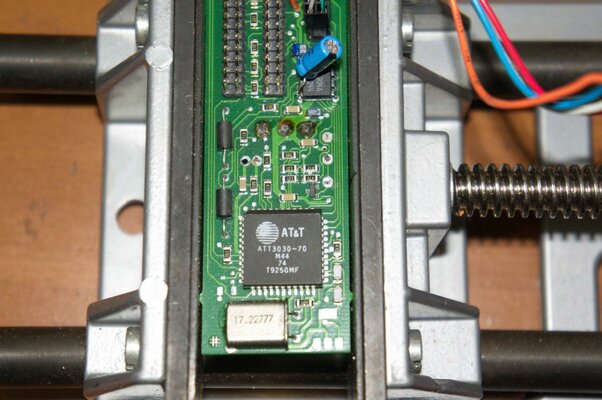
Well, I opened the unit and inside it has two NEC FD1138H drives, a little PCB and..... one CR2032 battery soldered in the PCB :blink:

So, thinking on a battery problem I desoldered the original ( ? ) one and I installed a new CR2032 with socket.

Now, when I connect the KCS unit to the Amigas:

On A4000: My onboard DF0 & DF1 works fine, the external KCS not

On A500: Onboard DF0 works, the external KCS not.

Other test I realised is to power on the inside drives of the KCS unit with external power but no way.....
 
So after you replaced the battery the non-booting issue went away? And the system boots and works fine, of course with the exception of the KCS unit?
 
So after you replaced the battery the non-booting issue went away? And the system boots and works fine, of course with the exception of the KCS unit?

Yes, that is the situation now.... :blink:

Edit: Also tested on an towerised A600... no way
 
Last edited:
Well, you can take a look at these NEC drives, if they look like standard PC HD floppy drives just replace them with some other standard PC HD floppy drives.
The only drives (other than the "official" Chinons) capable of working at 150 rpm in "native" Amiga HD mode were a Sony and a TEAC model IIRC, so maybe the drives are indeed stock PC HD units and it's the small PCB in this unit that buffers the data flow and then outputs it at half the rate to match the Amiga's capability.
 
Thanks for the info :thumbsup:

I will try this evening/night :)

Well, you can take a look at these NEC drives, if they look like standard PC HD floppy drives just replace them with some other standard PC HD floppy drives.
The only drives (other than the "official" Chinons) capable of working at 150 rpm in "native" Amiga HD mode were a Sony and a TEAC model IIRC, so maybe the drives are indeed stock PC HD units and it's the small PCB in this unit that buffers the data flow and then outputs it at half the rate to match the Amiga's capability.
 
I have heard romours about these drives that after opening them, they no longer work. This is the second time I have heard of this issue, but what exactly causes this behavious I do not know. Maybe the CR2032 holds some volatile RAM which is now cleared? (that means the drives would self destruct when the battery runs low, a little unlikely but not entirely impossible).

Is there any EPROM inside? Maybe without the window blocked so any UV light could kill it? (not that it's my experience that they are that sensetive, but still)

BTW: I looked at the print inside the KCS drives, is that not a rechargeable battery? If you put a normal one in, maybe that causes problems?
 
Hi mate,

No EPROM, just one square IC (I can check type & specs this evening/night).

About original battery, it looks like one standard CR2032/1 3v and I used one of the same brand Panasonic.

Maybe it's possible to find the .bin file to reprogramm the IC? I can made this task without probs (If the IC permit this, of course).

I have heard romours about these drives that after opening them, they no longer work. This is the second time I have heard of this issue, but what exactly causes this behavious I do not know. Maybe the CR2032 holds some volatile RAM which is now cleared? (that means the drives would self destruct when the battery runs low, a little unlikely but not entirely impossible).

Is there any EPROM inside? Maybe without the window blocked so any UV light could kill it? (not that it's my experience that they are that sensetive, but still)

BTW: I looked at the print inside the KCS drives, is that not a rechargeable battery? If you put a normal one in, maybe that causes problems?
 
A photo (or a few of them :p ) of the unit's guts would be nice :roll:


A little update,

With new FDD cables, now I get Three BAD units :blink:

DF1: ????
DF2: ????
DF3: ????

If possible I will upload some pics this evening/night
 
Hi again,

Today I have more time, so I taked some pics of the PCB

Of course, I'm not an Solder Master like others here (I'm light years far away :oops: ), but I readed carefully other threads at the site and the results.....
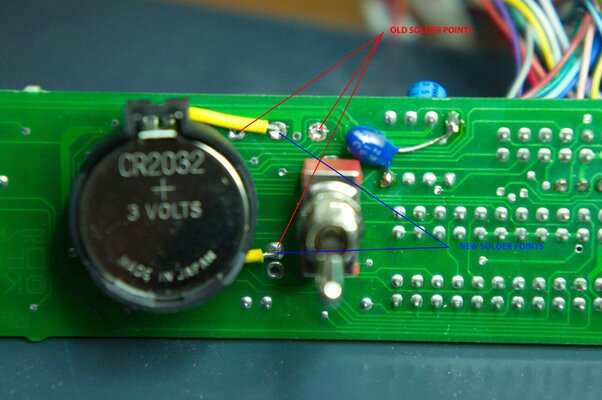
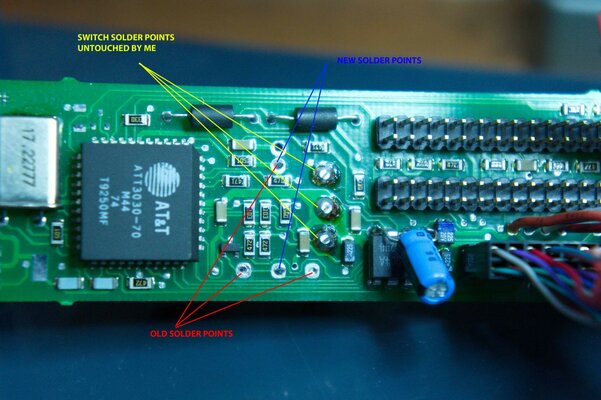
KCS DHD-Drive - 001.jpg KCS DHD-Drive - 002.jpg KCS DHD-Drive - 003.jpg

As I said before, with new Floppy cables I get now Three ( ? ) unreadable units... DF1: ????? DF2: ????? DF3: ????? on my A500 & A600 (they have only DF0: )

Also I tested with different & new CR2032 batteries, but no way.....

Any help? :bowdown: :bowdown: :bowdown:
 
As I said before, with new Floppy cables I get now Three ( ? ) unreadable units... DF1: ????? DF2: ????? DF3: ????? on my A500 & A600 (they have only DF0: )

This happens with the switch set to any of the three positions?
 
Strange, one would think that with the switch at the OFF position you should at least not be getting those weird DFx: ???? 'errors'.
Can you verify that the switch actually 'switches'?
Also reading the datasheet, the ATT3030 FPGA apparently uses +5V Vcc on pins #12 and #34, but judging from your photo #12 is wired to the (-) terminal of the battery, so seems to be pin #34.
 
Hi mate :)

Switch seems to be working, in anyway I will try desoldering the older and installing a new one. But, more strange things... this morning I connected again the unit to the Amiga's "praying for a miracle"... Now, nothing appears, no drives :blink:

One more thing... the AT3030 is an FPGA? It's possible to reprogramm it? Do you have any idea where is possible to get the code? If not, it looks like I have a nice door-stop.

Thanks a lot for your help :bowdown:


Strange, one would think that with the switch at the OFF position you should at least not be getting those weird DFx: ???? 'errors'.
Can you verify that the switch actually 'switches'?
Also reading the datasheet, the ATT3030 FPGA apparently uses +5V Vcc on pins #12 and #34, but judging from your photo #12 is wired to the (-) terminal of the battery, so seems to be pin #34.
 
Last edited:
According to the datasheet it's an FPGA, pin compatible with Xilinx 3000 series or something like that, so it should be programmable.
I have no idea if the code exists somewhere though, I don't even have any hands-on experience with this unit.

But the way I see it, some things to try would be:

a) verify continuity between the corresponding pins of the external cable connector and internal header on the PCB
b) verify that drives + cabling works fine
c) verify that the drives used are Amiga wired/PC wired/maybe other?

A basic approach for b + c would be to test each of these NEC drives i) on a PC ii) on a generic external DD drive's PCB

c) determine (perhaps comparing the PCB with that of a generic external DD drive) if a sub-circuitry can be isolated that makes the drives work as standard ones

d) use external power for peace of mind as per the Hardware Manual the floppy port provides power for a single external unit (although later gen drives skip on the +12v line and quite possibly pose lower requirements on the +5v line too. But why risk it?)

e) verify that the battery should indeed be installed with the polarity as such. The datasheet confused me on this, both because it looks reversed on your photos and because a 5v power source is mentioned while the battery is 3v. Oh well :blink::unsure:

f) If you get bored with it, send it to me :p
 
Hi again,

Thanks for the info mate :thumbsup:

I will try again.... :D

According to the datasheet it's an FPGA, pin compatible with Xilinx 3000 series or something like that, so it should be programmable.
I have no idea if the code exists somewhere though, I don't even have any hands-on experience with this unit.

But the way I see it, some things to try would be:

a) verify continuity between the corresponding pins of the external cable connector and internal header on the PCB
b) verify that drives + cabling works fine
c) verify that the drives used are Amiga wired/PC wired/maybe other?

A basic approach for b + c would be to test each of these NEC drives i) on a PC ii) on a generic external DD drive's PCB

c) determine (perhaps comparing the PCB with that of a generic external DD drive) if a sub-circuitry can be isolated that makes the drives work as standard ones

d) use external power for peace of mind as per the Hardware Manual the floppy port provides power for a single external unit (although later gen drives skip on the +12v line and quite possibly pose lower requirements on the +5v line too. But why risk it?)

e) verify that the battery should indeed be installed with the polarity as such. The datasheet confused me on this, both because it looks reversed on your photos and because a 5v power source is mentioned while the battery is 3v. Oh well :blink::unsure:

f) If you get bored with it, send it to me :p
 
Did you guys ever figure this one out? I picked one up from an AO member thinking I would have time and fun working it out, but it doesn't look like I will for a while and I've already had it for a few years. I'd rather someone work on it, or if someone can give me a jump-start, than let it sit here and rot.
 

Similar threads

Back
Top Bottom