Makin 2.35 ROM for the A570

  • Thread starter Thread starter Xanxi
  • Start date Start date
  • Replies Replies 25
  • Views Views 658

Xanxi

Well-known member
Donator
AmiBayer
Joined
Jun 10, 2010
Posts
3,010
Country
France
Region
Paris
Hi.

I need 2.35 updated ROM for my A570 to continue my investigations https://www.amibay.com/posts/2562126/

I'm sure there are on Amibay nice gentlemen who would be willing to burn me the ROM, but once in a while i like trying to do things by myself.
I have an old eprom burner that i can try to use with an XP laptop with parallel port and a few eproms.

But i need first to build the ROM.
I don't have a linux computer or Docker as suggested on th gifthub https://github.com/C4ptFuture/cdtv-os235patch?tab=readme-ov-file#ImportantNotes
I have a 2.30 ROM matching the correct md5.
I have found a Windows version of bspatch that i run with admin rights.

However,
bspatch 230.rom "CDTV Extended-ROM v2.35 (2022)(CDTV Land)(A570).rom" 235-release-a570-patch.bin
just returns corrupt patch.

I have downloaded several time the patch 235-release-a570-patch.bin but it still doesn't work.

So i am stuck here.

What might be the problem? Perhaps bspatch is no good on Windows?
What to do next?

Thanks for your help.
 
I run docker at home on my homeserver (I have an IT-student at home which needs it). I pulled the repository from git. If you can send me 230.rom via PM, I will build the rom for you.
 
Thanks @HomeLate, i have finally been able to create the ROM.
The patch got to be downloaded as RAW via the Gigthub menu and not by right clicking as i did.
Then it worked.

However, only one file is created with bspatch whereas the gifthub says Docker would create a bunch of files.

My Willen burner is ready and seems to work with my old XP laptop.
I had a very hard time tonight inserting my eproms into the tulip, not ZIF support, and already broke one unfortunately. I hate those chips.

Now i would need a clarification about byte swapping. Docker should create


A570_v2_35.binThis is the A570 CD-ROM drive 2.35 byteswapped ROM image you can use to burn to a 27c400 EPROM
but i only have


CDTV Extended-ROM v2.35 (2022)(CDTV Land)(A570).romThis is the A570 CD-ROM drive 2.35 ROM image you can use in emulators

So how can i byte swapp this before burning?
 
Last edited:
And crap, it seems my chip is not blank although i did let it into the UV eraser for 30 min.

Have to remove it again.
 
You can byte swap with srec_cat: https://srecord.sourceforge.net/ in Windows.

To swap the bytes in a bin file: srec_cat CDTV Extended-ROM v2.35 (2022)(CDTV Land)(A570).rom -binary -byte-swap 2 -o CDTV Extended-ROM v2.35 (2022)(CDTV Land)(A570)_swapped.rom -binary

Are you sure it needs byte swapping? If the rom image contains readable text, it doesn't need byte swapping.

Which eprom are you using? Google the brand + type for a datasheet. In there you'll find the amount of time needed to erase the contents for the eprom.
 
They are from AMD AM27C400-150.
ChatGPT says 30 min should do even with an old lamp from my chinese eraser.

About the byte swap, i don't know but the gifthub mentions the ROM is for emulators and that there is a byte swapped version for burning.

I should also find another 42 pin ZIF socket to put on my tulip socket before i destroy all my chips.

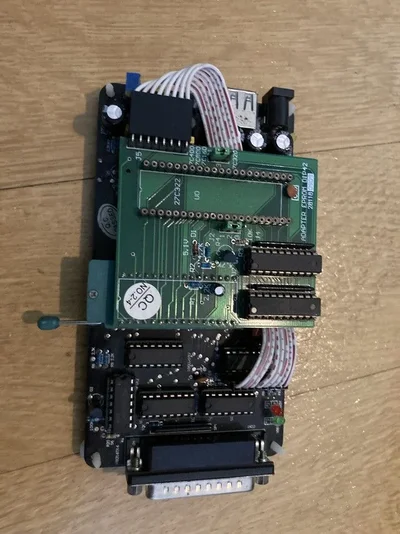
Here is a picture of my burner. I don't know why anyone made chips so difficult to insert into sockets.
 

Attachments

  • IMG-4340.webp
    IMG-4340.webp
    92.5 KB · Views: 6
That's weird.
I have a bunch of these chips, supposedly new in packaging (new from circa 2012 but can't remember from where i got that stuff, burner included).
I have tested 4 so far and none of them is blank, even after a long time in the UV eraser, which seems to light ok.
There is repetitive stuff inside the EPROM when i read them but not FF FF FF. The software says they are not blank.
Maybe i have defective hardware here or bad software.

Anyway, i feel that might be better if someone would burn me that ROM, as i obviously own the A570 and the ROM it has inside already...
 
Last edited:
What type of rom does it need (my A570 is in storage)? I can check if I have one and burn it for you.

Although these sockets are very good, they should have used a regular socket or indeed as ZIF-socket.
 
That's a 27c400 and a 256 KB ROM.

My chips seems to enter easier in the socket now after a lot of precautions to put them in, then extract them clean with one of these japanese chip extractors that i own.
Again, one not blank after another 30 min course in the UV box.

I will try maybe another version of the software, then i will put my hope in you, thanks for your help.
 
That’s weird. I usually put these for 15 minutes under UV and then these are blank. I do have a professional UV eraser if that makes any difference.
 
ChatGPT tells me that somehow the software is mistaken when reading the chip because something is amiss in the setup.

I have now tried version 98d5, checked the jumpers according to the picture in the software for the 27C400, choosen the right type of chip, i use a power 12V PSU, but it still don't see my chips as blank.
I'm going to recheck what the jumpers on the DIP42 adapter itself should do.
 
After thorough tests, i can see as blank a 27C512 on the ZIF socket of the burner itself without the DIP42 card.
Yet, all my 27C400 are still not seen as blank even with correct dip jumpers.
This narrows the problem to the 16 bit adapter card.
 
Ok, case solved!
Problem was actually between the brain of the user and the 16 bit adapter, because i kept aligning the 40 pin chip from the pin 1 of the 42 pin socket as ChatGPT told me to do so yesterday. Now, from the second row, it works perfectly.
So many hours wasted.
Now proceeding to burn the ROM, i will make one byte swaped and one not to see which one will work.
 
I forgot that this ROM being 256 KB it has to be doubled inside the 27C400, so i have redone it.
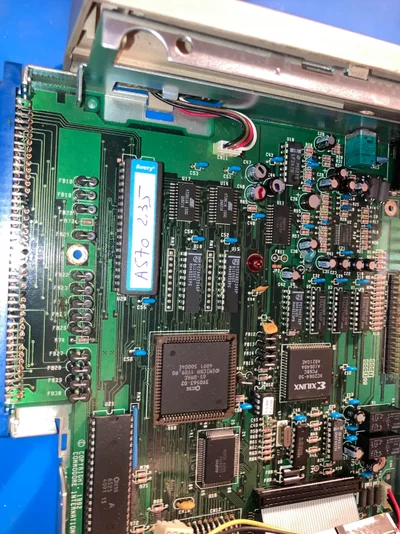
Now it is inside this rather clean unit, even after 20 years of storage, and next step is to test in with my A500Plus and Spitfire 500.
 

Attachments

  • ROM 2.35 in place.webp
    ROM 2.35 in place.webp
    549.1 KB · Views: 6
Unfortunately, no change from the previous 2.30 ROM on my setup.
CD insertion causes small noises in the drive, don't know if it is spinning or not, then nothing happens and it boot straight to the WB from the hard drive, whatever the position of the knob is. Then i can't launch A570 utils such as CDPlay bevause it can find cdtv.library, which i believe should be exposed by the ROM.
The 2.30 did the same.
The unit is still detected in Sysinfo as A2091/A590 so it does autoconfig.

Problem is i don't know how a working A570 should behave or what would be the normal working noise.
 
It doesn't work either as CDTV/A570 should with a mere 68000 in replacement of the spitfire. Yet, i have seen the A570 startup screen last week when testing briefly a TF536.
So maybe i programmed an inadequate ROM.
I will have to start over again next week.
 
I only recently bought an A570 here on Amibay. If I remember correctly, it can boot in two ways when a CD is inserted:
- if a music cd is inserted, the audio controls should be displayed an you can play an audio cd
- if a CDTV cd is inserted, it should boot with the contents of that CDTV, a game for instance.

This is with the 2.30 roms.

With the 2.35 roms, there should be a brief pause until it boots up the hard drive connected to the TF536. During the pause, it checks if a cd is loaded or not.

Unfortunately, I don't have a TF536 so I can't check the above. I do have the parts to build one, but not the time unfortunately. I also never took the effort to build it because I have Vortex AtOnce Plus in my Amiga 500 which doesn't tolerate any accelerators. It does work with the A590 and A570.

And indeed, you should have rom image twice in a 27400. Here's a good overview of eprom's and there size: https://www.cpushack.com/EPROM.html Don't forget the /b indicating it's a binary file.
 
Thanks Homelate.

Now i got the real ROM image A570_v2_35.bin. It is indeed byte swapped compared to the other one. I have doubled it and programed it into the 27C400, and verified it.
Is it in the right place inside the A570.

But now the device behave like this with the A500Plus and Spifire:

- knob off to the left : boots straight for the Spitfire drive - still no cdtv.device, an audio disc pretend to spin for a very short time, no A570 software is working because it is looking for cdtv.device according to SnoopDOS

- knob on to the right : black screen forever, no CDTV logo, no boot

As i don't see what i could be doing wrong now, either the A570 is faulty or it is incompatible with the Spitfire beyond the Autoconfig problem (which has been solved by the soldering job on the left connector).
Before that, with the original 2.30 ROM, the A570 has shown it's boot screen when trying a TF536 with no drive but with red taint - supposedly the TF536 needs a special CDTV firmware to work, and ROM 3.1 and i am on 2.05.

I can still test it with a mere 68000 to see if the A570 would show its boot screen, or go find a spare A500 in my storage place and get it in shape, but i am quite fed up now.
 
I have an A500plus with a Spitfire500 in it and have done the config pass through ( wire to config out ) and it works fine with both the A570 and the A590 .

Iwould give more info , but currently have the A2000 on the bench and will be helping with the testing of the SpitFire2000 .
 
Last edited:
Oh that means my A570 is not working then.
Is yours working with ROM 2.30 or ROM 2.35?
 
Back
Top Bottom