
Making a SCART input cable for a Commodore 1084, or trying to

  • Thread starter Thread starter KBQ
  • Start date Start date
  • Replies Replies 8
  • Views Views 3415

KBQ

New member
Joined
Feb 10, 2015
Posts
265
Country
Netherlands
Region
Nijmegen
This is a right pain. I remember a few years ago I had a phillips CM8833 and I made a cable where one end had a female scart connector. That way I could plug in Playstation, Freeview box, etc. Took no effort at all.

Now I'm trying to do it for a Commodore 1084, the early type which has two DIN connectors on the back - one digital CGA and one analogue RGB. And it's giving me the biggest headache ever!

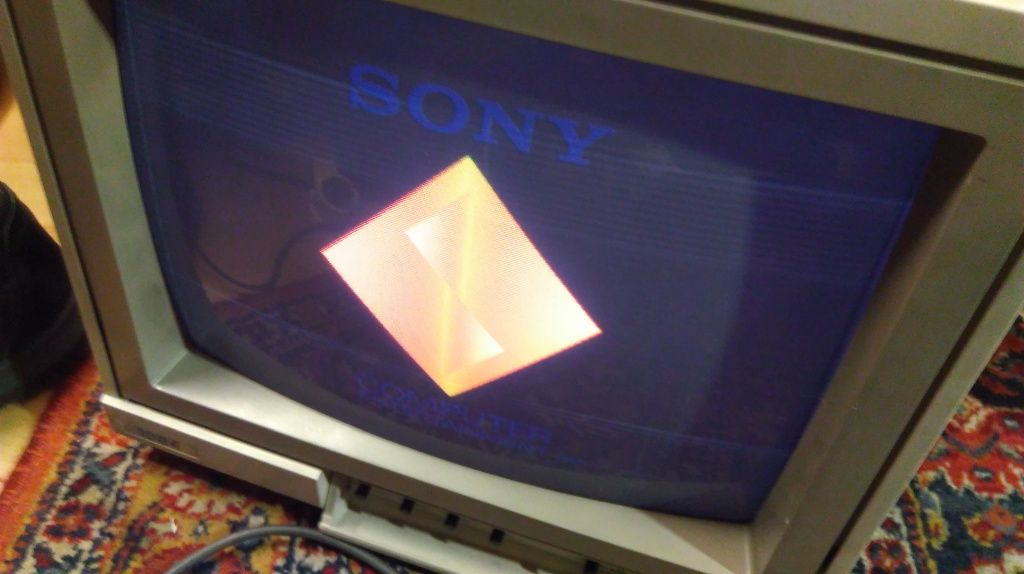
R G and B connected correctly, triple checked. Tried feeding SCART composite pin to hsync, like I did on the phillips, no picture. Feed composite to Vsync - get this result:
IMAG0681.jpg


I've never seen this before in my life. White is black! All other colours are fine. There's also a little horizontal juddering about 3/4 of the way down.

I'm absolutely baffled. Have any of you seen this sort of thing before?
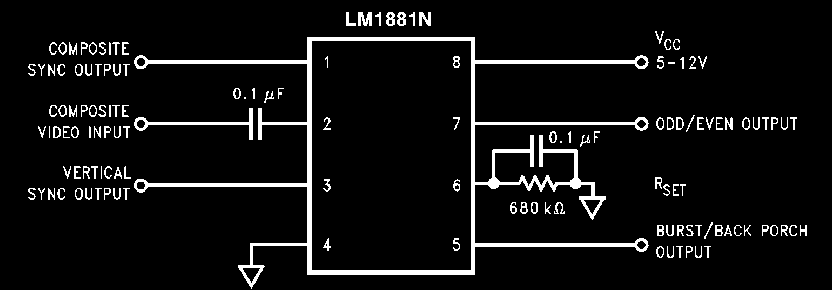
 
To investigate further I've put together a sync stripper based on an LM1881.

rolling.gif


I've made sure to use a stable supply of 5v, using alternately USB power from a laptop, a USB power bank I trust, and also a bench supply.

Results are interesting, but not good. The monitor can't sync with the LM1881 output at all, it sits there rolling. Be that with the stripped composite sync fed to the V sync, or the H Sync. When putting comp sync into H-Sync, I also tried both with and without the stripped V sync going to it's corresponding pin, but that makes no difference either.

The only result I've got with any picture at all is when sending the playstation's composite video directly into the V-sync pin. I also have a SNES with RGB Scart cable, that gives only a blank screen.

So, would it be fair to think the monitor might be broken? It works fine in composite mode, but what's the point of an RGB monitor that can't do RGB?
 
Looking at the DIN pinout, looks like it has no support for CSync, so you need to feed it proper separate H and V Sync.
Connecting CSync to either H or V probably confuses it.

I have an identical looking 1084 with SCART input, which works only with CSync.
 
You must be clear here - Csync is only the sync part of a composite video signal.

With this my monitor doesn't work. However with the full entire composite video signal fed to a H or V sync pin, it syncs. The monitor must therefore have it's own sync stripper, and it's trying to strip video information that isn't there when fed Csync, and screwing it up.

I would be incredibly surprised if your monitor with built in SCART works only with CSync - no SCART device sends it, only CVideo.

None of this answers the strange colour behavior.
 
Last edited:
According to SCART standard, the Composite Video pin is used as CSync in RGB mode.
My 1084 works great with many devices which only output CSync, had no issues so far.

I highly doubt your monitor performs any type of sync stripping on the RGB input.
 
Lets look at real life output devices that actually exist, VCR, Playstation etc.

Those things don't have an "RGB Mode". They simply output RGB and composite video out of their video socket at the same time. When you set your TV to use RGB or composite, that's simply changing what the TV pays attention to. When your TV is using RGB Scart, it's still syncing to the composite video signal - there is no other sync source. To do this it has it's own methods of disregarding the irrelevant parts of the signal - this process is called sync stripping.

That is what it means, normally, when the SCART standards say composite is used for sync in RGB mode. It doesn't mean the specific type of signal known as Csync, it means it uses the output device's Cvideo as a sync.

This has started to change with the LCD TVs, who often can accept either CVideo or Csync on the composite SCART pin. In fact a lot of them hate CVideo for syncing RGB, and give weird artifacts and checkerboard patterns. But that's a total digression.

If you don't have any actual useful advice to say about my specific problem please don't reply again.
 
Lets look at real life output devices that actually exist, VCR, Playstation etc.

Those things don't have an "RGB Mode". They simply output RGB and composite video out of their video socket at the same time. When you set your TV to use RGB or composite, that's simply changing what the TV pays attention to. When your TV is using RGB Scart, it's still syncing to the composite video signal - there is no other sync source. To do this it has it's own methods of disregarding the irrelevant parts of the signal - this process is called sync stripping.

That is what it means, normally, when the SCART standards say composite is used for sync in RGB mode. It doesn't mean the specific type of signal known as Csync, it means it uses the output device's Cvideo as a sync.

The "devices" I have connected to my 1084 all output a clean CSync signal, not composite video, through their video ports (for example, the A500).
What you write is correct for TVs, but not for the 1084.

If you don't have any actual useful advice to say about my specific problem please don't reply again.

No problem...
 
Have you tried moving the Video mode switch?

https://www.manualslib.com/manual/1338750/Commodore-1084.html?page=5#manual
Hope I've got the right variant.

Nope, not that one, I've got the one I took a picture of and posted.

Yesterday I went and rechecked all the connections and found that ground pin wire broke off inside the DIN plug. Fixed that, and got correct colours, but a rolling picture. Added LM1881 back in, and got a perfect picture with playstation 1 and 2. MGS and rayman look great.

SNES is rolling like mad. This cheap scart lead was wired up all funny, 8, 16, 18 soldered together, so I'm going to get a pinout for nintendo's video socket and check what wire is going where.
 
Last edited:
Back
Top Bottom