Mediator 1200 TX Troubles

  • Thread starter Thread starter BigRed
  • Start date Start date
  • Replies Replies 14
  • Views Views 129

BigRed

Member
Joined
Jan 15, 2019
Posts
60
Country
Germany
Region
Hesse
Hey Folks!

I recently bought a Mediator for my trusty 1200, but I run into troubles.

Here's the setup:
  • 1200 in custom Tower
  • TF1260 (Firmware 999)
  • 3.2.3 Custom ROMS (stock + ehide.device)
  • 3.2.3 OS
  • Radeon 9250
  • Installation of Mediator CD, followed by the update pack from elbox and replacement of pci.library & vendors.txt
  • MedConfig executed
For the installation, I followed the Mediator Guide on github and the Radeon help on the MM CD.

Here's the situation:
  • Mediator is seen in Early Startup Menu and Showconfig
    • Mediator is listed as Z2 in ESM Showconfig...Shouldn't this be Z3?
  • PCIInfo shows cards with bogus IDs and "Unknown" vendor/name strings
    • This happens for the Radeon and a Soundblaster card
    • Radeon shows as 2 cards, Soundblaster as one card
  • P96 fails to initialize the Radeon Card
  • AHI crashes when Soundblaster is installed
What I tried already:
On every try, the results are the same. The only difference is the Config=closed jumper. When this is open, the TF1260 is not seen by showconfig, but works fine.

Does anyone have any idea left?
Today, I will try if the Radeon is working (test in PC) and maybe disassemble the setup again and try in another 1200. But before I do that, I hope some of you has a better idea ;-)
Thanks in advance!
 
@BigRed

Amiga 1200 use the zorro 2 bus so it indicating Z2 is correct.

Unless you are using PCMCIA slot Mem window should be 8mb (I noticed your link goes to my post wow I cant remember this I need to have a read )

What I would suggest doing is one card at a time starting with your video card

There is a bug with the setup of the sound card which can cause it to crash I need to find out what that is I'm not sure if it was fixed with new drivers from Elbox ( if you haven't already download the newest drivers from Elbox)
 
Last edited:
Wow I forgot all about that thread OK so the TF and Mediator does need the 4mb window unless this has been sorted in a newer that @supaduper mentions at the end of that thread I cant remember if I did the update, Notice you are on the 999 Firmware so 8mb should work for you

I would recommend getting it setup with the B1230 first and then going to the TF1260
 
Last edited:
Okay. Here is how I fit and setup a Mediator:

1).. download free from Aminet V2 or buy the new V3 from Icomp the Picasso96 software. Install this First! Why? Because the Mediator setup will put the Radeon driver into a Picasso96 area which is needed by installing Picasso96 (Now known by Icomp as P96). if using the older V2 P96, then choose “Cybervision 64/3D” on installing. Also re-run setup again to make sure output is set correctly for your Monitor. After installation go to Devs Monitors. Rename the Cybervision Icon to Radeon. Go to Icon Information and edit the card from Cybervision to Radeon and Save. Reboot.

2).. Check the mediator is connected up 100% to the A1200 mainboard. Check connections are pushed in.

3).. Make sure you are using a Very Good PSU. I.e it has the right voltages especially -12volts. I use a ATX Corsair.

4).. Start as @Timtheloon as mentioned with the RTG card (Radeon) first. This is essential to provide DMA and RAM for the other PCI cards you are attaching. Without this working, you won’t get the other PCI cards to function.

5).. Use the 8MB Window unless you are using the PCMCIA slot. The config jumper is either on or off depending on the accelerator used. To test, use the 2 mouse buttons on power up and look to see in the early startup if the board and accelerator are being seen.

6).. Install MMCD first, then MMCDUPD2.6 then copy over the other updated PCI.library (V13.15), Radeon.card drivers not put into MMCDUPD2.6. Make sure you are then running Mediconfig afterwards. As this will setup other stuff to make the system function. MediaConfig should be in Sys

7).. Check all with PCIINFO command. For the sound card, rem out the “Mixer” or this will cause the system not to boot if you don’t have a sound card installed. Also replace Mixer with Ghostmix from Elbox download page and set this up instead.

8).. Once all looks good then start adding a PCI card at a time.

Good Luck.
 
Thanks for the answers!

I just did a fresh install and proceeded as described by @Timtheloon and the Mediator guide. Same results.
I swapped out the 9250 with a 9200 from my Peg2, same results.

But i figured out that pciinfo shows me subvendor and subdevice IDs, where at least the subvendor is listed in vendors.txt.
Just for asking the obvious: Is vendors.txt just for "nice output" or does my exact card need to appear there?

I will do a fresh install again and proceed with 1) as described by @Boing-ball . I am using P963.2 from icomp. (But also tried 2.1 from Aminet with no difference whatsoever)

As for the rest of @Boing-ball list:
2) Triple checked that ;-)
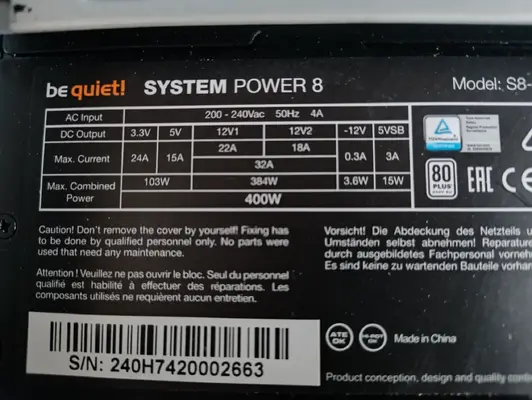
3) See pic for specs of the PSU...that good?
4) After first unsuccessful attempt, all further tests have been done with only the GFX
5) TF1260 is seen with config=closed, Blizzard with open or closed. Will try both 4 and 8 MB Windows
6) That's how i rolled :giggle:
7) & 8) Sound & other cards I will test once GFX works.
 

Attachments

  • IMG_20260104_145721840.webp
    IMG_20260104_145721840.webp
    142.2 KB · Views: 2
How many monitor drivers to you have in dev/monitors folder

I find that OS 3.2 does not like multiple drivers in this folder (don't know why)
 
So just read that thread again that you linked in your first post, it looks like the firmware on your TF is old if you see this post below it states that my TF was on the old firmware 999 when doing my testing.

@ Tim, there is a new firmware ( 68090 ) out and checking my records you have 999 firmware so it is x2 firmwares old, if you can`t update it just post to me to update

Are you able to update your TF?
 
Small Futurama quote: Good news everyone!

I installed a fresh 3.2 and then followed @Boing-ball advice to first install P96, and then die MM CD.
This seems to be the culprit.

Now I don't get P96 error when clicking the Radeon Monitor, P96 Checkboard finds my card and I was able to configure a ScreenMode that works!

For future reference, here's what I've done this time:
  1. Installed fresh 3.2 with 3.2.3 ROMs
  2. Installed P96 3.2, and ran again to set up Monitor (as described in Radeon Guide on MMCD) - reboot
  3. Installed MMCD - reboot
  4. Installed MMCD Update Pack - reboot
  5. Copied vendors.txt and pci.library - reboot
  6. Tested with pciinfo & checkboards - reboot
  7. Installed 3.2.3 Update (did this last because I thought maybe that was the problem)
I've done above steps successfully with Blizzard1230 & TF1260.

So the current, confirmed working, setup is:
  • ROM 47.115 with ehide added
  • OS 3.2.3
  • TF1260 with old 999 Firmware
  • Mediator 1200TX with Radeon9250
  • Config=Closed
  • Memory Window=4M (will test 8M in future)
Now....I am going to clean up my desk :ROFLMAO:

Thanks @Timtheloon & @Boing-ball for your support!
 
So just read that thread again that you linked in your first post, it looks like the firmware on your TF is old if you see this post below it states that my TF was on the old firmware 999 when doing my testing.


Are you able to update your TF?
Will do in the future, but FW 999 seems to work at the moment.
 
Bit late to the party…

The PSU looks good to me. 👍🏻

Unfortunately the A1200 Mediators are always more problematic than most.
The 8MB is more for Warp3D than anything else. So if the 4MB works, then go with it.

Glad you got it to work.
 
Gratz on getting it running, I didn't think the TF1260 worked with the Mediator so that's good to know!
 
After some thinking I have an alternative Idea why it works now:
Before the last test, I repartitioned my Boot Drive, and set MaxTransfer to 0xFE100. It is quite possible that this wasn't the case in the original install, because I read that in 3.2 that is no longer strictly necessary in most cases.
I do remember that at some point "version pci.library" gave me 9.1 when it should read 9.15, which in hindsight could mean data corruption.
That could also explain the garbage output from pciinfo, because vendors.txt was corrupt.

So what fixed it was either setting MaxTransfer, or installing P96 before everything else......or some other reason :ROFLMAO:
 
After some thinking I have an alternative Idea why it works now:
Before the last test, I repartitioned my Boot Drive, and set MaxTransfer to 0xFE100. It is quite possible that this wasn't the case in the original install, because I read that in 3.2 that is no longer strictly necessary in most cases.
I do remember that at some point "version pci.library" gave me 9.1 when it should read 9.15, which in hindsight could mean data corruption.
That could also explain the garbage output from pciinfo, because vendors.txt was corrupt.

So what fixed it was either setting MaxTransfer, or installing P96 before everything else......or some other reason :ROFLMAO:
First off. Nah! It shouldn’t matter about the max Transfer.

The garbled output from Pciinfo was because it wasn’t seeing the PCI cards properly. Normally down to connection or power to the PCi card.

It was also possibly down to the pci.library version. Elbox need to provide a MMCDUPD2.7 for the updates not included in MMCDUP2.6. Rather than implement separate updates.
It’s confusing at the moment due to being 2 different pci.library updates. V 13.14 for 68060 and V13.15 for 68040 and possibly 68060 as well? Elbox need to clarify this.
Also there were latter Voodoo and Radeon.card updates.
 
Back
Top Bottom