Sold N2630 (A2630 Clone)

  • Thread starter Thread starter steveed
  • Start date Start date
  • Replies Replies 56
  • Views Views 4706
Status
Not open for further replies.
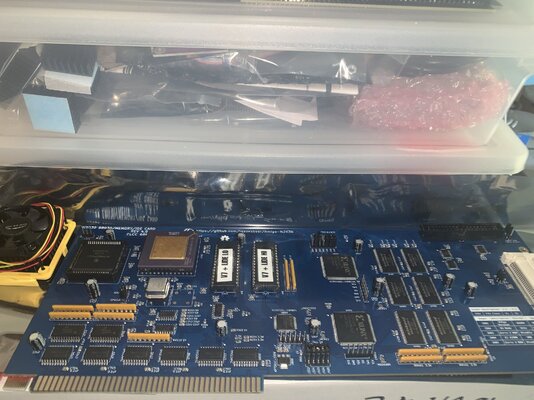
Unboxed the card today. Very nice and I am happy I waited an extra week for black socket. PCB is nicely labeled for jumpers and settings. Need to replace the bracket with an EATX version and have that 3D printed in metal.
 

Attachments

  • IMG_1414.jpeg
    IMG_1414.jpeg
    435.1 KB · Views: 27
Arrived safely. Thanks for the extra effort to source/send the CF card. Mark as shipped/received. Thanks again.
 
Has anyone tested one of these with other Z2 RAM boards? Case in point can I set this board to 4mb, and use the A2091 2mb and another 2mb board to make up the 8mb total?
 
Has anyone tested one of these with other Z2 RAM boards? Case in point can I set this board to 4mb, and use the A2091 2mb and another 2mb board to make up the 8mb total?
I have used it with the A2091 set at 2mb and the N2630 set at 4mb. I have also used it with the A2386 bridgeboard.
 
Card arrived Saturday. Very well packed, beautiful card. I am very happy with it.
It works with the A2090, the 2088XT card.
I will need to change RAM config in order to have no conflict with my GVP HC8+ SCSI 2 card as it has 8 Meg on it.
I am very happy with the card, thanks Steve!!

 
Declaring interest.
A completed board, US Shipping. Will send a PM Shortly.

Edit: response received, payment sent.
 
Last edited:
Has anyone tested one of these with other Z2 RAM boards? Case in point can I set this board to 4mb, and use the A2091 2mb and another 2mb board to make up the 8mb total?
From an AutoConfig perspective, you have 8MB Z2 address space to work with on the A2000. When the N2630 board is in 4MB mode, you can add up to 4MB of other Z2 AutoConfig cards of whatever nature, all 16-bit, in the Zorro Slots (2MB on the A2091, and a 2MB RTG card, for example). Unless you absolutely need a 16-bit FastRAM board for some particular reason, like in 68000 mode (where there is no conflict), there is no need for the 2MB on the A2091 to be enabled. It will be best set disabled (0MB). If you need the 2M in 68000 mode, try a DPDT switch mounted on the rear in an open slot cover, mimic the wiring to match the jumper settings of closed and open for the 0MB and 2MB jumpers, and toggle the switch when the need happens. If you leave the board enabled with the 8MB N2630 setting, under OS 2.0 and later, there will be a boot time Early Startup Menu pop up with an error that the 2MB A2091 memory board can't go anywhere.

Performance-wise, there is no reason to run with 16-bit RAM in Z2 and the A2091 since the N2630 Z2 RAM supports DMA. Beware of the 16-bit/32-bit memory merge in Z2 that can happen (unless there is a non-RAM card, like an RTG or Bridgecard between them). See comment further down for detail on that scenario.
 
Last edited:
Awesome info thanks mate. Looks like down to one left so I probably miss out this time. Maybe I should sell both my Z2 ram boards to raise some funds :ROFLMAO:
 
Card arrived Saturday. Very well packed, beautiful card. I am very happy with it.
It works with the A2090, the 2088XT card.
I will need to change RAM config in order to have no conflict with my GVP HC8+ SCSI 2 card as it has 8 Meg on it.
I am very happy with the card, thanks Steve!!
Be aware that under AmigaOS 2.0+, expansion.library will merge the 2MB HC8 memory (that is the setting you can use to fit with the A2088 present) with the N2630 4MB FastRAM. Merged, both will be seen as a single 6MB chunk. This has a possible pitfall. Make sure the Kickstart remap solution you use grabs the high-mapped Z3 memory on the N2630, or use the force 'head' option to select from the front of the highest priority FastRAM memory (if it's Z2). Depending on the default memory priority of Z3 vs Z2, if the merged Z2-address memory chunk becomes highest (the first choice), most Kickstart remap tool's default memory allocation for 'FastROM' remap comes from the tail end of the memory list. This is common behavior for CPU, SetCPU and/or MuLibs+library tools. The tail end of the first Z2 space is now a 16-bit RAM zone of the HC8, which is slow.

It probably won't fit with normal 30-pin SIMMs, but I'll mention it anyway. Putting the HC8 with 2x very low profile 32-pin 1MB SIMMs, card set for 2MB mode, placed after (left) of the A2088, would get around the auto MergeMem the OS does.
 
Last edited:
Status
Not open for further replies.
Back
Top Bottom