
You are using an out of date browser. It may not display this or other websites correctly.
You should upgrade or use an alternative browser.
You should upgrade or use an alternative browser.
Sold NEW - Acorn BBC IDE Interface
- Thread starter TheCorfiot
- Start date
- Replies 94
- Views 12425
- Status
- Not open for further replies.
soeter04
Active member
Thanks for the quick assembly and shipping TC, looking forward to receiving the lil' gem!

Excellent approach, that immediately justifies the purchase of a BBC MicroSadly I don't have any beebs (YET...) but when I do get one, this kit would come in handy. Thus, I would like to express my interest in 1 kit.
Sending PM.


Yes please. My BBC Micro needs to feel more useful
Kit reserved, will be in touch soon.
Thank you


Excellent approach, that immediately justifies the purchase of a BBC Micro
Indeed. Having an unused IDE interface sitting on a shelf reminds you what must be done. Better sooner than later. The wife must understand this, surely?
Last edited:


Hi
I'm having a problem with the ROM supplied with the kit
Installed in my BBC B it displays the following
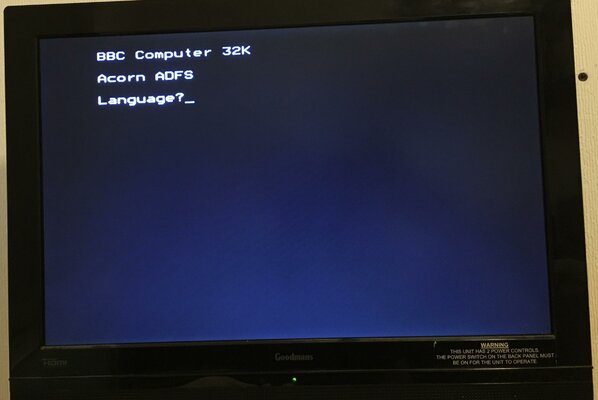
All the ROM sockets have been set up for 32k. How do I deselect the master part of the ROM?
I've got a few helpers fitting my IDE interface.
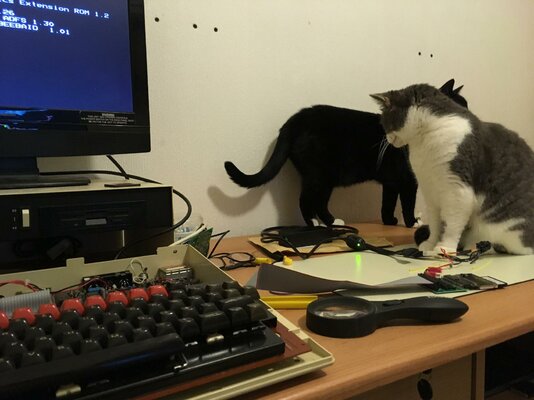
John
I'm having a problem with the ROM supplied with the kit
Installed in my BBC B it displays the following
All the ROM sockets have been set up for 32k. How do I deselect the master part of the ROM?
I've got a few helpers fitting my IDE interface.
John
Hello John
This is happening as your Rom sockets are 32K so your Model B is seeing both the Master and Model B version of ADFS and OS1.2 does not like Master ADFS.
Simple solution..
I can send you a 16K Eprom with just the Model B ADFS, or if you have access to an Eprom programmer then you can get the firmware from the download folder, link provided in the Welcome guide supplied.
Or we can build you some custom Rom, whichever you wish...
Are you certain your rom sockets arexjust 32k capable or 64k...if in doubt, a quick photo of the mods under your mainboard will identify this.
Gorgeous Kittys mate
Bas
This is happening as your Rom sockets are 32K so your Model B is seeing both the Master and Model B version of ADFS and OS1.2 does not like Master ADFS.
Simple solution..
I can send you a 16K Eprom with just the Model B ADFS, or if you have access to an Eprom programmer then you can get the firmware from the download folder, link provided in the Welcome guide supplied.
Or we can build you some custom Rom, whichever you wish...
Are you certain your rom sockets arexjust 32k capable or 64k...if in doubt, a quick photo of the mods under your mainboard will identify this.
Gorgeous Kittys mate
Bas
I don't have a Eprom programmer or any knowledge how to use one if I did.
I think you are right, they are 64k.
No need to send me a new rom, I'll remove the mod from the rom socket returning it back to how it was. Modifying all the ROM sockets seemed like a good idea at the time.
Have you tested to program cdbackup.exe on windows 10. doesn't seem to run on mine.
John
I think you are right, they are 64k.
No need to send me a new rom, I'll remove the mod from the rom socket returning it back to how it was. Modifying all the ROM sockets seemed like a good idea at the time.
Have you tested to program cdbackup.exe on windows 10. doesn't seem to run on mine.
John
I would recommend using the Middle socket (13) for the dual ROM and stick a 32K Static RAM in socket 15..
There is a utility on the HD image to softload a RAM based workspace version of ADFS and keep page &E00
CFBackup and CFRestore have been tested on Win XP/7/10 64 and 32 bit..
What error are you getting....
Please read the Readme.txt file in the that folder for instructions.
If you need to force an ADFS partition (& that is explained) then use Win32diskimager and the ModelBIDE.img file that will definitely work and you will find that CF utilities like the CF card then.
Bas
There is a utility on the HD image to softload a RAM based workspace version of ADFS and keep page &E00
CFBackup and CFRestore have been tested on Win XP/7/10 64 and 32 bit..
What error are you getting....
Please read the Readme.txt file in the that folder for instructions.
If you need to force an ADFS partition (& that is explained) then use Win32diskimager and the ModelBIDE.img file that will definitely work and you will find that CF utilities like the CF card then.
Bas
I should have read the instructions first, cdbackup.exe and cdrestore.exe need to be run from the command prompt, sorted cf card now set up and tested with datacentre in my master 128.
I'm using a Transcend 133x cf card, would appear to be compatible with the IDE interface.
Thanks for the advice, I think I already have a 32k ram in the socket nearest the edge of the circuit board. The kit of parts for this mod came from you many, many moons ago, I'll have to dig out the instruction you supplied to remained me how to undo it.
John
I'm using a Transcend 133x cf card, would appear to be compatible with the IDE interface.
Thanks for the advice, I think I already have a 32k ram in the socket nearest the edge of the circuit board. The kit of parts for this mod came from you many, many moons ago, I'll have to dig out the instruction you supplied to remained me how to undo it.
John
Excellent Stuff.. I did spend a lot of time writing guides and instructions so it's nice to know they are worth reading lol..
Please don't fully undo the mod... Keep socket 14 & 15, the two furthest right as they are..
Remind me which Disc controller your machine has and I will send you a brand new 64K Replacement ROM which will contain the ADFS too as well as a Rom manager, effectively turning it into a hot-rod.. This will get you the best from the machine using the SWR.
I'm glad I chose to design the system so it was addressed as per the DataCentre, I guessed people would have a Datacentre but maybe just want IDE for their other systems.
You can swap programmed cards freely between the two
thx for the feedback
Bas
Please don't fully undo the mod... Keep socket 14 & 15, the two furthest right as they are..
Remind me which Disc controller your machine has and I will send you a brand new 64K Replacement ROM which will contain the ADFS too as well as a Rom manager, effectively turning it into a hot-rod.. This will get you the best from the machine using the SWR.
I'm glad I chose to design the system so it was addressed as per the DataCentre, I guessed people would have a Datacentre but maybe just want IDE for their other systems.
You can swap programmed cards freely between the two
thx for the feedback
Bas
Hi Bas
Thank you for the offer of a new 64k rom, I have a 1770 disk controller installed in this beeb.
Would you like me to send you the rom that came with the SWR upgrade labelled 1770 system 64k.
I have left the 2 right rom sockets modified for 64k as per your original instructions.
The ide interface is now working. only need to get the beeb put back together and it'll be job done.
John
Thank you for the offer of a new 64k rom, I have a 1770 disk controller installed in this beeb.
Would you like me to send you the rom that came with the SWR upgrade labelled 1770 system 64k.
I have left the 2 right rom sockets modified for 64k as per your original instructions.
The ide interface is now working. only need to get the beeb put back together and it'll be job done.
John
Excellent News John
I will post out an updated ROM for you on the weekend which means you will no longer need a separate ROM for the ADFS-IDE system, will also include a handy ROM manager and if you want to use a TurboMMC or Standard MMC you can softload it instantly from the Hard drive
Out of interest for my records, what Issue is your Mainboard please.
Bas
I will post out an updated ROM for you on the weekend which means you will no longer need a separate ROM for the ADFS-IDE system, will also include a handy ROM manager and if you want to use a TurboMMC or Standard MMC you can softload it instantly from the Hard drive
Out of interest for my records, what Issue is your Mainboard please.
Bas
Hi Bas,
Installed the IDE adapter internally within my BBC Master and all seems to be fine (very neat!). The only problem I have is that after a SHIFT-BREAK, the menu shown in your video doesn't load - what I get is this:
*DIR :0.$
*LIB :0.$.Library
>
The image I used was the MasterIDERel3.img file from the HDImages folder in your Dropbox.
Any ideas please? Can I load the menu manually?
Incidentally, I wrote the image to a 4GB Kingston CF card which appears to be compatible with the interface.
Cheers,
Dean
Installed the IDE adapter internally within my BBC Master and all seems to be fine (very neat!). The only problem I have is that after a SHIFT-BREAK, the menu shown in your video doesn't load - what I get is this:
*DIR :0.$
*LIB :0.$.Library
>
The image I used was the MasterIDERel3.img file from the HDImages folder in your Dropbox.
Any ideas please? Can I load the menu manually?
Incidentally, I wrote the image to a 4GB Kingston CF card which appears to be compatible with the interface.
Cheers,
Dean
Last edited:
Hi Dean
Thanks for the feedback and i'm glad all is working well.
The Model B image is aimed more towards games therefore shift break will run the menu.
With the Master Image it is aimed to be a lot more 'Jack of all trades' as the Master platform is much more powerful.
The current Image, When shift Break is actioned will simply mount the partition and set default paths, so you can type in *PANEL or other utility programs.
It also has a fully setup DOS partition, PANOS 32016 and ARM2 support, so if you have a matchbox copro then all enviroments are setup for you.
You can of course still run a Menu system which will give you the option of Games, utilities...etc
So after a shift break, type, CH."MENU" and you will be greeted with the Menu, Note Date will be incorrect unless my TripleMos is fitted which is y2k compliant.
You also have a 'GAME' directory which contains more subdirectories for Elite and other various games.
Hope you read up on ADFS, it's a great powerful Filing system which really shines with a hard drive connected and on Master platform is the best implementation too, what really kicked off this project, Not the Model B lol.
Let us know how you get on, all tips and problems discussed here along with solutions will be a great resource for other users too.
Best Wishes
Bas
- - - Updated - - -
Hello Everyone
It's great to hear of the success' & use you are getting from this neat upgrade.
I hope you guys all understand that everything is still under development and that the first shipment is the first attempt to replicate the design in numbers and in some ways you guys are helping me test the Interface, I have high confidence with the design as I have been personally (and a few close friends) using prototypes for the last 2 years with very few issues.
If any thing creeps up then rest assured that it will be looked into and fixed as required.
For the moment I would also like to restrict the use of the HDImages or other utiltities, etc to just this Interface as the Images and content as well as support apps and documents are being continuously updated and I just want to address and support any issues with known hardware.
So can you please refrain from sharing the Download link provided in the Welcome guide with non users of this Interface until further notice.
I am approachable if someone else is interested and will consider it.
Thanks and Enjoy
Bas
Thanks for the feedback and i'm glad all is working well.
The Model B image is aimed more towards games therefore shift break will run the menu.
With the Master Image it is aimed to be a lot more 'Jack of all trades' as the Master platform is much more powerful.
The current Image, When shift Break is actioned will simply mount the partition and set default paths, so you can type in *PANEL or other utility programs.
It also has a fully setup DOS partition, PANOS 32016 and ARM2 support, so if you have a matchbox copro then all enviroments are setup for you.
You can of course still run a Menu system which will give you the option of Games, utilities...etc
So after a shift break, type, CH."MENU" and you will be greeted with the Menu, Note Date will be incorrect unless my TripleMos is fitted which is y2k compliant.
You also have a 'GAME' directory which contains more subdirectories for Elite and other various games.
Hope you read up on ADFS, it's a great powerful Filing system which really shines with a hard drive connected and on Master platform is the best implementation too, what really kicked off this project, Not the Model B lol.
Let us know how you get on, all tips and problems discussed here along with solutions will be a great resource for other users too.
Best Wishes
Bas
- - - Updated - - -
Hello Everyone
It's great to hear of the success' & use you are getting from this neat upgrade.
I hope you guys all understand that everything is still under development and that the first shipment is the first attempt to replicate the design in numbers and in some ways you guys are helping me test the Interface, I have high confidence with the design as I have been personally (and a few close friends) using prototypes for the last 2 years with very few issues.
If any thing creeps up then rest assured that it will be looked into and fixed as required.
For the moment I would also like to restrict the use of the HDImages or other utiltities, etc to just this Interface as the Images and content as well as support apps and documents are being continuously updated and I just want to address and support any issues with known hardware.
So can you please refrain from sharing the Download link provided in the Welcome guide with non users of this Interface until further notice.
I am approachable if someone else is interested and will consider it.
Thanks and Enjoy
Bas
- Status
- Not open for further replies.
Similar threads

- Replies
- 8
- Views
- 3K

- Replies
- 8
- Views
- 3K
- Replies
- 9
- Views
- 2K

- Replies
- 6
- Views
- 2K
