Sold NEW - Acorn BBC IDE Interface

  • Thread starter Thread starter TheCorfiot
  • Start date Start date
  • Replies Replies 94
  • Views Views 12425
Status
Not open for further replies.
Excellent News John

I will post out an updated ROM for you on the weekend which means you will no longer need a separate ROM for the ADFS-IDE system, will also include a handy ROM manager and if you want to use a TurboMMC or Standard MMC you can softload it instantly from the Hard drive :)

Out of interest for my records, what Issue is your Mainboard please.

Bas :)


Hi Bas
My mainboard is an issue 7

I'm having issues running some of the games (Chuckie egg) and the command *ROMS just gives "bad command". Another issue, BASIC is not loading when first switching on from cold, ctrl/break have to be pressed, this only happens with the interface attached and the Beeb as been switch off for at least 20 seconds.

John
 
Hi John

The new Rom being posted out to you tomorrow will give you the advanced Rom Manager inc *Roms command..
This will allow you to turn off un needed Roms, claiming back user memory, ie lowering page so all the games will then run.

The Basic error sounds unusual, lets see what hapoens when you fit the new rom.

If you watch the demo video i discuss the PAGE issues and the softload ADFS solution..:)

Bas :)
 
I've watched the video, P.+PA only comes back with "no such variable". The !E00 will not work as you show in your video.

When I receive the new ROM I'll let you know how I get on.

John
 
Latest version of Acorn1770v4 64K Rom posted to you this morning John :)

Just swap the old with the new then everything you see in the Demovideo will apply to you :)
 
Latest version of Acorn1770v4 64K Rom posted to you this morning John :)

Just swap the old with the new then everything you see in the Demovideo will apply to you :)


Thank you Bas

I'll report back when I've tested it.

John
 
Latest version of Acorn1770v4 64K Rom posted to you this morning John :)

Just swap the old with the new then everything you see in the Demovideo will apply to you :)


Thank you Bas

I'll report back when I've tested it.

John

And don't forget to remove the ROM that was included with the IDE kit, you no longer need it as the 64K Rom has built in support :)
 
Latest version of Acorn1770v4 64K Rom posted to you this morning John :)

Just swap the old with the new then everything you see in the Demovideo will apply to you :)

With this Acorn1770v4 64K ROM, a 32K Beep will have 64K RAM?

EDIT: Sorry for the silly question. I just read the previous posts and I found the answer.
 
Last edited:
Software update

Software update

There is now ModelBIDErel2 available in 1GB and 512MB .dat format and 512MB .bin format.

It is recommended that HotRod Model B or Sideways RAM users upgrade to the new image.

Initial Release 04.11.2016
MasterIDErel3.dat - Master Enviroment with full Matchbox / Acorn Coprocessor support.
ModelBIDErel1.dat - Model B Enviroment with ADFSE00 Sideways Ram support.

Date 12/11/2016

ModelBIDErel2.dat - added TurboMMC and MMC support MMFS1.28, updated *MEM utility to KILL ROMS 13,10,2 (64K1770v4 HotRod)
 
ROM arrived today and seems to be working fine - many thanks Bas! Just 2 more questions if I may?

Does this new ROM also fix the Y2k problem - control panel still shows a 19xx date? And

Is there an easy way to find out how to load the ROMS from the ROMS directory once loaded into sideways ROM/RAM - I.e. DRWHO other than guessing? I.e. To run the ROM, what comes after *

Thanks again

Dean


Sent from my iPad using Tapatalk
 
Hiya buddy
Control panel has a hard coded 19 so that will not change but if you run the Menu you should now see the correct date on the 2nd top row :)

To load Roms into SWR you can use the MOS SRLOAD command.

Example
*SRLOAD :0.$.ROMS.filename 8000 x Q

Where filename is the Rom name and x is the sideways bank.

Note the ADFS path command
:0.$.dir.dir.dir.filename. etc

:)
 
Hiya buddy
Control panel has a hard coded 19 so that will not change but if you run the Menu you should now see the correct date on the 2nd top row :)

To load Roms into SWR you can use the MOS SRLOAD command.

Example
*SRLOAD :0.$.ROMS.filename 8000 x Q

Where filename is the Rom name and x is the sideways bank.

Note the ADFS path command
:0.$.dir.dir.dir.filename. etc

:)

So, let's say I have loaded the DRWHO rom into sideways ram - how do I run it? I know it will be *<something> - but is there a way to find out what the <something> is for each rom?

Thank you
 
The Doctor Who Rom doesnt run, it is a support Rom.
You need to run the Dr WHO game after loading the ROM, the game will then access the Rom..

:)
 
Hi bas
The new rom arrived yesterday, while it is working I'm still noticing a delay when booting from cold. Depending on how long the Beeb as been switched off it can be up to 30 seconds

John


Short video demonstrating the issue.

 
Last edited:
Hi John
I would suggest trying a different CF card, but it's possible your Issue 7 board (cost down version) might be teetering on the edge of running in spec after 30+ odd years.

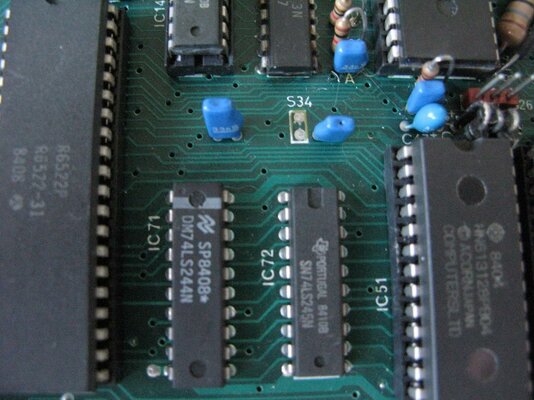
It's worth seeing what manufacturer chips you have for the 74LS244 and 74LS245 near the 1MHz Bus, Acorn used Motorola devices on some Iss7 boards and they are known to be problematic regarding timing.

Bas :)
 
I've had a look but don't know what make can you tell from this picture

IMG_0294.jpg
 
Yeah it's a signetics 244

I mention in the Welcome guide that to date to date I have had only 1 Model B board refuse to play ball and that was an Issue 7 board, well this was actually solved last week by replacing the LS244 with a Texas Instruments LS244 and now she plays ball beautifully.. so to date no non workers.

I would advise trying a few different CF cards because basically the CF is connected directly to the Adress and Data Bus's of the 1MHz Bus.

Bas :)

Looking at the Video, Yes the CF Card is not initialising due to timing, definitely the LS244 but do try another card or 2 first.

On a plus point, The E00 process works great, so you can now load and play anything of the CFcard..

If you find after playing a game that Page has been reclaimed, just Enter *MEM and CTRL BREAK and you should be at E00 again :D
 
8 Bit IDE Interface arrived today safe and sound, I will let know how its doing after reading the instructions.
 
Status
Not open for further replies.
Back
Top Bottom