Nintendo NES 72-pin connector

  • Thread starter Thread starter UberFreak
  • Start date Start date
  • Replies Replies 13
  • Views Views 2667

UberFreak

Active member
AmiBayer
Joined
Sep 28, 2009
Posts
1,029
Country
Israel
Hi :)

Does anyone have experience with the new replacement 72-pin connectors sold on the other bay for the NES?

I took a chance & ordered one, but both units I tried it on are behaving the same as before - flashing red light.
I got one game to work (kind of... there was some gfx garbage on the screen) by wiggling the cartridge in wierd angles :thumbsdown:

I'm about to mail the seller about it, but would like to know if anyone has any tips before I do.

Thanx!
 
I've never dealt with replacement connectors, but I find that these problems are just as likely to be caused by gunk build-up on the cartridge edge connector. If you pick up a 3.8mm security bit to open the cartridges with, you can use a hard rubber eraser to clean the contacts off, which usually resolves the problem.

Also, the flashing red light is a reset cycle the NES stays in when it fails to talk with the cartridge's lockout chip (which was used to prevent unauthorized third parties from making NES cartridges.) Usually this is resolved by cleaning the cartridge connector, but you can circumvent this problem entirely by disabling the lockout chip on the NES.
 
Hi

Thanx for the info!
I did clean all my cartridge contacts with alcohol, but will try to open one & use the method you suggest.
Somehow, it seems unlikely that all my ~20 cartridges suffer from bad contacts, one of them is completely new (it was boxed until a few days ago...).
 
You're probably right, then. One other thing you could try is using a needle or toothpick to gently pull the springy contacts on the NES connector in towards the slot where the edge connector fits. Don't pull them too hard, but if you're careful you can get them to push a little firmer against the cartridge and make contact better.
 
I tried the needle method on a couple of bad connectors I have, with poor results (it worked for a few minutes, then died again).
The whole point is, I shouldnt have to go through this with a new connector...

I messaged the seller but so far no reply. He did advertise "180 days warranty" so I expect a replacement.
 
I did replace the connector on my NES and it made all the difference.
Games didn't work, or only after several tries, before. Worked first time every time after.
I did all the cleaning and such before the swap.
However, that has been about 4 years ago, and I don't remember where I got it from. I am assuming it was the other bay....

desiv
 
This may be a stupid question...

...but have you checked you are using the correct region carts for the NES?
 
Yes, they're the correct region (I have both PAL & NTSC consoles & carts).
I got a response from the seller, he's shipping a replacement connector.
Hopefully this one will work ok!
 
Hi again

Got the replacement connector from the seller, but I need some opinions.
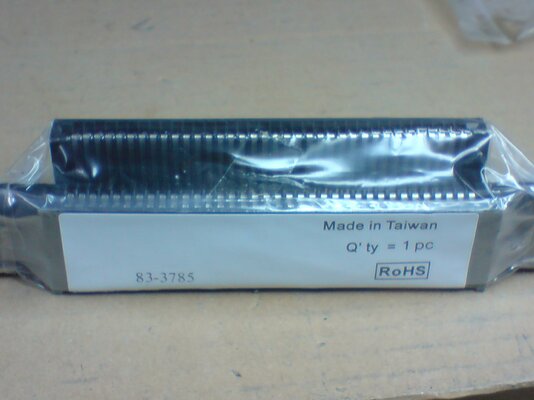
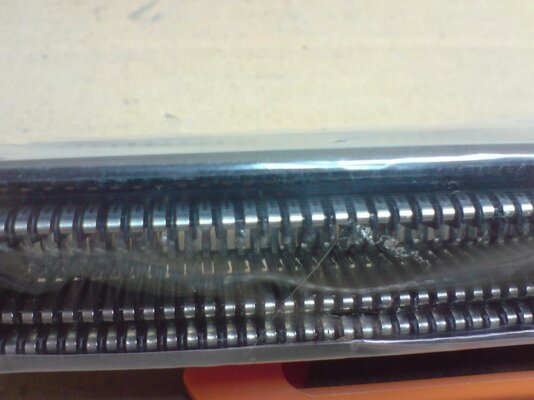
Please look at the close-up picture & tell me if you think this is how a NEW connector should look like!

I havent tried it yet, since it looks exactly like the previous one, which didnt work... :thumbsdown:
 

Attachments

  • nes_72pin_.JPG
    nes_72pin_.JPG
    180.4 KB · Views: 6
  • nes_72pin_closeup_.jpg
    nes_72pin_closeup_.jpg
    171.5 KB · Views: 2
I have replaced several connectors in the past, and it always made a massive difference.
Games not loading previously instantly worked. I did have 2 occasions of faulty replacement connectors though, which simply did not work.
A flashing red light in general indicates a game can't be loaded, so switching the connector sounds like the right first step.

In my experience, its not always the connectors thats the problem, i used to clean really old and abused carts a bit with a Q-tip and some alcohol (hint, do not ever blow in a cartridge to get it clean, that is really not a good thing to get used to).
Try a set of different carts if you can to try to pinpoint the problem.

Having a look again at your pics, that is certainly not an official connector. Try to get a 'real' official nes connector, not a clone like this. These could seriously harm your nes.

There's also some other stuff you can try/test:
- Push the game down and then wedge another cart on top of the game to hold it down.
- Another is don't push the game in too far. Leave it slid out as much as you can while still being able to push it down.

and last but not least, check your connector for bent connections. You could also buy a nes cleaning kit and clean your old connector, that works about as good as replacing it with a new connector (which you obviously have some problems with)

(for further assistance, tell me what color your screen is when your red light is flashing)
 
Hi JiggyMF :)

I have 3 consoles, all with bad connectors it seems.
Its not a matter of dirt, you just feel the game sliding in there with no resistance.
This usually happens when games are left inside for very long periods of time.
I have around 10 games, all were cleaned with Q-tips & alcohol, one is boxed & new, zero dirt on that one.

I did "experiments" on one connector & managed to get it to partially work (the game loaded with gfx "junk" in some areas of the screen) when applying pressure.

So far I was sent 2 replacement connectors by the same seller, both of them behave the same as the old ones - flashing red light with a flashing light gray / white TV screen.

When you say "official NES connector" do you mean Nintendo are still making them?
The one I bought was made in Taiwan, there's no Nintendo logo on it anywhere.
Can you please point me to a website selling official ones?

Thanks!
 
A year ago nintendo still had stock for this kind of stuff. I'm assuming they still do.

I will locate some sources for you and get back to you :)

However reading your story, i start to doubt it is the new connector. If you have 3 systems, all not working, then that's getting a bit to much of a coincidence.

What color is your screen when your system fails and flashes red (does it always do this when it fails?)
 
Hi

As mentioned above, its always flashing, the TV screen color is usually white, although in a few cases it was very light gray.
I have one connector which sometimes works (in weird angles) and I tried it with all consoles, I believe they're fine, its only the connectors.
 
Back
Top Bottom