Odd CRT problem (Acorn AKF18)

  • Thread starter Thread starter Hell_Labs
  • Start date Start date
  • Replies Replies 9
  • Views Views 2383

Hell_Labs

New member
Banned
Joined
Mar 27, 2010
Posts
674
Country
England
Region
St.Helens, Lancashire
Just got a new monitor though the post, a AKF18 Multisync made by lite-on for Acorn (yeah, the one that catches fire...)

What's happened tonight:

got it, unpacked it, doesn't look damaged. hooked it up to my powerbook. Was a tiny bit blurry. left it for about half an hour.

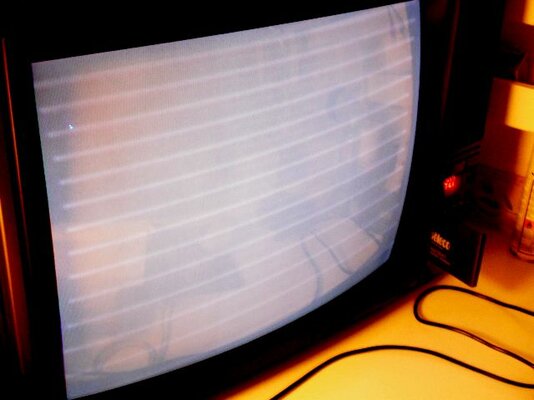
Came back, proper blurryness was happenning, with horizontal lines appearing +flicker(interference?) Making a nasty gas leak sound too!

turned it off, left it for a bit, turned it on, back to as it was when I first unpacked it! left it for a bit again, symptoms happen again!

Right now it's sat on the bench with the case off. There are two screws on the flyback.

Turning the one that says "focus" all the way gives me a perfectly sharp image, but the interference is back, and the gas leak sound! Turning the other way makes it too blurry to see anything, but gets rid of the horrible lines and sound.

turning the other one (it says "screen") just makes it lighter or darker.

Any idea what my fault is? This is a really good monitor, no fault except for this, and I don't want to throw it away if it can be fixed.

The gas leak sound isn't the tube leaking, I think. Otherwise the picture wouldn't sharpen again? (and I have a PSU for a printer that makes this noise).
 
A leaking tube would give no picture at all.

I would suspect something in the HV side of things, possibly the Flyback LOPTX (Line Output Transformer). These tend to make a high pitched 'whistle' or 'whine' when they are starting to fail.

Dodgy caps could also give out noises like the 'gas leak' sound you describe - look for any badly discoloured ones or ones with domed tops - they are likely to be duff. bad caps can introduce voltage bias that can create interference.

Rkauer could be the best person to answer this one when he sees this thread.

A good TV engineer would be able to sort this out, if you know one locally.
 
Turning the one that says "focus" all the way gives me a perfectly sharp image, but the interference is back, and the gas leak sound! Turning the other way makes it too blurry to see anything, but gets rid of the horrible lines and sound.

turning the other one (it says "screen") just makes it lighter or darker.

--------------------

The gas leak sound isn't the tube leaking, .

Sorry to hear of your bad luck.

The "interference" or *lines you see are most likely the retrace (flyback) [slightly slanted]. Be careful adjusting (over ramping/probable cause of sound) the focus (G1-GRID & G4) and screen (G2) as you'll induce potential damage (stress) to both the electronics and the phosphor (see electrons) though a HV protection (SMPS) should kick.

If the tube leaked you'd hear a "puff" and smell it. (see neckboard/heater) for damage. [Besides as mentioned; no picture]. Check anode cap secure (be careful of arcing.)

Merlin rightly mentions check the Flyback/ HT V/ LOPT.

Perhaps try isolating sections of the monitor for testing.

Safety first and hope you manage to fix it :thumbsup:

*See photo illustration attached.

Regards,

Paul.
 

Attachments

  • TV.jpg
    TV.jpg
    32.1 KB · Views: 6
I agree with both you guys.

But I can bet big money on a faulty flyback. Grab the code written on the original sticker (it may/must have one with the original code) and go to the HR site for a replacement.

Retrace lines can also be caused by burned resistors or shot transistors on the little board hooked on the tube's neck, but they don't "sound" at all.

When retrace is caused by the above normally the screen goes to the colour of the culprit colour cannon: red, blue or green.
 
Also, try and locate where the noise is coming from, if it's not from the SMPS, check the filament (F1/F2) (*heater /electron gun) for loose partials (coating oxidisation (age) (aubible noise) ) or see if there is any visible warping to the grids (G1/G3/G5) causing shorts (visible frame distortion **interference)
{with referencing to the increase of focus (G4) and noise}.

* Try disconnecting the neckboard.
** As you mentioned, if not retrace lines, as demostrated in my own TV photo.

Regards.
 
Okay, last night I left it long enough (turned off!) that it went back to it's normal blurriness. Adjusting it right away got me a sharper image (running it at 800x600) and it didn't seem to get any worse in to 10 minutes I had it on. (maybe running 1024x768 had something to do with it?)

None of the caps look like they're past it. I'm going to run it for awhile at 800x600 and see what happens.
 
Last edited:
As your Focus/Screen are part of the flyback and the blurriness resolves and stablises after a period of warming it's probably your best starting point as rkauer stated. (High voltage, dividers network, [fluctuatations of focus and/or brightness], Epoxy breakdown).

Here is a .pdf manual from the Acorn community. It states the monitor is capable of up to 1024*768 'interlaced'. If switching to this mode from 800*600 is causing issues, might help to isolate a potential problem.


http://acorn.chriswhy.co.uk/docs/Monitors/Monitors.html

Paul.
 
Some more weirdness chaps!

No more blur, but just now it started going pink! It would flicker between normal white and pink about once a second. Stopped now though.

I didn't touch anything!
 
Sounds like the poor bugger is just about hanging in there, seems very temperamental. :(

If the entire image appears bias (SCREEN) to RED, then perhaps your GREEN and BLUE are drifting. Maybe disconnect the R G B s individually from the neck board and see if each work and meter them. Check the wires/solder etc.

If you look in here there I've got some .pdfs could aid you with service and repair of similar "type" monitors. Inc pictorials on disassembling and testing.

https://docs.google.com/browse?pli=...4ZmQzYWUtMTIwYi00ODJmLWExYzctZWFkNDk5ZDM3MmY2

(Moderators amend link accordingly)

Hope this helps.

Paul.

*Edit* Might need to look into the white-balance circuitry aswell.
 
Last edited:
I probably should have mentioned white balance as that's exactly what it looks like. Didn't want to use a term that I wasn't sure applied to monitors. Doesn't look like it's losing G and B, it's a lot more subtle.

Thanks for the guide.
 
Back
Top Bottom