PC won't power on.... help please!

  • Thread starter Thread starter -Acid-
  • Start date Start date
  • Replies Replies 31
  • Views Views 5014
In my main machine, I use an TX1200 - It's a bit overkill, but with an Obsidian D800, 2x7990 ATI Graphics cards, 5 Hard drives, 2 DVD Writers, 1 BluRay Writer, a 990X installed in a Rampage Extreme III, oh and 12Gb RAM (Dominator 2000Mhz) and H100 closed water loop, you can't be too careful about power. :lol:
I prefer PSU's to have a large 12 Volt rail. ;)
Anyone would think I was sponsored by Corsair.. ;)

You have a pair of 7990s?? GPU scaling must be terrible seeing as it's basically a quad crossfire setup (most games won't even benefit from it). I'm guessing it's not just for gaming then?

I'd probably choose a pair of GTX Titans if i had that much to spend on GPUs. You're still only getting 3GB of useable VRAM with dual 7990s as each card has 6GB split between 2 GPUs (cannot be shared or stacked with crossfire). The GTX Titan on the other hand is a single GPU card with access to a full 6GB! So you still get 6GB of useable VRAM if you SLI a pair of Titans :cool:.
 
@Powerpie5000 - Thanks for the info, If I am honest, My main machine just HAD to be a powerhouse, I can't really complain about graphics card performance, and if I am honest, just use one of the GPU's mainly. (Someone say waste of money? :) )
I know everyone has there favourites in terms of hardware, but for some reason I have always had NVIDIA cards, but decided to change to ATI on this build.
I love my machine, but on the downside, I do have a problem with the SATA3 ports not functioning at the full SATA3 data rate, but this is a known issue with the controller that ASUS used on the Rampage III mobo. It's just... well, pants....
I am not going to upgrade my machine for a while yet, so I have to make do.
I have however, just found a new love in an Amiga 1200 with a BPPC and (soon) BVision setup - this is the machine that is turned on the most at the moment. ;)
 
Last edited:
£2K + PC and the guys giving more love to 25 year old tech :lol:

Gotta love this place :D
 
If the computer beeps at you, then its telling you what's wrong. if there are no beeps then its most likely your power supply. Assuming your area is having power outages then try a new pay. they're cheapies
 
-Acid-
I am interested, I take it, since you haven't posted in a while, either it was good or bad news, is your PC up and running again, since you purchased your PSU?
Is it now as smooth as silk in operation?
 
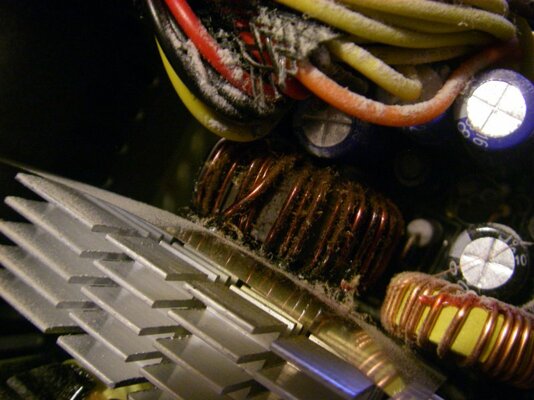
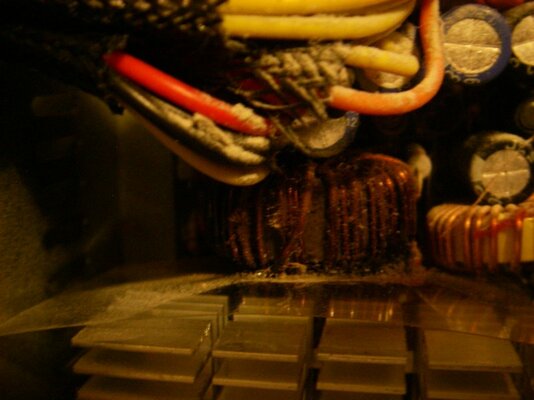
Yes i'm back up and running, fortunately it seems it was just the PSU that went. Here some pics I took of the inside of the burnt out one.

Thanks for the suggestions and help everyone :)
 

Attachments

  • Imgp1000.jpg
    Imgp1000.jpg
    79.5 KB · Views: 3
  • Imgp1001.jpg
    Imgp1001.jpg
    62.1 KB · Views: 4
glad your sorted acid

but everyone take note of this don't ever skimp on a psu as this could have been very expensive and acid could have lost a lot more
 
I love my machine, but on the downside, I do have a problem with the SATA3 ports not functioning at the full SATA3 data rate, but this is a known issue with the controller that ASUS used on the Rampage III mobo. It's just... well, pants....

I'm pretty sure SATA3 controllers use PCIe lanes, so your dual 7990s and PCIe sound card (if you have one?) could be hogging them all! Usually the graphics card PCIe slot would drop from x16 to x8 if there's not enough PCIe lanes to go around.
 
@Powerpie5000 - You are correct, the PCI bus drops to x8 with two cards, I actually have an ASUS Xonar sound card which is plugged into the x1 slot.
The SATA3 ports are first generation, it's all over the ROG forums whereby people have been noticing that they don't operate at full speed, and have said that the reason was because of the SATA controller, it's just not capable of operating at the supposed rate of SATA3 - Asus now use another controller on all boards, I can't recall what the controller is, but in order to make full use of SATA3, I have to purchase another motherboard.
Like anything, when jumping onto the 'new' processor bandwagon (at the time) improvements are made all the time, the SATA3 chipset, is one of the things that let's my motherboard down.
With an OCZ Vertex 3 Max IOPS edition 240Gb drive, Windows still loads very quickly, so it's not really all bad, it just could be quicker with a newer motherboard.
... As it's a 990x, I am just a bit reluctant to upgrade - £780 processors don't grow on trees you know ;)
I am an ASUS fanboy too, I have been building PC's for years, and they haven't ever let me down, unlike the Giga****e boards I used to have before I switched.
Personal preference is a brilliant thing, if you love the Gigabyte range of motherboards, I don't mean to slate them, but they are not for me, and for me, the failure rate has been higher. I just don't buy them, or recommend them for clients that request them. The world is a big place, other PC builders and over clockers wouldn't have any other board in their system. Consumerism, need I say more ?! lol.
 
I'm not keen on Coolermaster for various quality reasons, but thats a vast improvement over what you had. They aren't bad at all just not great.

Cooler Master have some of the best gold rated (90+) power supplies and they have decent long warranties too... I'm not too sure about the quality of their cases though as i've never owned or even built a machine in one.

Both my PCs use Cooler Master PSUs with the best one being a Cooler Master Silent Pro Gold (modular)... You won't find a single bad review and they can handle much higher loads than they advertise (mine is a 600W unit with 700W peak power, but some reviews pushed it beyond that with no issues). I've been using Cooler Master for a while now after being put off by a couple of shonky Corsair units in the past (i still like their memory though ;)).

---------- Post added at 22:25 ---------- Previous post was at 22:07 ----------

@Powerpie5000 - You are correct, the PCI bus drops to x8 with two cards, I actually have an ASUS Xonar sound card which is plugged into the x1 slot.
The SATA3 ports are first generation, it's all over the ROG forums whereby people have been noticing that they don't operate at full speed, and have said that the reason was because of the SATA controller, it's just not capable of operating at the supposed rate of SATA3 - Asus now use another controller on all boards, I can't recall what the controller is, but in order to make full use of SATA3, I have to purchase another motherboard.
Like anything, when jumping onto the 'new' processor bandwagon (at the time) improvements are made all the time, the SATA3 chipset, is one of the things that let's my motherboard down.
With an OCZ Vertex 3 Max IOPS edition 240Gb drive, Windows still loads very quickly, so it's not really all bad, it just could be quicker with a newer motherboard.
... As it's a 990x, I am just a bit reluctant to upgrade - £780 processors don't grow on trees you know ;)
I am an ASUS fanboy too, I have been building PC's for years, and they haven't ever let me down, unlike the Giga****e boards I used to have before I switched.
Personal preference is a brilliant thing, if you love the Gigabyte range of motherboards, I don't mean to slate them, but they are not for me, and for me, the failure rate has been higher. I just don't buy them, or recommend them for clients that request them. The world is a big place, other PC builders and over clockers wouldn't have any other board in their system. Consumerism, need I say more ?! lol.

I like both Asus and Gigabyte, but i've also had iussues with both! Asus are well known for not properly applying thermal compound to their heatsinks. I returned one Gigabyte board as my graphics card totally blocked the SATA ports (bad design) and returned another Gigabyte board due to serious timing issues and clock failure... These were not expensive boards high end boards though.

My main gaming PC is an Intel Core i5 3570K with a Radeon 7950... I've been using the same motherboard for the last couple of years as i had absolutely no reason to change it when i upgraded (or side stepped) to Ivy Bridge. It's a cheap and very reliable Biostar TH67XE with full speed USB 3.0 ports, SATA3 and PCIe 3.0 (using Ivy Bridge CPU)... It's one of the very few (or possibly only) H67 based boards with CPU overclocking, although i don't bother as i'm not into overclocking and don't ever feel the need to do it. The newer B75/H77/Z77 boards just don't offer anything new (or useful to me) compared to what i already have.

Companies like Biostar, Asrock and ECS have really upped their quality in recent years (i wouldn't have touched any of them 10+ years ago!)... I'd happily purchase a mid-high end board from one of these companies (their higher end stuff looks great for the price :)).
 
Back
Top Bottom