Questions about iMac 1.83Ghz

  • Thread starter Thread starter dougal
  • Start date Start date
  • Replies Replies 10
  • Views Views 2290

dougal

Active member
AmiBayer
Joined
Nov 25, 2009
Posts
2,360
Country
Malta
I might be buying this older iMac and just wanted to ask some questions.

It is a 17" Intel Core Duo (Not Core 2) 1.8G3hz and comes with 2GB RAM, Snow Leopard, 160GB HD, Superdrive and mouse and keyboard.

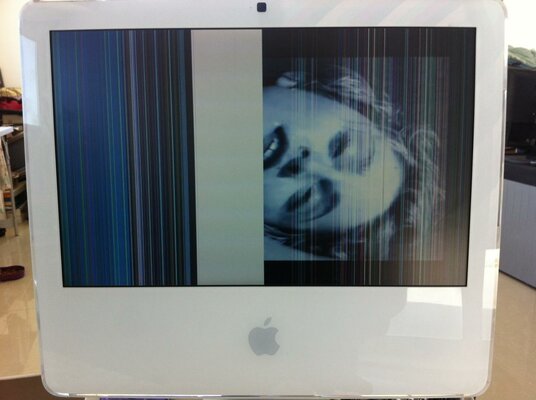
It works perfectly but the screen is damaged as in only about 30% of it works. It does have a VGA out etc and is currently used with an external monitor.

I offered the guy a price which is around the price of 2 new PS3 games rounded off to the nearest 100 hint hint and he accepted. Collection is local, so i have no P&P etc.

Is it worth-it ? And does anyone know of a good, reliable site where i can get a replacement display / lcd for it ?
 
I had the display replaced on mine under extended warranty, due to a known manufacturing fault on my particular display. I remember looking around at the time, and it would have been cheaper to pay Apple to do the work than buy the display panel and fit it myself.
 
In what way is the screen damaged? I ask because I acquired one of these iMac models and it's got some coloured bands down the display now. Single-pixel-wide bars in either magenta or cyan. I'm wondering if it's worth investing in getting it repaired.
 
In what way is the screen damaged? I ask because I acquired one of these iMac models and it's got some coloured bands down the display now. Single-pixel-wide bars in either magenta or cyan. I'm wondering if it's worth investing in getting it repaired.

Yeah, watch out! A lot of these older iMacs have GPUs that are giving up. It could be just the display too, though.
 
I looked at buying an iMac G5 or early intel recently but read so many issues with them - lines down the screen relating to defective LCD screens, GPU issues or capacitor based problems.

I found it was hard to source replacement screens which stopped me buying a faulty one - ebay has some second hand ones but they cost a fair bit and it looks a little hard to fit them too.

However I saw one person hacked another screen inside the case and used the external VGA out to make it work - that could be an option.

In the end I opted for a Mac Mini which has been great - and I can use any screen with it. Also the early 2009 models onwards can use Lion too.
 
This is the problem.. Look at pic. The GPU is fine as an external monitor works.
 

Attachments

  • photo.jpg
    photo.jpg
    98.9 KB · Views: 4
Well first off , I have bought these in the past and looked in to this.

The LCD is fault and was a manufacturing fault on the 17 inch iMac - very common fault.

You can replace the panel but..

The are (almost) unique to Apples iMac, you can find similar models in other monitors but not exactly. The model number for the Mac screen is important. Second hand working screen appear but carry a hefty price tag.

The iMac g5 17 inch is different.

Mike.
 
I bought this display which according to the UniMac website is compatible:

http://www.ebay.co.uk/itm/130702414...X:IT&_trksid=p3984.m1497.l2649#ht_1372wt_1180

It was cheap and is the same resolution 1440x900 as the original 17 inch LCD of the iMac.

Next up, when i have some money i'll buy the unimac adapter. Checked out ifixit and it looks pretty easy to open the mac and replace the display.

---------- Post added at 09:59 ---------- Previous post was at 08:32 ----------

Just for future research (for when i can afford the unimac) i followed the guide on ifixit and opened the imac and did all the steps up to the very last one of unscrewing the mountings of the lcd panel (only because i lack a long/thin torx screw driver)

It's a breeze and hopefully i'll probby manage to replace the display in no more than 1 hour :)
 
Back
Top Bottom