Rebuilding my A3000: video doesn't work!

  • Thread starter Thread starter McVenco
  • Start date Start date
  • Replies Replies 7
  • Views Views 1500

McVenco

Grumpy Old Man
AmiBayer
Joined
Dec 6, 2007
Posts
1,478
Country
The Netherlands
Region
Limburg
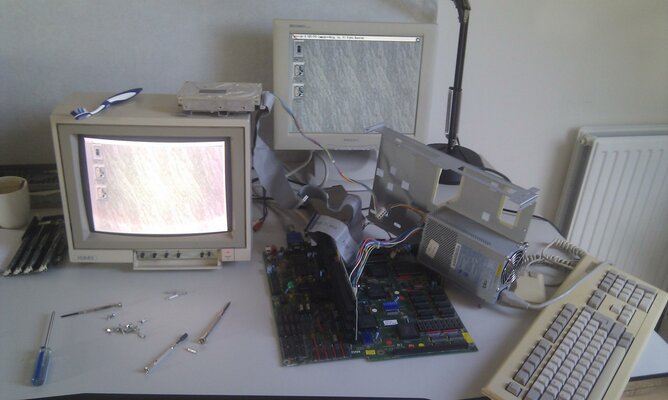
I've just started rebuilding my A3000 after a few months of it being scattered in parts all over the attic, but I immediately bumped into a tiny problem that renders the computer completely useless: there no video output :mad:

The Amiga seems to boot just fine from both diskette and harddrive (vanilla WB3.1 install). The sound also works (booted from a game disk to test that) and the keyboard responds just fine to Ctrl-A-A and continuously pressing Caps Lock.

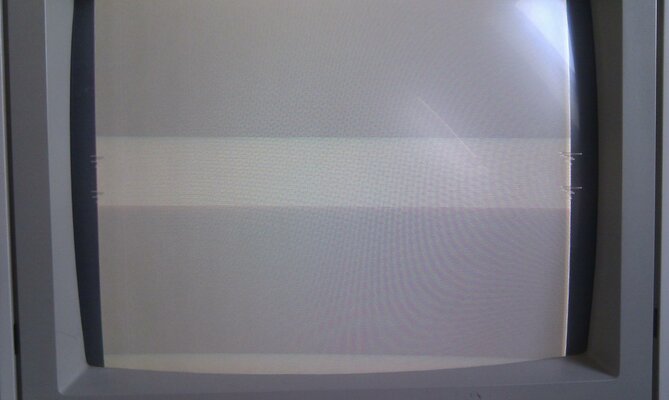
However, I get a NO SIGNAL message on a TFT screen, and a 1084 monitor displays a grey screen with vertically scrolling/flickering artifacts on the sides of the screen. The 1084 works just fine on my A1200, so that's not the problem.

So, what could this be? Broken Denise? Something else perhaps?
 

Attachments

  • IMAG0446.jpg
    IMAG0446.jpg
    195.2 KB · Views: 6
there may be a problem related to amber.

Wouldn't that only affect the output on the VGA port? The standard RGB output hasn't got anything to do with Amber does it?


Anyway, I've just ruled out the Denise as a problem. I tested in in my A500 and works without problems. The 8362 OCS Denise from the A500 doesn't work in the A3000 either. Also, I have plugged in another keyboard, and now the artifacts on the side are gone :unsure:. Still no picture though...
 
I'll be darned. I've disconnected and reconnected everything three times, removed the mainboard from the case, tried again and hey presto, it works! Then I connected the harddrive and it didn't work anymore. I turned the machine off, unplugged everything and replugged everything (including the harddrive) and then it worked again!

I don't know what's wrong really, I think a bad/loose contact somewhere, though I don't really know where. Every chip, socket and connector seems pretty solid to me, the only thing that's a bit wobbly is the daughterboard.

I'll try to gently bend the pins from the daughterboard connecter to make it a bit tighter, but I'm glad that nothing's actually broken (or so it seems).

These old computers, eh? :picard
 

Attachments

  • IMAG0448.jpg
    IMAG0448.jpg
    178.7 KB · Views: 6
You could try to clean the contacts with rubbing alcohol. It usually fixes problems like these.
 
I'll be darned. I've disconnected and reconnected everything three times, removed the mainboard from the case, tried again and hey presto, it works! Then I connected the harddrive and it didn't work anymore. I turned the machine off, unplugged everything and replugged everything (including the harddrive) and then it worked again!

I don't know what's wrong really, I think a bad/loose contact somewhere, though I don't really know where. Every chip, socket and connector seems pretty solid to me, the only thing that's a bit wobbly is the daughterboard.

I'll try to gently bend the pins from the daughterboard connecter to make it a bit tighter, but I'm glad that nothing's actually broken (or so it seems).

These old computers, eh? :picard


the custom chips come loose sometimes when you insert cards into it or anythng really that involves pushing down on the motherboard.

my only suggestion is to reflow all the solder joints on connectors and ic sockets(as you know theres lots) as a precaution action.

because it may get to a state where just simply moving it makes it unstable with odd effects just like this.
 
Back
Top Bottom