Recommendations for Commodore CDTV

  • Thread starter Thread starter trankitron
  • Start date Start date
  • Replies Replies 31
  • Views Views 4579

trankitron

New member
Joined
Jun 6, 2023
Posts
3
Country
España
Region
Madrid
Hello everyone!

Some episodes of Amiga Wave podcast (in spanish) where they reviewed the Commodore CDTV have piqued my curiosity about this machine, and I finally have one on the way.

While it arrives, I wanted to ask for advice from those who own this machine regarding what type of things they consider essential. I don't want to modify it too much, but perhaps you can recommend something that is a must-have and doesn't detract from its original essence. For example, I've seen a series of videos by RMC The Cave on YouTube where he recommends an SD2SCSI. By the way, does the Pistorm work on the CDTV?

In addition to this, I could use some useful resources. For example, I've already seen the CDTVLand website, but maybe there are other forums or specific resources out there for this machine. Are there any catalogs of public-domain CDs for the CDTV?

Does anyone have it in their living room in a setup similar to the one it was originally intended for, or perhaps as a desktop computer with a keyboard and mouse? Has anyone painted a 1084 black to use it with the CDTV?

Well, I think that's enough questions. Sorry, it's the anxiety of a noob.

Thank you and greetings.
 
Hi,

Congrats on the CDTV score. :)

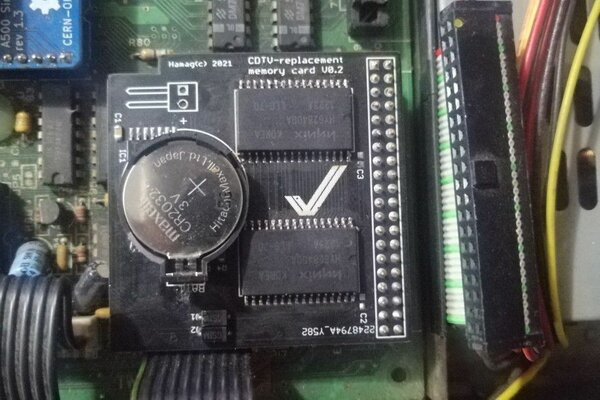
If you don't want to modify it too much, then pretty much the best option is indeed a SD2SCSI type based solution that uses the Expansion port on the back of the player, so you can have a hard disk like solution. You might also want to consider an 8MB Fast RAM mem expansion that neatly slots into the otherwise unused diagnostic port, because adding a SCSI HDD is gonna eat a little more of your already precious 1MB system RAM. Another option is a floppy drive, either real or Gotek. (I have a Gotek hooked up to the drive port on the back). This will allow you to play games and demos if you don't have WHDLoad (WHDLoad would need a Kickstart ROM upgrade and a CDTV OS ROM upgrade to work, and is maybe not what you want if you want to keep the CD1000 as original as possible). A floppy drive or Gotek is also great to use with the many PD collection CDTV titles like the 17-Bit PD series and the CDPD series.

If you're going to hook the player up to a modern (i.e. HDMI) display I can very much recommend the RGBToHDMI CDTV v2 by Monideth Pen, which slots right into the video module port in the back. For a living room set up this probably the way to go. If you're gonna do proper gaming, the standard CDTV remote controller can be a bit.. challenging. Depends on the game really. To hook up normal joysticks you can use the RGBtoHDMI v2 again, because it has joystick ports on the back, but there are also separate solutions for joysticks available. However in a modern living room setup the joystick wires might be less desirable and/or too short. A good (but expensive) solution is to try and get hold of a CD1200 Trackball controller for infrared joystick control. Connect your joysticks to the CD1200 and just put it on a table or other convenient location with line of sight to your CD1000. Nice and neat an no tripping over wires in front of the TV.

The PiStorm is not fully compatible with CDTV, because it doesn't do bus arbitration. Anything that uses the DMAC controller chip on the CDTV player (that's the CD-ROM drive or any peripheral attached to the Expansion port, like e.g. a SCSI HDD) will cause bus contention and almost certainly crash your system or worse. https://github.com/captain-amygdala/pistorm/issues/48 for more info.

As far as resources go, there's still the old cdtv.org.uk site you can check using the Wayback machine on archive.org. There's a LOT of info still on there, but (naturally) some of it is quite dated and unfortunately some of the info on there is incorrect, but still.. well worth a look. Speaking of archive.org, it's also filled to the brim with CDTV ISOs, manuals and of course many Amiga magazines from back in the day with articles on CDTV, if you really want to go down a retro trip and see how the machine was received back then. Finally, as resources go, you might also want to see if you can find the CDTV Disc Reference Guide book by AmigaJay. It's a great little catalog of most released (and even unreleased) CDTV Titles. I'm not sure if he still sells hard copies, but he might still have it in PDF form. All the (known) PD collection CDTV titles are listed in that book.

Oh, and don't forget to play Audio CDs! Dig out your old CD collection from the 90s if you still have it and listen to music retro style. ;)

Enjoy your CDTV!

Edit: Forgot to mention. If you're on Facebook, there's also a great CDTV FB group!
 
Congratulations on your CDTV acquire!

I don't think the CDTV gets its well deserved credits and kudos for you for recognizing them!!

In my CDTV I have the following options installed:
- RGB2HDMI (must have for crystal clear pictures). I have version 1 without the joystick ports.
- CDTV Accelerator - TF536 with 64MB FastRAM (https://www.amibay.com/threads/cdtv-accelerator-tf536-with-64mb-fastram.2438436/)
- Bluetooth receiver CDTV for using PS3, PS4, PS5, xbox, 8Bitdo wireless controller (https://www.amibay.com/threads/blue...-ps5-xbox-8bitto-wireless-controller.2439688/). This still needs to be installed...
- Original keyboard
- Original IR-mouse (unobtainium). The wired mouse will do, as it contains a very long wire (bit less unobtainium, but still hard to find)
- Amiga CD-1411 Black Floppy drive (equal to a Amiga CD-1011 floppy drive, but then in CDTV Black)
- Indivision ACE2 Fat Agnus adapter (for 2MB chip)
- Kickstart 3.2 and Extended ROMs v.2.35 (which allows for the TF536 to work properly, with some additional bug fixes, see also: https://cdtvland.com/os235/)


As nrc said, you can also get a separate joystick port adapter (for mouse and joystick), which gives you two DB9 connectors that you need to mount somewhere. The CD1200 option is indeed out there, but it is as hard to get as the IR mouse. If you're willing to pay the bucks, expect approx. € 500,- for the CD1200 alone!! They are offered once in a while on eBay.


So, pick your battle... Although the development for the CDTV is a bit behind the A500/A1200 and bigbox expansions, they are there. You just have to look a little harder.
 
Hi guys.

I am currently servicing my own CDTV which happens to work fine after 10/15 years in storage, but i am annoyed by the noise of the fan.
Do you have replaced it ? Would you have any ref? I see no sticker on it to see if that is 12V, 5V or what might be the pinout. Would like to replace it by some Noctua counterpart.
Or maybe is it possible to operate fanless?

I am not accustomed to such a noise no more. My A4000 fans are barely audible, my A1200 and A600 are 100% silent.

Thanks.
 
Congrats on the aqusition of a CDTV. Mine has a SCSI card with a 1GB Jaz removable cart drive. Installed WB 1.3 on the drive cart with HDInstallTools (Aminet).
I had an 8mb mem card on the diagnostic port but sold it. The CDTV has it's mouse, fdd and keyboard too. My main issue with it is the cd-rom only reads "some" discs and to get it repaired 'round here is tough. Other advice is when burning ISO roms to disk - no faster than 4x write speed for compatibility.
Good luck with it.
 
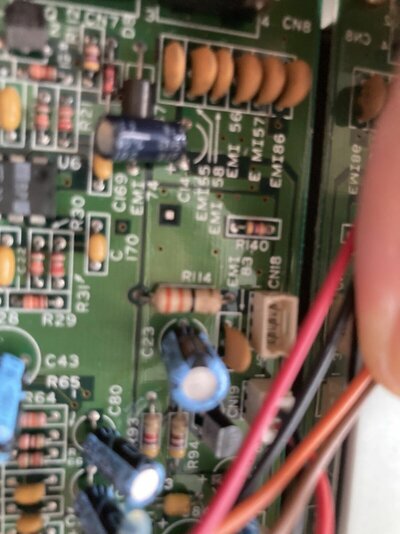
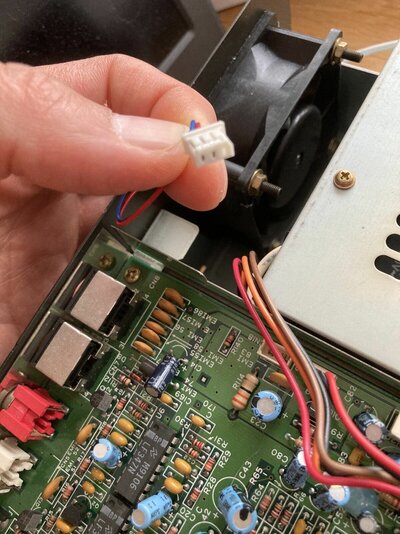
I have received already the Noctua fan from amazon. It is same size and fit but header is not the same. The CDTV header is a very small one. I need to find an adapter to avoid cutting and soldering wires.
I am very bad at manual work and that's why i have broken my mouse/joystick adapter from Ebay. The pins wouldn't push into the socket (there is also a nearby cap which does conflict) and it is now useless. I would be glad to find instead an external interface brickette.
Fortunately, installation of the TF536 went fine and the RGB2HDMI as well. New 2.35 extended ROM and 3.1 ROM as well.
I need to install an OS on the CF card and solve later my fan and mouse/joystick problem.

I also think that the save RAM board i ordered here might not be usable along with the TF536 as they will overlap.
img_20230622_192330_crop_40-jpg.jpg
 
Nice! There are several ways to connect wires without soldering, you could use heat shrink tubing, or wire nuts (if you can't find an adapter, that is, that would be the cleanest).

As far as the TF536 is concerned, I don't really recall it's using the memory block at $E00000, so the (replacement) memcard will probably work just fine with TF536.
 
Good tip, thanks for the link.
Indeed, i am talking about physical conflict between the two boards. The TF536 CDTV edition is a tight fit in the case.

Anyway, i am stucked for now in my upgrade process because my 16 GB CF from Transcend won't boot at all with the TF536, even after setting the partition as recommanded with blocks of 4096. Is there anything special to do to boot the CDTV from a harddrive instead of the CD? I just get stuck on a black screen with nothing happening, while without the CF i get the CDTV animation or the CD is read if there is any.
I have never been able to boot either from the IDE of a regular TF536 with my A500Plus until i gave up. These boards are very finicky. I might fall back to a simpler 68000 IDE RAM board.
Any recommandation of a drive that might work? I would prefer to use a small SSD rather than a CF.

Finally, would the CD drive be able to read CDRW or just CDR?


PS: here are pictures of the fan header, i don't know how this one might be called. I may have seen this before for very small fan such as the one from the Dreamcast but i am not sure.
 

Attachments

  • IMG-9511.jpg
    IMG-9511.jpg
    233 KB · Views: 48
  • IMG-9510.jpg
    IMG-9510.jpg
    346.9 KB · Views: 47
Indeed, i am talking about physical conflict between the two boards. The TF536 CDTV edition is a tight fit in the case.
Ah, my bad. :)

Is there anything special to do to boot the CDTV from a harddrive instead of the CD?
It should just boot straight off the CF as long as there is no CD or floppy disk inserted. Do you have any spare CF cards that you can try?

Finally, would the CD drive be able to read CDRW or just CDR?
I have never had success with CD-RW but CD-R has worked just fine on every CDTV player I have owned! The quality of the discs and/or their compatibilty with your particular CD-writer hardware will be of influence. Unfortunately I cannot recommend any specific brand atm, since it's been ages ago that I stocked up on CD-Rs. But this site might be a helpful guide: https://www.cdmediaworld.com/hardware/cdrom/cd_factories.shtml
 
I've been working on mine for a while now, the hardware side is fairly straightforward but I've had to learn a lot on the OS/software setup side.

It was stock when I got it, I've added:
3.2.2 Kickstart
2.35 extended ROMs
TF536
SD2IDE, 32GB (PFS3 AIO, OS 3.2.2.1)
DB9 joystick/mouse ports with a 3D printed back panel
LIV2 2MB Chip RAM board

It's nearly ready, I've got a longer IDE cable coming so I can feng shui the internals a bit better, there's a bit of a clash between the accelerator, the DB9 board and the megachip. It's a buffered IDE interface so hopefully a slightly longer cable will be ok. It's becoming my dream Amiga, I'll post pics on the photos forum when my mission is complete.

cdtv_mods.jpg
 
  • Love
Reactions: nrc
Oh great, nearly there I guess. Those new 2.35 ROMs give CDTV a new breath...

IDE is PIO mode 0 as all Amigas are?
 
@segasonic : nicely done. Care to share tangential pics of how you have fitted the mouse/joystick adapter? Mine did not fit well due to long pins and broke when trying.
 
@segasonic : nicely done. Care to share tangential pics of how you have fitted the mouse/joystick adapter? Mine did not fit well due to long pins and broke when trying.

I've got a pic from the other side without the IDE cable in the way, I thought I'd have to move that capacitor but it just about fits there. I've seen a different board with the cable connectors on the sides but this one seems to be the only one that's easily acquired.

db9.jpg
 
I have the same one but i haven't been able to push it enough inside the socket, until it broke.
I have ordered the bluetooth adapter instead, so i could use a BT joypad and perhaps fit internally the wireless adapter of the kickstarter Tank Mouse that i backed in black for my CDTV.
 
I have the same one but i haven't been able to push it enough inside the socket, until it broke.
I have ordered the bluetooth adapter instead, so i could use a BT joypad and perhaps fit internally the wireless adapter of the kickstarter Tank Mouse that i backed in black for my CDTV.

That's a shame. I don't recall it being too hard to fit, I put it in a while ago.

I've got a black Tank Mouse too, and the ridiculously-named Turbo 2000 Super Wireless Gamepad. They work great. I considered fixing the receivers inside the expansion bay as they stick out a fair bit at the back, but I also want to be able to use them on my other machines without unscrewing stuff.
 
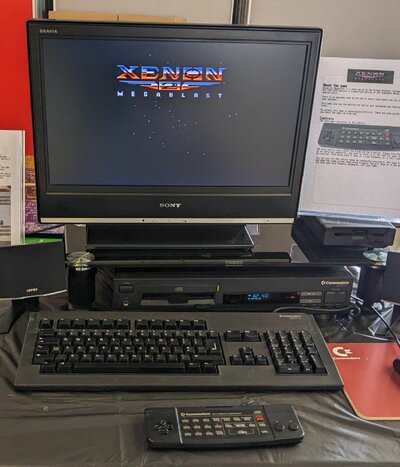
My CDTV is a little more stock than most here. I mostly take it to shows now, and the photo attached is hows I set it up. I have:

  • An RGBtoHDMI, this isn't essential, I could live without it
  • An 8MB upgrade in the diagnostic port, also isn't essential for my usage
  • A 68010 CPU, the best upgrade so far
  • Changed the fan on it, the old one was very noisy
The 68010 CPU is used because Bitmap Brothers games in particular appear to see a nice performance improvement from the tight loop optimisations in it. I keep meaning to make a video showing the difference it makes.

I highly recommend playing the CD version of Xenon II on it with some good speakers (there is a nice big base speaker underneath this table at OLL23).

As for PiStorm, it works but you won't be able to use the CD drive any more. I don't think we ever fixed that (I develop more the Musashi side than the Emu68 side).
 

Attachments

  • PXL_20230414_132401586 (1).jpg
    PXL_20230414_132401586 (1).jpg
    266.2 KB · Views: 54
My CDTV is a little more stock than most here. I mostly take it to shows now, and the photo attached is hows I set it up. I have:

  • An RGBtoHDMI, this isn't essential, I could live without it
  • An 8MB upgrade in the diagnostic port, also isn't essential for my usage
  • A 68010 CPU, the best upgrade so far
  • Changed the fan on it, the old one was very noisy
The 68010 CPU is used because Bitmap Brothers games in particular appear to see a nice performance improvement from the tight loop optimisations in it. I keep meaning to make a video showing the difference it makes.

I highly recommend playing the CD version of Xenon II on it with some good speakers (there is a nice big base speaker underneath this table at OLL23).

As for PiStorm, it works but you won't be able to use the CD drive any more. I don't think we ever fixed that (I develop more the Musashi side than the Emu68 side).

Xenon II was the first iso I grabbed for testing purposes :D
 
Back
Top Bottom