
After repairing a bunch of Amiga motherboards lately, it was a pleasant change to attempt to repair something else for a change.
This time I had a faulty Apollo 3040 68040@33MHz to repair. One of the 74ACT16543 transceivers had taken a hike and took ten tiny pads with it.


Also one of the electrolytic capacitors had leaked on the board and corroded some pins of the Boot ROM socket.

Before attempting to repair the board, the first thing was to test if the MACH chips were okay.
If the MACHs were faulty, there was no much point to spend more time on this one.
I tested the chips on another, working Apollo board. The working Apollo booted with the MACH chips,
so now I knew the faulty board had some hope. I also tested the 68040 CPU and the Boot ROM
at the same and they were also okay, nice.
So back to repairing the board. First I replaced the electrolytic capacitors and the Boot ROM socket.
After that I began working on the missing pads of the 74ACT16543 chip.
I used a small copper wire about the same thickness as the pads as a substitute.
The plan was to keep the changes as indistinguishable as possible. I soldered the wires to vias when possible,
otherwise I scraped some lacquer off from the broken traces and soldered the wires there.
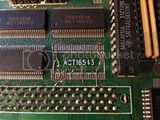
A few photos after fixing the pads and soldering a new 74ACT16543 in place.
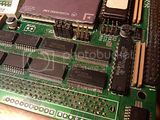
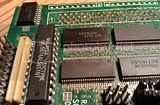
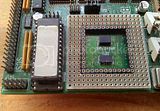
I also replaced the original ghetto 68040/68060 CPU socket with a new one.
It was time to test the board, would it work? Well, it didn't. The Amiga only booted to a dark grey screen.
Probably a bad connection somewhere. I cleaned the CPU slot connector pins with isopropyl alcohol but that didn't have any effect.
The connector pins had some oxidation that was difficult to scrape off. Sockets of the MACH chips were also oxidized and
I couldn't get them cleaned satisfyingly enough, so I desoldered the sockets and soldered the chips directly to the board.
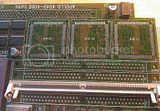
Another try to boot the Amiga with soldered MACHs still gave only a dark grey screen.
Hmm, the remaining problem was probably with the CPU slot connector or the other transceiver chips.
I replaced the 74ACT16543s and 74LS245s with faster 74FCT16543s and 74F245s keeping a 68060 upgrade in mind.
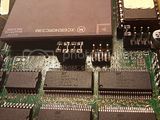
Visually the solder joints of the CPU slot connector pins were okay, but I refluxed the pins just in case.
Only after refluxing the pins the board woke almost alive, this time the Amiga booted to a light grey screen.
Now the Amiga could execute the boot up sequence up to some point before the computer hung.
So the CPU slot connector was the culprit. I desoldered the old connector and compared it with a brand new one.
The new connector is in the picture on top and the old one is below it.
The old connector had some oxidation that most likely prevented the board from working (or a loosened pin).


After soldering a new socket it was time to test the board again.

This time the Amiga booted to AmigaOS without any problem. Finally.
Next I will test if the board can be upgraded to 68060.
This time I had a faulty Apollo 3040 68040@33MHz to repair. One of the 74ACT16543 transceivers had taken a hike and took ten tiny pads with it.


Also one of the electrolytic capacitors had leaked on the board and corroded some pins of the Boot ROM socket.

Before attempting to repair the board, the first thing was to test if the MACH chips were okay.
If the MACHs were faulty, there was no much point to spend more time on this one.
I tested the chips on another, working Apollo board. The working Apollo booted with the MACH chips,
so now I knew the faulty board had some hope. I also tested the 68040 CPU and the Boot ROM
at the same and they were also okay, nice.
So back to repairing the board. First I replaced the electrolytic capacitors and the Boot ROM socket.
After that I began working on the missing pads of the 74ACT16543 chip.
I used a small copper wire about the same thickness as the pads as a substitute.
The plan was to keep the changes as indistinguishable as possible. I soldered the wires to vias when possible,
otherwise I scraped some lacquer off from the broken traces and soldered the wires there.

A few photos after fixing the pads and soldering a new 74ACT16543 in place.


I also replaced the original ghetto 68040/68060 CPU socket with a new one.

It was time to test the board, would it work? Well, it didn't. The Amiga only booted to a dark grey screen.
Probably a bad connection somewhere. I cleaned the CPU slot connector pins with isopropyl alcohol but that didn't have any effect.
The connector pins had some oxidation that was difficult to scrape off. Sockets of the MACH chips were also oxidized and
I couldn't get them cleaned satisfyingly enough, so I desoldered the sockets and soldered the chips directly to the board.

Another try to boot the Amiga with soldered MACHs still gave only a dark grey screen.
Hmm, the remaining problem was probably with the CPU slot connector or the other transceiver chips.
I replaced the 74ACT16543s and 74LS245s with faster 74FCT16543s and 74F245s keeping a 68060 upgrade in mind.

Visually the solder joints of the CPU slot connector pins were okay, but I refluxed the pins just in case.
Only after refluxing the pins the board woke almost alive, this time the Amiga booted to a light grey screen.
Now the Amiga could execute the boot up sequence up to some point before the computer hung.
So the CPU slot connector was the culprit. I desoldered the old connector and compared it with a brand new one.
The new connector is in the picture on top and the old one is below it.
The old connector had some oxidation that most likely prevented the board from working (or a loosened pin).


After soldering a new socket it was time to test the board again.

This time the Amiga booted to AmigaOS without any problem. Finally.
Next I will test if the board can be upgraded to 68060.


 oh
oh


