

Introducing the sd2iec!
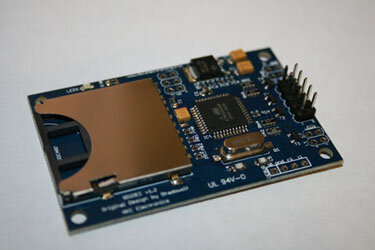
The SD2IEC is a hardware mass storage device using an SD/MMC card and interfacing with the IEC bus. The SD2IEC is an emulation/replacement of a Commodore-1541 disk drive for a C64 and 128.
The hardware is a small credit card sized board with an sd reader
Slot and 5 wires soldered on it, which need either connecting to
The c64 serial port with a plug or soldering directly to the c64 / 128 motherboard.
(i have diagrams if anyone needs them)
With each new firmware revision , new features are added.
Use:
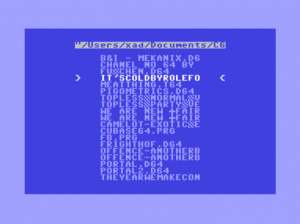
It's pretty simple to use, copy your .d64 and run them as you would a real c64 disk drive program or use a simple file manager. I personally use the file manager, it's quick and easy to use, highlight the program name and press fire on the joystick- easy.
Speed ?
Well it's quick , a game will load in about 20 seconds (ish) depending on its size but if you have jiffy dos installed, cut this by more than half.
Compatability?
99% of games and demos I have tried, work. However fast loaders are not supported - as of my firmware anyway. I have had issues with 128 software but I should revisit this - its been six months or so
Features of SD2IEC.
D64/M2I support (both reading and writing for D64, even with direct sector access using U1/U2)
PRG/P00 etc. support
Subdirectory support (CMD command syntax).
Support for Turbo Disk AKA Fast Load AKA Speeddisk fastloader
Supports the JiffyDOS fast serial bus protocol
Supports the Final Cartridge 3 fastloader/fastsaver
Supports an external "disk change" button
Supports FAT long file names
Supports FAT12/FAT16/FAT32 formatted SD cards
Improved IEC compatibility (expect all apps that run in VICE without exact floppy emulation to run)
Over all view?
Cheap , quick , silent and easy to use. Some comparability issues but these are minor. The more expensive 1541 emulation devices off more speed and 100% comparability but at a much higher cost.
Where can I get one?
eBay, amibay, google - some shops sell them online.
Pics & vids later ...
youtube sd2iec
http://www.youtube.com/watch?v=CSgA9jYpV_k
The SD2IEC is a hardware mass storage device using an SD/MMC card and interfacing with the IEC bus. The SD2IEC is an emulation/replacement of a Commodore-1541 disk drive for a C64 and 128.
The hardware is a small credit card sized board with an sd reader
Slot and 5 wires soldered on it, which need either connecting to
The c64 serial port with a plug or soldering directly to the c64 / 128 motherboard.
(i have diagrams if anyone needs them)
With each new firmware revision , new features are added.
Use:
It's pretty simple to use, copy your .d64 and run them as you would a real c64 disk drive program or use a simple file manager. I personally use the file manager, it's quick and easy to use, highlight the program name and press fire on the joystick- easy.
Speed ?
Well it's quick , a game will load in about 20 seconds (ish) depending on its size but if you have jiffy dos installed, cut this by more than half.
Compatability?
99% of games and demos I have tried, work. However fast loaders are not supported - as of my firmware anyway. I have had issues with 128 software but I should revisit this - its been six months or so
Features of SD2IEC.
D64/M2I support (both reading and writing for D64, even with direct sector access using U1/U2)
PRG/P00 etc. support
Subdirectory support (CMD command syntax).
Support for Turbo Disk AKA Fast Load AKA Speeddisk fastloader
Supports the JiffyDOS fast serial bus protocol
Supports the Final Cartridge 3 fastloader/fastsaver
Supports an external "disk change" button
Supports FAT long file names
Supports FAT12/FAT16/FAT32 formatted SD cards
Improved IEC compatibility (expect all apps that run in VICE without exact floppy emulation to run)
Over all view?
Cheap , quick , silent and easy to use. Some comparability issues but these are minor. The more expensive 1541 emulation devices off more speed and 100% comparability but at a much higher cost.
Where can I get one?
eBay, amibay, google - some shops sell them online.
Pics & vids later ...
youtube sd2iec
http://www.youtube.com/watch?v=CSgA9jYpV_k
Attachments
Last edited by a moderator:


