SCSI newbe and A4000 onboard memory speed?

  • Thread starter Thread starter 2E1 BZU
  • Start date Start date
  • Replies Replies 13
  • Views Views 3284

2E1 BZU

New member
AmiBayer
Joined
Apr 2, 2010
Posts
338
Country
East Sussex
Region
UK
Hi all

I am a complete newbe regarding SCSI, and need some assistance please.

1) I bought this https://www.amibay.com/showthread.php?t=13787 (SCSI CDROM, external) It will be connected to a Blizzard 1260 SCSI card. Do I need SCSI termination? If so, what do I need to get?

2) I am now thinking of using the onboard SCSI on my BPPC in my A1200T for a hard disk, either running OS3.9, OS4 or OS4.1 when it comes out. In any case, what do I need to get that going, do I need termination, what cable would I need, and what type of hard disk do I need ?

3) In my A4000 I have a CSPPC, and a Buddha Flash Pheonix edition (er, I think..it has gold pads) Is it worth going down the SCSI route with that as well, or stick with the IDE ports on the Buddha?

4) I read in a for sale thread on this site about a user removing the fast memory from the A4000 main board due to performance loss. Is this right? Is it best to remove this from my A4000 when it's up and running again?

Any help or pointers would be greatfully recieved.

Cheers
 
IDE is a cheap fix on Amiga's. C= used it as Standard with the release of the AGA range of puters, as it was cheaper than SCSI. SCSI was always the standard for Amiga prior to this. The real downer with IDE is the CPU hit for it. SCSI does not hit the CPU with any loading & therefore, your Amiga will breathe a new life for using as much SCSI as possible, because it can multi-task that much faster.

SCSI always has to be terminated at both ends of the cable, what ever standard of SCSI is employed. Your BPPC SCSI is only SCSI II (50 pins) whereas your CSPPC is SCSI III (68 pins) & boy, is this a FAAAAASt SCSI option for the Big Box Amiga. :nod:

Both of your PPC cards can also utilise SCSI Breakouts to the rear of the Case so you can plug in External SCSI devices such as Scanners or Hard Drive/CD/DVDROM Enclosures. Such set ups will always need an Active Terminator plugging in when no External Devices are hooked up, as this forms the end of the SCSI Bus.

You can use 68 & 80 pin SCSI drives on the BPPC SCSI but you will need specific converters to do so. These devices are usually quieter than some of the early 50 Pin SCSI Hard Drives, but afair, Quantum LPS SCSI drives were always very quiet, if somewhat small.

More recent 68 pin SCSI Hard Drives might have a jumper option to enable Termination, which might save you the expense of Active Terminators. Be sure you use Active Terminators & not Passive ones. Passive ones are very common in Centronics 50 Way type as per the back of your acquired External CDROM enclosure. Stachu100 made his own BPPC SCSI Cable, though AmigaKit did make one for a while back so they might be a good source to check. The CSPPC requires a 68 Way ribbon cable & if no one on here can help you, the other bay surely will.

RE your A4KD having Fast Ram fitted & slowing your Amiga down is complete & utter tosh. :roll:
Any Fast Ram on your CSPPC will be assigned a higher priority than Fast Ram on the Mobo & consequently, this Ram will be used before the A4KD's own Fast Ram. Taking it out will remove what ever value of Ram you have fitted & will not make the A4KD any faster for doing so. Access to the A4KD's Fast Ram is far slower than access to the Accelerator Ram & is why when you have an Accelerator card with Ram fitted in your Amiga, it gets assigned a higher priority @ a hardware level. ;)

There is a lot more info you are probably going to need & plenty of folk on here who can help, but hopefully I've given you some easy-ish ground rules to get to grips with. :thumbsup:

Best Wishes & Good luck.

Kin
 
Last edited:
IDE is a cheap fix on Amiga's. C= used it as Standard with the release of the AGA range of puters, as it was cheaper than SCSI. SCSI was always the standard for Amiga prior to this. The real downer with IDE is the CPU hit for it. SCSI does not hit the CPU with any loading & therefore, your Amiga will breathe a new life for using as much SCSI as possible, because it can multi-task that much faster.

SCSI always has to be terminated at both ends of the cable, what ever standard of SCSI is employed. Your BPPC SCSI is only SCSI II (50 pins) whereas your CSPPC is SCSI III (68 pins) & boy, is this a FAAAAASt SCSI option for the Big Box Amiga. :nod:

Both of your PPC cards can also utilise SCSI Breakouts to the rear of the Case so you can plug in External SCSI devices such as Scanners or Hard Drive/CD/DVDROM Enclosures. Such set ups will always need an Active Terminator plugging in when no External Devices are hooked up, as this forms the end of the SCSI Bus.

You can use 68 & 80 pin SCSI drives on the BPPC SCSI but you will need specific converters to do so. These devices are usually quieter than some of the early 50 Pin SCSI Hard Drives, but afair, Quantum LPS SCSI drives were always very quiet, if somewhat small.

More recent 68 pin SCSI Hard Drives might have a jumper option to enable Termination, which might save you the expense of Active Terminators. Be sure you use Active Terminators & not Passive ones. Passive ones are very common in Centronics 50 Way type as per the back of your acquired External CDROM enclosure. Stachu100 made his own BPPC SCSI Cable, though AmigaKit did make one for a while back so they might be a good source to check. The CSPPC requires a 68 Way ribbon cable & if no one on here can help you, the other bay surely will.

RE your A4KD having Fast Ram fitted & slowing your Amiga down is complete & utter tosh. :roll:
Any Fast Ram on your CSPPC will be assigned a higher priority than Fast Ram on the Mobo & consequently, this Ram will be used before the A4KD's own Fast Ram. Taking it out will remove what ever value of Ram you have fitted & will not make the A4KD any faster for doing so. Access to the A4KD's Fast Ram is far slower than access to the Accelerator Ram & is why when you have an Accelerator card with Ram fitted in your Amiga, it gets assigned a higher priority @ a hardware level. ;)

There is a lot more info you are probably going to need & plenty of folk on here who can help, but hopefully I've given you some easy-ish ground rules to get to grips with. :thumbsup:

Best Wishes & Good luck.

Kin

Hi Kin

Thanks for the reply. Ref the A4000 fast memory, thats a nifty thing then, I had always wondered how it deals with the motherboards memory when the accelerator has it's own which is more or less directly connected to the new/faster CPU.

Yea, I will check with Amigakit and see if they can build up the correct cables for both the BPPC and the CSPPC, and also if they can supply two SCSI hard disks for both with the correct termination.

This will be my first dabble with SCSI ever, always put off by all the requirments, but I don't want any of my PPC Amigas bottle necked by IDE now. So, time to bite the bullet!
 
Last edited:
Just to add RE using devices to Terminate SCSI Buses:

It does not always work. SCSI does not always conform to the Rule book on it & there are far too many permutations to go through. :|

It is always best to Terminate the Cable at both ends & leave the devices termination set to off. That way, you should always stay in the safe zone. ;)

Kin
 
Hi all

I am a complete newbe regarding SCSI

You and me both! :lol:

Have a look at my A4k project page,https://www.amibay.com/showthread.php?t=8247&page=19 post 190 at the bottom of the page. This is the recommended config for setting for the SCSI chain. I am still building my A4k so have not had a chance to test it out yet.
Hi Geraldine

I don't know if it's a SCSI chain in my case...planning just the one device.

Just to add RE using devices to Terminate SCSI Buses:

It does not always work. SCSI does not always conform to the Rule book on it & there are far too many permutations to go through. :|

It is always best to Terminate the Cable at both ends & leave the devices termination set to off. That way, you should always stay in the safe zone. ;)

Kin

Hmmmm, I am getting lost here. The way I imagined it in the BPPC and CSPPC cases, was that a single cable would connect to a hard disk, and the hard disk would have it's own termination then.

As for the SCSI cdrom, I was thinking of a termination plug that plugs into the second socket on the CDROM case. But what about termination on the Blizzard SCSI card? Do I need SCSI drivers for the Blizzard SCSI or CDROM drivers?

But in all these cases, would active or passive termination be needed? Is it easy to blow these things up if not done right?
 
Hi Amigafun & Geraldine

- Blizzard SCSI IV Kit -> 1230scsi.device
- CSPPC -> cybppc.device

Both are inside the firmware of the boards. Best is update to the latest versions.

About devices.... the SCSI chains must be terminated in both sides.

- BSCSI includes onboard terminator:

SCSI Board - DEVICE - DEVICE - ..... - Active terminator

- CSPPC is not terminated in any side:

Active terminator - DEVICE - CSPPC - DEVICE - DEVICE - ...... - Active terminator

or

CSPPC - Active Terminator Passtrough - DEVICE - DEVICE - ..... - Active Terminator.

------------

Be carefull with SCSI ID's 0, 6 or 7 maybe are used by the SCSI controllers.

One good idea is to use:

ID1 -> HDD
ID2 -> HDD
ID4 -> CD, DVD
ID5 -> CD, DVD

or something like that.

Of course, in all cases, check the HDD's config: LVD, SE, TRM ....... (jumpers on the board of HDD).

All the best.
 
Last edited:
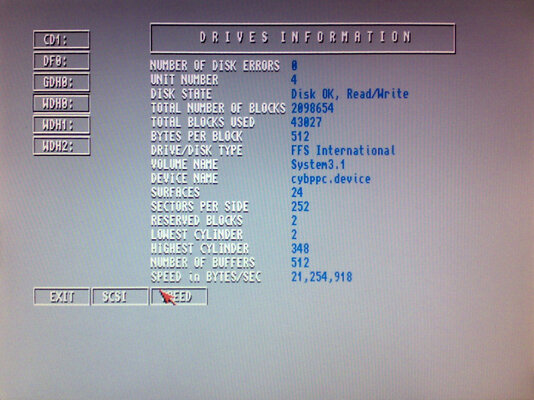
I can certainly recommend the SCSI on the CSPPC ;)

attachment.php


No termination problems either in this case, just a cable with a terminator at both ends and all works nicely.
 

Attachments

  • sysspeed.jpg
    sysspeed.jpg
    42.4 KB · Views: 8
@ajk

Yes, I can reach 20 to 21MB/s....

Overall performance varies because my first HDD is an UWSCSI-IDE-CF adapter and depends of the CF I'm using...

My config:

CSPPC-ACTTERMPASS-HDD-HDD-DVD-DVD-ACTTERM

Works like a charm.... :thumbsup:
 
Thanks everyone for all your responce's. There is an awful amount of things to take into concideration with SCSI (as I first feared). What I have done is asked Amigakit (:)) to supply everything I need to get SCSI working on both machines, with any termination required, cables, adapters from SCSI to IDE as well. It's the safest way.

Cheers everyone!
 
Well, I recieved the memory the other day and just got round to installing it. But come accross a problem where with both the Blizzard board and the SCSI board plugged in, the Blizzard was bent down. I had to cut away the plastic guide rail by the floppy drive to get it to seat right...but even now it it's still wonky.
The other little problem now is that the machine won't boot up. It loads from the hard drive and gets so far then crashes. I have held both mouse buttons down and disabled boot up sequence, and now at a command prompt. Now, I guess this problem is casued by the 68040/68060 libary not being right.
Is there anyway of getting this file installed without having to remove the B1260 card again?

Thanks

Mart
 
Back
Top Bottom