Shocked by a power supply

Jumping Anaconda

Member
AmiBayer
Joined
Dec 31, 2009
Posts
683
Country
England
Region
Hertfordshire
I bought a new power supply for my HP530 Laptop on Sunday. It seemed to work fine the first couple of times I used it. I tried to plug it in today and got nothing. No charging, no sign of an power with the laptop battery in or out. No multimeter on hand to test if there was no current at all, but that will probably be tested tomorrow at the nerve centre with Imnogeek.

I unplugged it from the laptop and then unplugged it from the wall plug socket. After the wall plug was completely disconnected, the two lower pins of the plug touched my hand and I got quite a big shock from it.

I concluded from this that something is pretty massively wrong with the power supply I have just bought. I am beginning to suspect it might be a counterfeit. Surely a genuine power supply that has been produced to UK standards could not allow current to pass back through to pins on the plug socket? I do not understand how residual charge from capacitors could get delivered to the live pins if it was a genuine supply.

It hurt quite a bit too.

Any guidance?
 
Dont think you should really be getting a jolt from the plug... imagine if it was perhaps a young child or worse someone with a pacemaker... think I`d be returning it to the seller
 
i would just send it back for replacement or refund and look elsewhere
 
I can see it now...

Sorry boss the service desk was down for 30 mins because one of the service desk engineers blew all the fuses with his dodgy power supply

.....and what if you break my multimeter too :lol:
 
I was thinking along the lines of "sorry I'm running late for work, I soiled my trousers after trying to switch my laptop on this morning".

Back on the original supply now. Screen dimmed as low as it will go. Great.
 
I remember this happening to me some time ago. I can't remember which device it was though.

It would only mess with your pacemaker if you managed to touch one prong with your left hand and the other prong with your right hand, with the current therefore running across your chest.

I zapped myself when modding a PS1. Middle finger of left hand on copper shielding, middle finger of right hand grazed a PSU component. Yowza! :P
 
I had it once just plugging a device in the wall outlet. (some fireworx and shock) The outles are safe and good parts at my home and from a well known local brand.:( And they are still local law approved.. And the device probably took just 800 watts causing that effect.. At the end the plug at the device as used in computers was worn to much...
 
The symptoms you are experiencing is an indication that the chopper transistor is not functioning hence the resovior feed caps can only discharge in the other direction.
This is quite common with SMP supplies
:lol:
 
For obvious reasons and for your own safety, don't plug it in again. I have built countless computers and it is a very rare occasion where a computer will fail to that degree. It can happen but in my opinion, the chances of it happening from genuinely built components from name brand manufacturers are very rare.

For your computers sake don't plug it back in. Who knows what havoc it would cause if given the chance. I would pursue the refund route due to safety concerns. Good luck in that process.

Bob
 
Hertz by name, hurts by nature! :o


If it's a legit item and bought from a reputable dealer it should have the various standards printed or moulded onto it; CE, BS kite mark, TUV etc.
 
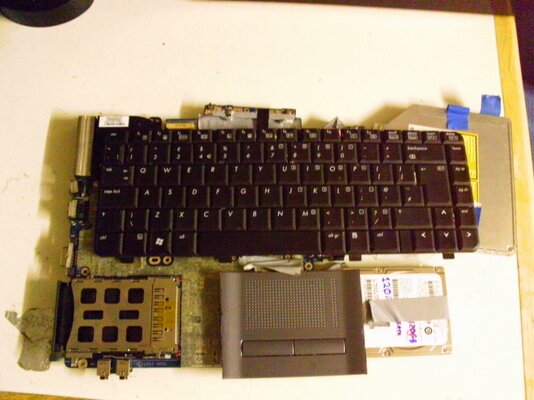
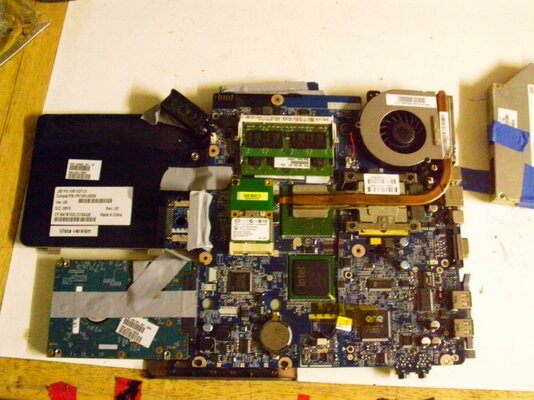
Just to Cheer u up heres a couple of pics of my HP530 Laptop, Finely whitewashed the bios so can put a different WIFI card in as that is the only thing AROS dosn`t recognise
 

Attachments

  • IMAG0151.jpg
    IMAG0151.jpg
    187.6 KB · Views: 3
  • IMAG0152.jpg
    IMAG0152.jpg
    195.6 KB · Views: 2
Thank you Amifolks for the further guidance.

Cosmicfrog, did you find the HP530 that hard to take to pieces and put back together? I've been thinking about swapping the Celeron 1.7ghz CPU for a T7200 or slightly higher, but the disassembly instructions look like a nightmare.
 
For me it was fairlly easy to take apart, if you look on the HP/compaq web site thers full documentation to do it with pics too, I must be upto about 10 laptops that I have had a good look in by now. The best tip I can give you is don`t just undo all the screws you can see take a bit of time to find out which ones can stay and which you need to exctract.

I changed to cpu on mine too. Its just a bit fiddly takein the screws out and liftin the heat pipe, but least the cpu is socketed \o/. The only bad thing I can say about this laptop is HP have tied you down to certain miniPCI wifi cards, but u can reflash the bios like I did to get round that problem. This machine came to me with a dead screen, thats why its in the naked state that its in. I want to case it in perspex so you can see the inners Ive just gota sort out how I am goung do the keyboard and mouse, Find a wifi solution that AROS likes then I can really crack on with it
 
Back
Top Bottom