Strange behaviour with Broadband dropping

  • Thread starter Thread starter Harrison
  • Start date Start date
  • Replies Replies 53
  • Views Views 5713

Harrison

Member
Joined
Dec 1, 2007
Posts
10,149
Country
UK
Region
West Sussex
I've got some strange behaviour with my home network/broadband that I was wondering if any of you could work out.

I'm with Be Broadband and am using their technicolor router.

The router is connected via ethernet cable to a Zyxel Gbit 8 port switch and all my wired equipment is connected to that. Laptops, smartphones and PS3 are connected to the router via wi-fi.

Here is the behaviour:

  1. I've noticed when a new device is connected to the network the broadband drops for a few moments and then comes back. I've watched uTorrent running on one of my PCs with the Speed graph showing its upload/seeding rate, and when a device is connected to instantly drops down to 0kB/s then starts to build back up to full speed almost straight after.
  2. The broadband connection drops regularly then instantly reconnects and goes back to full speed. This can sometimes happen every few minutes, or can stay up for some time (1 hour) then do it again.
  3. Sometimes when I check the connection the download speed has dropped to around 600Kbps and I need to reboot the router to make it go back up to 3-4Mbps. It can stay at the correct speed for days, sometimes weeks, but then will do it again.
I'm thinking some of this behaviour might be noise on the line. Do you think that?

But what about the connection dropping when a new device connects to the network? And it can be a wired (ethernet cable) or wireless.

I've not tested the router from the master socket test port yet, but should have time to do that tomorrow.

I'm also wondering if my house has something to do with it. It was a recent new build be purchased new a few years ago. It has a master phone socket by the front door, and then a phone point in every room in the house (living room and 3 bedrooms). Could all of these extensions be causing issues? I've got filters in all the sockets that are being used, but none in other sockets.

I do also have a Sky box connected in the living room to that phone socket with a filter, and the main house phone (landline) is also connected to that point. I've read that Sky boxes can sometimes cause issues. Is that true?

I've also read that disconnecting the bell wire from the master switch can reduce a lot of line noise and fix many such issues, and also increase broadband download speed by as much as 3x. Anyone else tried that?
 
Sounds alot like an ip address conflict somewhere on the network when connecting something... dunno what ur setup is .... fixed or dhcp... if dhcp maybe not enough addresses to go allround, likely wrong but all i can think of
 
All network IP addresses are assigned by DHCP. The router also has WPS for connecting compatible devices like printers. I've checked settings on all devices and there are no conflicts. All are set to obtain their IP from the DHCP and nothing has a fixed IP (although I'm tempted to try setting fixed IPs).

Forgot to also mention a wireless printer is also on the wi-fi network, but I don't see that as the issue as it isn't actually switched on unless being used.

I decided to try removing the bell wire (ring wire) from the BT Master Switch, to see if there was any truth in what I was reading on many sites about it reduce line noise and increasing bandwidth. After rebooted the router my download speed has almost doubled! :o It was running at only 2672Kb/s (2.61Mb/s) when I tested it this morning just before I removed the wire, and is now running at 4567Kb/s (4.46Mb/s).

So if any of you have a BT master switch I highly recommend you try this. The master switch will be your main phone socket and it should be split with the bottom half removable with 2 screws. Unscrew it and you should see 4 wires connected to it. You want to remove the Orange/White wire which is connected to pin 3. Don't cut the wire, but remove it by teasing it out because if you ever sell your house or have a BT engineer visiting you should reconnect it.
 
Might want to try reducing the total outgoing global connections on your BT client. Adding more equipment increases the traffic through the modem and could be temporarily tipping it over the edge causing the modem to drop. Try a low limit of 150 or so and see if it makes a difference...
 
We had similar issues with our connection. The ISP technician fixed it by plugging us into another slot on their hub (or whatever it's called) and exchanging the modem on our end. We live way out there, so not much copper is present. Noise, and too little copper from us to the central were the culprits.
 
Forgot to say also that a failing/weak powersupply to modem/router/switch can also result in drops...
 
Might want to try reducing the total outgoing global connections on your BT client. Adding more equipment increases the traffic through the modem and could be temporarily tipping it over the edge causing the modem to drop. Try a low limit of 150 or so and see if it makes a difference...

Not quite sure what you mean? 150 what?

Is a brand new modem from Be only a month ago so I don't think it is a router issue, and the switch has never stopped transferring data between systems, just the broadband connection that drops.
 
Somewhere in the preferences in your BT client there will be a setting for the max number of global connections. Set this to 150 and see how it fairs...
 
All network IP addresses are assigned by DHCP. The router also has WPS for connecting compatible devices like printers. I've checked settings on all devices and there are no conflicts. All are set to obtain their IP from the DHCP and nothing has a fixed IP (although I'm tempted to try setting fixed IPs).

Forgot to also mention a wireless printer is also on the wi-fi network, but I don't see that as the issue as it isn't actually switched on unless being used.

I decided to try removing the bell wire (ring wire) from the BT Master Switch, to see if there was any truth in what I was reading on many sites about it reduce line noise and increasing bandwidth. After rebooted the router my download speed has almost doubled! :o It was running at only 2672Kb/s (2.61Mb/s) when I tested it this morning just before I removed the wire, and is now running at 4567Kb/s (4.46Mb/s).

So if any of you have a BT master switch I highly recommend you try this. The master switch will be your main phone socket and it should be split with the bottom half removable with 2 screws. Unscrew it and you should see 4 wires connected to it. You want to remove the Orange/White wire which is connected to pin 3. Don't cut the wire, but remove it by teasing it out because if you ever sell your house or have a BT engineer visiting you should reconnect it.


Only two wires are needed to convey PSTN & BB signals into any address.
Your tweak can be read here:

http://www.kitz.co.uk/adsl/socket.htm

It includes the iPlate upgrade too.

Also, Be might be able to help you with your setup & the dis-connects you get for adding another device. I could add, if you have a Server in the home, let the Server handle DHCP and see if the problem goes away. You will of course need to remove this Function from any Routers/Switches that are behaving as DHCP Servers on your home Network, especially with the On/Off Wireless one you use from time to time.

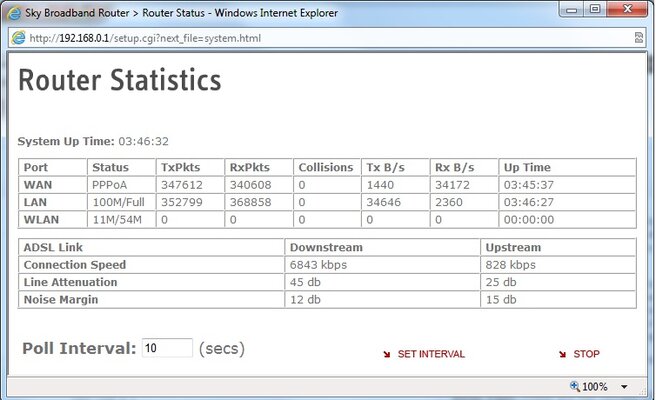
RE noise on the line: I could help point a finger if I could see some Router Stats, such as this from my Netgear. Distance from Exchange would be good too.
Also, is there actually a noise on the phone line itself? Pick the receiver up & dial 9 to get rid of the dial tone. Is there hiss, fizzing, pops and cracks? Do telephone calls go a bit echoey sometimes?
 

Attachments

  • Router.jpg
    Router.jpg
    52 KB · Views: 3
Last edited:
There has always been noise on the line when speaking to someone.

Fingers crossed, since disconnecting the bell wire it hasn't dropped once yet!

The download speed has dropped back down to 2.8Mb/s but I expected that as it will take a few days to adjust properly.

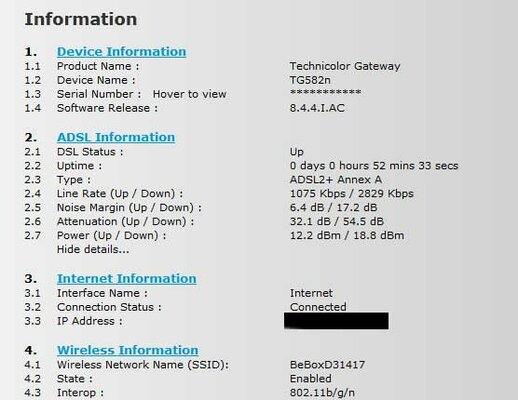
Here is an attached image of my routers stats.
 

Attachments

  • connection.jpg
    connection.jpg
    30.1 KB · Views: 2
If you have noise on your Phone line, is it there with the ADSL un-plugged? - If it is, you have a PSTN fault. If it isn't, trying to get anyone to do anything about it is pretty futile.

Your Line Attenuation @ 54db Downstream is suggesting one/two things.
You are way over 3KM from the Exchange or you have some poor wires. As a matter of interest, how far from the Exchange are you?

With a 2.8Mb connection @ 17.5db downtream, there is headroom for your ISP to increase your line speed. Might be worth having a chat with them. Before you do though, it's worth looking at your Downstream Noise margin at different times of the day over a week or so. High line attenuations have more chance of being hit with a reduced SNR in the evenings.
At anytime of the day, you never want to see your Downstream below 5db as you are entering the realms of disconnection teritory.
If you see fluctuations of +/-2db Downstream, there is a fault somewhere.

Good to hear the Bell wire resolved your issue so far. :)
 
Thanks for all the information. How would I find out how far from the exchange I am?
 
One thing I like to recommend to customers around here, in the middle of rural Wales in farmhouses with extensions running left, right and centre, is a faceplate filter such as the NTE2000. If this is not too inconvenient for where your router is, that is. This filters off the ADSL signal at the master socket and isolates your extension wiring which can help in weaker line situations.

I've fitted plenty for people who are marginal for ADSL at the best of times, and filtering at the master socket has been the difference between working/none working connection.


Secondly, you say your sync speed increased after removing the bell wire, and then dropped down back to 2Mbps or so?

To me this sounds like an iffy line, and also could explain your intermittent connection. When your router first connects, it will negotiate a set speed and stick to that. If there is noise on the line, external interference or a crackle or whatever, the router will momentarily drop the connection and resync at a lower speed, and so on until it finds a stable and reliable enough rate.

So, my theory is your line is capable of 4Mbps or so at best, but something intermittent is causing it to resync at lower and lower speeds.

As for things taking a few days to settle, this is down to Maximum Stable Rate, which is a seperate thing to line sync rate. Line sync is almost dynamic according to line conditions, MSR is "averaged".

The exchange notes your average stable sync speed and sets a profile for that as maximum throughput. I've come across a few connections where after some line problems have been fixed, the sync has been nice and high but the profile is still way down, so for a few days you get the situation where you can have a 8Mbps line sync, for example, but only 2Mbps throughput until the profile is kicked back up again.
 
@ Uncle_Meat

Where I live, those pre-filtered NTE2000 BT Faceplates no longer filter the noise off the line & have not done so since before December 2010. The ADSL services in my area do not function as they should & BT need lynching for it.
 
@ Uncle_Meat

Where I live, those pre-filtered NTE2000 BT Faceplates no longer filter the noise off the line & have not done so since before December 2010. The ADSL services in my area do not function as they should & BT need lynching for it.
Interesting. Around here, all the local exchanges are still on the old 8Mbps "BT Monopoly" ADSL Max lines, no "Up to 24" ADSL2+ so I've not come across that problem here.

Saying this, a filter is just a low pass filter after all with a cutoff at 5Khz or thereabouts. Unless the DSL signal is close to that with 2+ and the rolloff on the filter is a bit marginal... Hmm... Never had to deal with ADSL2+ so never needed to really gen up on it before now.

Any idea what the actual problem is?
 
@ UM

Not at the Moment. BT have been blaming my ISP for about two years now. However, my ISP have graphs plotted showing huge hits at specific times of the day. They can also back up with a huge loss of customers over these years.

Yes, the 24Mb ADSL fiasco is just a waste of time. BT just wanted as many old age pensioners as possible to have 24Mb to download Email. :roll: - Consequently, it has caused untold problems accross the entire UK's network.
Here in Cornwall, they are rolling out Fibre @ the cost of £138m: £80m of which is BT's money with the rest coming from the European Fund. When it went live in our exchange on 31/12/11, it was like turning on a set of late Xmas treee lights for the Blind. Current ADSL users are experiencing slower speeds & property with Fibre right into the home hasn't even been enabled yet, still leaving massive loadings on the Cabinets. Fibre in Cornwall is a complete farce. It's a separate network that does not alleviate the bottlenecks BT have caused over the last 10 years of Internet Boom. On top of this, BT are now claiming to be able to give 80Mb to FTTC users. I expect they will do this by the same method to get ADSL upto the realms of 24Mb. It is a complete waste of time as it doesn't work as was intended & once these excessive loadings are in place, Physics/Science takes over & leaves the customer with a terrible service, whilst the ISP's & BT say it isn't their fault. BT will even blame Eletrical interferences from other parties, yet do nothing to resolve it whilst still taking your money for full line rental.
Disgraceful tbh. :dry:
 
As the crow flies:

http://www.dslzoneuk.net/distance.php

Allowing for roads, you need to see this Post:

http://www.the-scream.co.uk/forums/t181.html

I use a BT Line so the service above works fine for me. Your milage may vary depending on who you pay Line rental to.

I'm also on a BT line.

As the crow flies it is showing it as 2.27KM from the exchange, so not that far. However using Googlemaps to measure the distance following the roads (which should roughly estimate the real wire route) I estimate the length to be closer to 4.4KM which is a lot further. And worse case if they have followed the main A27 and routed up a different main road would make it 5.1KM.

BTW, for anyone else wanting to try and work this out, the official GoogleMaps site no longer has the distance measuring tool, but this site does: http://www.daftlogic.com/projects-google-maps-distance-calculator.htm

I used the crow flies webpage to locate exactly where the exchange was, then used the site above to measure the distance along the roads from m house to it.

I've not yet tried the BT service to test for noise on the line, but will do if I get more time later today.

I also checked the router stats a couple of times:

1am this morning:
Line Rate (Up / Down) : 1065Kbps up / 3500Kbps down
Noise Margin (Up / Down) 6.6 dB / 14.2 dB
Attenuation (Up / Down) : 32.2 dB / 54.5 dB

10:30am this morning:
Line Rate (Up / Down) : 1065Kbps up / 3500Kbps down
Noise Margin (Up / Down) 6.6 dB /15.6dB
Attenuation (Up / Down) : 32.2 dB / 54.5 dB

12pm this lunchtime:
Line Rate (Up / Down) : 1065Kbps up / 3500Kbps down
Noise Margin (Up / Down) 6.6 dB /15.4dB
Attenuation (Up / Down) : 32.2 dB / 54.5 dB

The attenuation looks constant, and the download bandwidth looks like it has currently settled at 3500Kbps. The Noise Margin for down seems to be fluctuating a bit though from 14.2 to 15.6. What would that indicate? I'm assuming it initially dropped down to 14.2 because of the increase in download bandwidth. Is that correct?

I'm thinking it has to be noise on the line though so will perform the BT line check later. Otherwise it could be my house's internal extensions.

I don't have the option of running the router from the master socket however because in their wisdom the builders didn't put a electric socket anywhere near the master socket. How mad is that! The master socket is right by the front door, but the nearest plug socket is at the other end of the long hallway the other side of the kitchen door. I also need the router connected via ethernet to my switch and computers in my office/study upstairs so it would then need a long ethernet cable routed somehow upstairs if the router was located by the master socket, so I don't think it's an option.
 
Interesting I have had a lot of drops outs recently and last night my line went dead. So no broadband or dial tone.

There have also been a lot of solar flare activity recently which apparently can cause interferrence.

Related? Or cloud cuckoo?

Not sure hope to find out more later.
 
Back
Top Bottom