Strange behaviour with Broadband dropping

  • Thread starter Thread starter Harrison
  • Start date Start date
  • Replies Replies 53
  • Views Views 5713
Forgot to also mention the speed is now dropping again regularly. About ever 15-30 minutes the broadband speed drops to 0 and browsers can't connect, then after a few moments the connection is back. The router however never loses its connection (broadband and internet lights are always on on the router itself). Any ideas? noise?

I'm more worried about fixing this issue rather than getting any more speed from the line. It's making playing any games online hard as when these drops happen the server loses the connection to me and I'm kicked out of the game. And also if trying to update a remote script such as a site update a drop could mess up the update.
 
Forgot to also mention the speed is now dropping again regularly. About ever 15-30 minutes the broadband speed drops to 0 and browsers can't connect, then after a few moments the connection is back. The router however never loses its connection (broadband and internet lights are always on on the router itself). Any ideas? noise?

I'm more worried about fixing this issue rather than getting any more speed from the line. It's making playing any games online hard as when these drops happen the server loses the connection to me and I'm kicked out of the game. And also if trying to update a remote script such as a site update a drop could mess up the update.

You really need to get onto your ISP about your service behaving like this.
On my Netgear Router, I can set the refresh time to 1 second for the line stats, so you get to see some really wild downstream db fluctuations. If this is happening, you probably have a BT fault, but getting them to acknowledge this is futile & they will blame your ISP at every opportunity.

Were you able to reset your Line Stats via the Link I gave earlier using 17070 line tests?
 
I'm thinking the same regarding line noise to be fair. Your sync speed should not really vary as much as it is doing, from 4 to 2, back to 3 and so on.

Have you got another router you can test with? Not that this is definite proof that yours is flaky, some routers handle noise better than others, but it might be a clue.

Out of interest, is your LAN still alive when your connection drops? Try squirting some files across your network when it goes off again, hopefully this might eliminate that side of the router from being the problem.

Finally, any firmware updates for your router? If so, might be worth a try.
 
I've not had chance to do the 17070 line tests yet as I'm currently trying to finish a website I've been updating. Will probably be able to tomorrow.

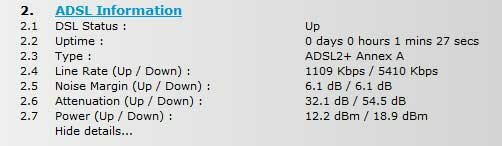
Interestingly I just rebooted the router to see if it would improve anything and checked the router stats page and it is now showing this:

Line Rate (Up / Down) : 1109 Kbps / 5410 Kbps
Noise Margin (Up / Down) : 6.2 dB / 6.3 dB
Attenuation (Up / Down) : 32.1 dB / 54.5 dB

I then performed a quick download of the Java installer (as i had the page open) and confirmed the speed has increased as it downloaded at an average of 568kbps. So after the initial speed increase yesterday from disconnecting the bell wire, then the drop back down to 2.8Mbps, it has now increased 5.2Mbps after the reboot. Would be good if it stays like that, but I bet it will lower.

Just need to get to the bottom of the drops now. Will try contacting the ISP later this afternoon to see what they say.
 

Attachments

  • connection2.jpg
    connection2.jpg
    12.3 KB · Views: 5
Okay, so now your line appears to be trying to reconfigure itself having hooked up @ just over 5Mb. Notice how much smaller your D/S db is @ 6.3?

You don't ever want to see this dipping much lower. If it does, your service will fail & the Router will reset.

Good luck with Be support. :thumbsup:
 
Post in Betheres forum. They are fantastic at tweaking your line and very responsive.

You wont get any other ISP to change your SNR ratio by just asking like you will be bethere.
 
Just to add, ask them to make sure you are on ADSL & not ADSL2. Whilst ADSL2 might give you a few kbps more, the performance of your service can suffer for it & as you can only get around 5Mb, there is no point.
If you can, get Interleaving dropped too. This will greatly reduce your ping times but your ISP should monitor this as Errors can build up on the line. If BT Wholesale actually made adequate Provision, there would be no errors on the line & there would be no need for Interleaving. It's bad practise to slow Networking down in any instance, but for BT, it is just a natural course of action for them.

I really hope you get a result from Be Support. :)

They might be able to run some logging for your connection. Always a good thing to do for flakey lines.
 
Those bethere modems aren't very good, my mate has now pinched my old netgear off of me because his connection was yo-yoing constantly.

His stats went from 3.5mb to 6mb just by changing the modem over and letting the adsl sync profile settle down.

I had to do the same with my Sky broadband, also had to do it with BT.

Not sure of any ISP tbh that actually supplies reliable kit for anyone boyond the 3km exchange distance.
 
@ Gouldin

How did you get to find your UserName & Password for SkyBB?

I used online hacks & even officially had them given to me by CS2 Managers on several occasions, yet my trusty DG834 would never connect. :huh:
 
Sky routers can have the password extracted, method varies depending on the model. You can google about it :)
 
@ Gouldin

How did you get to find your UserName & Password for SkyBB?

I used online hacks & even officially had them given to me by CS2 Managers on several occasions, yet my trusty DG834 would never connect. :huh:

I just used this site: http://www.cm9.net/skypass/

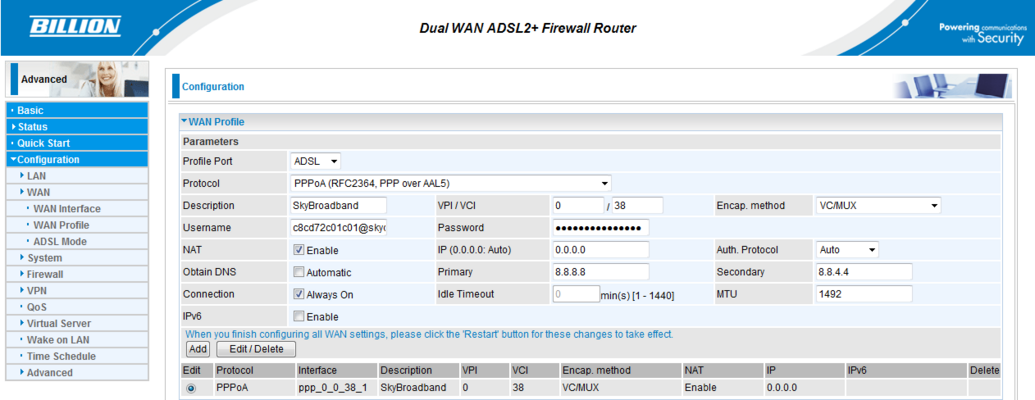
These are my settings, just the usual adsl settings work fine for me :blink:
 

Attachments

  • Capture.PNG
    Capture.PNG
    27.6 KB · Views: 6
I raised a ticket with Be and they got back to me about an hour later. They state they can see 2 disconnections and one rooter reboot in the last 16 hours. I had rebooted it once within that timespan so that is correct, however I've experienced a lot more drops than that so have passed additional information on to them and am waiting to hear back again.

Just checked my router stats again and it is still currently connected at 5.2Mb, but the noise margin for the download has fluctuated between 5.4-6.1dB. What isn't good is it? The Attenuation remains at 32.5/54.5.
 
@ Gouldin

How did you get to find your UserName & Password for SkyBB?

I used online hacks & even officially had them given to me by CS2 Managers on several occasions, yet my trusty DG834 would never connect. :huh:

I just used this site: http://www.cm9.net/skypass/

These are my settings, just the usual adsl settings work fine for me :blink:

It doesn't work for me, but all of a sudden, it's helping paint a clearer picture towards me knowing why my service is as poor as it is.
 
I raised a ticket with Be and they got back to me about an hour later. They state they can see 2 disconnections and one rooter reboot in the last 16 hours. I had rebooted it once within that timespan so that is correct, however I've experienced a lot more drops than that so have passed additional information on to them and am waiting to hear back again.

Just checked my router stats again and it is still currently connected at 5.2Mb, but the noise margin for the download has fluctuated between 5.4-6.1dB. What isn't good is it? The Attenuation remains at 32.5/54.5.

Your Line Attenuation is a factor generated from the Quality, length and condition of the wire. It should always be fairly constant though you will see small fluctuations during climate changes.

5.4-6.1dB is only .7db shift, but I'm guessing that's every 10 seconds. Better if you can set 1 sec refresh to see how stable/unstable it is. Not all Routers allow you to do this.

That said, providing you don't dip below 5db at any time, you are still in user teritory. I would say in simple terms the bigger the noise margin, the better the connection. The more db you have, the bigger shout at the Internet you have. You might want them to cap it @ 4Mb for a compromise. Slowing the Upstream speed will also give more db back to the downstream db. Ask Be to check their profile options & don't forget what I said earlier RE the ADSL or ADSL2. The ISP's Noise margin settings for you optimal profile will be affected by having a service that your line can't support. If you have to have Interleaving in place, ask for a gamers profile which will reduce your Ping times by 50%+.
Better still to have Interleaving off, but whilst not knowing your distance from the exchange, I'd say leave Interleaving on with such a High 54db Line Attenuation. Again though, your ISP need to run these configurations to see what suits your line conditions & by all accounts, Be support is good. :)
 
Last edited:
I'm with Be Broadband and am using their technicolor router.
Well there's your problem for a start - ditch the technicolor modem (technicolor bought thomson - the technicolor router is a tg587 which is an upgade of the old thomson tg585v2 that BE used to give out)

Seriously, get a decent router already.

Secondly, have you done a quiet line test? Dial 17070 and choose option 2 from the menu to do the test. Also, I know it sounds basic (and I bet you've already done it) have you replaced the filter and DSL cable? (when I got a new router, both filters were faulty from new :roll: )

As for disconnecting the bell wire, never tried it, but if that helps, sounds like something is not wired correctly as this should not affect your broadband speed at all.
 
The point of disconnecting the bell wire is that, in some installations, the bell wire can pick up RF which will then induce interference, and therefore overall noise, into the balanced pair that are the signal wires.

BT sell a device called an iPlate, or "ZOMG! Broadband Accellerator!" (Ok, I lied about the ZOMG! bit) which, according to them..

BT sales blurb said:
In previous tests the I-Plate has been shown to boost line speeds - typically by 1.5Mbps. The actual change will vary from house to house.

Wow!


All it does is isolate the bell wire... Or you can save £9 and snip it yourself.


@D.B.

Just done some nosing about about the NTE2000 regarding ADSL2+ circuits. The difference between ADSL/2+ is the upper frequency, up to 2.2Mhz from 1.1. So, a NTE2000 should work equally as well for a 2+ connection as for any other, old ADSL implementation.

As the rest of it, yep. Bang on. Pointless having 24Mbps to the cabinet if the infrastructure after that can't handle that without serious contention issues.

They don't tell you that on the BT Infinity advert with those studenty housesharing types being all happy and flirty with each other over their "our wireless hub can handle multiple laptops! !yay!" malarkey.

Fast forward a couple of hours into the evening when the lass from that advert is sobbing her heart out because her Skype video stream to Granny in Carlisle is stuttering like an old Movietone news reel because the exchange is congested to death. Let's see how flirty and impressed she is then. :)
 
@woodycool.

I am planning on replacing the "BeBox" technicolor router once this issue is sorted out, but I wanted to keep the standard equipment installed for the moment so the Be* tech didn't have any unknown elements in his diagnosis of the issue.

I'm planning on buying either a ZyXEL or Draytek router. Anyone recommend one? or another make?
 
Be* were quick to reply to the ticket I started and asked me to run 4 continuous ping tests to see where the connection was halting. The pings were testing the connection to the router from the computer, my static IP address, the Be* address range server and finally Google in the US. Each time the connection dropped both the Be* server and Google timed out. I reported this and this morning they got back to me saying they had traced the error and hopefully it is now fixed.

The error they stated was a duplicate account using the same IP as my connection. Does that sound feasible? I thought if 2 systems tried to use the same IP address on a network it wouldn't work at all. :unsure:

Anyway, fingers crossed it is now fixed. Very impressed with Be's support as they replied to each of my ticket updates within minutes and investigated and resolved the situation in less than a day.
 
For support, you cant really beat Be - as I mentioned earlier :)
 
Back
Top Bottom