MrWeedster
Member
Hi.
I'd love to just play a simple game on my 4000t but i'm too retarded to get anything working.
What i learned so far is that WHDload is the way to go. For extra retards like me there exists projects like AmigaVision (ex MegaAGS) which provide an image to write to an SD card which supposedly should work on real hardware.
Ofc it doesn't work on my hardware (fails to boot) so i thought i may do an installation of 3.2 manually and just copy over the AmigaVision whdload prepared things to the installation.
Now i'm struggling with the partitioning. Bc working on real hw is a bit pita i also installed WinUAE on a PC to prepare the CF (32GB) card.
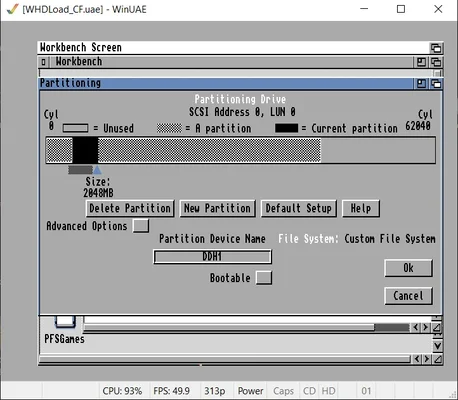
While at the beginning of the journey i was indeed able to partition the CF with 16/16GB, but i fiddled around too much i guess and now i can only partition up to 2048MB in WinUAE, i can't slide the arrow any further to the right to make it larger. I started WinUAE as admin as suggested here
Also there seem to be ghost partitions. When i click on 'New Partition' and chose an empty space after the two 2GB partitions, i always get the error 'Click was not in an empty area of the disk'
When i put in the CF card into the real Amiga i'm able to slide the arrow as far to the right as i like and can indeed partition the drive (2GB bootable DH0 and for example 20GB DH1).
Now after partitioning i'm unable to format DH1, the larger part of the CF card. The Icon shows 'DH1:????' and when i go to Icons -> Format nothing happens. This is the same in WinUAE as on real hardware.
[E] Note: I used different CF cards in WinUAE previously, 2GB and 4GB and also 64GB. Do the smaller cards interfere with partitioning of larger cards?
What am i missing?
I'd love to just play a simple game on my 4000t but i'm too retarded to get anything working.
What i learned so far is that WHDload is the way to go. For extra retards like me there exists projects like AmigaVision (ex MegaAGS) which provide an image to write to an SD card which supposedly should work on real hardware.
Ofc it doesn't work on my hardware (fails to boot) so i thought i may do an installation of 3.2 manually and just copy over the AmigaVision whdload prepared things to the installation.
Now i'm struggling with the partitioning. Bc working on real hw is a bit pita i also installed WinUAE on a PC to prepare the CF (32GB) card.
While at the beginning of the journey i was indeed able to partition the CF with 16/16GB, but i fiddled around too much i guess and now i can only partition up to 2048MB in WinUAE, i can't slide the arrow any further to the right to make it larger. I started WinUAE as admin as suggested here
Also there seem to be ghost partitions. When i click on 'New Partition' and chose an empty space after the two 2GB partitions, i always get the error 'Click was not in an empty area of the disk'
When i put in the CF card into the real Amiga i'm able to slide the arrow as far to the right as i like and can indeed partition the drive (2GB bootable DH0 and for example 20GB DH1).
Now after partitioning i'm unable to format DH1, the larger part of the CF card. The Icon shows 'DH1:????' and when i go to Icons -> Format nothing happens. This is the same in WinUAE as on real hardware.
[E] Note: I used different CF cards in WinUAE previously, 2GB and 4GB and also 64GB. Do the smaller cards interfere with partitioning of larger cards?
What am i missing?