Struggling with partitioning (Only 2GB volumes possible on 32GB CF card)

  • Thread starter Thread starter MrWeedster
  • Start date Start date
  • Replies Replies 14
  • Views Views 478

MrWeedster

Member
Joined
May 22, 2025
Posts
31
Country
ger
Region
by
Hi.

I'd love to just play a simple game on my 4000t but i'm too retarded to get anything working.
What i learned so far is that WHDload is the way to go. For extra retards like me there exists projects like AmigaVision (ex MegaAGS) which provide an image to write to an SD card which supposedly should work on real hardware.
Ofc it doesn't work on my hardware (fails to boot) so i thought i may do an installation of 3.2 manually and just copy over the AmigaVision whdload prepared things to the installation.
Now i'm struggling with the partitioning. Bc working on real hw is a bit pita i also installed WinUAE on a PC to prepare the CF (32GB) card.
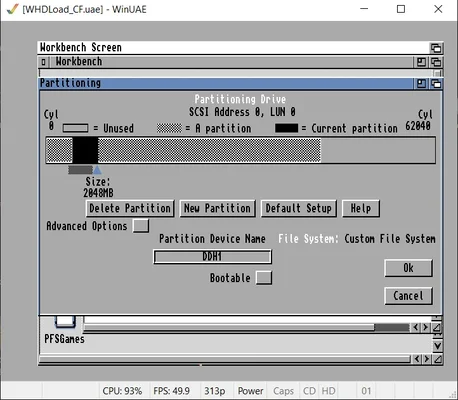
While at the beginning of the journey i was indeed able to partition the CF with 16/16GB, but i fiddled around too much i guess and now i can only partition up to 2048MB in WinUAE, i can't slide the arrow any further to the right to make it larger. I started WinUAE as admin as suggested here
Also there seem to be ghost partitions. When i click on 'New Partition' and chose an empty space after the two 2GB partitions, i always get the error 'Click was not in an empty area of the disk'
When i put in the CF card into the real Amiga i'm able to slide the arrow as far to the right as i like and can indeed partition the drive (2GB bootable DH0 and for example 20GB DH1).
Now after partitioning i'm unable to format DH1, the larger part of the CF card. The Icon shows 'DH1:????' and when i go to Icons -> Format nothing happens. This is the same in WinUAE as on real hardware.
[E] Note: I used different CF cards in WinUAE previously, 2GB and 4GB and also 64GB. Do the smaller cards interfere with partitioning of larger cards?

What am i missing?
 
So i somehow got the partitioning working using the real HW and PFS3. I can now see the larger partition and could format it using PFS3.
I then copied all the WHD ready games and files to this partition and now have everything i want on the system, great. Also copied the required kickstart files into Devs:Kickstart and thought i'm ready to go.
Testing a random game in WinUAE works perfectly, but on the real HW it fails.
When clicking the icon of a game the mouse pointer freezes for a second or two, then it turns to brown screen and after a while i get a black screen with red error message "Software failure, press left mouse button to continue", on which it seems to restart and i'm back in wb 3.2
What could be the issue here?
 
Was the CF card cleaned of all previous partition information before you set it up in WinUAE?

Commands to type in are shown in BOLD (press enter after each one).

1: Make sure the CF card is empty. Start CMD as administrator. Run diskpart. Type in "list disk",ad look to see what number is shown by the side of the CF card. "select disk <number of cf card> (should be the only one listed near to 32GB capacity) " (DO NOT SELECT WRONG DISK), "clean".
2: Run WinUAE as administrator (right click on it's icon, select "Run as Administrator" from the pop-up menu)

When you add the CF card through WinUAE, look for the one that shows as (UNK) in the list. Boot from the OS3.2 Install disk in DF0: to set up the partitions as per usual.

You will have to probably go through the "Define New Drive" option next, then read the settings from the CF card. It should tell you it's 32GB or close enough. If you get error about not able to save definitions, click in the box and change "drive definitions" to RAM: and try again.

From there partition as normal ... you don't really need PFS3 for large partitions in OS3.2, they are supported as standard. PFS3 just gives the data a bit more security, especially in case of a validation problem.

Remember: always Fast Format your partitions. AmigaDOS and the OS will take care of the rest :)


<Additional> Double check to see what version of Kickstart you are using in WinUAE. Choose the right one for the A1200 (Any 47.xxx is fine) as this can cause problems at a later stage. If you had it set to Kickstart 3.1 or 3.0 then change it :)

Remember, your A1200 is OS3.2 so your WinUAE ROM selection should reflect that.
 
Now i'm struggling with the partitioning. Bc working on real hw is a bit pita i also installed WinUAE on a PC to prepare the CF (32GB) card.
While at the beginning of the journey i was indeed able to partition the CF with 16/16GB, but i fiddled around too much i guess and now i can only partition up to 2048MB in WinUAE, i can't slide the arrow any further to the right to make it larger.

What am i missing?
after you make the first partition you are clicking ok and on next screen click save changes before making a new partition ? Also you could try using a different usb port. i had issues when i used a certain usb port on pc (could be slightly damaged). change port and things went ok. im relatively new to cf cards / sd and haven't done that many. i did read when i was having issues it could be that adapter, usb port and changing port fixed it.

i will be making a new card tonight or tomorrow so i will check then to see if i can replicate your problems
 
[...]
<Additional> Double check to see what version of Kickstart you are using in WinUAE. Choose the right one for the A1200 (Any 47.xxx is fine) as this can cause problems at a later stage. If you had it set to Kickstart 3.1 or 3.0 then change it :)

Remember, your A1200 is OS3.2 so your WinUAE ROM selection should reflect that.
Thx for your answer and brief explanation.
Yes i did indeed clean the disk before trying to partition it, did so a few times to be exact and it's still the same problem that i can't define larger partitions than 2048MB. See the attached screenshot where i tried to redefine a partition with the already partitioned volumes. I can't slide the arrow further to the right.
I may should mention that this worked before in WinUAE to partition any size, but i guess i fiddled so much around i broke it. To also answer CPoP: It worked on the USB ports beforehand and trying another one doesn't change anything.
But the other thing is: I only have 40.68 rom version in WinUAE. i looked around and cant find any 47.xx? Or is 47 just an abbreviation of 40.7x?
 

Attachments

  • amiga_part.webp
    amiga_part.webp
    41.4 KB · Views: 8
Thx for your answer and brief explanation.
Yes i did indeed clean the disk before trying to partition it, did so a few times to be exact and it's still the same problem that i can't define larger partitions than 2048MB. See the attached screenshot where i tried to redefine a partition with the already partitioned volumes. I can't slide the arrow further to the right.
I may should mention that this worked before in WinUAE to partition any size, but i guess i fiddled so much around i broke it. To also answer CPoP: It worked on the USB ports beforehand and trying another one doesn't change anything.
But the other thing is: I only have 40.68 rom version in WinUAE. i looked around and cant find any 47.xx? Or is 47 just an abbreviation of 40.7x?
from picture if you move that 2gb to left and the click ok, save the drives on next page and the goto new partition make sure the whole space is joined (you might need to delete one the blank or checkered) then you should be able to make another partition and click ok and save, and then click create a new after. always click ok and save and repeat, As for the 47.xx roms you would need to buy a license from an official hyperion seller. unless you already have a hyperion account with license
 
if you have a hyperion account you can download them from site if you dont have the cd. what rom chips are you using in the amiga ? if you are not using any 3.2 rom then you need to use the right kickstart rom for the roms you have installed. eg if you had rom chips 2.05 or 3.1 they would not work with wb 3.2.
 
Last edited:
I'd rather not destroy this card i've put so much blood and tears in, and i currently have no other card that's available to test.
I'm happy that the part with the partitioning is solved for now. As i said i was able to do the partitioning on real hw. Maybe the ROMs on the HW are newer than those in WinUAE and because of that i was able to do it.

The real concern is the software error messages when starting games. I have to add to this that this seems hardware related. I've used the 68020/030 A3200/A3400 CPU card until these errors and then switched to a cyberstorm, with which the error is gone and i can finally play games.
Is this 68020/030 card not compatible or even broken? Aside from games i had no problems with it. Or am i missing something?

if you have a hyperion account you can download them from site if you dont have the cd
I didn't yet create an account there bc i'm unsure if i keep it or not. But good to know that they're available on their site, thx
 
Thx for your answer and brief explanation.
Yes i did indeed clean the disk before trying to partition it, did so a few times to be exact and it's still the same problem that i can't define larger partitions than 2048MB. See the attached screenshot where i tried to redefine a partition with the already partitioned volumes. I can't slide the arrow further to the right.
I may should mention that this worked before in WinUAE to partition any size, but i guess i fiddled so much around i broke it. To also answer CPoP: It worked on the USB ports beforehand and trying another one doesn't change anything.
But the other thing is: I only have 40.68 rom version in WinUAE. i looked around and cant find any 47.xx? Or is 47 just an abbreviation of 40.7x?
The ROM images for 3.2 on the CD that you purchased are still good enough for what you wish to achieve on WINUAE.
Copy the correct ROM image over into the ROMs folder for WINUAE. For example. If you have a A4000 desktop WINUAE setup, then copy over the A4000 .rom file. Then when you choose a ROM to use, use that .rom file.
 
I'd rather not destroy this card i've put so much blood and tears in, and i currently have no other card that's available to test.
I'm happy that the part with the partitioning is solved for now. As i said i was able to do the partitioning on real hw. Maybe the ROMs on the HW are newer than those in WinUAE and because of that i was able to do it.

The real concern is the software error messages when starting games. I have to add to this that this seems hardware related. I've used the 68020/030 A3200/A3400 CPU card until these errors and then switched to a cyberstorm, with which the error is gone and i can finally play games.
Is this 68020/030 card not compatible or even broken? Aside from games i had no problems with it. Or am i missing something?
Have you installed ThorsMMU libs? These contain 68x libraries which you may need to correctly use the accelerator cards.

 
I'd rather not destroy this card i've put so much blood and tears in, and i currently have no other card that's available to test.
I'm happy that the part with the partitioning is solved for now. As i said i was able to do the partitioning on real hw. Maybe the ROMs on the HW are newer than those in WinUAE and because of that i was able to do it.

The real concern is the software error messages when starting games. I have to add to this that this seems hardware related. I've used the 68020/030 A3200/A3400 CPU card until these errors and then switched to a cyberstorm, with which the error is gone and i can finally play games.
Is this 68020/030 card not compatible or even broken? Aside from games i had no problems with it. Or am i missing something?


I didn't yet create an account there bc i'm unsure if i keep it or not. But good to know that they're available on their site, thx
what are the rom chips in your amiga ? 3.2 or 3.2.1 or 3.2.3 ? you need to use the rom file for the chip you have in the amiga
 
The ROM images for 3.2 on the CD that you purchased are still good enough for what you wish to achieve on WINUAE.
Copy the correct ROM image over into the ROMs folder for WINUAE. For example. If you have a A4000 desktop WINUAE setup, then copy over the A4000 .rom file. Then when you choose a ROM to use, use that .rom file.
That did the trick. Now i'm able to partition more than 2048MB.
 
what are the rom chips in your amiga ? 3.2 or 3.2.1 or 3.2.3 ? you need to use the rom file for the chip you have in the amiga
I got new 3.2.3 ROMs in it.

Have you installed ThorsMMU libs? These contain 68x libraries which you may need to correctly use the accelerator cards.

Yes i installed the MMUlibs (that came with the 3.2 CD) and also the Cyberstorm libs.
 
I got new 3.2.3 ROMs in it.


Yes i installed the MMUlibs (that came with the 3.2 CD) and also the Cyberstorm libs.
Thor updates the MMU libs over on Aminet. The Hyperion packed ones are now nearly 3 years old 😉
Always use the Expert option for installation.

To obtain later ROMs. Then ideally you need to create a Hyperion Account over on


Using the Serial key on your Amiga OS 3.2 CD cover will allow you to download the latest AmigaOS and ROM updates.
 
Thor updates the MMU libs over on Aminet. The Hyperion packed ones are now nearly 3 years old 😉
Always use the Expert option for installation.

To obtain later ROMs. Then ideally you need to create a Hyperion Account over on


Using the Serial key on your Amiga OS 3.2 CD cover will allow you to download the latest AmigaOS and ROM updates.
he has 3.2.3 so he has the latest files on the cd
 
Back
Top Bottom