Tapuino, the $20 C64 Tape Emulator

  • Thread starter Thread starter sweetlilmre
  • Start date Start date
  • Replies Replies 1059
  • Views Views 299319
Regarding the buzzer, I presume there is no polarity to respect.
Positive pin pointing to IC1, if you use passive buzzers the polarity is not important.

OK, thanks.
Just a couple of notes about the BOM if you allow me:

-About C1 capacitor : it would be better to write 47uF and not 47MF (someone could think Megafarad)
-About T1-T2-T3 transistors : it would be better to indicate them as 'PN2222' (TO-92 package) since the original '2N2222' come with a TO-18 package which would not fit in the Tapuino PCB.
Yes you are right, any NPN transitor with 500 mA or more Ic max will do the job
 
Last edited:
Hi,

My Tapuino displays nothing on the LCD screen when powered on (it has power)

I have tried adjusting the contrast pot on the back but no joy, although I notice that I can make out the pixels of the screen on the top row only.

I have tried two C64's incase not enough power but same result.

I have also double checked the wiring , e.g. GND goes to GND

Have tested the Arduino with a simple blink LED sketch and works as expected.

Upload of the Tapuino sketch reports done but provides the following - is this normal;


Sketch uses 28,338 bytes (92%) of program storage space. Maximum is 30,720 bytes.
Global variables use 1,728 bytes (84%) of dynamic memory, leaving 320 bytes for local variables. Maximum is 2,048 bytes.
Low memory available, stability problems may occur.

Here is the LCD I have
http://www.ebay.co.uk/itm/200984971109?_trksid=p2057872.m2749.l2649&ssPageName=STRK:MEBIDX:IT

Here is the Arduino I have
http://www.ebay.co.uk/itm/111528534529?_trksid=p2057872.m2749.l2649&ssPageName=STRK:MEBIDX:IT

Have read somewhere that it could be a timing issue

Any ideas?

It may be a duff LCD, if someone could please list the key presses I could attempt to load a TAP "blind" to prove that it's the LCD at fault?

Thanks
Lee

 
Last edited:
Hi,

My Tapuino displays nothing on the LCD screen when powered on (it has power)

I have tried adjusting the contrast pot on the back but no joy, although I notice that I can make out the pixels of the screen on the top row only.

I have tried two C64's incase not enough power but same result.

I have also double checked the wiring , e.g. GND goes to GND

Have tested the Arduino with a simple blink LED sketch and works as expected.

Upload of the Tapuino sketch reports done but provides the following - is this normal;


Sketch uses 28,338 bytes (92%) of program storage space. Maximum is 30,720 bytes.
Global variables use 1,728 bytes (84%) of dynamic memory, leaving 320 bytes for local variables. Maximum is 2,048 bytes.
Low memory available, stability problems may occur.

Here is the LCD I have
http://www.ebay.co.uk/itm/200984971109?_trksid=p2057872.m2749.l2649&ssPageName=STRK:MEBIDX:IT

Here is the Arduino I have
http://www.ebay.co.uk/itm/111528534529?_trksid=p2057872.m2749.l2649&ssPageName=STRK:MEBIDX:IT

Have read somewhere that it could be a timing issue

Any ideas?

It may be a duff LCD, if someone could please list the key presses I could attempt to load a TAP "blind" to prove that it's the LCD at fault?

Thanks
Lee

It looks like a bad wiring with I2C, double check the soldering and cables, look for bridges on the SDA or SCL pads on PCB, or try to swap the two wires to LCD, not the power (+5V) or GND, just the SDA & SCL
IF you welded the I2C board, check the soldering.

You can test Tapuino with a +5V volts DC power.

When the LCD has no communication with Arduino, IIRC just the upper pixels appears.

Upload of the Tapuino sketch reports are OK, the memory usage is very high.
 
Last edited:
there is one other thing to check eventually.
i have one display which is set on another adress as told to me. the seller told one adress, on PCB is written the next and in real time it was just nothing of both...
same problem happened to derschatten, he used a programm for arduino to listen where the display is sitting, i did it by trial and error :-)

thats the price for cheap hardware ;-)
 
Hi

Thanks for the replies,

I ran the I2C scanner which came back with an address of 0x27, which is the same address used in the code. I tried swapping SDA and SCL but no difference to output.

I've ordered another I2C interface and LCD, this time with them pre-soldered together, just incase my poor soldering is the issue!

Will update once received

Thanks again
Lee
 
If the i2c scanner picks it up can you try a hello world program for that lcd and see if it works? There is a very small possibility that the i2c chip is wired differently to the lcd pinouts which could be adjusted via the config file, but we would need a working sample first.

Edit: just checked, there is a sample program in the eBay description for your lcd/i2c.
 
Last edited:
Hmmm just checked out the sample code and it looks like the same code I based the current driver on! Additionally the pins seem to be configured in the same way.

See if you can run the code successfully and we can go from there. Sorry for limited comms I am on an island.

One last thing, just as a sanity check: are you sure the Nano is plugged into the board the correct way?

Sent from my SM-G900F using Tapatalk
 
Hi

Thanks for all the replies.

I tried the Hello World program and same result. The LCD and I2C arrived today; "Hello World!"

Uploaded the Tapuino sketch - displayed okay!

So, either duff LCD/I2C / duff soldering on my part or both :-)

Tested tapuino and it's working great - what a fantastic product so thanks to sweetlilmre for the concept and to spcbm for providing an assembled version - highly recommended!

Once I've mounted in a busted datasette I'll post some pics!

BTW I live on an island too and it's much smaller than Africa lol - Anglesey

Thanks again

Cheers
Lee
 
Last edited:
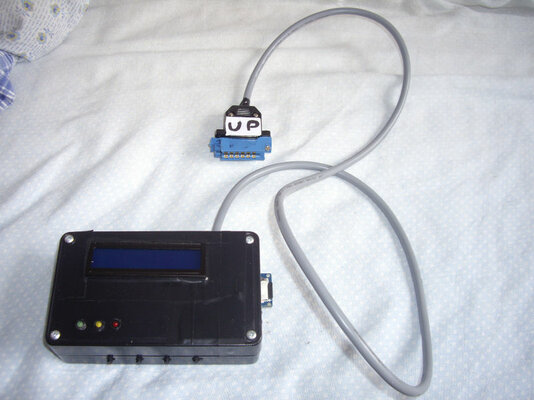
My Tapuino which I assembled some time ago!

The holes are a bit rough in the edges as I didn't have a drill to make them. I used a Swiss-army pocket-knife instead, and to my surprise it worked quite a bit better than what I expected.

Assembly went without a hitch. Things, including power lines, soldered easily, and documentation was sufficient allthough it is mostly for the mounting and not the soldering itself. I'm pleased with the result, and there were no major problems. The biggest issue I had during the project was how to label the switch, as this is only explained by analyzing the schematics.

It works, but I have yet to get a microSD card for it. I won't get access to my C64 before a good week from now anyways so it's no haste.
 

Attachments

  • RIMG1030_.jpg
    RIMG1030_.jpg
    40.5 KB · Views: 6
  • RIMG1031_.jpg
    RIMG1031_.jpg
    47.7 KB · Views: 5
Hi all,
I finally assembled my Tapuino with latest V1.71 R2 PCB (minus the LED and switch for the buzzer, I used a CD4052 instead of 74HC4052) but I can't make it working, all I get is a "Init Failed! V: 2.30" message when I power it up.MicroSD (8GB HC class) is properly formatted with FAT32 allocation table
Arduino NANO is a chinese clone with CH341 serial chip instead of FTDI one.I also reflashed its bootloader using an Arduino Mega2560 but without luck.

P.S.
I used IDE 1.6.4 and 1.6.5 to compile the sketch, both gives me a warning about few memory available.
 
Last edited:
Init failed indicates an issue with the SD Card initialization. Please carefully check the wiring to the SD module

-(e)
 
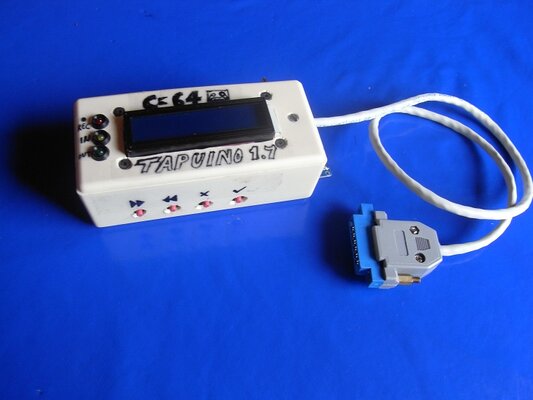
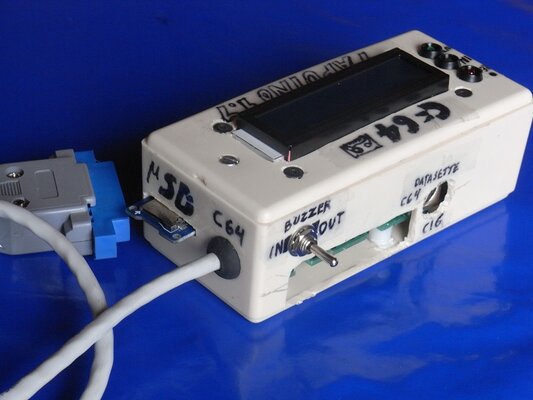
Here is my realization, a bit anonymous but fullly working

Tapuino_assembled_1.JPG

All my issues sorted soldering wires directly to headers without using any connector (as I said dupont wires are not really reliable)
I noticed that on some .TAP, though the game has successfully loaded, the counter is stuck at 99% and goes on.
Besides, also using a 100 Ohm resistor @R2 the buzzer volume is barely audible especially when you close the case.
 
Last edited:
That looks excellent! The 99% is a known thing, the tap files are often encoded with extra silence etc on the end.

-(e)
 
That looks excellent! The 99% is a known thing, the tap files are often encoded with extra silence etc on the end.

-(e)

Another issue I had was that the I2C board was soldered to the LCD module in a way that they touch each other causing malfunctioning of the LCD itself
No, I think we must concentrate on multigames TAP, I have some ideas but lack of skills to put them into practice

P.S.
It Tapuino compatible with all version of .TAP format?It would be useful to start a compatibility list (but I think it's hard due multiple versions of each game)

P.P.S.
I forgot..I have 7 PCBs of Tapuino V1.71 R2, I have no use of them so feel free to ask if you need one.
 
Last edited:
Besides, also using a 100 Ohm resistor @R2 the buzzer volume is barely audible especially when you close the case.

It depends on the buzzer, I tested with some of them until find a decent one.
Nice you got it working, so PCBs 1.71 R2 are now tested :-)
 
Back
Top Bottom