Testing CSPPC UWSCSI/Acard 7720UW

  • Thread starter Thread starter merlinkv
  • Start date Start date
  • Replies Replies 25
  • Views Views 5144

merlinkv

Active member
Joined
Oct 15, 2009
Posts
4,114
Country
Ukraine
Region
Kyiv
Hi to all

Just to share a little performance test. Maybe is usefull for anyone.

System:

- A4KD CSPPC 604e 060/66 363Mhz
- UW-SCSI Bios 44.71
- Acard's 7720UW
- 2 x Active Terminators
- CF Transcend 32GB 133x (Boot & WB)
- HDD's IDE Seagate Barracuda 80GB 8MB Cache

First of all I configured the SCSI devices in the CSPPC Bios as:

- ID0 => CF - Async - 16 bit bus
- ID1 => HDD - Sync - 16 bit bus
- ID2 => HDD - Sync - 16 bit bus

Notice the CF is in "Async" mode because I get r/w errors when working in Sync mode. Of course the speed decreases but all games/apps are installed in real HDD's

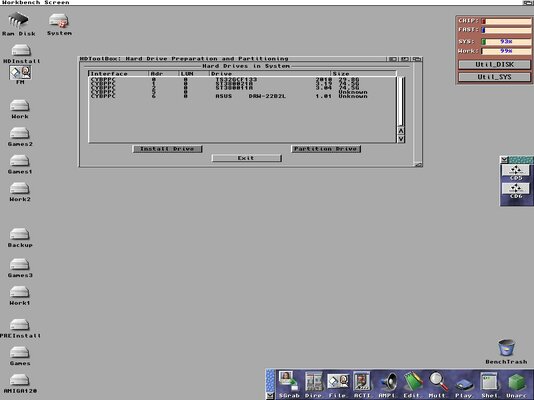
The cyppc.device 44.71 (and NOT scsi.device)
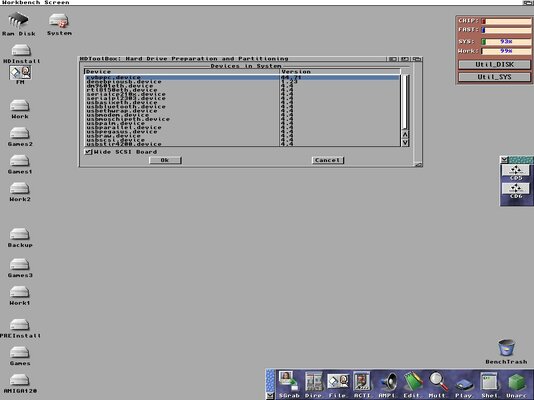
CSPPC_SCSI_001.jpg

The devices & ID's

CSPPC_SCSI_002.jpg

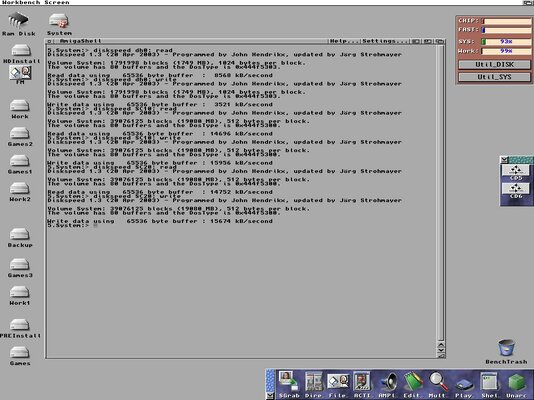
Performance test with Diskspeed Tool

CSPPC_SCSI_003.jpg

Real HDD's performance are near of theyr limits (16 MB/s) so, I think everything is OK :thumbsup:
 
Just for curiosity: What kind of filesystem are you using?
 
I got 14-15mb/s with my x133 CF card when i use the same scsi to ide as you and 28-30mb/s with a normal hdd.

So we end up very close in numbers.
 
Hi Stan,

Boot partition FFS and the rest SFS/00 selected in HDToolbox and 1.277 Smartfilesystem in DENEB

I don't touched any parameter, just using the default ones.

Just for curiosity: What kind of filesystem are you using?
 
Mind trying sysspeed? Have done all my tests in that program so would give me more acurate numbers to compare with :)
 
Hi

Downloaded & Installed

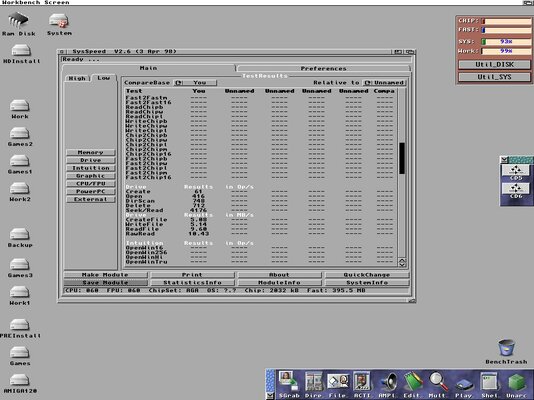
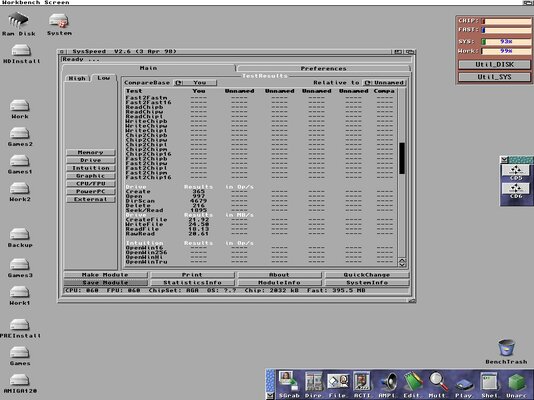
Sysspeed report higher values


- CF 133x

CSPPC_SCSI_004.jpg

- Real HDD

CSPPC_SCSI_005.jpg
 
Nice speeds my friend, 20mb/sec - about 10x faster than native IDE :thumbsup:
 
You should get higher speeds with both the hdd and the cf card. the problem with the cf card is probably the syncing problem, there are alot of speed difference betwen Async and sync. This is my cf card.

img706.imageshack.us/img706/2228/dsc073211277x855.jpg

i use SFS on the entire disk
 
Hi

Yes, I know that mate, but I get r/w errors when the CF's are working in Sync mode...... and I don't know for what :blink:

You should get higher speeds with both the hdd and the cf card. the problem with the cf card is probably the syncing problem, there are alot of speed difference betwen Async and sync. This is my cf card.

img706.imageshack.us/img706/2228/dsc073211277x855.jpg

i use SFS on the entire disk
 
have you tried different max transfers and things like that? there is a cf setup guide here on the forums, dont know if it makes any difference on a scsi unit but i used it and it is working just fine.
 
Hi again

I "updated" all SFS partitions and DENEB to SFS\02 1.279 and also I set the SCSI ID0 (CF card) in Sync mode...

Good news :)

The system works now more stable and don't crashes with the CF in Sync mode... Only with few games/apps I get a "Disk error" but I think is a compatibility problem of the soft.

Why I tought that? Because I tested all SFS\02 partitions with r/w operations of large amounts of data -more than 8GB- from the CLI and DOpus and the system don't crashes.

Now the CF reaches around 22.4 MB/sec in RAW mode and 8-10 MB/sec in "standard" mode.

..... :thumbsup:
 
Pablo, remember that you must re-format the partitions when changing from SFS/00 to SFS/02.
 
Hi Rogerio,

Thanks for the info my friend :).

Yes, I know. All SFS partition are reformated with the new 1.279 and sfsformat tool.

I finished today with the two A4K's and both are working now like a charm. These speeds in Amiga systems..... is like a dream..... :)

Thanks again to all of yours guys, for your help & support :thumbsup:

Pablo

Pablo, remember that you must re-format the partitions when changing from SFS/00 to SFS/02.
 
Hi again,

Sorry to write again..... :p

Just testing AmiKit in one A4K.... Wohooo!!!! Runs very fast and smooth with all active (Amistart, Clock, Taskbar,....)

I'm very....:bounceBoingBall: :bounceBoingBall:

Is time to......:pint::pint:

:D
 
Hi Pablo my friend,

I just hooked one of these Acard 7720UW adapters to my CSPPC and I'm seeing transfer speeds at 9mb/sec but with my SCSI-II Yamaha I get 12mb/sec :o

Can you tell me what jumper setting you're using? My ACard (borrowed from Zetr0) came without a manual :coffee:

Thanks!

Steve.
 
Hi Steve,

Update CSPPC to the 44.71 firmware

Check the CSPPC config (Bios) and save this settings:

- Sync
- 16 bit bus
- No reselection
- Mount
- No removable

Be carefull also if you have other SCSI devices in the chain. If you connect a Fast-SCSI device... all units go down to the Fast-SCSI speed.

Try using active terminators in both ends of the chain. The onboard terminator of the 7720UW sometimes don't works as desired.

Check if the Acard firmware is the latest one: 3.89

I'm getting with SysSpeed:

- With 133x CF's FFS

WriteFile: 10.59
ReadFile: 16.57
RawRead: 25.90

- With real HDD's SFS/02:

WriteFile: 29.38
ReadFile: 22.17
RawRead: 21.98

Firmware & Manual: View attachment AEC-7720UW.pdf View attachment SIBG389.zip

I hope this can help :)
 
Thanks my friend, can you show me which Jumpers you have set on the Acard it's self? Maybe you could take a picture?

I have active termination before CSPPC and after the HDD, nothing else is on the chain :)

I will check about firmware.

Thanks!

Steve.
 
Yes, of course

I can post pics, let me some minutes.... :D

I added the Manual and Firmware for the 7720UW.
 
Back
Top Bottom