The ACA500 Compatibility Thread

  • Thread starter Thread starter fitzsteve
  • Start date Start date
  • Replies Replies 86
  • Views Views 21328
Firmware updates won't help with hardware incompatibility (for example A1200 accelerator assuming 32-bit memory accesses, A1200 ROM and all RAM are 32-bit, A500 isn't).

Firmware update can help if you get blue screen (before menu appears) or menu crashes or if it crashes after exiting boot menu. It won't help if you get black screen or repeating garbage on screen at powerup.
 
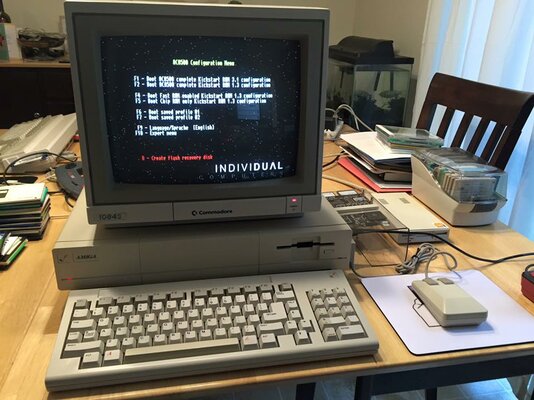
AMIGA 500 Rev5 (512KB ChipMem) + 512KB in Trapdoor

APOLLO 1240: don't work, with or without memory! Black screen :-(

[Update]
Microbotics MBX 1200z: don't work, not recognized by the ACA500 card :-(
 
Last edited:
I've tested the following CF cards:
- SMART Industrial CompactFlash 1GB: OK in AUX Slot / OK on Boot Slot
- SMART Industrial CompactFlash 2GB: OK in AUX Slot / OK on Boot Slot
- EMTEC CompactFlash (up to 80x) 1GB: OK in AUX Slot / OK on Boot Slot
 
Thanks guys! I'll get the first post & my blog updated ASAP :thumbsup:
 
I've tested the following CF cards:
- ANMO CompactFlash 64MB: OK in AUX Slot / OK on Boot Slot
- RAM Star CompactFlash 128MB: OK in AUX Slot / OK on Boot Slot
 
- SanDisk Ultra CompactFlash 15MB/s - 2GB: OK in AUX Slot / OK on Boot Slot
- SanDisk UltraII CompactFlash 15MB/s - 2GB: OK in AUX Slot / OK on Boot Slot

---------- Post added at 20:47 ---------- Previous post was at 20:34 ----------

- SiliconDrive CompactFlash (SSD-C01G-3500) 1GB: OK in AUX Slot / OK on Boot Slot
 
A500 Rev6a Hack for 1MB Agnus with ACA500 and Blizard 1230/50 IV 32 MB all functioning OK.
Playing Whdload games except ones needing 1.5 chip ram and AGA ones.
A nice ECS Whdload machine:D
 
I know two users who have problems getting the ACA500 to work with their A500. Both use an A500 (rev5) NTSC systems. I strongly suggest users of A500 NTSC rev5 (or lower) and PAL rev3 to avoid this ACA500 kit.

For reference purposes, one is a user called watsonfmly (URL https://www.amibay.com/member.php?8437-watsonfmly) (UNCONFIRMED) and the other is CONFIRMED from a user called Ryan Danhauser in Facebook (URL https://www.facebook.com/ryan.danhauser) where the problem was discussed in great detail in a FB group called "Commodore Amiga".
 
Something to consider, getting an ACA500 together with an ACA12xx card is cheaper to get an A1200 instead, no? And it comes with an AGA graphics too.
 
Last edited:
The motherboard was cheap (and cheap to mail as it was just the motherboard.

And I have a 1200. It needs to have the kickstart sockets replaced. I am just rounding out my collection
 
Tested my ACA500 with my NTSC Amiga 1000.

Working perfect with ACA1221.

Blizzard 1230 MKIV w/128MB. Seems to be working but sometimes I get a crash and GURU, but working for the most part ok.
 

Attachments

  • ACA500 A1000.jpg
    ACA500 A1000.jpg
    88.2 KB · Views: 5
  • ACA500 A1000 ACA1221 side.jpg
    ACA500 A1000 ACA1221 side.jpg
    75.4 KB · Views: 5
  • ACA500 A1000 ACA1221.jpg
    ACA500 A1000 ACA1221.jpg
    94.3 KB · Views: 5
  • ACA500 A1000 Blizzard 1230 side.jpg
    ACA500 A1000 Blizzard 1230 side.jpg
    78 KB · Views: 4
  • ACA500 A1000 Blizzard 1230.jpg
    ACA500 A1000 Blizzard 1230.jpg
    102.3 KB · Views: 3
Hello all,
I asked a couple questions over at EAB and have little response.
I recently purchased an ACA500 and ACA1220 for Rev5 A500.

1). I would really like to add ethernet to it. What is the best/cheapest option?
2). I cannot get acatune to work at all. It says "ACA Card Type Unsupported" and "Hardware ID: $f". Is it supposed to work?
3). Is there any way to make it boot without having to hit an F-Key? For example, boot to a specific profile unless the mouse key is held down?
4). With this setup, what is the best way to add USB support? Via the ACA500 or is there another option?

Thanks in advance,
Ron
 
I'll answer what I know.

Do you have a Rev 5 NTSC A500? Those are reported not working with the ACA500. Only 6+ for NTSC. PAL are fine.
ACATune is not working on the ACA500 yet. I cannot get it to work on mine either. You can try to update the firmware to the beta firware to see it helps.
I think there are USB add on's for the clock port, see Jen's website for more info.
 
I'll answer what I know.

Do you have a Rev 5 NTSC A500? Those are reported not working with the ACA500. Only 6+ for NTSC. PAL are fine.
ACATune is not working on the ACA500 yet. I cannot get it to work on mine either. You can try to update the firmware to the beta firware to see it helps.
I think there are USB add on's for the clock port, see Jen's website for more info.
Thank you for your response.
It is an NTSC unit and the cards work fine. It shows the 020 and memory but there is some funkyness due to the Ini ECS installed so I have purchased a Fat Agnus from a generous AmiBayer. From what I have read this will resolve the exact problems I am having.
So it is confirmed that ACATune does not see an ACA accelerator connected to an ACA500? I have the beta firmware installed and there was no change.


Thanks,
Ron
 
(This also posted to EAB)

Hello all!!
I would like to report an observation and post an issue.
I am currently running an A500 R5 with an ACA500 and ACA1220. While trying to update to the most "modern" OS available for that machine, I have run into a couple issues.
I installed OS3.9 with BB1 & BB2. Installed ClassicWB OS3.9 v28 using WinUAE onto a CF card. Moved it over to my Amiga and I get a Recoverable Error x2. Once those are clicked away, the OS boots just fine. After digging around a bit and not finding much as per definitive answers, I started shuffling around files and booting. Most of the info I found online spoke about the setpatch and Rom Update files. So installed OS3.9 and copied the Setpatch and Amiga Rom Update files. Installed BB1 and did the same. Installed BB2 and dito. So, I have multiple versions of each.
Found it's the Setpatch that is causing the issue. I did not touch the Startup-Sequence, but replaced the Setpatch from BB1 and the machine boots without issue.

Does anyone have any insight on this?

But I also noticed that the Aux CF slot does not show at all. Even since just the bare OS 3.9 install.
I commented out all the lines in the Startup-Sequence that relates to the ClassicWB update, the first 26 lines or so. At that point it's a horrible failure, but it boots and does show the Aux CF drive. :sad I restored the Startup-Sequence and the machine boots fine, but no Aux CF.

Does anyone know how to "have it all"? How do I get the Aux CF to show?

Thanks,
Ron
 
Hello,
Anyone have any ideas I can try??

Thanks,
Ron


(This also posted to EAB)

Hello all!!
I would like to report an observation and post an issue.
I am currently running an A500 R5 with an ACA500 and ACA1220. While trying to update to the most "modern" OS available for that machine, I have run into a couple issues.
I installed OS3.9 with BB1 & BB2. Installed ClassicWB OS3.9 v28 using WinUAE onto a CF card. Moved it over to my Amiga and I get a Recoverable Error x2. Once those are clicked away, the OS boots just fine. After digging around a bit and not finding much as per definitive answers, I started shuffling around files and booting. Most of the info I found online spoke about the setpatch and Rom Update files. So installed OS3.9 and copied the Setpatch and Amiga Rom Update files. Installed BB1 and did the same. Installed BB2 and dito. So, I have multiple versions of each.
Found it's the Setpatch that is causing the issue. I did not touch the Startup-Sequence, but replaced the Setpatch from BB1 and the machine boots without issue.

Does anyone have any insight on this?

But I also noticed that the Aux CF slot does not show at all. Even since just the bare OS 3.9 install.
I commented out all the lines in the Startup-Sequence that relates to the ClassicWB update, the first 26 lines or so. At that point it's a horrible failure, but it boots and does show the Aux CF drive. :sad I restored the Startup-Sequence and the machine boots fine, but no Aux CF.

Does anyone know how to "have it all"? How do I get the Aux CF to show?

Thanks,
Ron
 
Back
Top Bottom