Howdy Retro Users
Some of you already know I recently acquired an Acorn A3010.
Sadly, it was a little poorly, and upon opening it up, I found the dreaded battery damage!!

I utilised @LinuxJedi Acorn A3010 restoration information online, but did see that his damage seemed worse in other areas of the motherboard than mine but it was very helpful.
At first, I thought it was just on the surface and it did clean up very well
I removed the battery and taking the floppy cable out was near impossible and it actually broke on removal.
Getting the multimeter out I started testing continuity around the area of concern and my fears were confirmed not just one or two broken tracks but multiple broken tracks usually as it joined a pad
To continue, I had to remove it from its case and shielding, this is when the first issue arose. The parallel port bolt would not come out on one side, anyway, and the battery damage also caused a lot of corrosion to the port itself. The only way I could get it apart was by breaking the side plastic on the port.
I purchased a parallel port from "Amiga-kit", hoping it would work as a replacement.
Most of the track damage was around the parallel port, battery position, and FDD socket.
The worst area to fix was the parallel port, and to be honest, it's one part of the machine I've not been able to test, but the continuity all tested good. The repair doesn't look great but it's functional so I'm happy

I also attached the Amiga-kit parallel port, and although not a perfect fit, it does the job.
I think I was lucky because I could find 3 tracks damaged from all these tracks in the picture which I was able to repair with 3 red wires

The battery area required links in all its positions due to the damage caused
Due to the amount of battery corrosion seen on the floppy connector and due to non-connectivity with tracks going under it, I removed it and ordered a new one, repairing the 4 tracks which were damaged.
I also got a new battery and decided to mount it away from the board and attached link wires to try and protect it from future leaks

Upon testing, my work seems all good and the CMOS battery is functioning as it should keeping the required data for next boot.
However, the floppy drive was giving me a disc format error so I thought I must have more track damage
I did find two more areas of damage in the area between the CHIPS IC and the floppy drive connector, but still, the floppy drive was not playing ball. I scoured the area for two more days, and I still could not find any other issues. All continuity to the floppy drive socket matched the online schematics. I was at the point of giving up until I read @LinuxJedi site again and he was having the same issue and mentioned that the cleaning of the drive heads sorted the issue out, I'm like don't tell me thats been the issue all along!!
I got my disk drive cleaner disk out give it a few runs of formatting a disk with the drive cleaner in and upon test the disk loaded up woohoo
As mentioned before I've not been able to test the parallel port but everything else seems great
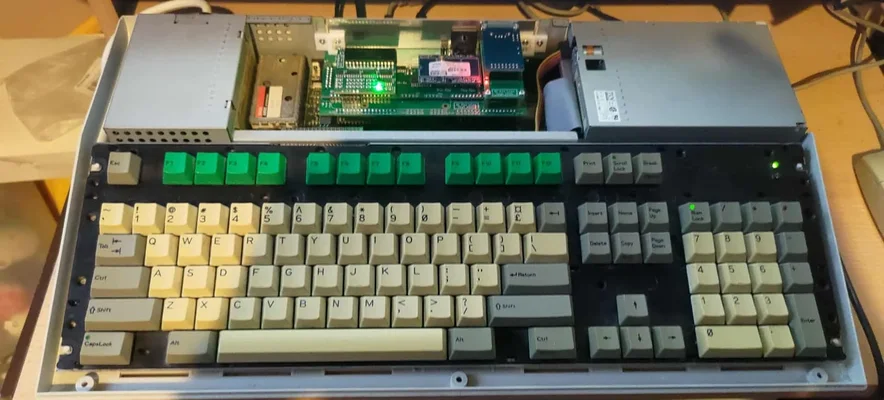
I also stripped the keyboard down due to the caps lock key LED flickering. There was a lot of dirt on the membrane, which I cleaned off, and using a fibre glass pen, cleaned the pins on the caps lock LED. This now works great.

I also got a 4MB ram upgrade and fitted this to give it an extra boost now Dune II runs without the not enough memory issue

Next will be to upgrade the old HDD to a SD or CF drive.
I'm not sure if I'm gonna retrobright it might, just leave it as it is
Some of you already know I recently acquired an Acorn A3010.
Sadly, it was a little poorly, and upon opening it up, I found the dreaded battery damage!!
I utilised @LinuxJedi Acorn A3010 restoration information online, but did see that his damage seemed worse in other areas of the motherboard than mine but it was very helpful.
At first, I thought it was just on the surface and it did clean up very well
I removed the battery and taking the floppy cable out was near impossible and it actually broke on removal.
Getting the multimeter out I started testing continuity around the area of concern and my fears were confirmed not just one or two broken tracks but multiple broken tracks usually as it joined a pad
To continue, I had to remove it from its case and shielding, this is when the first issue arose. The parallel port bolt would not come out on one side, anyway, and the battery damage also caused a lot of corrosion to the port itself. The only way I could get it apart was by breaking the side plastic on the port.
I purchased a parallel port from "Amiga-kit", hoping it would work as a replacement.
Most of the track damage was around the parallel port, battery position, and FDD socket.
The worst area to fix was the parallel port, and to be honest, it's one part of the machine I've not been able to test, but the continuity all tested good. The repair doesn't look great but it's functional so I'm happy
I also attached the Amiga-kit parallel port, and although not a perfect fit, it does the job.
I think I was lucky because I could find 3 tracks damaged from all these tracks in the picture which I was able to repair with 3 red wires
The battery area required links in all its positions due to the damage caused
Due to the amount of battery corrosion seen on the floppy connector and due to non-connectivity with tracks going under it, I removed it and ordered a new one, repairing the 4 tracks which were damaged.
I also got a new battery and decided to mount it away from the board and attached link wires to try and protect it from future leaks
Upon testing, my work seems all good and the CMOS battery is functioning as it should keeping the required data for next boot.
However, the floppy drive was giving me a disc format error so I thought I must have more track damage
I did find two more areas of damage in the area between the CHIPS IC and the floppy drive connector, but still, the floppy drive was not playing ball. I scoured the area for two more days, and I still could not find any other issues. All continuity to the floppy drive socket matched the online schematics. I was at the point of giving up until I read @LinuxJedi site again and he was having the same issue and mentioned that the cleaning of the drive heads sorted the issue out, I'm like don't tell me thats been the issue all along!!
I got my disk drive cleaner disk out give it a few runs of formatting a disk with the drive cleaner in and upon test the disk loaded up woohoo
As mentioned before I've not been able to test the parallel port but everything else seems great
I also stripped the keyboard down due to the caps lock key LED flickering. There was a lot of dirt on the membrane, which I cleaned off, and using a fibre glass pen, cleaned the pins on the caps lock LED. This now works great.
I also got a 4MB ram upgrade and fitted this to give it an extra boost now Dune II runs without the not enough memory issue
Next will be to upgrade the old HDD to a SD or CF drive.
I'm not sure if I'm gonna retrobright it might, just leave it as it is