
TRS80 model 3 repair advice

  • Thread starter Thread starter UberFreak
  • Start date Start date
  • Replies Replies 12
  • Views Views 2532

UberFreak

Active member
AmiBayer
Joined
Sep 28, 2009
Posts
1,029
Country
Israel
Hi

Bought this faulty unit recently.
When powered on, both drives spin for a few seconds and then nothing.
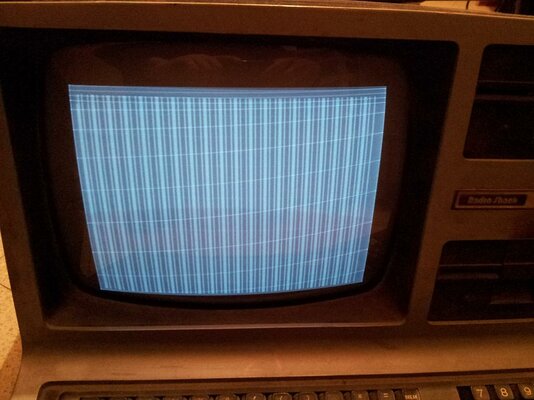
Pressing keys does nothing, the image on the screen remains static (see attached image).
I see horizontal retrace lines, which are a monitor fault, but the vertical bars are what worries me.
The image is always the same, its not random garbage.

I havent disassembled the unit yet, any pointers on where to begin checking would be greatly appreciated! :)
trs80small.jpg

EDIT: after leaving it on for about 5 minutes, heard a crackling sound & now my house is full of white smoke.
Guess I need to start with replacing those paper capacitors :mad:
 
Last edited:
Try holding down the Break key whilst pressing and releasing the orange reset button.
This should force the system to use Level 3 Cassette Basic and reward you with an onscreen prompt if the motherboard is healthy

There are contrast and brightness controls under the left hand edge beneath the monitor too..

:)
 
What TheCorfiot says, use the break key and it should do something (assuming keyboard isn't faulty) and use the dials on the left side on the underside to get an image.

You need to replace the paper capacitors indeed, probably the one on the primary power line broke and the other 2 are okay for now, but better replace them anyway. They will break. As soon as I have a Model 3 or any Model 4 I replace these, they will break....

When you open the computer, be careful when removing the upper part from the bottom part, the monitor is stuck to the top while the rest is connected to the bottom and there's not much space for the back of the tube to get free from the back, visually check (using the drive bays) if the back of the tube is free!

When the dials/break keys won't respond. Try to clean them first before doing anything else. If that doesn't work, remove memory and reseat it. You can do that with the CPU as well.
 
Thanks for the advice!

Break key (with or without Reset) has no effect, picture doesn't change no matter which keys I press.
Previous owner had this unit since new, he said it worked before going into storage ~25 years ago, so I have no reason to suspect a bad keyboard.
I will try cleaning & re-seating all socketed ICs and report back.
 
If it wasn't used for 25 years then the capacitors are definitely destroyed. Change these as mentioned above before you do anything else. Running the machine in this condition can cause further failures.

Bryce.
 
Thanks for the advice!

Break key (with or without Reset) has no effect, picture doesn't change no matter which keys I press.
Previous owner had this unit since new, he said it worked before going into storage ~25 years ago, so I have no reason to suspect a bad keyboard.
I will try cleaning & re-seating all socketed ICs and report back.

Have you tried to use the dials for the screen and do these affect the screen? Try that first. It should either ask for Diskette? (without Break key) or Memory Size? (with break key).

Second check is that you could press any key (startup or reset without pressing a key), will it read the FDD again?

If it wasn't used for 25 years then the capacitors are definitely destroyed. Change these as mentioned above before you do anything else. Running the machine in this condition can cause further failures.
Bryce.

Nah, not really. Only a lot of smelling and smoke but nothing more really. These capacitors are switched parallel in the powerline and only used to filter out RFI, they are not actually required for the power supply or safety of it. It may interfere reading floppies (never tested).
 
Some updates:

I replaced the 0.1uf capacitor in both PSUs and verified voltages are ok under load.
Found out the brightness & contrast pots are stuck, no amount of WD40 helped so I'll have to replace them at some point.
The vertical stripes are still there.

After reading the service manual, I noticed my Model3 has a circuit board on the back that's not mentioned in the manual at all.
After some google-fu, I found it:
http://www.prof-80.fr/kit-graphics-26-1125

Looks like some graphics board, which the monitor is connected directly to.
Maybe it needs some software driver to load before working?

I'd like to check the unit without this board, but currently not sure how to do that.

EDIT: found more info and the manual for this board:
http://www.vintagecomputer.net/tand...puter Graphics Upgrade Kit Service Manual.pdf

- - - Updated - - -

Another update:

I uninstalled the Hi-res graphics card according to its user manual, and now the machine boots up with a "Cass?" prompt :)
Looks like the graphics card is faulty.

Now the question is - do I attempt to debug the card or just use the machine without it ?
According to what I've read, there's very little software that takes advantage of it on the Model 3.
 
Last edited:
Judging from the stripes you were getting, I'd guess that some of the RAM on the hi-res graphics card has gone. If they are socketed, try re-seating them. If not, you'll have to start debugging the card. If it's of little use to you anyway, I'd probably just sell it as damaged.

Bryce.
 
If you want to have the card looked at thecorfiot has rebuilt a few trs80 .no harm giving him a pm before you sell it on as faulty
 
I have no intention of selling, even if I'm unable to repair it.
RAMs are socketed, so I'll give that a try first.
 
Definitely. If you have spare RAMs, then try swapping them out. The stripes on the screen would suggest that it's just a dead RAM.

Bryce.
 
Today I removed all socketed ICs & cleaned them & the sockets.
Then I cleaned the Expansion port and inspected the cable that connects this port to the Hi-Res card.
The cable was damaged - two wires were torn, exposed and shorted.

Fixed the damage, put everything together, and...
The stripes are gone, I now have the "Cass?" prompt with the Hi-Res card connected!
Now its time to replace the brightness/contrast pots, clean the drives, put everything back together and start testing.

I never could get this kind of satisfaction from building & repairing PCs :lol:
 
Congratulations. It's always rewarding when an old computer suddenly springs back to life.

Bryce.
 
Back
Top Bottom