UK1541 user feedback

  • Thread starter Thread starter MagerValp
  • Start date Start date
  • Replies Replies 95
  • Views Views 6419
Status
Not open for further replies.
Update 12.04.2015
- FS bug fixing,

Hmm, I thought you fixed the FS so you can have fragmented files (which is what everyone expects), instead you get a "File is Fragmented" error message now if you select such file :(
Question: Will you ever fix this so fragmented files will be supported (i.e. actual FAT32 support ?)
 
OK, 6502 core updated to 1.6. It seems to start more reliably, at least at the moment. When it gets stuck it's on this screen:

I think you checked the game with 1.1.5. this needs to be investigated.

@Tom-Cat
Please check if you defrag works.
Answer: yes
 
Last edited:
You guys seem to have tested the uk1541 very well so far...

So honest question, is the device usable at the moment... I read about the fragmentation bug.
So I guess it means that everytime you put new .d64 files on the sd card, you have to defragment the card to avoid problems ?

Does the card also become corrupted when you save on the real commodore to a .d64 file that is already there ? e.g. savefiles in certain games ?

I ask this because I am on the pre-oder list but just want to be sure that the product works well enough to invest my money in...
 
New update for Core6502, http://projekt64.filety.pl/index.php…
Version 1.2.0.11.2015, Independence Day
+ VIA code rewritten, timer added, hardware I/O behavior change.
+ most stable core

Feedback from:
- Mr.Jarecki
- WojtGL,
- Mr. Wegi,
- Alex Panchen
Thank you guys for report.
 
Hello kisiel.

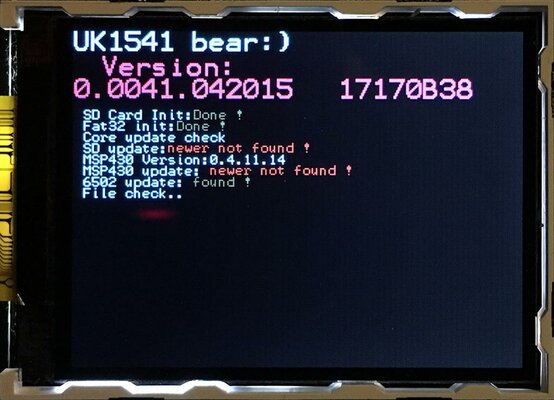
When I try flashing this new firmware my UK1541 always stays on the "File Check..." message and it does not go beyond - it does not flash the device !

What is wrong ? It worked fine with all other previous firmwares.
 
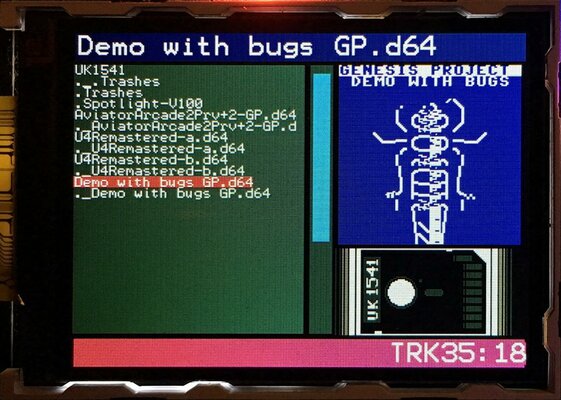
1. could you please, remove file , mount d64 , press menu button and make picture for me ?
2. Did you copy update to empty card formatted with FAT32 ?
3. are you trying to update file on c64 or c128 ?
 
Last edited:
I have the exact same problem:
UK1541-file-check.jpg

1) Removed 65CORE.BIN, copied a few d64s and mounted one:
UK1541-d64-mounted.jpg

2)
Code:
Primo:~ pelle$ diskutil reformat /Volumes/UK1541
Started erase on disk4s1 UK1541
Unmounting disk
Erasing
512 bytes per physical sector
/dev/rdisk4s1: 7721200 sectors in 965150 FAT32 clusters (4096 bytes/cluster)
bps=512 spc=8 res=32 nft=2 mid=0xf8 spt=32 hds=255 hid=8192 drv=0x80 bsec=7736320 bspf=7541 rdcl=2 infs=1 bkbs=6
Mounting disk
Finished erase on disk4s1 UK1541
Primo:~ pelle$ cp ~/Downloads/65CORE.BIN /Volumes/UK1541/
Primo:~ pelle$ ls -l /Volumes/UK1541/
total 40
-rwxrwxrwx@ 1 pelle  staff  18527 29 Nov 17:56 65CORE.BIN
Primo:~ pelle$ diskutil eject /Volumes/UK1541
Disk /Volumes/UK1541 ejected

3) C64.
 
So if you already mount d64, you can now press menu button and see what core6502 version you already uploaded.
For new SDcore, I changed boot loader to show what version you have in booting time. When it will be ready you won't need to read manual or even read my post above.
For sure users never read it, lesson learnt.
 
Last edited:
New SD Core update: 0.0045.122015

http://projekt64.filety.pl/index.php?dir=UK1541/FIRMWARE-UPDATE/&file=SDCORE.BIN

change log:
- full I/O engine rewritten, filefragmentation fixed (load/save)
- last accessed disk , beta but should works at least 10s after power down.
- menu under construction but more clear now.
- spin improved , checked with Eksa Dual Copy http://csdb.dk/release/?id=85860 (ca.40s both ways with my real drive D500)


- - - Updated - - -

Update 12.04.2015
- FS bug fixing,

Hmm, I thought you fixed the FS so you can have fragmented files (which is what everyone expects), instead you get a "File is Fragmented" error message now if you select such file :(
Question: Will you ever fix this so fragmented files will be supported (i.e. actual FAT32 support ?)

Good things come to those who wait
 
Last edited:
Thanks Kisiel. Fragmentation problem seems to be fixed now.
Unfortunetly there seems to be a problem with the "Core Reset" button of the remote control (the most up right button on the remote). Sometimes it works, but most of the times it just freezes up UK1541 and it doesn't work anymore (you have to turn off the c64 for a while to get it back to work).
 
6502Core reset is not connected to last firmware update for SD. Please do one test then freeze happens , remove IEC plug from c64 (not UK1541) and press reset on remote (this one on right corner) and check if is starts normal or freeze.
 
Last edited:
Status
Not open for further replies.
Back
Top Bottom