ZIP FRAM (Field RAM) to upgrade the MV1200 external Scandoubler to FlickerFixer
Only for the "FF model"
Manufacturer:......OKI
Part: ..................M518221-30Z or M518222-30Z
Package: ............ZIP 28-pin
New Old Stock
Unit(s) available: 2 sets => 2x M518221-30Z & 2x M518222-30Z
PRICE: 18.50 EUR / 2 chips / including P&P and including Paypal fee
Sold as it is - No warranty - No refund - No return.
Perfect for the MV1200 (ToastScan / AmiScan / EZ-VGA) card from ACT Electronik.
Upgrading to a FlickerFixer
To upgrade you need two video-field memories of type OKI 518221Z-30 OR OKI 518222Z-30 in ZIP form.
Open the unit and insert the chips into the ZIP sockets, make sure the writing is facing the 23pin video connector
After fitting, gently bend them towards the 23pin connector to allow the case to close correctly
Open the FF-Ena jumper
Set the 222Mod jumper correctly, according to the FRAM type you used.
Other link: Retro Game and Computer or RABAY Jr website.
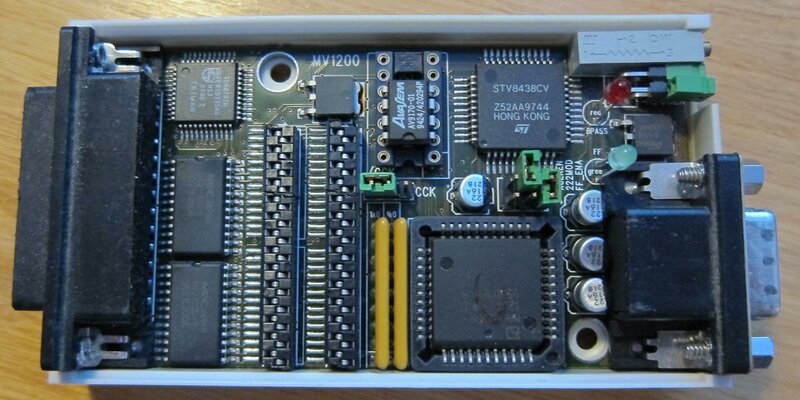
ONLY FOR THIS MODEL:
 This image has been resized. Click this bar to view the full image. The original image is sized 1398x932.

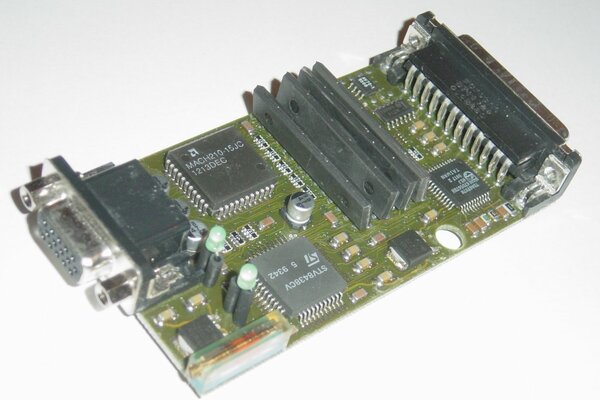
NOT FOR THIS MODEL:

Check here :
https://www.amibay.com/showthread.php?t=23312
https://www.amibay.com/showthread.php?t=15004
https://www.amibay.com/showpost.php?p=565689&postcount=28
Please use specific tools and all protections against ESD!!!


REMEMBER ALWAYS TO DISCONNECT ALL POWER CABLES BEFORE OPENING UP THE MACHINE!!!!! REMEMBER TO WORK IN A STATIC-FREE ENVIRONMENT, GROUNDING YOURSELF BY CONNECTING A WIRE FROM YOURSELF TO A NEARBY GROUND!!
Sold as it is - No warranty - No refund - No return.
Only for the "FF model"
Manufacturer:......OKI
Part: ..................M518221-30Z or M518222-30Z
Package: ............ZIP 28-pin
New Old Stock
Unit(s) available: 2 sets => 2x M518221-30Z & 2x M518222-30Z
PRICE: 18.50 EUR / 2 chips / including P&P and including Paypal fee
- SALES RESERVED ONLY OUTSIDE FRANCE!!!
- UK/Australia/USA: please add only 0.50 EUR
- Delay in economic mode: 5/10/25+ working days (depends)
- Delivery: in robust&indestructible :smile: pack - for worldwide.
- Shipment with insured+tracked: ask me please.
- Payment: PAYPAL only
Sold as it is - No warranty - No refund - No return.
Perfect for the MV1200 (ToastScan / AmiScan / EZ-VGA) card from ACT Electronik.
Upgrading to a FlickerFixer
To upgrade you need two video-field memories of type OKI 518221Z-30 OR OKI 518222Z-30 in ZIP form.
Open the unit and insert the chips into the ZIP sockets, make sure the writing is facing the 23pin video connector
After fitting, gently bend them towards the 23pin connector to allow the case to close correctly
Open the FF-Ena jumper
Set the 222Mod jumper correctly, according to the FRAM type you used.
Other link: Retro Game and Computer or RABAY Jr website.
ONLY FOR THIS MODEL:
NOT FOR THIS MODEL:
Check here :
https://www.amibay.com/showthread.php?t=23312
https://www.amibay.com/showthread.php?t=15004
https://www.amibay.com/showpost.php?p=565689&postcount=28
Please use specific tools and all protections against ESD!!!


REMEMBER ALWAYS TO DISCONNECT ALL POWER CABLES BEFORE OPENING UP THE MACHINE!!!!! REMEMBER TO WORK IN A STATIC-FREE ENVIRONMENT, GROUNDING YOURSELF BY CONNECTING A WIRE FROM YOURSELF TO A NEARBY GROUND!!
Sold as it is - No warranty - No refund - No return.
Last edited: