Why does the right mouse button always fail first?

  • Thread starter Thread starter Shoonay
  • Start date Start date
  • Replies Replies 14
  • Views Views 353

Shoonay

Global Caturator
Joined
Mar 30, 2009
Posts
2,176
Country
Poland
Region
Kaczyce
Is it just me? Or does the right mouse button always start to fail first? :unsure:

I've just found my old 4 button A4Tech WinBest 4D+ WWW-11 PC PS/2 mouse (~10 years old) and my old No Name Bus Mouse (Made In China) Amiga 2 button serial ball mouse (~15 years old), they both went into the closet because their right mouse button started to get more and more unresponsive so I just got a new mouse.

Same thing happening with my current mice, both the PC one, an optical PS/2 OP-620 from A4Tech (~5 years old) and Amiga - Logic3 SpeedMouse serial mouse (~15 years old), but since it's the weekend and all I said to meself: "screw it, I'm replacing the micro-switches".
Unsoldered the 2 buttons (left and middle) that were working just fine in the old PS/2 model, and replaced both right mouse buttons, all working just fine. :cool:

Yeah, yeah, cool story me, but anyways, does that happen to you too?
I think I'm using the left mouse button more often, so why is the right one always failing? I'm not that strong on one finger to be force-braking it or anything, lol...
 
Last edited:
The only explanation I could come up with is that according to the laws on natural selection whatever is not being used gets gradually lost :)
Seriously, I had the same issue with all my Commodore made mice. I think that Commodore's engineers had in mind that since the right mouse button was to be used less, it would take more to get worn and thus made it cheaper. Can't explain it elselike.
 
I believe that both buttons have almost the same frequency of tapping.

One reason I have to believe about the Amiga mice, is that when you use the right-mouse button in pull-down menus, you have to keep it pressed down for as long time as you make your choice, as there weren't any sticky menus back then. Probably that harms the switches much more than just pressing the (left)-button instantly for just a second.
 
@nkarytia: Yeah, but my current and that old PC mouse I found weren't made by Commodore ;)

Should I perform exorcism? :blased:

@Phantom: exactly, why would they have different microswitches...
 
both of the switches are the same anyway...

you should see the switches of a 1351 (c64) .. its like the original atari joystick! what the heck...
 
Last edited:
Scroll wheel always dies on me 1st. 2nd would be LMB, then I usually have to tell my pc to swap LMB with RMB to get by, since I'm cheap and slack :D
 
Could be for any reason! I mean, it could even be physics!:unsure: Maybe the point finger and middle finger (which are usually the ones we use) have different values of force upon the two buttons. One stressing the switch more than the other.. :nuts:
Well, at least with tank mice it ain't really a problem, because they're easily replaced. :)
 
I have a manhatten mouse.. same problem..
funny thing.. just fixed that one today :-)

off topic

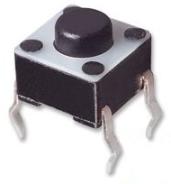
if it is like most mice buttons, it's a "tactile" in case you want to repair it they are usually 6x6mm and something in height "something" differs but can be measured from the pcb to the top of the button.

I've used this one in one model
http://www.ebay.co.uk/itm/Pack-25-S...566?pt=LH_DefaultDomain_3&hash=item2560ec111e
(beware excessive quantity :-))

but you might want to do some measurements first.
 
Maybe the point finger and middle finger (which are usually the ones we use) have different values of force upon the two buttons. One stressing the switch more than the other.. :nuts:

Or maybe the middle finger tends to apply force at a slight angle, while the index finger presses straight down?
 
I like those theories guys, keep'em coming! :D

I've used this one in one model
uuth9.jpg
I had bad experiences with those switches, 3 mice I know (mine and my two friends) died after a few years. ;)

All my mice use these now:
7ei2P.jpg

And the middle and left mouse buttons are still perfect after ~15 years! ... except for the right mouse button which holds ~5 years... :blased:
 
My theory is:

left button: gets lots of use so the contact cleans itself
middle button: rarely gets used so little wear to the contact surfaces
right button: gets some use and contact wear, but not used enough to clean the contacts fully

Then there are theories about how having your finger resting on the right button putting it in a semi on position and creating some sort of mechanical or dirt problem.
 
Or maybe the middle finger tends to apply force at a slight angle, while the index finger presses straight down?

Could be! One way to figure that out is examine the busted right-button switch. If slight-angle pressing has done the job, it could be a mechanical wear. Meaning, the switch axle cannot be pressed any more. (not doing the "clickety-clack" thing):D
No, seriously, this might be it. It may be unable to travel all the way down while being pressed, or it could just be an electrical malfunction where the clean-contact theory comes in.

@Shoonay: I agree, i like the way this conversation is advancing :thumbsup:
 
Never had a mouse button stop working on me. I kept killing the rollers for the ball. When i reached "cleaning it every other day" state, and it still would stick, and jump around, it'd replace it. Since the introduction of optic mice i've only owned Logitech mice, and they have had some "rubber texture" for a nice grippy feel. That one has been the one to wear out and leave hard edges rather then the mouse not working any more... My current mouse it a Logitech MX Revolution, that is starting to show wear on the thumb grip, after 3-3.5 years of (PC) use.

B!
 
Back
Top Bottom