Z3 Fastlane strange Chip Ram/Crashing issue?

  • Thread starter Thread starter fitzsteve
  • Start date Start date
  • Replies Replies 17
  • Views Views 3307

fitzsteve

Retired Slacker
Assistant
AmiBayer
Joined
Aug 19, 2009
Posts
20,777
Country
UK
Region
Sevenoaks
Setting up my Z3 Fastlane on a newly aquired A4000 Mobo with Buster11, this will all go in a Tower at some point, but its very early days on the project.

I set the Motherboard up outside the case just for testing and after an early scare everything is working fine. I thought it was just displaying a blank screen at first but turns out the Scart lead that works on my A1200 does not work on A4000's! Whats that about... So after removing and refitting everything and raiding my main A4000 for all its parts in a fault finding panic I though, hmm try the Scart lead - bingo :Doh:

Anyway back to the point! I setup a little workbench and everythi g was running fine, played some games messed around in workbench, etc.

Then I added the Zorro Daughter Board and at first it did not recorgnise but I think it just wasn't plugged in properly (maybe this is where my problems are)

After adding the Z3 fastlane (jumpers set according to manual) the Amiga booted and all the Ram was showing :cool:

But after a minute or two I got strange readings on the chip Ram then guru and game over.

Unplugged, plugged back in and OK for a few mins and then, boom - game over and reboots to a nasty red screen! This is the same Red screen I got when I tried the Z3 Fastlane in my main A4000 so maybe thats faulty?

Anyone seen this before?

I'm going to give all the contacts a clean in a while and leave it overnight to dry as everything is a little dusty and it might just need a clean - interested to hear on the Chip Ram issue though - very weird!

Thanks :thumbsup:

IMG_0349.jpg


IMG_0348.jpg


IMG_0347.jpg


IMG_0345.jpg


IMG_0350.jpg
 
Do you have the latest firmware on this Z3FASTLANE?
 
Do you have the latest firmware on this Z3FASTLANE?

As far as I know, yes I was told it has latest firmware the one that can accept 256mb of Ram.

I've cleaned all the Zorro slots, the slot on the motherboard andf the connector on the Z3 Fastlane. I'll give them a good 24-48 hours to dry and then set everything up in the Elbox Tower, when the Daughterboard is screwed in I might find the issue is gone.

I forgot to mention before I don't have a proper chip Ram for the motherboard, I'm using a double sided 8mb Simm (as I was told this is a good alternative to use) and this was working fine until the introduction of the Z3 Fastlane, so I guess I'd ruled that out as a problem unless anyone thinks that could be the issue?

Steve.
 
run a mem checker, pays to make sure you mem is fine
 
run a mem checker, pays to make sure you mem is fine

Thanks cosmic, will run memcheck.

Everything seems dry this morning, but will leave till I get home tonight before putting all in the Tower.

Was really interested to know if anyone has seen this -memory error before, a new one to me!

Also, this card has an insert in the manual that it has the upgraded firmware to allow a full 256mb Ram to be used and to Call them for the Jumper Settings, well since I can't phone them up and ask :Doh:

Does anyone know these Jumper settings? Once card is confirmed working and when funds permit I may take the plunge and order 256mb in 16mb Simms from USA...

Cheers & will update once the Tower is assembled :cool:

Stevo.
 
Hi,
Phase5 has never released the 256 MB firmware for public use. Check on Fastlane their ROM socket and maybe remove it and put it carefully in.
Please check also if your A4000 mainboard has right clockport chip ends with -244.

Took a photo from your Fastlane and jumper positions and your RAM.
 
How to check your Z3FASTLANE firmware:

Old version:


Latest version:
 

Awesome, I'll be prining that little fella out!

Hi,
Phase5 has never released the 256 MB firmware for public use. Check on Fastlane their ROM socket and maybe remove it and put it carefully in.
Please check also if your A4000 mainboard has right clockport chip ends with -244.

Took a photo from your Fastlane and jumper positions and your RAM.

I'll take a photo later on, no problem & check main board.

Also, there is an update attached to the Manual that says this one has been setup at the factory to support 256mb so that is strange, maybe its a special one!

How to check your Z3FASTLANE firmware:

Old version:


Latest version:

Thanks for this I'll check that too!

Thanks for the info guys, its really appreciated :thumbsup:
 
Hey guys!

Well when I got home from work I re-built everything inside the Tower.

First boot I got the yellow screen, reboot then red screen with 'defective' so I gave it some CNRL-A-A and she booted up fine and have been working for thr last 40 mins or so, played some WHDLoad games, installed the X-Surf drivers, no more troubles?

Done the version check, its come back as 5.1026 is this really old then?

Going to test the SCSI shortly as I have hooked up a SCSI CDROM on the 50pin and will try mem test and to copy some files to RAM.

Report back soon!
 
Hi,
Phase5 has never released the 256 MB firmware for public use. Check on Fastlane their ROM socket and maybe remove it and put it carefully in.
Please check also if your A4000 mainboard has right clockport chip ends with -244.

Took a photo from your Fastlane and jumper positions and your RAM.

There is no specific Firmware upgrade to enable 256Mb. For a starters, the Firmware has to be V8.5. Then it has to be either a V2.3 Z3 Fastlane with modifications & upgraded MACH chips, or a V2.4 Fastlane with upgraded MACH Chips. Afaik, no Z3 ever shipped as a 256Mb version on retail sale. It was always an upgrade one had to apply for via Phase5/DCE. Imagine the costs of 16 x 16Mb 30 pin simms back in those days too. :blink:


@ fitz

The Full English Z3 Fastlane manual can be downloaded from here:

Linky

Have you tried this Z3 with just the standard C= ZORRO Backplane?
The reason I suggest this is because the Z3 relies heavily on DMA & the Meditor boards (all of em) do not handle DMA correctly.

Kin
 
Hi Kin,

Thanks for the info, I have the full original printed manual here, however thanks for the link its nice to have an electronic copy :)

I've taken and attached a picture of the board, I booted the Amiga just now and again on cold boot I get the defect screen and after a soft reboot it seems to work thereafter so maybe I have set the jumpers wrong somewhere.

When I tried this board with my main A4000 it wouldn't even boot, just the defect screen that had a standard daughter board but it has buster 9.

The A4000 Elbox tower I've installed it in now has buster 11 on the motherboard and its a 7 slot elbox zorro board not a mediator in this setup, I've attached a couple of ectra pics of the setup.

The person who owned this board before me said that he has run this board with 256mb, however for now thats not an issue as I only have the 48mb of 4mb Simms so at this stage at least I'm not too worried about exploring that further, as long as it works in the configuration for now I'll be happy :cool:

IMG_0351.jpg


IMG_0352.jpg


IMG_0353.jpg


IMG_0354.jpg


IMG_0355.jpg


---------- Post added at 19:36 ---------- Previous post was at 19:11 ----------

Hey guys, quick update - posting from the A4000, installed a fresh workbench and no boot errors this time. Obviously since I am posting from the A4000 this means the X-Surf is also working!!!
IBrowse/2.4demo (AmigaOS 3.1; 68K)
 
Based on hear-say, why didn't the chap sell the board as a 256Mb Z3 Fastlane?
I've never seen one for sale, ever, making it almost priceless. *cough*

Also worth noting, 1Mb simms can not be used on a board that has been modified to accept 256Mb. Also not sure 100%, but you can read in the manual about the Logic chip replacement & the data file for jumper settings there-after the mod. It could be a 256Mb capable board that you have but the missing info on correct jumper settings for such a board. - I really don't know what else to suggest other than the Ram Speed jumper. You must have it set to the ns rating for the slowest modules you have in place. Also, the modules must be in sets of 4 & preferably matched. Difficult to tell exactly with your last 4 simms as two of them have labels. :shrug:

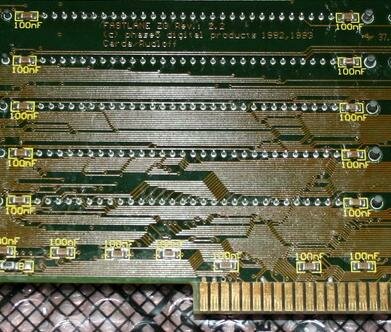
Also m8, have you found the Silk Screened Version number of the PCB yet? It's on the back side as per pic below. Very hard to see on some boards unless you just get the angle right. ;)

Kin
 

Attachments

  • Z3-64MBback.jpg
    Z3-64MBback.jpg
    40.8 KB · Views: 2
Based on hear-say, why didn't the chap sell the board as a 256Mb Z3 Fastlane?
I've never seen one for sale, ever, making it almost priceless. *cough*

Well firstly the card was given to me, not sold by xpect over at EAB - he said that he did not want to sell these items (also have me a Tocatta)

Also worth noting, 1Mb simms can not be used on a board that has been modified to accept 256Mb. Also not sure 100%, but you can read in the manual about the Logic chip replacement & the data file for jumper settings there-after the mod. It could be a 256Mb capable board that you have but the missing info on correct jumper settings for such a board. - I really don't know what else to suggest other than the Ram Speed jumper. You must have it set to the ns rating for the slowest modules you have in place. Also, the modules must be in sets of 4 & preferably matched. Difficult to tell exactly with your last 4 simms as two of them have labels. :shrug:

It could be something as simple as combination of Simms, I don't think those four are matching, the others vertainly are though, if I get more problems I'll take them 4 Simms off and see if it helps - but knock wood for now it seems to be running flawlessly, done some browsing on IBrowse, playes some WHDLoad, all fine.

Also m8, have you found the Silk Screened Version number of the PCB yet? It's on the back side as per pic below. Very hard to see on some boards unless you just get the angle right. ;)

Kin

I didn't yet no, but next time its out I'll take a look at the board.

Thanks for all the info, its appreciated. Going to test out the SCSI in a bit...

Steve.
 
Well this is sounding healthier, but what have you done different to get rid of the Red Screen/Card fault?

Kin

ps. Nice steal on the Hardware btw. - Haven't you done well. ;) :nod:
 
Well this is sounding healthier, but what have you done different to get rid of the Red Screen/Card fault?

Kin

ps. Nice steal on the Hardware btw. - Haven't you done well. ;) :nod:


All I've changed is installing a fresh work bench. classic work bench advanced instead of 68k and now the red screen has gone. :bowdown:

Thanks again Kinny, everything seems to be OK for now so I'll soldier on for the moment. Tempting to put this motherboard in my main A4000 and see if the updated Buster I'm able to run my Picasso in ZIII mode and get the X-Surf working in that.

Time for a break today though!

Steve.
 
Last edited:
The errors came back, but I've since removed the mixed Simms and just running 32mb and now it seems to be running perfectly :cool:

Fingers crossed!
 
I was just clearing my Subscribed threads & discovered this thread, so I thought I'd drop a note in here RE this thread's date stamp & recent developments over here:

https://www.amibay.com/showthread.php?t=11369

It would appear the lack of a version 8.5 ROM might be the culprit. - Fingers crossed.

Kin
 
Back
Top Bottom